• No-Logs Policy
    • Servers in 105 Countries
    • Use on Multiple Devices
    • High-Speed VPN
    • Access Online Services Securely
    • VPN for Gaming
    • 30-Day Money-Back Guarantee
    • Explore All Features
    • About ExpressVPN
    Sign Up For ExpressVPN

    One subscription gives you access to a fast-growing suite of privacy and security tools that work seamlessly together to improve your digital life.

    View all products
    • Lightway VPN Protocol
    • Internet Kill Switch
    • Split Tunneling
    • Private, Encrypted DNS
    • Avoid ISP Throttling
    • Threat Manager
    • Ad Blocker
    • Parental Controls
    • Dedicated IP
    • Windows
    • MacOS
    • Linux
    • iPhone / iPad
    • Android
    • Apple TV
    • Fire Stick
    • Android TV
    • VPN for Routers
    • Aircove Routers
    • Chrome
    • Firefox
    • Edge
    • All Apps & Devices
  • Pricing
    • What Is a VPN?
    • VPN for Beginners
    • How To Use a VPN
    • VPN Encryption Explained
    • Blog
    • Glossary
    • IP Address Checker
    • DNS Leak Test
    • WebRTC Leak Test
    • Password Generator
    • Support Center
    • FAQ
    • Live Chat
    • VPN Setup Tutorials
    • Redemption Code
  • VPN for Teams
    • ExpressVPN

      ExpressVPN Industry-leading, ultra-fast VPN with secure servers in 105 countries.

    • ExpressMailGuard

      ExpressMailGuard Private email relay service to protect your inbox and identity.

    • ExpressKeys

      ExpressKeys Secure password management, multi-factor authentication, and more.

    • ExpressAI

      ExpressAI The first consumer AI powered by confidential computing for privacy-led intelligence.

    • Identity Defender

      Identity Defender Powerful suite of ID protection, monitoring, and data removal tools.

    • View All Products

    Other products from the family behind ExpressVPN

    • holiday.com eSIM

      holiday.com eSIM Unlimited data with a single eSIM across 150+ destinations.

    • Intego

      Intego Award-winning macOS antivirus, firewall, system tools, and more.

    ExpressVPN for Teams
    ExpressVPN for Teams

    Get fast, secure VPN protection for growing teams. Easy to deploy, simple to manage, built to scale.

  • My Account
  • Skaff deg Aircove Kom i gang
  • Kom i gang
  • Kom i gang Skaff deg Aircove Kom i gang
  • Explore ExpressVPN
    • Why ExpressVPN?
    • No-Logs Policy
    • Servers in 105 Countries
    • Use on Multiple Devices
    • High-Speed VPN
    • Access Online Services Securely
    • VPN for Gaming
    • 30-Day Money-Back Guarantee
    • Explore All Features
    • About ExpressVPN
    • VPN Security & Access Features
    • Lightway VPN Protocol
    • Internet Kill Switch
    • Split Tunneling
    • Private, Encrypted DNS
    • Avoid ISP Throttling
    • Threat Manager
    • Ad Blocker
    • Parental Controls
    • Dedicated IP
  • Download VPN
    • Desktop
    • Windows
    • MacOS
    • Linux
    • Mobile
    • iPhone / iPad
    • Android
    • TV & Streaming
    • Apple TV
    • Fire Stick
    • Android TV
    • Routers
    • VPN for Routers
    • Aircove Routers
    • Extensions
    • Chrome
    • Firefox
    • Edge
    • All Apps & Devices
  • Pricing
  • Resources
    • VPN Basics
    • What Is a VPN?
    • VPN for Beginners
    • How To Use a VPN
    • VPN Encryption Explained
    • Content Library
    • Blog
    • Glossary
    • Tools
    • IP Address Checker
    • DNS Leak Test
    • WebRTC Leak Test
    • Password Generator
    • Support
    • Support Center
    • FAQ
    • Live Chat
    • VPN Setup Tutorials
    • Redemption Code
  • VPN for Teams
  • Products
    • ExpressVPN

      ExpressVPN Industry-leading, ultra-fast VPN with secure servers in 105 countries.

    • ExpressMailGuard

      ExpressMailGuard Private email relay service to protect your inbox and identity.

    • ExpressKeys

      ExpressKeys Secure password management, multi-factor authentication, and more.

    • ExpressAI

      ExpressAI The first consumer AI powered by confidential computing for privacy-led intelligence.

    • Identity Defender

      Identity Defender Powerful suite of ID protection, monitoring, and data removal tools.

    • View All Products

    Other products from the family behind ExpressVPN

    • holiday.com eSIM

      holiday.com eSIM Unlimited data with a single eSIM across 150+ destinations.

    • Intego

      Intego Award-winning macOS antivirus, firewall, system tools, and more.

    ExpressVPN for Teams
    ExpressVPN for Teams

    Get fast, secure VPN protection for growing teams. Easy to deploy, simple to manage, built to scale.

  • My Account
Home Home » Hvordan koble Amazon Fire-enheten din til en VPN-ruter eller virtuell VPN-ruter

Oppsettsveiledninger

Hvordan koble Amazon Fire-enheten din til en VPN-ruter eller virtuell VPN-ruter

Sist oppdatert: 10. mars 2025

Share in FacebookShare in TwitterShare in WhatsappShare in TelegramShare by email

Du må registrere deg for en ExpressVPN-konto for å bruke appene og konfigurasjonene våre.

Denne veiledningen vil vise deg hvordan du setter opp en VPN-tilkobling for din Amazon Fire TV-stick og Fire TV ved å bruke en ExpressVPN ruter eller virtuell VPN-ruter.

Viktig: Denne veiledningen er for brukere som ikke kan få tilgang til ExpressVPN på Amazon Appstore. Hvis ExpressVPN er tilgjengelig på din Amazon Appstore, bruk ExpressVPN app-oppsett for Amazon Fire-enheter.

Før du fortsetter, må du forsikre deg om at du har et aktivt ExpressVPN-abonnement.

Ikke en kunde ennå? Les hvorfor du bør få ExpressVPN for Amazon Fire TV og Fire Stick.

Hopp til…

1. Sett opp VPN-ruteren eller den virtuelle VPN-ruteren
2. Koble Amazon Fire-enheten din til ruteren


1. Sett opp VPN-ruteren eller den virtuelle VPN-ruteren

For å etablere en VPN-tilkobling, må du sette opp en VPN-ruter eller en virtuell VPN-ruter.

Sett opp en VPN-ruter

For å sette opp en VPN på ruteren din, kan du:

  • bruke ExpressVPN app for rutere på utvalgte ruter modeller, eller
  • bruke de manuelle ruter konfigurasjonene

Sett opp en virtuell VPN-ruter

Du kan også sette opp en virtuell VPN-ruter på din Windows-PC eller Mac.

Trenger du hjelp? Kontakt ExpressVPN Support-teamet for umiddelbar hjelp.

Tilbake til toppen


2. Koble Amazon Fire-enheten din til ruteren

På menyen til din Amazon Fire-enhet, velg Innstillinger.
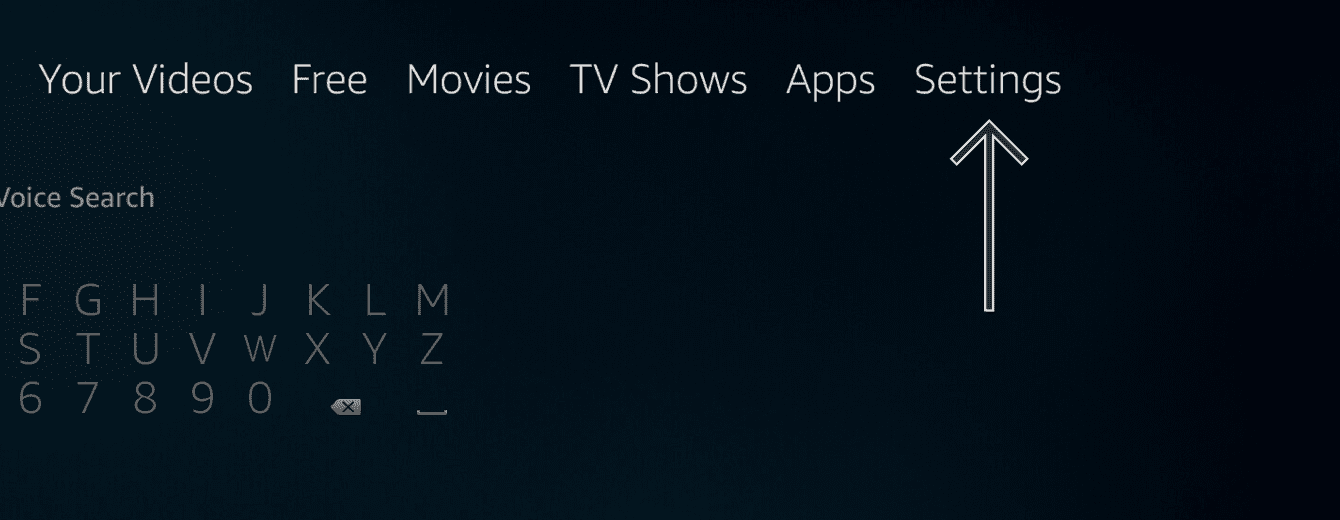
Velg “Innstillinger.”

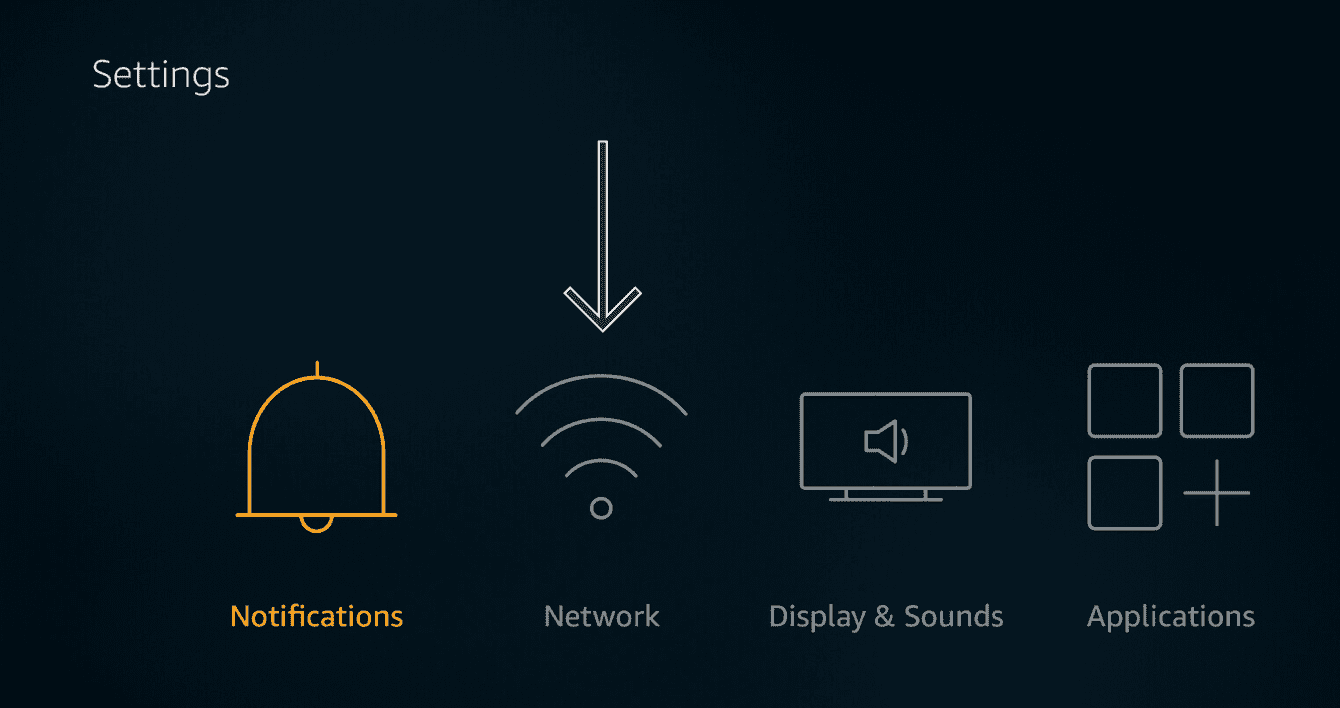
Velg Nettverk.

Velg

Velg nettverksnavnet til VPN-ruteren eller den virtuelle VPN-ruteren du satte opp tidligere.

Skriv inn nettverkspassordet for din VPN-ruter eller virtuelle VPN-ruter:

  • VPN-rutere: Skriv inn Wi-Fi-nettverkspassordet.
  • Virtuelle VPN-rutere: Skriv inn passordet du opprettet på din Windows-PC eller Mac tidligere.

Velg KOBLE TIL.

Trenger du hjelp? Kontakt ExpressVPN Support-teamet for umiddelbar hjelp.

Tilbake til toppen

Share in FacebookShare in TwitterShare in WhatsappShare in TelegramShare by email
Var denne artikkelen nyttig?

Det var leit å høre. Fortell oss hvordan vi kan bli bedre.

Please enter a valid email address.

Et medlem i støtteteamet vårt vil se på saken din snart.

Share in FacebookShare in TwitterShare in WhatsappShare in TelegramShare by email
  • VPN for alle enheter
  • Last ned ExpressVPN
  • MacOS
  • Windows PC
  • iOS (iPhone og iPad)
  • Android
  • Linux
  • Rutere
  • Apple TV
  • Fire Stick
  • Android TV
  • Chrome-utvidelsen
  • VPN-serverlokasjoner
  • Servere i 105 land
  • VPN for USA
  • VPN for Storbritannia
  • VPN for Canada
  • VPN for Australia
  • Funksjoner
  • Se alle funksjoner
  • Risikofri prøveperiode på VPN
  • Abonnementer og priser
  • Produkter
  • Keys passordlagring
  • Aircove-rutere
  • Om ExpressVPN
  • Om oss
  • Klareringssenter
  • Rettighetssenter
  • Sikkerhetsrevisjoner
  • Anmeldelser av ExpressVPN
  • Våre eksperter
  • Presse
  • Karriere
  • Programmer
  • Tottenham Hotspur
  • Bli partner med oss
  • Partnerprogram
  • Influensere
  • Få hjelp
  • Kundestøttesenter
  • VPN-konfigurasjonsveiledning
  • Ofte stilte spørsmål
  • Kontakt oss
  • Kjøp VPN
  • Skriv inn innløsningskode
  • Les mer
  • Hva er VPN?
  • Hva er min IP-adresse?
  • Skjul min IP
  • Topp 5 bruksområder for VPN
  • Blogg

© 2026 ExpressVPN. All rights reserved.

Retningslinjer for personvern Tjenestevilkår Cookie Preferences
Youtube Linkedin Twitter Facebook Instagram

Velg språk

  • English
  • Dansk
  • Deutsch
  • Español
  • Français
  • Italiano
  • Nederlands
  • Polski
  • Português
  • Suomi
  • Svenska
  • Türkçe
  • Русский
  • ภาษาไทย
  • 한국어
  • 日本語

Live chat

Need help? Chat with us!

Online