Online shopping safety: How ExpressVPN helps you shop securely


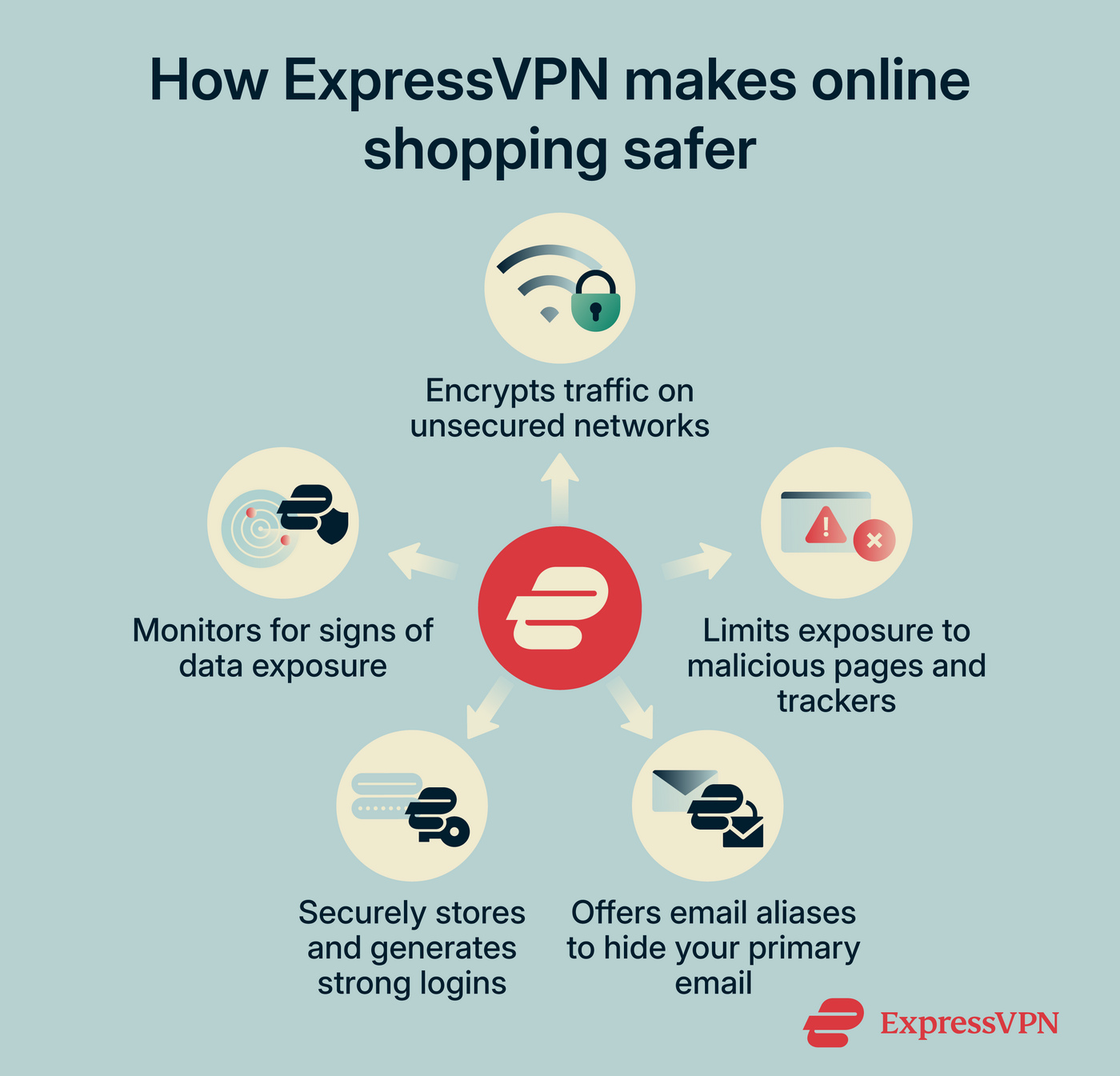
ExpressVPN can help you shop more securely by encrypting connections on unsecured networks, limiting exposure to some dangerous sites, protecting your primary email address, monitoring for data leaks, and helping with password management.
However, ExpressVPN can’t determine if a retailer is genuine, protect devices against malware infections, and secure payment or personal information you willingly enter into fraudulent websites. Layered protection is needed to fully safeguard your accounts and data, meaning you should use extra security measures alongside ExpressVPN.
How to use ExpressVPN to shop safely online
Here are some practical problems online shoppers encounter that ExpressVPN can help you solve.
Problem: Unsecured networks
Not all Wi-Fi networks use encryption to protect user traffic. This is often the case with public networks, like hotel, airport, transit station, campus, or coffee shop Wi-Fi. Such networks may leave some data visible when you shop online. Malicious actors can use different methods, such as man-in-the-middle attacks, to capture unencrypted information or interfere with unprotected connections.
Note that HTTPS protects sensitive information exchanged with secure websites, including payment details and passwords. However, someone monitoring an unsecured network may still be able to determine which services you're connecting to or observe other connection metadata. A VPN adds another layer of protection by encrypting traffic between your device and the VPN server.
As shown by our 2026 survey of 6,000 football fans from the U.S., U. K., France, Germany, Spain, and Australia
Cybercriminals can also set up fake networks that imitate legitimate public Wi-Fi. Such networks typically don’t use encryption, allowing attackers to monitor user connections and potentially steal sensitive data. ExpressVPN data shows many people trust Wi-Fi networks if the names seem legitimate. We surveyed 6,000 football fans from the U.S., U. K., France, Germany, Spain, and Australia and found that 70% of those surveyed would trust public networks by their names alone.
Solution: Protect your connection when shopping on public Wi-Fi
ExpressVPN encrypts your connections, limiting attacker and network operator visibility into your online activities. They only see you’re connected to a VPN server and not which services you access. To get started with ExpressVPN, refer to our download and installation guide.
Problem: Fake and malicious shopping sites
Perhaps the single biggest danger of online shopping is fake shopping platforms that imitate legitimate brands by using lookalike URLs and copying visual design elements. Fraudsters often use social media ads or fake messages to trick people into interacting with the fake site. They then collect personal information and payment details entered by the victims.
Solution: Reduce exposure to malicious sites
ExpressVPN offers a suite of privacy tools that includes a malicious site blocker that reduces exposure to dangerous links, such as phishing pages or fake storefronts. It relies on open-source blocklists compiled from publicly available lists of known phishing websites, malware-hosting domains, and fraudulent sites. Note that this means it only protects against links included in those blocklists, so it may miss fake sites that are brand new.
The malicious site blocker is available with all subscriptions on the ExpressVPN desktop and mobile apps. For instructions on how to use it, please read our Advanced Protection Knowledge Hub article.
Note that the blocker is only active when you are connected to ExpressVPN. If you don’t want the VPN switched on while shopping online, you can enable Web Protection in the ExpressVPN browser extension. It works a bit differently from Advanced Protection (it blocks specific URLs, not entire domains), but essentially, it provides similar protection from scammy websites.
Problem: Account compromise
Using weak passwords makes it easier for attackers to brute force accounts. Also, reusing logins across accounts puts them all at risk. If one account is breached, criminals can use bots to test your stolen login details on thousands of other sites. This attack, known as credential stuffing, means a single reused password can give thieves access to your most critical accounts.
Additionally, interacting with unsafe links may lead to credential theft or malware infections, which can result in account takeover.
Solution: Monitor for data exposure and use unique passwords
Monitoring for data exposure doesn’t prevent scams or phishing, but it helps you take immediate action if your information is somehow compromised.
U.S. users on the Advanced and Express Pro plans can receive alerts if their personal details show up in data breaches or on the dark web via Identity Defender, ExpressVPN’s dedicated identity protection service. Identity Defender can also monitor credit card activity and alert users to changes that can indicate fraud. In addition, it provides financial protection through ID Theft Insurance*, which can reimburse eligible losses and recovery-related expenses.
Identity Defender is available via standalone apps on Android and iOS. To get started, follow the instructions in our download guide and setup tutorial.
Using strong, unique logins helps protect your accounts from brute force and credential stuffing attacks. Coming up with a complex password for each account is difficult, but ExpressKeys, ExpressVPN’s password manager, simplifies the process by generating strong passwords and securely storing all your logins in one encrypted vault. You only need to remember the master password to unlock it.
ExpressKeys also autofills logins on trusted pages. This can make spotting fake retailers easier, since not receiving an autofill prompt can indicate that something’s wrong.
ExpressKeys is available as a standalone app on Android and iOS and a browser extension on Chrome and Firefox. It’s included in the ExpressVPN Advanced and Express Pro plans. For detailed setup instructions, please refer to our ExpressKeys Android, iOS, and browser extension guides.
Problem: Spam and phishing emails
Sharing email addresses with too many retailers doesn’t just lead to unwanted marketing. If the shopping platforms suffer data breaches or have improper privacy protections in place, emails may be exposed. This can increase exposure to phishing attacks, where users receive fake, misleading messages that attempt to trick them into sharing sensitive information or interacting with malicious links and files.
Solution: Use an email alias instead of giving out your real address
ExpressMailGuard, ExpressVPN’s private email relay service, reduces your email address’s exposure. It lets you create email aliases, which act as a privacy barrier between your primary email and the shopping platforms you interact with.
When a retailer asks for your email, you can instead use an ExpressMailGuard alias. The alias becomes the only address the retailer interacts with, keeping your primary address private. When the alias receives a message, it forwards it to your main inbox. If you reply, the message is forwarded to the retailer through the alias. (Note you still need to evaluate messages, links, and attachments carefully to ensure they’re safe, as ExpressMailGuard doesn’t scan the contents of your emails.)
ExpressMailGuard is included in all ExpressVPN subscription tiers. To learn how to access and use it, follow the instructions in our tutorial.
If at any point, an ExpressMailGuard alias becomes noisy, compromised, or misused, you can simply deactivate the alias.
Shop online without looking over your shoulder
ExpressVPN encrypts your connections and includes tools that limit exposure to malicious pages and keep your primary email address hidden.
Try ExpressVPN with a 30-day money-back guarantee for new users.
What ExpressVPN can’t protect you from
While ExpressVPN can secure internet traffic while shopping online, it can’t protect against all threats.
If you interact with a dangerous website, ExpressVPN can’t:
- Secure information you enter into the fake website.
- Protect against malware infections.
- Guarantee that the seller will actually deliver the ordered items.
- Reverse an unauthorized payment.
- Determine if the purchased items are counterfeit.
Also, while ExpressVPN protects against malicious eavesdropping and interception, it can’t protect against all types of cyberattacks. For instance, it can’t stop magecart attacks, where cybercriminals inject malicious code into the payment pages of entirely legitimate and trusted online stores.
Using only one product doesn’t stop all digital threats when shopping online. For enhanced security, it’s important to combine ExpressVPN with other security measures, such as an antivirus program.
FAQ
Can ExpressVPN protect my payment information when I shop online?
Is it safe to save my card details in a browser or store app?
How can I stop shopping websites from getting my real email address?
*The insurance is underwritten and administered by American Bankers Insurance Company of Florida, an Assurant company, under group or blanket policies issued to Array US Inc, or its respective affiliates, for the benefit of its Members. Please refer to the actual policies for terms, conditions, and exclusions of coverage. Coverage may not be available in all jurisdictions. Review the Advanced Tier Summary of Benefits and the Express Pro Tier Summary of Benefits .