How often should you change your passwords?


Leading cybersecurity authorities like the National Institute of Standards and Technology (NIST) and the UK’s National Cyber Security Centre (NCSC) no longer recommend routine password resets every 30, 60, or 90 days. Frequent, unnecessary changes can encourage weaker, more predictable passwords.
Instead, focus on changing passwords that genuinely need attention. ExpressKeys can help by flagging weak, reused, or compromised credentials.
When should you change a password?
As a general rule, change a password only if you have a credible reason to believe it’s no longer secure.
After a data breach that exposed login credentials
If ExpressKeys or another password manager you use alerts you that one or more of your passwords may have been exposed in a data breach, change them as soon as possible. Cybercriminals could sell or share the exposed passwords, putting your accounts at risk of unauthorized access.
If you shared your password insecurely
If you shared a password with someone without using ExpressKeys or another secure method, update it at your earliest convenience. Even if you shared the password with someone you trust, it carries risk if it isn’t used or stored securely.
If you need to share access to an account, you can do so securely with ExpressKeys. It lets you share logins, payment information, secure notes, and file attachments with others, and you can customize how long the item stays viewable, how many times it can be viewed, and who can view it.
If you entered your password somewhere you don’t trust
If you’ve entered your password on a website you don’t trust or later discover is suspicious, change it as soon as possible.
ExpressVPN’s Block malicious sites feature can reduce the risk of exposing your password to malicious websites by automatically blocking known phishing, malware, and fraudulent domains. However, not every unsafe website will have been identified and blocked, so be cautious about entering your passwords on unfamiliar sites.
How ExpressKeys helps when you need to change passwords
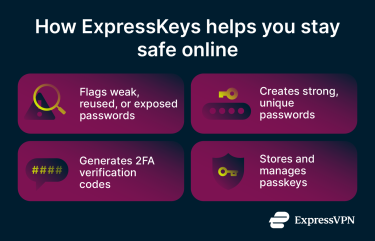
ExpressKeys can help you use strong, unique credentials across all your accounts, identify and address weaknesses, and add extra security measures where possible.
Find passwords that need changing
The Password Health feature continuously assesses the security of all passwords saved in the ExpressKeys vault. It can flag weak passwords, such as those containing common dictionary words or deemed relatively predictable or basic, as well as passwords you’ve used across multiple accounts.
Password Health also alerts you to exposed passwords found in online lists, usually from data breaches. This helps you focus on updating the accounts most at risk, instead of simply changing credentials because they’ve reached a certain age.
Generate strong, unique replacement passwords
When you need to replace a password or generate one for a new account, ExpressKeys can generate a strong and unique one. You can customize the length and style of your password and automatically add it to your vault when you create it.
This means you don’t have to spend time and energy creating a new password each time. It also makes you less likely to use small variations of similar passwords, which are easier to remember (or may seem so) but are less secure.
Add 2FA after changing a password
ExpressKeys can help you add two-factor authentication (2FA) codes to compatible platforms. It can also autofill 2FA codes for compatible services, letting you log in faster and more securely to apps and sites.
This adds an extra layer of security to your online accounts, so even if someone learns your password, they still can’t log in without the second factor.
Replace passwords with passkeys where available
ExpressKeys can create, store, and manage passkeys for supported services, helping you upgrade the security of at least some of your digital accounts.
Many cybersecurity authorities, including NIST and NCSC, recommend using passkeys wherever possible because they offer inherent security advantages over conventional passwords. They let you log in to services using device-based authentication, such as PIN codes and fingerprint scans, instead of a password.
Check which passwords need changing with ExpressKeys
FAQ
How do I know if my password has been compromised?
There are several ways to spot a compromised password. Services like Identity Defender (available exclusively to US-based users with Advanced or Pro subscriptions) can notify you if your credentials are exposed in a data breach and recommend the best next steps to secure your accounts.
You may also notice messages or notifications in your inbox about unfamiliar logins to your account, password reset requests, or other authentication requests you don’t recognize or remember initiating.
Is it safe to store passwords in a browser?
Storing passwords in a browser-based password manager isn’t inherently unsafe and is recommended by cybersecurity authorities, such as the NCSC. Provided you use a reputable provider and keep your browser updated, your passwords should be reasonably secure.
However, dedicated password manager apps often offer additional features and controls. For example, ExpressKeys offers built-in 2FA, zero-knowledge encryption, and a Password Health checker that flags weak, reused, or exposed credentials.
Do I need to change my password regularly if I use ExpressKeys?
Using a password manager like ExpressKeys doesn’t mean you need to update your passwords regularly. However, you may still need to replace passwords you suspect are compromised or weak.
ExpressKeys’ Password Health feature helps you identify such passwords and alerts you if your credentials have been exposed in data breaches. It can also generate and securely store strong, unique passwords for your accounts when you need them.
Should you change all your passwords after a data breach?
In most cases, no. A single breach is unlikely to expose all your passwords unless you use the same one or similar variations across multiple accounts.
Start by finding out what information was exposed in the breach. If your password was affected, update any relevant accounts immediately, and enable additional security features, like 2FA, where available.
You may also want to check whether you used the same password on other accounts and update them if you did, but you don’t need to update accounts that weren’t affected by the breach.