Expressvpn Glossary
Personal VPN
What is a personal VPN?
A personal virtual private network (VPN), also called a consumer VPN, is a service that creates an encrypted tunnel to carry traffic between a user’s device and a VPN server, making it harder for others on the local network or along the internet path to read the contents of that traffic. This can enhance online privacy and security, especially when using unsecured Wi-Fi.
Individuals or families can also use VPNs to mask their IP addresses from the sites they visit. Many VPN services offer servers in multiple countries, allowing browsing to appear as if it came from another location. Personal VPNs differ from corporate or business VPNs, which are typically designed to provide authorized users with secure access to private organizational resources.
How does a personal VPN work?
Most personal VPNs come as user applications for devices such as PCs, smartphones, and tablets. A user launches the VPN app, which then typically gives them a choice of servers to connect to.
VPN connections use one of several protocols that define how the device and VPN server authenticate each other, establish cryptographic keys, and encapsulate and protect traffic sent through the VPN tunnel.
Only the user’s VPN app and the VPN server have the keys needed to encrypt and decrypt the traffic contents. Without these keys, properly implemented modern encryption is designed to make unauthorized decryption computationally infeasible with current technology.
The VPN server then decrypts and forwards the traffic to the online services the user interacts with. This is necessary so that the intended services can understand what the user sends. Replies from the services pass back through the VPN server, where their contents are re-encrypted and routed back to the user. Traffic sent through the VPN tunnel appears to originate from the VPN server.
While many consumer VPNs route all device traffic through the tunnel by default, many also include a split tunneling feature that allows the user to decide which apps or destinations will use the VPN.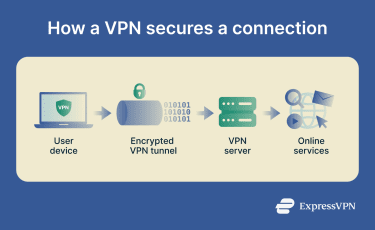
Types of personal VPNs
Personal VPN clients may take a variety of forms:
- Commercial VPN service: Many VPN companies offer their services to the public through subscription agreements. Users typically pay a subscription fee to use the service.
- Manual VPN client setup: Some users may configure a VPN connection using their operating system's built-in VPN capabilities or a compatible VPN app, rather than relying on a provider’s full-featured client.
- Router-level VPN for the whole network: This involves configuring a VPN on a router so that all connected devices route traffic through it.
- Self-hosted VPN server: Others may set up and manage their own VPN server on a home device, dedicated hardware, or a cloud instance, often using self-hosted VPN software such as WireGuard- or OpenVPN-based solutions.
Why is a personal VPN important?
Personal VPNs are used to protect digital privacy in the following ways:
- Helps prevent Wi-Fi snoops from reading traffic: On public Wi-Fi, a VPN helps protect against local monitoring by encrypting traffic over the network.
- Reduces internet service provider (ISP) tracking and profiling: Even on a home network, a VPN creates an encrypted tunnel over the ISP’s infrastructure. The ISP can usually see that the user is using a VPN, but not the contents of traffic inside the tunnel, though some metadata may still be visible.
- Helps bypass local network restrictions: Public or workplace Wi-Fi often restricts certain types of traffic or services. A VPN can sometimes help by routing traffic through an encrypted tunnel, though some networks may block VPN use.
- Reduces some forms of ad tracking: By masking the user's public IP address, a VPN can reduce IP-based profiling. Some commercial VPNs also offer built-in ad- and tracker-blocking tools, but a VPN alone does not stop tracking through cookies, browser fingerprinting, or account logins.
- Supports safer remote access to home: A self-hosted VPN server allows users to establish an encrypted connection to their home network from another location. This can make it possible to securely access files or local devices remotely over the internet.
- Enables more flexible browsing: Users can choose among servers in different regions, depending on what the service offers.
Risks and privacy concerns
A VPN can improve privacy, but it’s not a complete solution on its own. For example, using one doesn't prevent a user from voluntarily sharing personal details or downloading malware. To get the most out of a VPN, it’s also important to be aware of a few factors:
- Provider trust matters: Because user traffic passes through the VPN’s servers, it’s important to choose a provider with strong privacy practices, such as a verified no-logs policy.
- Configuration and setup: Features like Domain Name System (DNS) leak protection help reduce the risk of data leaving the VPN tunnel and exposing the user’s IP address.
Further reading:
- VPN for dummies: Simple no-jargon guide for beginners
- What does a VPN hide? Full breakdown of what’s protected and what’s not
- VPN protocols explained and compared
- Should you use a VPN at work? A practical guide