
Nejlepší VPN rozšíření pro Microsoft Edge: Soukromé, bezpečné a intuitivní
Posilte ochranu svého soukromí s rozšířením ExpressVPN pro Microsoft Edge na systémech Windows, Mac a Linux
- Soukromé surfování přes servery ve 113 zemích
- Ochrana na veřejných Wi-Fi a neznámých sdílených sítích
- Funguje na Edge s aplikací ExpressVPN i bez ní
Aktivovat zkušební verzi Stáhnout doplněk
30denní záruka vrácení peněz pro nové uživatele

Proč potřebujete VPN rozšíření pro Microsoft Edge
Vyměňte integrovanou VPN Edge za ExpressVPN a získejte kompletní ochranu
-
![Zaplní mezery integrované VPN Microsoft Edge Integrovaná VPN Microsoftu omezuje šifrování a maskování IP jen na přenosy v prohlížeči, m...]()
Zaplní mezery integrované VPN Microsoft Edge
Integrovaná VPN Microsoftu omezuje šifrování a maskování IP jen na přenosy v prohlížeči, má omezená data a server si nemůžete vybrat sami. Rozšíření ExpressVPN dokáže oproti tomu v kombinaci se stolní aplikací ochránit přenosy celého zařízení. Získáte servery ve 113 zemích and prověřené zásady ochrany osobních údajů.
-
![Ochrana aktivit v prohlížeči před trackery, reklamou a úniky Naše rozšíření pro Edge můžete používat v kombinaci s plnohodnotnou VPN ...]()
Ochrana aktivit v prohlížeči před trackery, reklamou a úniky
Naše rozšíření pro Edge můžete používat v kombinaci s plnohodnotnou VPN aplikací a chránit tak nejen přenosy prohlížeče, ale i celého zařízení. Navíc získáte funkce dostupné jen v aplikaci, včetně blokování trackerů a reklamy. Nástroj Threat Manager blokuje trackery a reklamy, aby si vás nemohl nikdo profilovat, vaše přenosy jsou šifrované, vaše IP adresa je skrytá a nechybí ani prevence úniků.
-
![Bezpečí na veřejných Wi-Fi a sdílených zařízeních na 1 kliknutí Veřejné Wi-Fi a sdílená zařízení mohou ohrozit vaše hesla a odhal...]()
Bezpečí na veřejných Wi-Fi a sdílených zařízeních na 1 kliknutí
Veřejné Wi-Fi a sdílená zařízení mohou ohrozit vaše hesla a odhalit ostatním, co na internetu děláte. Stačí jediné kliknutí v Edge a ExpressVPN začne šifrovat připojení k internetu. Nouzové odpojení zároveň ochrání situace, kdy vám náhle vypadne připojení k VPN, takže vaši IP ani data nic neohrozí.



Jak nastavit VPN pro Microsoft Edge
Nasadit VPN rozšíření do prohlížeče Edge je hračka
-
![How to sign up for ExpressVPN]()
1. krok
Stáhněte si a nainstalujte rozšíření ExpressVPN pro prohlížečePořiďte si
ExpressVPN pro své zařízení a stáhněte si rozšíření pro prohlížeč Edge.
-
![Connect To Server Firefox]()
2. krok
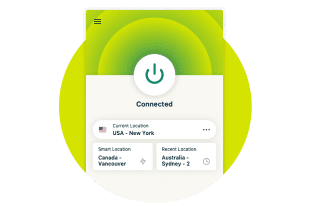
Přihlaste se a připojte k VPN serveru
Přihlaste se a připojte k serveru v jedné z více než 214 oblastí pro ochranu připojení v prohlížeči Edge.
-
![Connect To Server@2x 7]()
3. krok
Surfujte bezpečně s Edge
Teď už vás chrání spolehlivá VPN pro Edge, takže můžete vesele a bez starostí surfovat, používat bankovnictví nebo nakupovat na internetu.


Tipy pro používání ExpressVPN na Edge
4 tipy, jak si nastavit a optimalizovat VPN na Microsoft Edge
-
![Image 9]()
Aktivujte automatické připojení při zapnutí prohlížeče
Aktivní ochrana kdykoliv je Edge zapnutý. Bez manuálních zásahů do připojení. Při surfování po internetu už vás nic neohrozí, ani když si zapomenete ExpressVPN zapnout. Nastavení najdete v menu rozšíření.
-
![Image 10]()
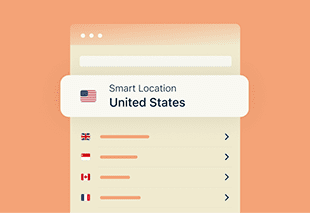
Využijte funkci Smart Location pro nejrychlejší připojení
Získáte nejrychlejší připojení na jedno kliknutí. ExpressVPN automaticky vybere nejvhodnější server pomocí své funkce Smart Location. Tato funkce analyzuje stav sítě v reálném čase, aby vám vždy zajistila jen ten nejlepší možný výkon pro vaši oblast.

-
![Image 11]()
Sledujte streamingové služby při cestování
Připojte se k serveru ze svého domova a sledujte své aktivní lokální streamingové služby. Nové díly vašich oblíbených pořadů a seriálů už vám neuniknou ani na pracovní cestě nebo na dovolené.
-
![Image 12]()
Zapněte blokaci WebRTC
WebRTC může i při zapnuté VPN nechtěně prozradit, odkud se opravdu připojujete. V nastavení rozšíření proto zapněte ochranu, která webům zabrání odhalit vaši skutečnou IP adresu.


Proč je ExpressVPN nejlepší řešení pro Microsoft Edge
Rychlé a bezpečné surfování s nejlepší VPN pro Microsoft Edge

Vyhněte se monitoringu a škrcení rychlosti
Pokud používáte v Microsoft Edge rozšíření ExpressVPN, přenosy jsou šifrované a váš poskytovatel internetu nevidí vaše aktivity a nemůže podle nich škrtit rychlost vašeho připojení.
ExpressVPN používá maskované servery, takže přenosy přes VPN vypadají jako běžné připojení k internetu. Díky tomu získáte rychlé a stabilní připojení pro hraní, streaming i běžné surfování, aniž byste na sebe zbytečně upozorňovali.

Spolehlivý přístup ke streamingovým účtům
Integrovaná VPN Microsoft Edge neumí měnit polohu, což vás může omezovat například při cestování, protože se v zahraničí nepřihlásíte k některým domácím účtům.
Rozšíření ExpressVPN pro Edge nabízí servery s kapacitou 10 Gb/s a 40 Gb/s ve 113 zemích. Díky tomu se můžete spolehnout na rychlé a stabilní připojení, ať už jste v zahraničí na dovolené nebo za prací.
Pokročilá výbava pro ochranu soukromí
Získejte víc než jen změnu IP adresy. Rozšíření pro prohlížeče ExpressVPN vynucuje HTTPS všude, kde je to možné, takže vás automaticky převede na bezpečnější, šifrované připojení.
Blokace WebRTC vás chrání před únikem IP adresy a maskování HTML5 polohy se postará o to, aby prohlížeč neprozradil údaje o poloze. Pomocí nástroje Smart Routing si můžete nastavit, jak se mají konkrétní weby v prohlížeči Edge připojovat. Všechny tyto postupy a nástroje ochrání vaši identitu a aktivity před běžnými způsoby trackování.

Snadné a intuitivní ovládání
Rozšíření ExpressVPN pro Edge je jednoduché, přístupné a dostupné v 17 jazycích. V kombinaci s plnohodnotnou VPN aplikací funguje rozšíření jako dálkové ovládání aplikace, takže přes něj ochráníte přenosy celého zařízení.
Zabezpečení nastavíte přímo v okně prohlížeče Edge a připojení nebo změnu serveru zvládnete na pár kliknutí. Kdybyste potřebovali pomocnou ruku, naši skuteční zaměstnanci jsou vám k dispozici 24/7 na živém chatu.

Široká podpora zařízení a operačních systémů
ExpressVPN ochrání víc než jen Edge prohlížeč. Postará se o celý váš digitální život na noteboocích, telefonech, tabletech a dalších zařízeních a podporuje Windows, Mac, Linux, iOS, Android and další operační systémy.
Jelikož si k jednomu předplatnému můžete připojit až 14 zařízení současně, bude vám stačit pro zabezpečení streamingu, surfování a práce na internetu jeden jediný účet.
Prémiová výbava přímo uvnitř rozšíření pro Edge
Rychlost, ochrana a soukromí s nejlepší VPN pro Edge
-
![Lightway@2x 8]()
Rychlý a bezpečný protokol Lightway uvnitř prohlížeče
Our protokol Lightway jsme postavili od základů a nabízí stabilní připojení, nízkou odezvu a silné šifrování při používání Edge. Zajistí rychlé načítání webových stránek, přehrávání videí ve vysokém rozlišení a bezpečnou práci na dálku.
-
![Vlastní pravidla pro každý web pomocí Smart Routing Pomocí funkce Smart Routing si můžete nastavit, jak se budou webových stránky chovat p...]()
Vlastní pravidla pro každý web pomocí Smart Routing
Pomocí funkce Smart Routing si můžete nastavit, jak se budou webových stránky chovat při používání rozšíření pro Edge v proxy režimu. Některé weby můžete směrovat přes konkrétní servery, zatímco ostatní nemusí proxy používat vůbec.
-
![TrustedServer architektura bez HDD, žádné záznamy, žádné ústupky Celá síť ExpressVPN běží na serverech bez HDD paměti (RAM-only) s t...]()
TrustedServer architektura bez HDD, žádné záznamy, žádné ústupky
Celá síť ExpressVPN běží na serverech bez HDD paměti (RAM-only) s technologií TrustedServer, takže se žádná data nezapisují na pevné disky. Ve spojení s nezávisle prověřenými zásadami neuchovávání záznamů tvoří bezpečnostní vrstvu, co ochrání vaše soukromí i před námi samotnými.



Proč je ExpressVPN lepší než bezplatné alternativy pro Edge
Prémiová ochrana ExpressVPN překoná bezplatné sliby ve všech ohledech
| ExpressVPN rozšíření pro Edge | Většina bezplatných VPN rozšíření | |
|---|---|---|
| Instalace a výkon | Rychlá a snadná instalace a pravidelné aktualizace rozšíření pro stabilní, bezpečné a soukromé připojení | Snadná instalace, ale slabší výkon a časté výpadky připojení |
| Rychlost a data | Rychlé a stabilní servery s kapacitou 10 Gb/s a 40 Gb/s, protokol Lightway a neomezená data | Pomalejší připojení z důvodu přetížení serverů a omezená ochrana kvůli limitu dat |
| Síť serverů | Přes 214 bezpečných oblastí po celем světě | Omezený nebo žádný výběr serverů |
| Podpora streamingových služeb | Spolehlivé připojení pro všechny přední služby | Přední streamingové služby s největší pravděpodobností nebudou fungovat |
| Ochrana soukromí | Chrání data pomocí technologie TrustedServer a dodržuje striktní zásady neuchovávání záznamů. | Rizikové pro soukromí, protože mnoho bezplatných VPN prodává data svých uživatelů |
| Počet souběžných připojení | Až 14 připojení, aplikace pro Windows, Mac, Linux, iOS, Android a další | Jedno připojení |
| Bonusy | Maskování polohy, blokace WebRTC a prevence úniků, tmavý režim, Smart Routing | Žádné |
Zkušenosti uživatelů: Co říkají naši skuteční zákazníci
Tady jsou zkušenosti našich spokojených zákazníků s ExpressVPN
ExpressVPN mám na všech zařízeních - telefon, notebook, tablet, AppleTV, atd. a naprosto ji zbožňuju.


* Ukázka recenzí našich nejspokojenějších zákazníků
Včera jsem si založil účet u @expressvpn. Super na cesty do zahraničí!
@D_Geiger

* Ukázka recenzí našich nejspokojenějších zákazníků
Díky konzistentnímu výkonu a spolehlivému zabezpečení je ExpressVPN ta nejlepší VPN na trhu.

* Někdy platíme odborným webům za doporučení zákazníků
Časté dotazy
Vše, co potřebujete vědět o ExpressVPN pro Edge
Je ExpressVPN rozšíření pro Microsoft Edge bezpečné?
Ano. ExpressVPN rozšíření pro Microsoft Edge můžete používat samostatně nebo v kombinaci s plnohodnotnou stolní aplikací. Nabízí rychlé připojení, silné šifrování dat a snadné přepínání mezi servery, takže kromě zabezpečení přináší i pohodlnější používání. V kombinaci s VPN aplikací získáte i další funkce jako například nouzové odpojení.
Skryje VPN moji historii procházení v prohlížeči?
Prohlížeč ukládá historii procházení lokálně a VPN na tom nic nemění – vyčistit ji můžete jedině manuálně. ExpressVPN šifruje přenosy po internetu, aby váš poskytovatel internetového připojení nebo správce Wi-Fi nemohl sledovat, co za stránky navštěvujete. Poznámka: pokud jste při vyhledávání přihlášeni k účtu (např. Google), může daná služba vaše vyhledávání stále zaznamenávat.
Jak používat VPN na Microsoft Edge?
Pořiďte si ExpressVPN, stáhněte si a nainstalujte rozšíření, přihlaste se a připojte se k serveru. Rozšíření lze používat i ve spojení se stolní aplikací. V takovém případě ochráníte celé své zařízení a vše můžete ovládat přímo v prohlížeči.
Stačí mi integrovaná VPN Microsoft Edge?
Integrovaná VPN Microsoft Edge (Edge Secure Network) nabízí základní ochranu, ale šifruje jen přenosy uvnitř prohlížeče Edge a limituje data na 5 GB měsíčně.
Můžu si ExpressVPN nainstalovat i bez stolní aplikace?
Ano. Rozšíření ExpressVPN pro prohlížeče můžete používat samostatně bez stolní aplikace. V takovém případě funguje rozšíření jako VPN proxy a chrání jen přenosy uvnitř prohlížeče. Pokud chcete zabezpečit celé své zařízení, můžete k rozšíření přidat ještě aplikaci ExpressVPN, ale není to povinnost.
Přidejte si ExpressVPN do Microsoft Edge hned teď
Chraňte své připojení pomocí nejlepšího VPN rozšíření pro Edge

Instalace přímo přes Edge obchod s doplňky a 30 dní bez rizika
Nainstalovat ExpressVPN rozšíření přes Edge obchod s doplňky zabere jen pár vteřin. Každý nový předplatitel dostane 30denní bezrizikovou zkušební verzi. Bez složitého nastavování.
Přejděte v Edge na prémiovou ochranu soukromí
Většina lidí se spokojí se základním surfováním. Na zákazníky ExpressVPN však čeká mnohem špičková péče – neomezené přenosy, globální pokrytí ve více než 214 oblastech a tak rychlé připojení, že nejde poznat, že máte VPN zapnutou.
Nainstalujte si VPN nyní a poznejte změnu na vlastní kůži.















Videonávod: Vyzkoušejte tmavý režim
Nastavte si barevné schéma podle sebe