How ExpressVPN can help you avoid phishing attacks


A VPN connection alone can’t stop phishing, but ExpressVPN offers several tools to help you avoid phishing attacks. Its Advanced Protection feature can block known phishing sites, while the browser extension's Web Protection adds URL-level blocking even when the VPN isn’t connected. ExpressKeys also helps protect your login credentials from phishing attempts.
There’s also ExpressMailGuard, which helps keep your real email address private, reducing your exposure to phishing emails, while Identity Defender's Data Removal (U.S. only) feature may limit the personal information scammers can use to create targeted phishing messages.
Protect yourself against phishing sites and credential theft
If a phishing message reaches you, ExpressVPN has tools that block connections to known malicious websites and make it harder for scammers to steal or misuse your login credentials.
Block known phishing sites
ExpressVPN's malicious sites blocker helps protect against phishing by blocking connections to known malicious websites.
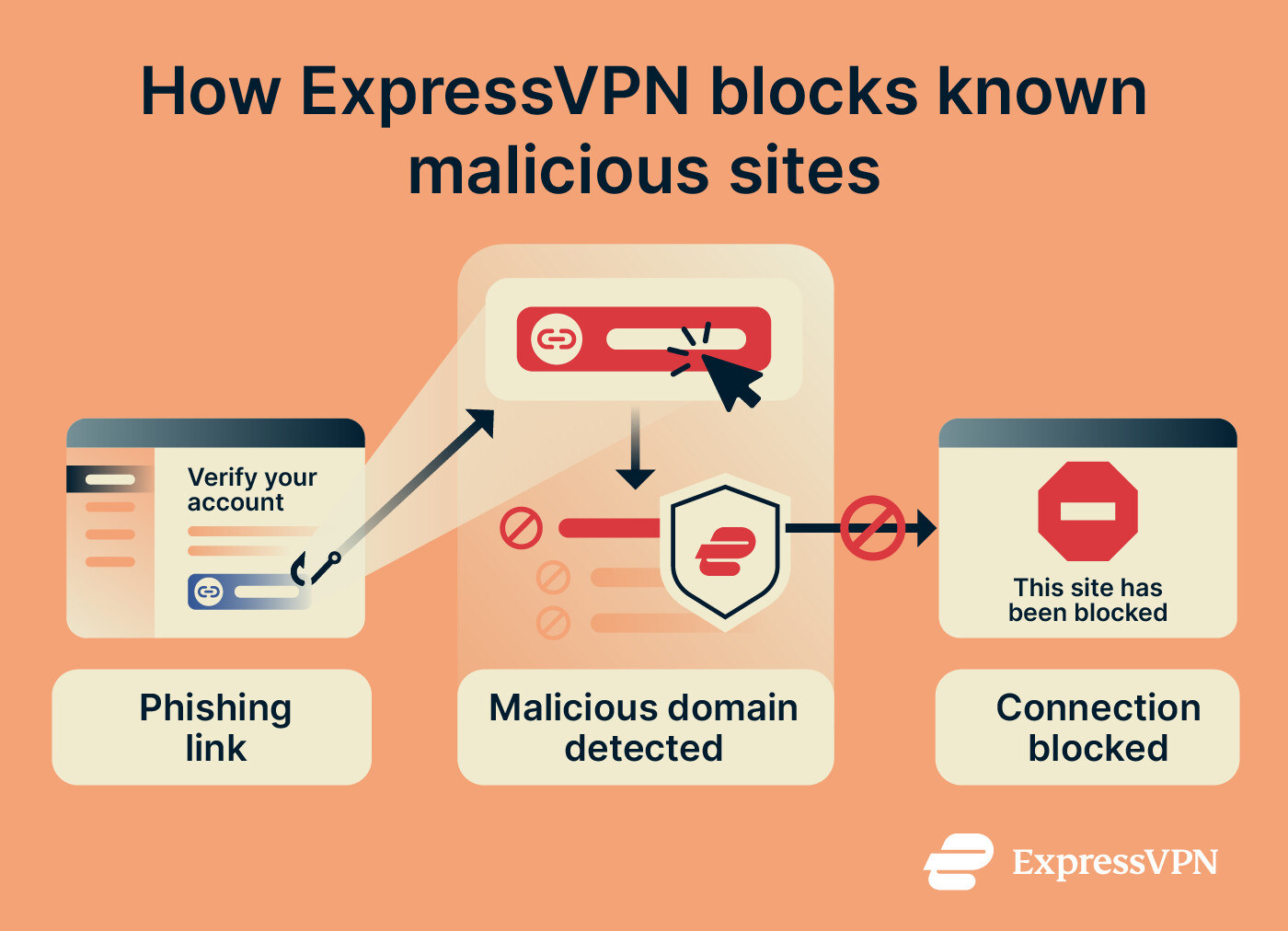
Because the malicious site blocker works at the Domain Name System (DNS) level, it can block known malicious websites across browsers and apps, including when you open a phishing link in an email or messaging app.
The blocker is built into the ExpressVPN app and is available with all subscription tiers. However, it has a couple of limitations:
- ExpressVPN updates its blocklists weekly. Newly created phishing websites may not be listed yet and could go undetected.
- The malicious site blocker only works while your VPN connection is active (using any supported protocol except IKEv2).
For setup instructions, see our guide to enabling Advanced Protection.
Block phishing pages in your browser with Web Protection
For additional phishing protection, ExpressVPN's browser extension includes Web Protection. Like Advanced Protection, it blocks known malicious, phishing, and scam URLs, but it works even when you're not connected to the VPN.
Web Protection also offers more precise blocking. It can block specific harmful pages or resources instead of entire domains. For example, if scammers create a fake login page on an otherwise legitimate website, Web Protection can block that page without restricting access to the rest of the site.
When Web Protection blocks a known threat, it displays a warning explaining why the page was blocked. You can choose to go back or proceed anyway, although continuing to a flagged website may put your information at risk.
Web Protection is included with all ExpressVPN subscriptions but is disabled by default. To enable it, sign into the ExpressVPN browser extension and turn on Threat Manager in the Web Protection settings.
Avoid autofilling passwords on fake login pages
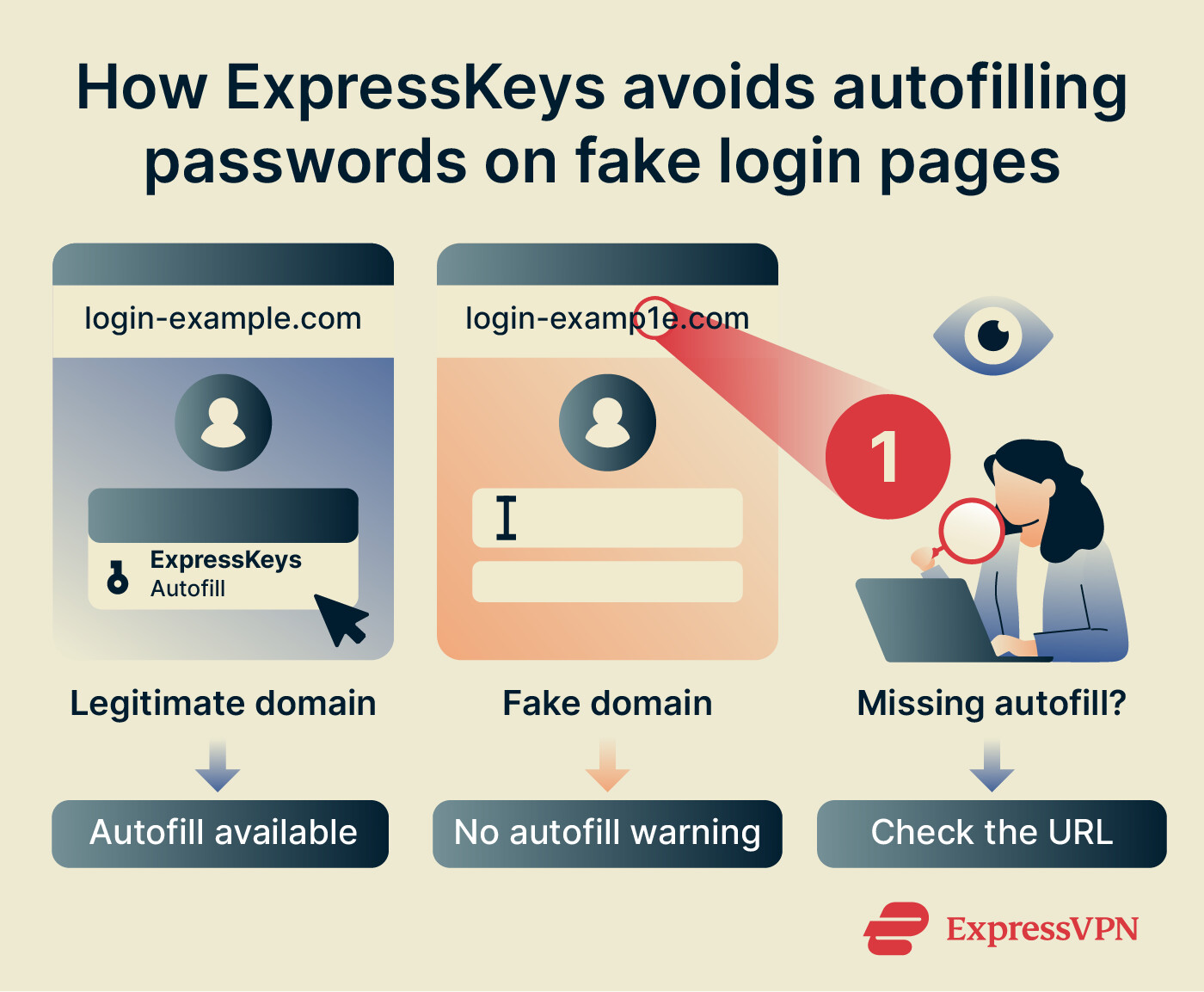
ExpressKeys can help prevent you from accidentally entering your login credentials on phishing websites. It only offers to autofill saved logins when the website's domain matches the one associated with your credentials, so a lookalike site with a different domain (opened from a phishing link, for example) won't trigger autofill.
If ExpressKeys normally autofills your credentials on a website but doesn't, check the URL for misspellings or an unfamiliar domain before entering them manually. This could indicate you’re on a phishing site, although website changes or compatibility issues can also interfere with autofill.

Note: ExpressKeys is included with Advanced and Express Pro subscriptions and can also be purchased separately.
Use passkeys instead of passwords
Passkeys offer stronger phishing protection than passwords because they're cryptographically tied to the website or app they were created for. This means a phishing website with a different domain can't use your passkey to sign you in, even if its login page looks identical to the legitimate one.
ExpressKeys lets you create and store passkeys for supported services in its iOS and Android apps and browser extension, alongside your regular passwords.
Add two-factor authentication
ExpressKeys can generate two-factor authentication (2FA) codes for supported accounts. These codes add an extra step to the sign-in process, so even if someone steals your password, they'd still need a valid 2FA code to access your account.
However, scammers can still trick you into sharing a valid 2FA code, so always verify the website before entering it.
Reduce your exposure to phishing attempts
Scammers can use your email address and other personal details to target you with phishing messages. Limiting how widely this information is available can help reduce your exposure to these attacks.
Hide your real email address with aliases
Websites and online services can suffer data breaches that expose your email address to scammers. ExpressMailGuard (available with ExpressVPN subscriptions) lets you use email aliases for different websites and services without sharing your real email address. If an alias starts receiving phishing emails, you can deactivate it, and ExpressMailGuard will reject any new emails sent to that address.
Note: You can access ExpressMailGuard from your ExpressVPN+ dashboard.
Email aliases can also help you spot phishing attempts. For example, if an email claiming to be from your bank arrives via an alias you use for online shopping, that's a red flag because your bank shouldn't have that address.
Keep in mind that, while ExpressMailGuard cleans incoming messages by removing embedded tracking pixels, it doesn’t scan the text to filter out phishing emails. If you receive a suspicious message, you should avoid clicking its links and verify the sender through an official channel. You can also set up custom automated rules to block or route emails based on specific senders or subject keywords to catch potential phishing attempts.
Remove your details from data broker sites
Scammers can use personal details, such as your name, employer, address, or contacts, to make targeted phishing messages more convincing. Data broker sites are one possible source of that information.
In the U.S., you can run a free scan to check whether data brokers and people-search sites have your personal information. If they do, Data Removal, which is part of ExpressVPN's Identity Defender suite, can submit removal requests on your behalf and monitor whether your details reappear. This is only available in the U.S., with Advanced and Express Pro subscriptions.
Removing your details from these sites may make it harder for scammers to personalize phishing messages to you, but it won't stop phishing attacks from happening.
Want to make yourself a harder target for phishing scams?
ExpressVPN helps protect you from phishing by blocking known malicious sites, securing your passwords and passkeys with ExpressKeys, and offering email aliases.
Strengthen your phishing protection with ExpressVPN
Try ExpressVPN with a 30-day money-back guarantee for new users.
FAQ
Does a VPN protect you from phishing?
However, ExpressVPN's malicious sites blocker can block connections to known phishing domains, while ExpressKeys helps reduce credential theft risks through domain-matched autofill and passkeys.
Will ExpressVPN block every phishing site?
What should I do if I entered my password on a phishing site?
ExpressKeys can generate a new, unique password for the account and save it to your vault. Its password health check also flags reused passwords, so you can find and change any other accounts that use the same one. If you shared payment details, contact your bank or card provider.
What's the difference between phishing and spam?
ExpressMailGuard aliases reduce how widely you share your real email address, limiting exposure to both types of messages. However, filtering messages is still up to you and your email provider.
Can a password manager stop phishing?
It also supports passkeys that can't authenticate on a fake domain. However, you can still manually enter your password on a phishing page, so always verify the website address before signing in.