VPN protocols explained: Which ExpressVPN uses and why



ExpressVPN uses several protocols: Lightway, WireGuard, OpenVPN, and IKEv2. Lightway, ExpressVPN's own protocol, is designed for fast connections that stay stable when a device switches networks. The other three are alternatives for networks where Lightway can't connect or for users who prefer a different protocol.
A VPN protocol is the set of rules that controls how a device connects to a VPN server and how data travels through the encrypted connection. Different protocols can affect connection speed, stability, security, and compatibility with a particular network.
Which VPN protocols does ExpressVPN use?
ExpressVPN supports the following protocols:
Lightway
Lightway is ExpressVPN’s proprietary VPN protocol, designed from the ground up to be lightweight, fast, and secure.
It supports both Transmission Control Protocol (TCP) and User Datagram Protocol (UDP), making it more versatile than protocols like WireGuard, which only supports UDP. This flexibility helps Lightway perform better on networks where UDP is blocked or unreliable.
In early 2025, we released a new version of Lightway, rewritten in Rust, a modern programming language that’s become popular for building reliable, high-performance systems. Lightway was originally written in C, but moving to Rust made it even more secure and efficient while also making the code easier to maintain and build on over time. Lightway is open-source (anyone can inspect its code here) and has been audited by two independent cybersecurity firms, Cure53 and Praetorian.
One of Lightway’s key features is that it stays connected in the background when a device switches networks or wakes from sleep. Instead of dropping the connection, it goes idle and reconnects almost instantly, minimizing interruptions and making the experience feel seamless, especially on mobile.
Lightway includes post-quantum protection by default as a core part of its design. It uses Module-Lattice-Based Key-Encapsulation Mechanism (ML-KEM), the post-quantum standard selected by the National Institute of Standards and Technology (NIST). This helps protect traffic against "harvest now, decrypt later" attacks, in which attackers collect encrypted data now and wait until quantum computers can decrypt it.
What are Lightway advanced options?
Lightway has a few advanced settings for troubleshooting. Most users don't need them, because the app chooses suitable settings automatically.
On iOS, Android, and Windows, users can switch the encryption cipher, the algorithm that scrambles data. Advanced Encryption Standard (AES)-256 runs fastest on modern devices, while ChaCha20 may perform better on older or lower-cost ones.
On iOS and Android, the Network Address Translation (NAT) heartbeats setting keeps the connection active when the device sits unused, so push notifications arrive on time. However, it increases battery use.
Lightway – TCP can route traffic through a manually configured HTTPS proxy, which gives advanced users another way to connect when VPN connections are blocked.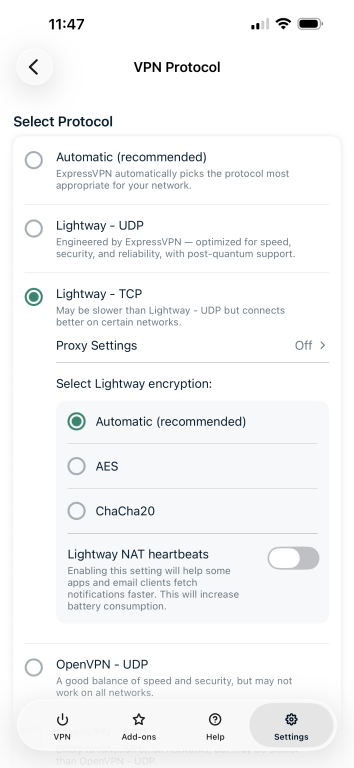
What is Lightway Turbo?
Lightway Turbo is an enhanced version of the protocol designed to make connections even faster. Instead of sending all traffic through one tunnel, Turbo creates multiple tunnels to ExpressVPN's servers and spreads traffic across them, so more data can travel at the same time.
Turbo is currently available only in the Windows app, with support for other platforms in development. Routers don't support it. It works with the Lightway – UDP and Automatic protocol settings, but not with Lightway – TCP or split tunneling. To turn it on, open the ExpressVPN Windows app, go to the Protocol settings, and turn on the Enable Lightway Turbo toggle. Choose Single tunnel or Dual tunnel from the dropdown menu.
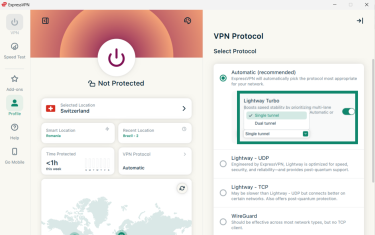
Single tunnel sends traffic through one path and works with most websites, apps, and games. Dual tunnel sends traffic across two paths at once for more bandwidth. If a website, app, or game stops working with dual tunnel, switching to single tunnel usually fixes it. For full instructions, see the support guide.
With Turbo on, Windows doesn't show a separate VPN network adapter. Some apps rely on a visible network adapter to work. For those apps, switching to Lightway – TCP creates a visible adapter as before.
TCP vs. UDP: What’s the difference?
TCP is stream-based. It ensures that data arrives in order and none of it is missing. If something doesn’t arrive, TCP automatically resends it. This makes it highly reliable, which is ideal for things like file downloads, emails, or web browsing.
UDP is message-based. It sends data without checking whether every packet arrives or arrives in the correct order. This reduces overhead and can improve performance, particularly for activities like online gaming and video calls, where low latency matters.
That said, the gap between TCP and UDP performance has narrowed significantly over the years. Twenty years ago, gaming over TCP was painful. Today, most users won’t notice the difference unless they’re doing something latency-critical.
While it’s technically possible to build a reliable protocol on top of UDP, you’d have to reinvent things like ordering and retransmission, which is why, for many use cases, TCP remains the simpler and smarter choice.
OpenVPN
OpenVPN is one of the most trusted and secure VPN protocols. It’s open-source and widely used, making it a reliable choice for many users. Like Lightway, OpenVPN works in two modes: TCP and UDP.
OpenVPN’s maturity is a strength: it’s been around for years, meaning it’s well-documented, battle-tested, and compatible with a huge range of devices and configurations. That said, newer protocols like Lightway or WireGuard may offer better speed and battery performance, especially on mobile.
We currently provide OpenVPN on Android, iOS, Windows, macOS, Linux, Apple TV, and routers.
IKEv2
IKEv2, which stands for Internet Key Exchange version 2, is available in the ExpressVPN app on iOS. It's a fast and stable protocol that works especially well on mobile devices. Its main drawback is limited configurability. Some IKEv2 implementations are also proprietary, which makes them difficult to audit, so ExpressVPN uses an open-source implementation.
WireGuard
WireGuard is a newer VPN protocol that's designed to be simple, fast, and secure. And like OpenVPN and Lightway, it's open-source.
What sets WireGuard apart is how lean it is; it's built from just several thousand lines of code (compared to OpenVPN's tens of thousands). This makes it easier to audit, maintain, and update, and it also helps make it one of the fastest VPN protocols available today.
ExpressVPN offers its own post-quantum implementation of WireGuard. It starts every connection with a post-quantum key exchange using ML-KEM, providing the same protection against future quantum decryption as Lightway. It also generates new encryption keys and an internal address for each connection, making activity harder to track over time.
WireGuard is available in the ExpressVPN apps for Windows, macOS, Linux, Android, iOS, and Apple TV.
Which protocols ExpressVPN doesn't use and why
ExpressVPN doesn’t support every VPN protocol. Some have security weaknesses, some offer little benefit over the protocols already available, and others serve a different purpose or require a setup that doesn’t fit the ExpressVPN app.
- Point-to-Point Tunneling Protocol (PPTP): This older protocol has known weaknesses in its authentication methods. Its lower encryption overhead can make it fast, but that speed comes at the expense of protection.
- Secure Socket Tunneling Protocol (SSTP): Microsoft developed this protocol, and it has historically centered on Windows. Its code is closed source, so unlike OpenVPN and WireGuard, it hasn't been open to broad, independent review.
- Layer 2 Tunneling Protocol (L2TP): Because L2TP doesn't provide encryption by itself, it's commonly paired with Internet Protocol Security (IPsec). This combination adds extra encapsulation and tends to perform worse than newer protocols. It also uses fixed ports that some firewalls can block.
- SoftEther: Built as open-source, multi-protocol VPN software, it can support remote-access and site-to-site VPN configurations, among other uses. Its broad feature set requires substantially more setup and configuration than a protocol integrated directly into a consumer VPN app, and it isn't as fast as modern protocols.
- Shadowsocks: Although it often comes up in conversations about VPNs, it's a proxy rather than a VPN protocol. It can encrypt and relay traffic between a Shadowsocks client and server, but it doesn't work in the same way as the VPN protocols ExpressVPN uses to create a VPN tunnel.
How to change your protocol in the ExpressVPN app
For most people, Automatic is the best place to start. It’s the default setting and lets ExpressVPN choose a protocol based on your device and network conditions, which is often Lightway.
Manually switching protocols makes the most sense when the VPN won’t connect, keeps disconnecting, or performs unusually slowly. The protocols you can choose depend on your device and app version.
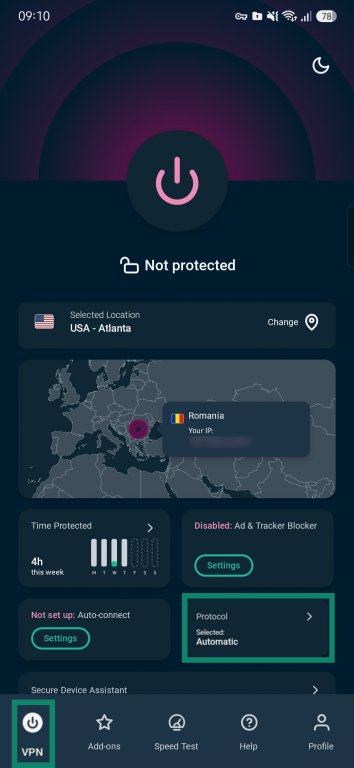
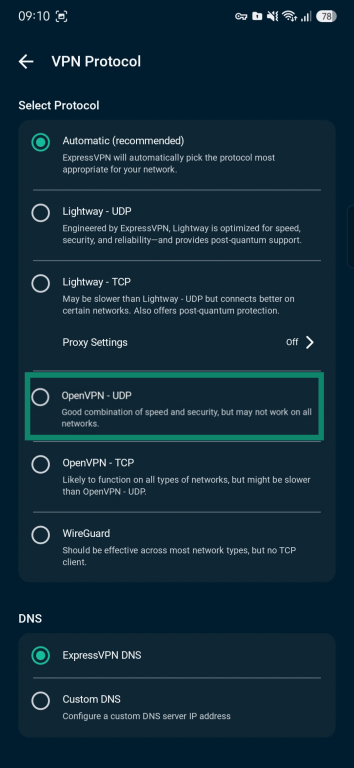
Here’s how to change protocols on Android, but the steps are essentially the same for all mobile and desktop apps:
- Open the ExpressVPN app and select Protocol.
- Choose a protocol to switch to.
- Select CHANGE ANYWAY.
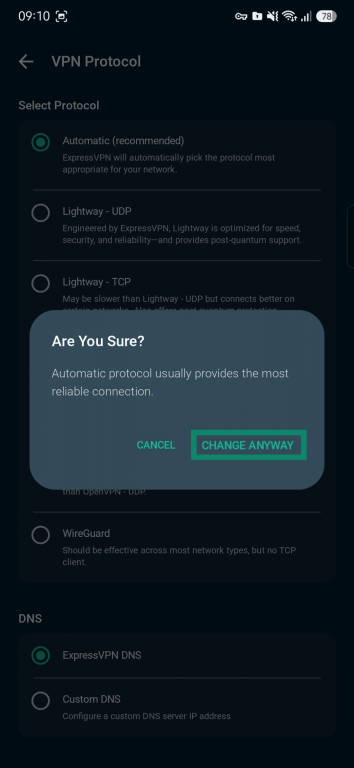
- Reconnect to the VPN, and the new protocol will automatically be selected.
Note: Check our detailed guides for iOS, Windows, macOS, Linux, Android TV, Fire TV, Apple TV, and routers.
Want a VPN that adapts to your connection?
ExpressVPN's Lightway protocol is designed for fast, secure, and reliable connections, even when you switch between networks. And with Automatic mode, ExpressVPN selects a suitable protocol for your device and network conditions.
Try ExpressVPN with a 30-day money-back guarantee for new users.
FAQ
Should I leave ExpressVPN on Automatic?
ExpressVPN recommends leaving the protocol on Automatic for most users. Automatic chooses the best option for the current network, which is usually Lightway. Choosing a protocol manually mainly helps when the VPN won't connect, keeps disconnecting, or runs unusually slowly.
Which protocol works best on networks that block VPNs?
No single ExpressVPN protocol works on every network that blocks VPNs, because networks detect and block VPN traffic in different ways. If Automatic can't connect, we recommend trying Lightway first and then the other protocols in the order listed in this Support guide.
Which protocol uses the least battery?
Lightway is the ExpressVPN protocol designed for low battery use. We built it to be lightweight, so it uses less battery while running faster. Battery use also depends on settings: on iOS and Android, the Lightway NAT heartbeats option sends small packets every few seconds to keep an idle connection active, which increases battery consumption.
Why can't I see a protocol in my ExpressVPN app?
The protocols in the ExpressVPN app depend on the device. For example, WireGuard is available on Android, iOS, Windows, macOS, Linux, and Apple TV, while IKEv2 is only available on iOS and the Lightway Turbo option only on Windows. If a protocol listed for a device is missing, updating the app to the latest version is worth trying.
Is Lightway TCP more secure than Lightway UDP?
Lightway TCP isn't more secure than Lightway UDP. Both send traffic through the same encrypted Lightway connection and offer the same encryption ciphers. The difference is how they deliver data: UDP prioritizes speed, while TCP checks that data arrives and resends anything missing, which can help on unstable or restrictive networks.
Can I use Lightway outside the ExpressVPN app?
Lightway can be used outside the ExpressVPN app because its core code is open source and published on GitHub. Developers can inspect the code and build Lightway into their own products, and some other VPN services already use it.
Why is IKEv2 only available on some platforms?
While IKEv2 has strong native integration on some operating systems, it offers less flexibility than ExpressVPN’s current cross-platform protocols and uses UDP, which some networks block. ExpressVPN currently supports IKEv2 for iOS.
Does Lightway Turbo always make the connection faster?
Lightway Turbo doesn't always make an ExpressVPN connection faster. It makes the biggest difference on very fast connections (over 900 megabits per second) and when connecting to VPN servers far from the user's location. On slower connections or with nearby servers, the gain may be small. Running a speed test with Turbo on and then off shows which setting works better on a given network.