Expressvpn Glossary
Storage management

What is storage management?
Storage management is the process of coordinating storage resources and managing data across its lifecycle. It covers how data is stored, accessed, protected, and maintained to support reliable system operation.
How does storage management work?
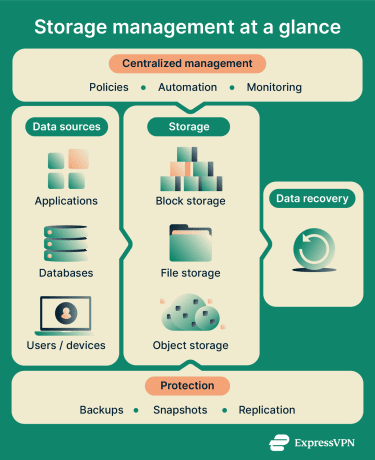
Storage management follows a continuous cycle that controls how resources are used and protected. It typically involves these steps:
- Discovery: Identifies storage assets and data types and the workloads that use them.
- Allocation: Assigns storage space using defined policies and quotas, ensuring resources are used efficiently.
- Access control and encryption: Enforces permissions to limit who can access data and applies encryption to protect data at rest and in transit.
- Monitoring: Tracks capacity and performance indicators like Input/Output Operations Per Second (IOPS) and latency.
- Protection and backup: Creates backups, snapshots, and replicas to protect data in case it’s lost or corrupted.
- Tiering and lifecycle management: Moves data between hot, warm, and cold storage based on how often it’s used.
Types of storage management
- Block storage management: Manages data as fixed-size blocks, commonly used in storage area network (SAN) environments.
- File storage management: Organizes data into files and directories through Network Attached Storage (NAS) systems and protocols like Server Message Block (SMB) and Network File System (NFS).
- Object storage management: Stores data as objects within buckets, paired with metadata and unique identifiers.
- Cloud storage management: Controls cloud-hosted storage using access controls and lifecycle rules.
- Hybrid storage management: Combines on-premises and cloud-based storage under a single management approach.
Why is storage management important?
Storage management is important in several regards. First, it helps to prevent the outages resulting from full disks by monitoring capacity. It also helps reduce the impact of breaches, because access controls can limit system exposure after a compromise.
The retention policies associated with storage management limit data retention and reduce unnecessary storage of information, and backups and snapshots can support restoration and recovery after an attack or disaster. Finally, storage audit logs and records support compliance audits and incident response.
Where is it used?
Storage management is used across many computing environments, from large-scale infrastructure to individual devices.
- Data centers: Manages SAN and NAS systems across servers and applications.
- Cloud platforms: Governs object storage and cloud-hosted storage services.
- Enterprise systems: Supports structured and unstructured data across shared storage environments.
- DevOps environments: Controls storage for logs and build data used in development workflows.
- Endpoints: Applies to laptops and mobile devices through device-level storage controls such as encryption and access restrictions.
Risks and privacy concerns
When implemented well, storage management reduces the risks involved in data storage. However, there are aspects that, if mismanaged, can lead to issues. First, if overly broad permissions are granted, this can increase the risk of unauthorized access. Second, if data is kept for longer than necessary, this increases what can potentially be exposed during cybersecurity incidents.
Unencrypted backups also risk exposing large volumes of data, and incorrect cloud settings can make private data publicly accessible. Finally, metadata may reveal file names, timestamps, and location data, which can disclose sensitive patterns.
Further reading
- How to back up your files and encrypt them
- Security concerns in cloud computing and how to address them
- What is data encryption?