How to spot and report Coinbase scam emails safely


Cryptocurrency scams are getting more sophisticated, and one of the most common tactics fraudsters use today is scam emails that pretend to be from well-known companies like Coinbase. These fake Coinbase messages often look very real, and they may even include bits of personal information, which can make them difficult to tell apart from genuine Coinbase communication.
The good news is there are almost always clear signs that help you spot these fake Coinbase emails before they do damage. Here’s what to look for and what to do if one shows up in your inbox.
How to recognize Coinbase phishing emails
There are several phishing red flags that can help you distinguish a fake Coinbase email from a legitimate message. You’ll want to consider the sender address, the context of the message, what you are being asked to do, and the overall tone. Here are the main warning signs to watch for:
How to tell if a Coinbase email is legitimate
The first and most important indication is checking the sender’s address. All official Coinbase emails come from the Coinbase.com domain, meaning all legitimate emails end with “coinbase.com.” Examples of verified Coinbase email addresses include (but are not limited to):
- @mail.coinbase.com
- compliance-kyc@coinbase.com
- contact@coinbase.com
- contact@updates.coinbase.com
- help@coinbase.com
- info@cb.mail.coinbase.com
- no-reply@coinbase.com
- no-reply@info.coinbase.com
- support@coinbase.com
If an email comes from a domain that doesn’t clearly belong to Coinbase, for example, misspellings (like coinbsae.com), extra words, or unrelated domains such as Gmail or Outlook, it should be treated as suspicious.
However, the sender field alone isn’t always reliable. Some scammers use email spoofing to disguise their real email address and make it appear as if it's from Coinbase. You can typically identify these addresses by checking for subtle spelling differences in the domain, unusual subdomains, or mismatched display names and addresses when you expand the full sender details.
Urgent or threatening language
Coinbase phishing emails, like most phishing attacks, often rely on urgent or threatening language to pressure you into responding or reacting without pausing to verify first. Messages may warn that your Coinbase account has been locked, that suspicious activity has been detected, or that failure to act immediately will result in restrictions.
Personal information requests
One of the clearest indicators of a phishing attempt is any request for sensitive account information. Legitimate Coinbase communications will never ask you to share your password, two-factor authentication (2FA) codes, recovery or seed phrases, or provide remote access to your device. They’ll also never instruct you to transfer your cryptocurrency “for security reasons.” If a message, even one that looks professional and uses Coinbase branding, asks for any of this information, it should be treated as fraudulent.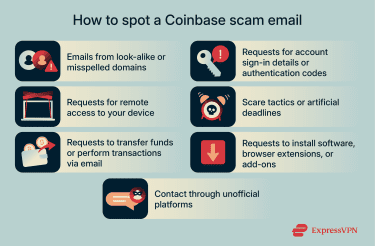
Suspicious links, attachments, and login pages
Most phishing emails almost always try to redirect you to a resource controlled by the attacker. This can be a fake Coinbase login page, designed to capture your credentials, but it may also be a malicious website, attachment, QR code, or software download intended to compromise your device or account. Before interacting with any link, hover over it (or long-press on mobile) to preview the destination address. Don’t click on the URL if it doesn’t clearly belong to Coinbase.
Generic greetings vs. personalized messages
Both generic and personalized messages can be scams. Many low-level Coinbase phishing emails still rely on generic greetings such as “Dear Customer” or “Hello User,” because they are sent in large batches to thousands of recipients.
That said, incidents like Coinbase’s May 2025 insider data breach show how phishing emails can become more convincing when attackers gain access to limited customer details. In that case, criminals obtained names and contact information with the apparent aim of impersonating Coinbase and conducting social-engineering attacks.
While Coinbase has not publicly confirmed examples of personalized phishing emails tied to this incident, access to personal details makes targeted messages more plausible. For this reason, any email that combines personal information with urgent warnings should be treated with extra caution, especially if it pressures you to click links or share information.
How Coinbase phishing scams typically work
In Coinbase phishing scams attackers rely on a few patterns, including manipulating trust, familiarity, and routine online behavior to convince people to hand over access voluntarily.
Understanding this process helps explain why even cautious users sometimes fall for these emails.
Social engineering tactics
Social engineering is the foundation of most Coinbase phishing scams. Attackers pose as legitimate support staff, compliance teams, or automated security systems to appear authoritative and credible.
They often reference routine activities such as account reviews, login alerts, or policy updates. When messages include realistic details like your name or contact information, they feel authentic, even if the threat itself is fabricated. The goal isn’t to break into the account, but rather to have you provide them with the login credentials needed to access it.
Credential harvesting attempts
Once the attacker establishes trust, phishing emails typically direct the recipient to a fraudulent login page or verification form. These pages are designed to closely resemble legitimate Coinbase sign-in screens, often using similar layouts and wording.
Any information entered on these pages goes straight to the attacker. This includes usernames, passwords, or authentication codes entered in response to prompts. From there, attackers may attempt to use that information to take over the account and initiate unauthorized transactions.
Fake account verification requests
In these fake Coinbase email scams, attackers claim that your account requires additional confirmation due to suspicious activity, regulatory checks, or security updates. The verification process usually involves clicking a link, scanning a QR code, or responding to an email with personal details. Legitimate companies don’t request sensitive information through email-based verification workflows. These requests exist solely to move the conversation into an attacker-controlled environment.
Common types of Coinbase phishing scams
Coinbase phishing scams take several forms, but they all share the same goal: getting the necessary data to access the Coinbase account. Some scams rely on email alone, while others combine email with phone calls, text messages, or even social media outreach.
SIM swap attacks
SIM swap attacks, also known as phone-porting attacks, target your mobile phone number. In these cases, attackers use stolen personal information and social engineering to convince your mobile carrier to transfer your phone number to a device they control.
Once successful, they can receive your texts, including login and verification codes, which makes SMS-based security especially vulnerable. When combined with stolen login details, this access can allow attackers to sign into your Coinbase accounts and take control of them.
Technical support scams
Technical support scams involve attackers impersonating Coinbase support staff or affiliated service providers. These scams may start with an email claiming there is a problem with your account, followed by a phone call or instructions to contact “support” through a provided number. Pressure is central to these scams. Attackers often claim there is an emergency and discourage you from verifying the situation independently.
The defining red flag, though, is a request to install software or grant remote access to your device. Legitimate companies don’t need direct access to your computer to resolve account issues. Once attackers gain remote access, they can monitor activity, capture credentials, or manipulate what appears on your screen to maintain control.
Giveaway and airdrop scams
Giveaway and airdrop scams are commonly carried out through email and social media. Attackers impersonate Coinbase, well-known brands, or executives and advertise limited-time offers that appear official.
Typically, these messages prompt you to visit external websites to "verify" your eligibility. The verification step exists solely to collect information or redirect victims into follow-up phishing attempts. Attackers even go as far as creating fake accounts and replies to make the promotion appear legitimate and widely endorsed.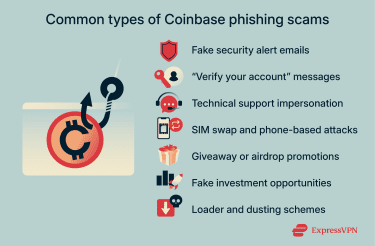
Fake investment opportunity scams
Fake investment scams promise unusually high returns, early access, or exclusive opportunities tied to Coinbase branding. Emails or phone calls may claim that an opportunity is available only to select users or that action is required quickly to avoid missing out. These messages rely on optimism rather than fear. If an offer sounds unusually generous, secretive, or time-sensitive, it is almost always a scam.
Loader scams
Loader scams involve scammers asking to use your Coinbase account to temporarily move money they cannot safely move themselves. They often frame this as a workaround for account limits, verification delays, or exchange restrictions, making the request sound like a routine financial favor rather than fraud.
The scammer offers to “load” funds into your account and promises a share of the proceeds. In reality, the money is added using stolen bank accounts, compromised cards, or hacked financial profiles. When the legitimate owner reports the fraud, the transaction is reversed. Because the activity occurred through your Coinbase account, the resulting chargebacks, restrictions, or investigations are linked to you, while the scammer disappears with any withdrawn funds.
If anyone asks for access to your Coinbase account or offers to add money for profit, it’s a scam.
Dusting scams
In a dusting attack, scammers send a very small amount of cryptocurrency, sometimes called “dust,” to multiple wallets. The transaction itself is harmless, but it’s used to encourage curiosity or interaction. Follow-up messages or labels may try to draw the recipient to external websites or phishing links or to collect identifying information about the wallet owner. If you receive an unexpected small crypto deposit, it’s safest to avoid interacting with the sender or any links associated with it.
Employment and recruitment scams
Employment and recruitment scams impersonate Coinbase hiring teams or partner organizations. These emails may advertise remote roles, onboarding steps, or urgent hiring needs.
Scammers often request personal details, identity documents, or follow-up communication through unofficial channels. Legitimate companies don’t conduct hiring processes through unsolicited messages that bypass formal application systems.
How to report Coinbase scam emails
Reporting a Coinbase scam email or text can help prevent others from being victimized by the same scam. The Coinbase security team will investigate the report and do what they can to shut down the malicious sites that target its user base.
Steps to take if you suspect a scam
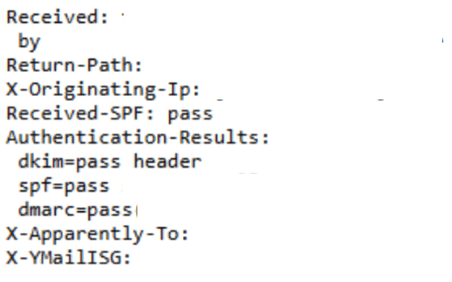
If you receive a Coinbase scam email, you should email the details to security@coinbase.com. Your report should include the full URL of the phishing site, the content of the email, and the full email headers. The email header contains metadata that can help Coinbase understand where the email was sent from and the path it took before getting to your inbox. Locating the header differs by platform, but here’s how to find it with Gmail, Outlook, and Yahoo Mail.
Gmail
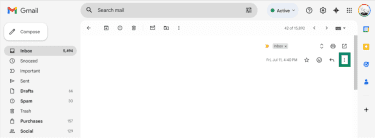
- Open the email you want to check and select the three dots in the top-right corner of the message.
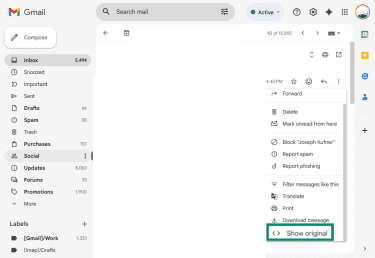
- A menu window will open. Choose Show original.
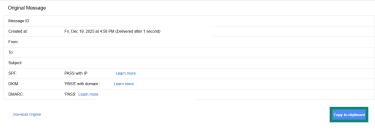
- A new tab opens with the full header. Press the Copy to clipboard button and paste it in your email to Coinbase security.
Outlook
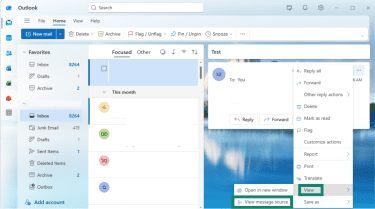
- Open the email and click the three dots in the top-right corner.
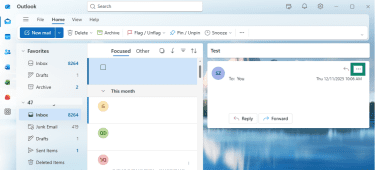
- Hover the mouse over View and click View message source.
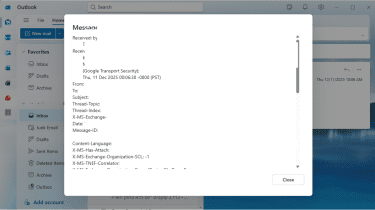
- A window will open with the complete header information. Copy the entire header section and paste it in your email to Coinbase security.
Yahoo Mail
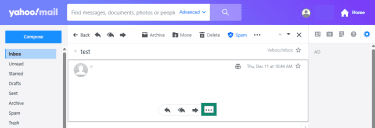
- Open the email and click the three dots at the bottom.
- Select View raw message.
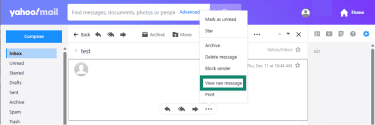
- A new tab will open with the email header. Copy the entire header section and paste it in your email to Coinbase security.
Additional reporting options
If you received a Coinbase scam text, you can take a screenshot of the message and forward it to security@coinbase.com. You can also forward the text to 7726 (which spells “SPAM” on your keypad). This is a reporting service supported by most major mobile carriers in the United States, Canada, and the United Kingdom. When you forward a scam text to 7726, it alerts your carrier so they can investigate and help block similar messages in the future.
If you’re in the U.S., you can report it as a “scam likely” call. Most major mobile providers have free or low-cost tools that block or label suspicious calls before they reach you, including:
- Verizon Call Filter: Adds spam alerts and blocks suspicious numbers. The premium plan includes caller ID, personal block lists, and category filtering.
- AT&T ActiveArmor: Blocks suspected fraud calls and gives you control over how potential spam calls are handled.
- T-Mobile Scam Shield: Labels “scam likely” calls and can block them before your phone rings.
What to do if you clicked a phishing link
Clicking a phishing link doesn’t necessarily mean your accounts are compromised. The trouble usually starts when you provide the scammers with the data they’re after. If you’ve entered your login details, recovery phrase, or verification codes into a fake website, act quickly using the steps below.
Reset passwords immediately
The first step is to update the password for your Coinbase account immediately, as well as any other services that share the same or similar credentials. Use strong, unique passwords for each account. Otherwise, once the scammers have the password, they can access multiple accounts and increase the potential damage.
Enable two-factor authentication (2FA)
If 2FA is not already enabled, turn it on immediately. If it is enabled, review the settings to confirm they haven’t been changed. Stronger authentication methods provide better protection than SMS-based verification. Using phishing-resistant multi-factor authentication (MFA), such as hardware security keys or app-based authentication methods that don’t rely on SMS codes, reduces the risk of attackers intercepting codes through email or phone-based attacks.
Check account activity
Review recent account activity for anything unusual. This includes:
- Login alerts or unfamiliar sessions.
- Changes to account settings.
- Security notifications you do not recognize.
Don’t rely on links in emails to check activity. Always sign in through the official website or app by navigating there directly. If something looks unfamiliar, treat it as a signal to secure the account further and contact support through official channels.
Secure email and mobile number
After a phishing incident, your email address and phone number often become the weakest points. You should update your email password and confirm recovery options are accurate and up to date. Open the email settings and make sure that no new forwarding rules, filters, or recovery addresses were added without your knowledge.
For your mobile number, review your carrier account for unauthorized changes and consider adding a carrier-level PIN or port-out protection to reduce the risk of phone-based attacks.
When to contact the Coinbase security team
You should contact the Coinbase security team as soon as you receive a suspicious email, text, or phone call. Additionally, contact them when:
- You entered login credentials on a suspicious page.
- You see unfamiliar account activity.
- You are locked out of your account.
- The phishing attempt involved impersonation of Coinbase support.
Use official support channels only, and avoid contact details provided in emails or messages.
FAQ: Common questions about Coinbase scams
How do I know if a Coinbase email is real?
A legitimate Coinbase email will never ask for your password, two-step verification codes, seed phrase, or remote access to your device. It’ll also come from an official Coinbase domain, not a lookalike address with extra characters or misspellings.
Does Coinbase contact users by email?
Coinbase does send emails for account notifications, security updates, and policy-related messages. However, these emails are informational and don’t require you to share sensitive information or take urgent action through embedded links.
What are the warning signs of a scam?
Common warning signs of Coinbase scam emails include:
- Urgent or threatening language designed to cause panic.
- Requests for passwords, authentication codes, or personal information.
- Links to unfamiliar or misspelled domains.
- Attachments, QR codes, or software download requests.
- Instructions to move conversations to unofficial platforms.
If a message includes any of these elements, it’s best to assume it is a phishing attempt and avoid interacting with it.
Take the first step to protect yourself online. Try ExpressVPN risk-free.
Get ExpressVPN