DNS record types explained: A complete guide for privacy



The Domain Name System (DNS) is a core piece of internet infrastructure, responsible for translating domain names into IP addresses so internet traffic can be routed correctly and facilitating communications between devices and networks. It all works thanks to DNS records, which essentially provide the information needed for DNS servers to correctly respond to user queries.
There are various DNS record types, and while they may seem complex or confusing at first glance, each one has its own clear purpose in the broader DNS ecosystem. This guide explores the most common varieties of DNS records, with brief explanations of each one.
What are DNS records?
The DNS is often described as the “phone book of the internet,” and if we continue that analogy, DNS records are like the entries within that phone book. In the same way that phone book listings provide details about specific businesses and entities, DNS records provide information about domains.
These records detail information about domains, including which IP address is associated with them and how requests should be processed. They’re defined using a standardized DNS syntax that DNS servers can read in order to understand how to resolve the requests they receive.
Why DNS records are important
DNS records are important because the DNS wouldn’t be able to function without them. They provide the necessary information and records for the system to work, so that user requests can be processed and people can find and access the online sites and services they need.
DNS records also make email delivery possible, so they’re vital for the overall functionality of the internet as we know it.
Common types of DNS records
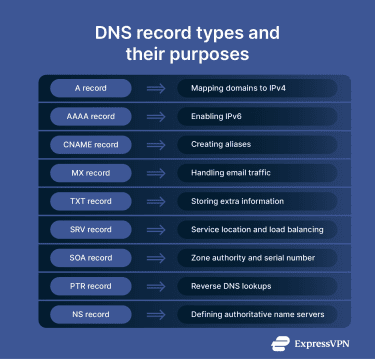 There are several dozen DNS record types, each with its own distinct purpose. We won’t cover every single one in this guide but will instead focus on the most common varieties that play the most critical roles in routing traffic and keeping the internet running.
A record: Mapping domains to IPv4
A record, or address record, is one of the most fundamental DNS record types, and also one of the easiest to understand. It maps human-readable, text-based domain names (like www.example.com) to numerical IPv4 addresses that devices use to communicate with one another, like 104.18.27.120.
When you type a website address into your browser and hit the “Enter” key, a DNS query gets sent into the system and travels through a chain of DNS servers. The relevant A record for your desired domain is located so that your traffic can be routed toward the specific address you’re trying to reach.
AAAA record: Enabling IPv6
AAAA records are almost identical to A records, but instead of pointing to IPv4 addresses, they point to IPv6 addresses. IPv6 is just a more recent version of the Internet Protocol. It uses 128-bit addresses, while IPv4 uses 32-bit addresses, so IPv6 addresses are a lot longer, though they work in a very similar way to IPv4 ones.
If a user types a website address into their browser, a DNS query goes into the system to find the relevant A or AAAA record (or both, since some sites have both IPv4 and IPv6 addresses).
CNAME record: Creating aliases
A CNAME or canonical name record points from one domain to another, rather than to an IP address. This is useful in situations where site owners may have subdomains or might want to ensure that users can access their site even if they type slightly different domain names into their browsers.
For example, you might own example.com, which has its own IPv4/IPv6 address and relevant A/AAAA record. But you might also want to ensure that if someone types blog.example.com or store.example.com, they will resolve to the same canonical domain, without needing separate A/AAAA records for each one. You can use CNAME records to essentially map queries to your main or “canonical” domain.
Redirecting vs. mapping
It’s important to differentiate between mapping and redirecting in the context of CNAME DNS records. Redirecting is a common web browser process in which a user types in one site address and ends up at a different one, but this is done at a web server or browser level, not within the DNS itself.
CNAME records, therefore, don’t redirect queries; instead, they map domains to other domains. The user can tell the difference because when they type in an address in their browser, even if a CNAME record is needed to find the canonical domain, the actual URL in the address bar won’t change.
MX record: Handling email traffic
MX or mail exchange records are all about email. Their role is to route emails to the correct mail servers. Each record contains information about how email messages should be routed, which are used by the Simple Mail Transfer Protocol (SMTP), the standard protocol for email routing.
Like CNAME records, MX records point to domain names, not IP addresses. So, when you send an email to someone, the mail server looks up the MX records for that email address, using the relevant A/AAAA record to establish a connection and deliver the message. MX records are essential for emails to function and messages to go to the right people.
TXT record: Storing extra information
A TXT or text record is used by domain administrators to provide additional information in the DNS. It was created for writing and storing human-readable notes that didn’t actually impact how the DNS works in any way, but now TXT records can also store machine-readable information and have several important purposes, like:
- Email security: TXT records can provide instructions about which mail servers are allowed to send mail to a domain, or contain public keys used to verify email authenticity and sender legitimacy. They might also contain instructions on how servers should respond to suspicious emails, which can help stop spam messages from spreading.
- Verification: Site owners are sometimes asked to include TXT records to confirm ownership of their domains.
SRV record: Service location and load balancing
A SRV or service record provides information about which exact host servers and ports to connect to in order to accurately respond to requests for certain online services. It’s similar to an A record, but more specific, as it provides the hostname and port of the specific server to connect to.
These DNS record types are often used for services like Voice over IP (VoIP) or instant messaging platforms. When a relevant request enters the system, the SRV record ensures it goes to the exact destination.
SOA record: Zone authority and serial number
SOA stands for start of authority, and this type of record contains specific data about DNS zones. That includes the name of the main DNS server for the zone in question, the email address of the admin that owns the zone, a serial number containing the version number of the zone file, and timers that tell the server how long to wait between refreshes or retries.
All of this information is useful within the DNS for servers to have up-to-date data on different zones and domains, but doesn’t necessarily impact the experience of the end user.
PTR record: Reverse DNS lookups
An easy way to think of PTR or pointer records is that they’re almost the exact opposite of A/AAAA records. Where A and AAAA records map domain names to IP addresses, PTR records to the reverse: they map IP addresses to human-readable domain names.
For example, a PTR record would contain information to say that the IPv4 address 104.18.27.120 maps to a human-readable hostname. These records are used for reverse DNS lookups, like when a user has an IP address and wants to find out what domain name it matches with.
NS record: Defining authoritative nameservers
NS or nameserver records indicate which DNS servers are the authoritative servers for each domain. An authoritative server is the one that contains the relevant DNS records for the domain in question. So, in simple terms, NS records explain where to go to obtain information about a domain, like its IP address.
Here’s how this works in practice: a user types a web address into their browser, which sends a DNS query to the configured DNS resolver. When the resolver doesn’t have the answer cached, it determines which authoritative server to ask by working through the DNS hierarchy, using root servers to identify the correct top-level domain (TLD) nameservers and then querying those TLD servers for the domain’s authoritative nameservers. The resolver then communicates with the authoritative servers to get the A/AAAA record (and IP address) for the domain.
DNS settings and performance
Next, let’s take a closer look at some of the specific settings mentioned in DNS records.
Understanding time to live (TTL)
TTL is one of the most important settings in DNS records. It dictates how long a DNS resolver should remember DNS records, in seconds, before asking for them again.
For example, a domain might have an A record with a TTL of 3,000 seconds. So, when you want to go to that site, your resolver will look up the relevant A record to find out the IP address and store that data in its cache. For the next 3,000 seconds, if you need to access that same domain, your computer will reuse the IP address from the cache, rather than doing another DNS lookup. But once the TTL expires, a fresh lookup will take place to check the A record again and retrieve the IP address.
Caching DNS record information is helpful, as it speeds up performance and negates the need for constant DNS lookups. This also eases the load on DNS servers.
Impact on DNS propagation
DNS propagation refers to how long it takes for DNS record changes to be reflected as cached records expire across the internet. For example, if a domain gets a new IP address, it takes a certain amount of time for all DNS records to reflect that change.
TTL directly impacts propagation, because if you have a long TTL and then make a change to the DNS record, resolvers will take longer to check the servers and receive the new information. If the TTL is short, propagation moves faster, since there is less time between lookups.
How to flush DNS cache
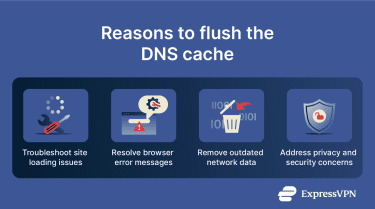 If you encounter DNS errors, flushing the cache can be a good way to resolve them. You can do this quite easily on any Windows or Mac device.
For Windows:
- Open the Command Prompt.
- Type “ipconfig /flushdns” and hit Enter.
For Mac:
- Open Terminal.
- Type “sudo dscacheutil -flushcache;sudo killall -HUP mDNSResponder” and hit Enter.
Tools for DNS lookup
If you need to check DNS records manually, you can use built-in system tools for DNS lookups or free online tools to help you.
How to check an A record with nslookup
On Windows:
- Open the Command Prompt.
- Type “nslookup -q=a example.com” (replace example.com with the name of the domain you want to check) and hit Enter.
On Mac:
- Open Terminal.
- Type in “dig example.com a” and hit Enter.
Using dig command for DNS queries
Linux users can use the dig command to gather DNS records information.
- Use “dig example.com” to look up a domain name.
- Use “dig example.com a” to get the A record, or replace “a” with any other record type to search for that specific DNS record.
Free online DNS lookup tools
There are many popular and trusted DNS lookup tools you can use for free online, including:
DNSSEC: The security layer of DNS
The DNS is not inherently secure and has some weaknesses that can be exploited in various ways. There are many types of cyberattacks that focus specifically on this system, like DNS spoofing, cache poisoning, and DNS hijacking. Fortunately, the system has a special security layer, called DNS Security Extensions, or DNSSEC, to guard against these attacks.
The way DNSSEC works is by adding cryptographic signatures to DNS records to verify that the data within those records hasn’t been tampered with or corrupted in any way. It’s like adding a seal of authenticity to individual DNS records, proving that they’re legitimate and trustworthy, and thereby making it much harder for cybercriminals to interfere with them.
What is a DNSSEC record?
When you attempt to access any domain, DNS resolvers that support DNSSEC will also request DNSSEC records alongside other types of DNS records. The DNSSEC records contain the digital signature data that proves the other DNS records are legitimate and come from a trusted authoritative DNS server, so the resolver knows it’s safe to proceed.
The signatures are verified to ensure they match. If they’re valid, the lookup process continues, but if not, the lookup will fail, and the user will receive an error message or warning about the site they want to visit being unsafe. This all helps to stop DNS cyberattacks like DNS spoofing, in which DNS cache records are altered by cybercriminals to map users to unsafe domains.
There are several different types of DNSSEC records, including DS (delegation signer) records, which point to relevant DNSSEC keys, RRSIG (resource record signature) records, which contain the cryptographic signatures of individual DNS record sets, and DNSKEY records, which contain the public keys needed to read and verify RRSIG data.
Why DNSSEC matters for security
As explained above, DNSSEC is vital for online security. It adds a much-needed protective layer to the DNS system to essentially cover up some of its weaknesses and make it less vulnerable to attacks. It can prevent DNS spoofing and other DNS-related cyberattacks by maintaining the integrity of different types of DNS records.
Benefits and limitations
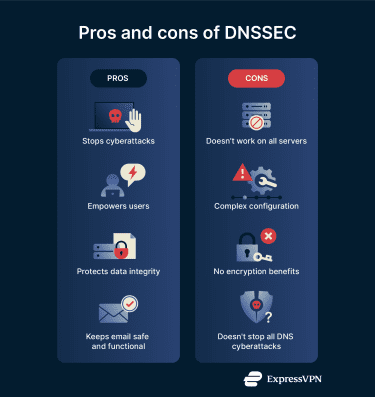 Some of the plus points of DNSSEC include:
- Security: It guards against DNS attacks, like cache poisoning, so users have less risk of ending up on malicious sites or being subject to malware and phishing attacks.
- Trust: Users can feel more confident using the internet and relying on DNS to take them to safe sites thanks to DNSSEC.
- Integrity: By adding signatures to DNS records, DNSSEC protects the integrity of the important information that fuels the DNS.
- Email: DNSSEC supports email security by helping ensure that DNS information used by email systems isn’t tampered with or altered by unauthorized parties.
On the downside, some of the limitations of DNSSEC are:
- Support: Older DNS resolvers and applications don’t fully support DNSSEC, so the benefits aren’t universally applied across the entire DNS.
- Complexity: Setting up and maintaining DNSSEC records is quite a complicated process, and misconfigurations can cause errors.
- No encryption: DNSSEC is purely about authenticating/verifying data. It doesn’t encrypt it, so it doesn’t provide any sort of extra privacy for DNS lookups.
- Not comprehensive: DNSSEC can stop some types of DNS cyberattacks, but not all of them.
FAQ: Common questions about DNS record types
What are the 4 most important DNS records?
There are different interpretations of which Domain Name System (DNS) records are the most important, but arguably the four main pillars of the DNS are A and AAAA records, which are needed for mapping domain names to IPv4 and IPv6 addresses so that internet traffic can be routed correctly, as well as MX, or mail exchange, records that allow emails to function and flow to the right places, plus CNAME, or canonical name, records for aliasing domains.
How can I check my Domain Name System (DNS) records?
You can use command-line tools such as nslookup or free online DNS lookup tools to find and view your DNS records. Alternatively, site admins can log into their domain registrar’s control panel or dashboard and view or manage their DNS records from there.
What’s the difference between an A record and a CNAME?
A records are used for mapping domain names to numerical IPv4 addresses, while CNAME, or canonical name, records are used for mapping domain names to other domain names to create aliases for the main or canonical domain. The two have different purposes, but are closely linked, as CNAME records are often used to link subdomains to A records.
What is the role of MX records?
An MX or mail exchange record stores domain names of mail servers, which are then used to direct emails to the correct mail servers. They ensure emails are delivered to the correct mail servers for a domain, so without MX records, email as we know it wouldn’t exist.
How does TTL affect DNS?
Time to live or TTL refers to how long Domain Name System (DNS) servers cache individual DNS queries before requesting new ones. TTL can be adjusted to different lengths of time; shorter TTLs allow DNS changes to propagate more quickly but may slow down site performance, and longer TTLs speed up DNS lookups in general, but can slow down the process of updating DNS records.
What is DNSSEC, and why is it important?
DNSSEC stands for DNS Security Extensions. It’s the name of a group of protocols that make the Domain Name System (DNS) more secure by digitally signing DNS data to verify its origin and authenticity. This helps to minimize the risks of DNS-related cyber-attacks, such as cache poisoning or DNS spoofing. This, in turn, helps users evade fake sites, phishing attacks, and malware.
Take the first step to protect yourself online. Try ExpressVPN risk-free.
Get ExpressVPN