How to identify and respond to NetWalker ransomware attacks


NetWalker was a well-known ransomware operation, first identified in 2019, which became especially prominent during the COVID-19 pandemic. Attackers used it to encrypt victims’ files and demand ransom payments, often targeting organizations that couldn’t afford prolonged downtime.
In 2021, U.S. law enforcement disrupted NetWalker by seizing key infrastructure and charging affiliates, but the broader Ransomware-as-a-Service (RaaS) model that helped it spread remains a serious threat. Today, attackers use similar tools, tactics, and delivery methods, including phishing emails and compromised remote access, to gain access to systems.
Knowing what to look for and having the right security measures in place can help prevent or reduce the damage caused by this kind of ransomware attack. This guide explains how NetWalker attacks worked, what warning signs to watch for, and why those lessons still matter.
What is NetWalker ransomware?
NetWalker, sometimes referred to as Mailto ransomware, was a Windows-based ransomware strain first identified in 2019. During a NetWalker ransomware attack, attackers encrypted files on infected systems and demanded payment in exchange for a decryption key. In many cases, the attackers also stole data before encryption, increasing pressure on victims to pay.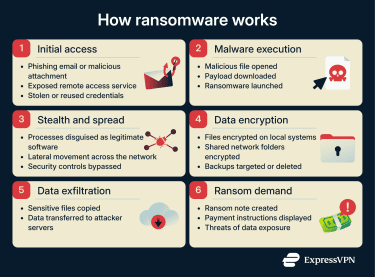
This double extortion attack method allowed the attackers to prevent victims from accessing their files and threaten to release them to the public if they didn’t pay the ransom. The tactic put extra pressure on organizations that stored sensitive or regulated information, such as medical clinics.
U.S. law enforcement disrupted the operation in 2021, significantly limiting its ability to carry out attacks. That said, because NetWalker operated as RaaS, many of its tools and tactics have continued to appear in later ransomware campaigns.
What is Ransomware-as-a-Service (RaaS)?
RaaS is a model where attackers gain access to a ready-made ransomware platform that includes the technical components needed to build and deploy ransomware and manage encryption. In some cases, they might also receive guidance or tooling that supports social-engineering attacks like phishing. This model turns ransomware into a commercial product that others can deploy.
Under the RaaS model, ransomware developers create and maintain the malware, while affiliates typically share a portion of any ransom payment in exchange for using the tools in their attacks. This lowers the technical barrier to entry; attackers can launch ransomware campaigns without having to develop the malware themselves.
RaaS operates in a similar way to legitimate Software-as-a-Service (SaaS) platforms. Affiliates are often given access to dashboards, documentation, and support as part of a revenue-sharing arrangement. NetWalker relied on this model, which partly explains its rapid spread and why its techniques continue to influence current ransomware campaigns.
Who did NetWalker target?
NetWalker targeted a wide range of organizations, including hospitals, law enforcement, universities, local government, and private companies. At the height of the COVID-19 pandemic, it focused particularly on the healthcare sector, using pandemic-related urgency and themed phishing emails to trick users and extort them.
The ransomware operated internationally, with reported victims including an electricity provider in Pakistan, an Australian logistics company, and government departments in Austria and Argentina.
Common infection vectors
Modern ransomware attacks are often difficult to detect in their early stages. They’re often preceded by attacker activity that is designed to evade detection and appear benign. This makes early compromise harder for system administrators and endpoint security tools to identify.
In many attacks, the ransomware payload is deployed later, after attackers have gained and maintained access, meaning there may be little or no obvious malicious activity at first. Initial entry is gained via a few common vectors, with phishing and insecure remote access consistently identified as the most common ones.
Phishing emails and malicious attachments
Many NetWalker ransomware infections began with phishing emails. These messages rely on social engineering to trick recipients into clicking on malicious links or opening infected attachments.
Some NetWalker campaigns in 2020 specifically used COVID‑19‑themed emails, often including attachments with names like CORONAVIRUS_COVID-19.vbs that executed the ransomware when opened. The attackers often leveraged publicly available information to craft their messages and make them more convincing.
Compromised remote access and stolen credentials
NetWalker operators also relied on compromised remote access systems, particularly Remote Desktop Protocol (RDP). RDP allows users to remotely access computers over a network, but when organizations leave RDP ports exposed to the internet, attackers can exploit them.
Cybercriminals routinely scanned for exposed RDP ports and used brute-force attacks or stolen credentials to gain access. Once inside a network, attackers could deploy ransomware directly, harvest credentials, disable security controls, and move laterally to expand access before launching the attack.
How NetWalker encrypted and exfiltrated data
After gaining a foothold in a victim network, NetWalker carried out a coordinated process of data encryption and theft. Once executed, NetWalker followed instructions from an embedded configuration file that controlled how the attack unfolded. This configuration defined which folders, file types, and network locations the malware should target.
NetWalker typically encrypted data across local systems and accessible network shares, and in many cases, data exfiltration occurred before or during the encryption process. This exfiltration enabled double-extortion tactics by giving attackers leverage to threaten to disclose this stolen data publicly if the ransom was not paid.
To avoid detection, NetWalker attempted to blend in with normal system activity, sometimes using process masquerading or legitimate Windows tools to execute quietly. After encryption was complete, the malware displayed a ransom note explaining how victims could contact the attackers and submit payment.
Signs of a NetWalker ransomware infection
Identifying a NetWalker-style ransomware infection early can significantly reduce the damage and speed up recovery. With these kinds of attacks, some signs might appear as the attack unfolds, though note that early-stage activity can be largely silent. The most noticeable indicators typically emerge once encryption or data exfiltration is already underway.
Unusual file encryption and system behavior
One of the most obvious indicators of a ransomware infection is when files become unreadable or otherwise altered. Common warning signs include the following:
- File names changing or unfamiliar extensions: The files can’t be accessed without the decryption key.
- Inability to open normal files: Instead of opening, files may trigger error messages indicating corruption or encryption.
- Sluggish or unresponsive systems: In some cases, the device may slow down as the ransomware encrypts large volumes of files, though this is not always noticeable to users.
In a technical analysis by Sentinel Labs during the height of the NetWalker ransomware period, researchers observed NetWalker encrypting files across both local drives and network shares, often terminating running processes and altering files before leaving the ransom note.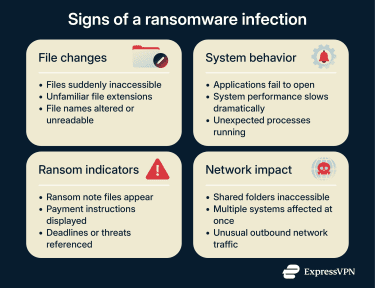
Ransom notes and network-wide indicators
A ransom note is one of the most obvious signs that a ransomware attack has worked. In NetWalker attacks, it generally appeared as a text file or messages placed in multiple folders that contain encrypted files. The message typically explains that files have been encrypted and are under the attackers’ control. It can list the payment demands and the consequences of nonpayment, like releasing the data to the public.
In most cases, the ransom note is only made available when the encryption is nearly complete. By the time victims see the message, attackers have already finished encrypting critical data and may have taken steps to prevent easy recovery.
Beyond ransom messages, ransomware activity can also affect multiple systems in a network. Shared folders may suddenly become inaccessible, services may fail across several systems, and unusual outbound network traffic might be observed as attackers transfer stolen data.
What to do if you’re hit by NetWalker or similar ransomware
A ransomware attack can be disruptive and stressful, but the steps you take in the initial moments are crucial. Acting quickly and deliberately can help limit further damage, preserve evidence, and improve your chances of recovery.
Immediate steps to take
Step 1. Isolate the affected device from the network: Immediately disconnect the affected computer from the network and the internet. This helps prevent the ransomware from spreading and limits further attacker activity. Whether to keep the system powered on depends on the situation: if encryption is ongoing, shutting the device down may help stop further data loss, but if encryption appears complete and investigation is required, keeping the system powered on but isolated (or hibernating it) may help preserve forensic information.
Step 2. Document the ransom note: This should be done from a different device, such as by taking a picture from your smartphone or a camera, because you don’t want to save the image on the infected device. This record can be useful when reporting the incident, working with investigators, or filing an insurance claim.
Step 3. Notify your security or IT team: They should have the tools and expertise to examine the ransomware closely and determine if it’s an advanced attack or one that can be resolved internally. If the attack is more advanced, they can take steps to contain the malware to prevent it from spreading throughout the network and activate the organization’s incident response plan. This ensures that the response follows established procedures rather than improvised decisions being made under pressure.
Isolating infected systems
Ransomware often attempts to spread laterally across a network once it gains access. Therefore, isolating infected or potentially infected systems should happen as quickly as possible. Disconnect affected devices from wired networks and disable wireless connections such as Wi-Fi and Bluetooth to prevent further propagation.
Any automated system maintenance tasks on affected machines should be stopped. Processes like log rotation or temporary file cleanup may overwrite data that investigators need to understand how the attack occurred. Preserving the system’s current state improves the chances of identifying the ransomware’s entry point.
Backups should be treated with caution during this stage. Many ransomware variants attempt to encrypt or delete backups to make recovery more difficult. Keeping backups offline and limiting access to backup systems can help protect them until the infection is fully removed.
Reporting the attack and seeking help
Ransomware is a form of extortion and should be reported to law enforcement authorities. Even if recovery efforts are unsuccessful, reporting the incident helps investigators track ransomware activity and may contribute to future takedowns or decryption efforts.
In some cases, reporting isn't optional. Certain organizations, such as healthcare providers, may be legally required to disclose ransomware incidents under data protection and breach notification laws. Early consultation with legal or compliance teams can guarantee the fulfillment of reporting obligations.
Organizations may also need to notify cyber insurance providers shortly after discovering an attack, as delays can affect coverage. In more complex incidents, working with a professional incident response firm can help contain the infection, preserve evidence, and guide recovery efforts. Maintaining detailed records of actions taken during the response can also support regulatory reporting and post-incident reviews.
How to protect against NetWalker-like ransomware
Ransomware attacks can be complex, and defending against them requires more than a single security tool. The attackers are always getting more sophisticated and improving their malware and delivery techniques. Therefore, organizations need to keep up and improve their preventive controls, user awareness, and recovery planning to reduce risk and limit damage.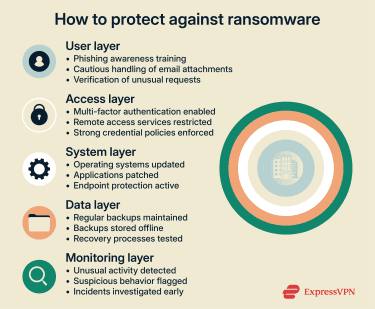
A good ransomware protection plan has three main areas of focus: preventing initial access, detecting malicious behavior early, and ensuring recovery is possible if an attack succeeds. Basic security hygiene lays the foundation, while layered defenses help close common gaps that ransomware actors exploit.
Learn to recognize phishing
One of the most common ways ransomware spreads is through phishing. Attackers use social engineering to make the email seem authentic, so there’s a greater chance of targets lowering their defenses and clicking the link or downloading an attachment. It’s vital to have effective training in place for staff to help them recognize phishing tactics.
Phishing and spear phishing emails often imitate trusted sources, such as coworkers, service providers, or internal departments. They may reference familiar tools, recent activity, or plausible problems to appear legitimate. When a message creates pressure to act immediately or asks you to bypass normal procedures, that sense of urgency is often intentional.
Users should be cautious about sharing personal or login information in response to unsolicited emails, texts, or calls. If a request seems unusual, verifying it through a known and trusted channel, such as contacting the sender directly using a saved phone number or official website, is safer than replying to the message itself.
Use an antivirus
Antivirus software alone isn’t enough to stop most ransomware attacks, but it still plays a useful role when combined with other security controls as part of a layered defense strategy. A good antivirus can detect ransomware using several methods, each with strengths and limitations.
Signature-based detection compares files against known malware samples. This approach works well for identifying previously seen ransomware, but it struggles with new or modified variants. Since ransomware operators constantly change their code to evade detection, signature-based tools often lag behind active threats.
Heuristic analysis looks for suspicious file characteristics or behavior patterns rather than exact matches. This allows antivirus software to catch some unknown ransomware strains, but it can also generate false positives and can still miss carefully crafted attacks.
Behavioral analysis watches what happens on the system in real-time to identify actions that are often linked to ransomware, like quickly encrypting files or making unauthorized changes. This method is more adaptable, but advanced ransomware can still evade detection or trigger alerts only after damage has begun.
Because of these limitations, antivirus software is best viewed as a supporting control, not a primary defense.
Secure remote access and credentials
Ransomware attacks often exploit stolen or weak credentials, particularly when they expose remote access services. Enforcing multi-factor authentication (MFA) for remote access significantly reduces the risk of attackers logging in with compromised usernames and passwords.
Even if attackers get hold of login credentials, MFA adds a verification step that they can’t easily bypass. Applying MFA consistently across remote access tools and administrative accounts helps block many opportunistic and targeted ransomware attempts.
Backups, updates, and endpoint protection
Regular backups are one of the most reliable safeguards against ransomware. Even strong defenses can't eliminate risk, and backups can determine whether an attack becomes a crisis or remains a manageable disruption.
Offline backups, also known as "cold" backups, provide strong security due to their isolation from active systems. If ransomware can't access backup storage, it can't encrypt or delete recovery data. Cloud backups can also be effective, but access controls must be carefully managed to prevent attackers from reaching them through compromised systems.
Endpoint protection complements antivirus tools by offering a broader layer of defense on individual devices. Endpoint protection tools like endpoint detection and response (EDR) solutions can reduce the likelihood of ransomware executing successfully by restricting risky activity, controlling which applications can run, and monitoring high-risk behaviors. Advanced endpoint protection can detect suspicious behavior and stop malicious activity that signature-based tools might miss.
Keeping systems and software up to date is equally important. Many ransomware attacks exploit known vulnerabilities, and regular patch management helps close these gaps and prevent attackers from gaining initial access.
FAQ: Common questions about NetWalker ransomware
How does NetWalker ransomware spread?
NetWalker ransomware was commonly spread through phishing or spear phishing messages. Attackers would trick users into opening malicious attachments or clicking links that delivered the ransomware. Other infections occurred after attackers gained access through exposed Remote Desktop Protocol (RDP) services or reused credentials from previous breaches.
Can NetWalker ransomware steal data as well as encrypt it?
NetWalker was known for using a double extortion strategy. In addition to encrypting files, attackers frequently exfiltrated sensitive data before launching the encryption phase. Victims were then forced to pay a ransom to get their files back and stop the data from being leaked.
Should you pay the NetWalker ransom?
Security experts and law enforcement agencies generally advise against paying ransomware demands and instead recommend focusing on containment, recovery from backups, and working with incident response professionals. Paying a ransom doesn't guarantee file recovery or prevent the release of stolen data, and it can encourage repeat attacks.
How can organizations reduce ransomware risk long-term?
Organizations can lower exposure by securing remote access with multi-factor authentication (MFA), keeping systems and software up to date, maintaining offline backups, and limiting user privileges. Regular security awareness training helps employees recognize phishing attempts and other common attack techniques. Together, these measures make it harder for ransomware to gain access and reduce the damage if an attack does occur.
Take the first step to protect yourself online. Try ExpressVPN risk-free.
Get ExpressVPN