What to do if your Twitch account gets hacked


Attackers who gain access to your Twitch account may be able to change your login credentials, make unauthorized purchases, broadcast inappropriate content, or use your channel to scam your followers. If you suspect your Twitch account has been compromised, or you've already confirmed it, acting quickly can limit the damage.
This guide covers immediate recovery steps, how to recognize the warning signs, and what you can do to prevent it from happening again.
What to do if your Twitch account has been hacked
The moment you suspect unauthorized access, prioritize these steps.
Reset credentials and secure your Twitch account
If you can still log into Twitch, change your account password immediately:
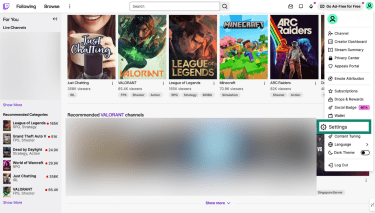
- Click your profile icon and select Settings.
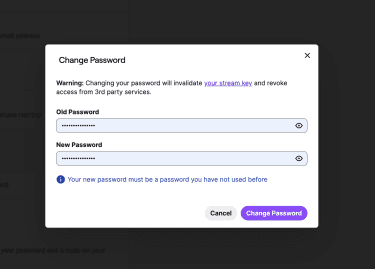
- Go to Security and Privacy and click Change password.
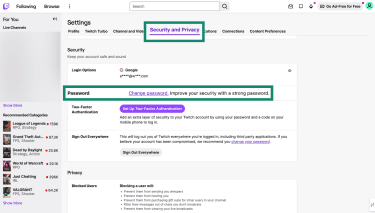
- Enter your old password, then choose a new and unique password, and click Change Password to confirm.
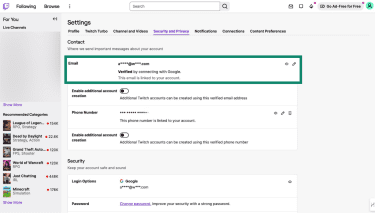
- While in Security and Privacy, verify your email address hasn't been changed. If it has, change it back to one you control.
Reset your Stream key
Your Stream key is a unique code that broadcasting software uses to connect to your channel. If an attacker has it, they can broadcast to your channel from their own computer even after you’ve changed your password.
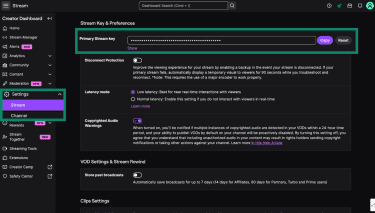
Changing your password should invalidate your Stream key automatically, but you can also reset the key from your Creator Dashboard:
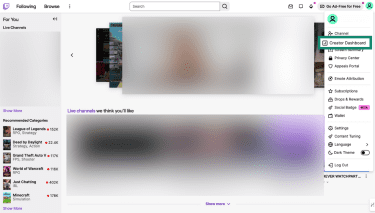
- Open the Creator Dashboard from your profile icon.
- Select Settings, then Stream. Locate your Primary Stream key and click Reset.
Revoke third-party connections
When you connect third-party apps or services to Twitch, you grant them permission to perform specific actions, such as reading your chat, modifying channel settings, or accessing account information. These permissions remain active until you revoke them, even if you change your password.
If a connected service is compromised or misused, it can continue acting on your account, which is why it’s important to review your connections after a suspected breach.
Changing your account password should automatically revoke any third-party access to your account. You can check that this has worked by going to Settings > Connections and reviewing the Other Connections section.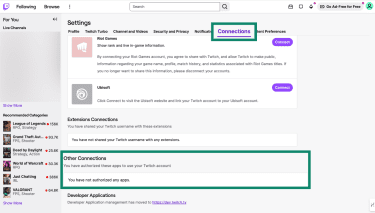
Check for unauthorized payments
If you’ve saved a payment method on Twitch, it’s worth checking whether any purchases were made without your permission. This includes subscriptions, Bits, or other charges tied to your account.
- Click the profile icon and select Wallet.
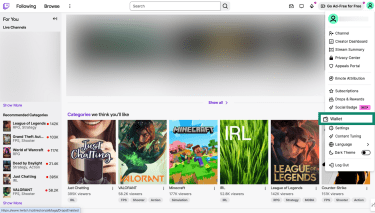
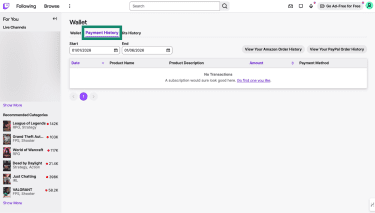
- Review the Payment History tab.
Related: How to secure your bank account from hackers
Contact Twitch support
If you can't regain access to your account, or if you've noticed unauthorized activity you can't reverse yourself, open a support ticket with Twitch. Go to help.twitch.tv and submit a request under Account/Login Issues.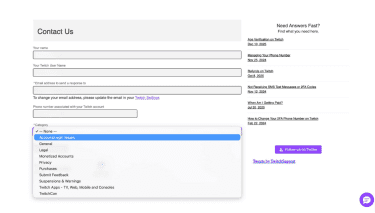 Provide your username and any information that helps verify ownership, such as the original email address on the account or your subscription history.
Signs your Twitch account has been hacked
Unexpected login alerts or 2FA requests
When someone tries to log in from an unrecognized device, Twitch requires verification. If you don't have two-factor authentication (2FA) enabled, Twitch sends a code to your email. If you use SMS-based 2FA, you'll receive a text message with a code.
If you receive either of these and you weren't trying to log in, someone may have your password and could be attempting to access your account. That said, make sure to confirm that the message or email you received is legitimate, as fake account security alerts can be a form of phishing.
Likewise, if you're unexpectedly logged out and your password no longer works, an attacker may already have changed your credentials.
Suspicious activity on your account
If someone has hacked your Twitch account, you might notice unusual activity: broadcasts you didn't create, chat messages sent in your name, followers reporting strange messages from your account, or new follows and subscriptions you didn't make. You might also find changes to your channel's moderators, VIPs, or banned users.
How Twitch accounts get hacked
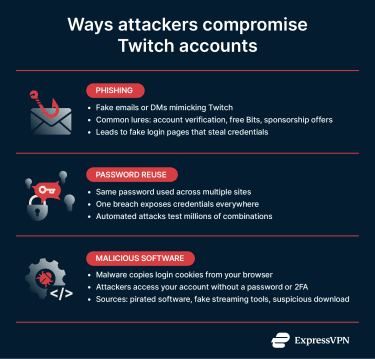
Phishing
Phishing remains one of the most common attack methods. Scammers send emails or direct messages that appear to be from Twitch, warning about account issues, offering fake giveaways, or claiming you've won prizes.
Common lures include messages about account verification to avoid suspension, "free Bits" promotions, sponsorship opportunities, and urgent policy violation warnings. These often direct you to fake login pages designed to capture your credentials.
Password reuse
If you use the same password across multiple sites and one of those sites experiences a breach, attackers can try those leaked credentials on other platforms, including Twitch. This technique is called credential stuffing. It’s typically automated and can test millions of username-password combinations quickly.
Malicious software
When you log into Twitch, your browser stores a cookie that keeps you signed in so you don't have to enter your password every time. Malware installed on your computer may be able to copy this cookie and send it to an attacker.
With it, they could potentially access your account without needing your password or 2FA code. To Twitch's servers, it looks like you're already logged in from a trusted device.
This malware can come from many sources: pirated software, malicious email attachments, or downloads from untrustworthy sites. Gamers and streamers are sometimes targeted with malware disguised as streaming tools, game mods, or sponsorship offers.
How to protect your Twitch account going forward
Recovering from a hack can be stressful. Here are a few tips and habits that can help prevent it from happening again.
Enable two-factor authentication (2FA)
2FA adds a verification step when you log in, making it harder for attackers to access your account with just your password. To enable it:
- Go to Settings, select Security and Privacy, and click Set Up Two-Factor Authentication.
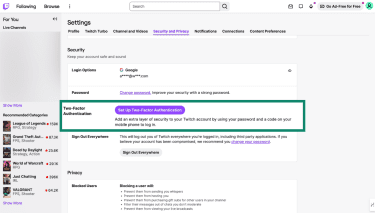
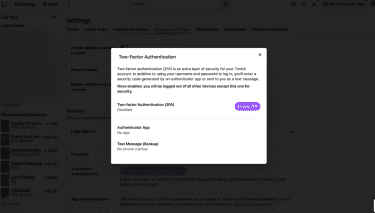
- Click Enable 2FA.
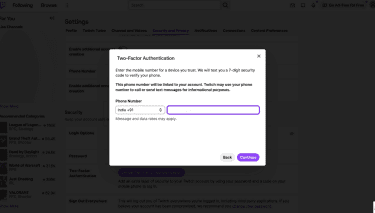
- Enter your phone number and click Continue.
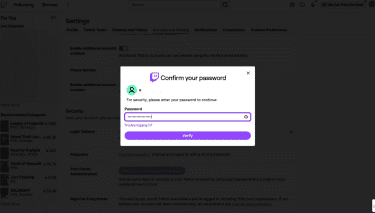
- Enter your account password to confirm it's you, then click Verify.
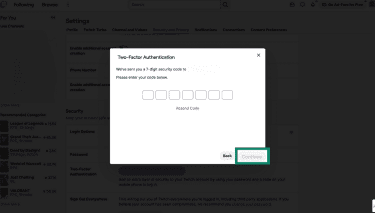
- Enter the verification code sent to your phone and click Continue.
- Download an authenticator app (like Google Authenticator or Authy) and scan the QR code. You can also use ExpressKeys to generate 2FA codes.
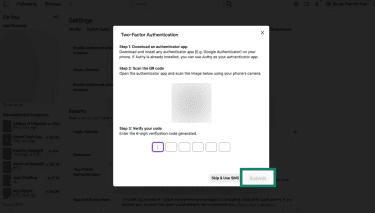
- Enter the 6-digit code from the authenticator app and click Submit. 2FA will now be enabled for your account.
You can also click Skip & Use SMS if you'd prefer to receive codes via text message, though authenticator apps are generally more secure. SMS can be intercepted through SIM-swapping attacks, where someone convinces your carrier to transfer your number to their SIM card.
Use a password manager to create strong passwords
Remembering a unique password for every account is difficult, which is why password managers exist. Tools like ExpressKeys generate and store strong, random passwords so you only need to remember one master (primary) password. This makes it practical to use a different password for every site, including Twitch.
Recognize phishing attempts
Keep an eye out for phishing red flags. If you receive a message claiming to be from Twitch, check the sender's address carefully. Go directly to twitch.tv rather than clicking links in emails or DMs.
If you’re a streamer and you receive a sponsorship offer, it’s best to verify them through the company's official website before clicking links or downloading files.
Secure your email
Your email account is a potential entry point to your Twitch account. If you’ve forgotten your password, Twitch offers a “Trouble logging in?” button that lets you reset it. By default, this sends a reset link to your phone number (if you have one connected to your account). However, it also gives you the option to receive password reset links to your associated email address instead.
If an attacker has access to your email, they may be able to intercept password reset links and access your account. This is why it’s essential to secure your email account with a strong password and enable 2FA.
Related: How to change your Google password
Keep your devices updated
Keep your operating system and browser updated. Updates often patch security flaws that malware can exploit to install itself. Only install browser extensions you actively use, and download software from official sources.
Related: How to stream Twitch with a VPN
FAQ: Common questions about Twitch accounts getting hacked
Can Twitch accounts be hacked even with 2FA?
Yes, though it's significantly harder. Attackers may be able to bypass two-factor authentication (2FA) by stealing browser cookies through malware or by intercepting SMS codes through SIM-swapping. Using an authenticator app and keeping your devices protected against malware reduces these risks.
What should I do if I can't log back into my account?
If you've been locked out entirely, go to the Twitch login page and click "Trouble logging in?" Enter your email or username and follow the prompts to reset your password. If the attacker has changed your email address and you can't receive the reset link, contact Twitch support. Be prepared to provide information that proves you're the account owner.
Was Twitch involved in a data breach?
Yes. In October 2021, Twitch confirmed that a server misconfiguration allowed an attacker to access and leak internal data, including source code and creator payout data. Twitch stated that login credentials and payment information weren't exposed. The company reset all Stream keys afterward and recommended that users enable two-factor authentication (2FA).
How long does Twitch account recovery take?
If you can reset your password through the normal process, it takes just a few minutes. If you need to contact Twitch support, they typically provide an initial response within 12 hours, though some issues require additional time.
How can I keep my account secure long-term?
There are several steps you can take: use a unique password, enable two-factor authentication (2FA) with an authenticator app, and be cautious of unsolicited messages. Keep your devices updated and only download software from official sources.
Take the first step to protect yourself online. Try ExpressVPN risk-free.
Get ExpressVPN