Why is phishing called "phishing"?


Cybersecurity experts sometimes sound as though they’re speaking a different language, using terms and acronyms that you wouldn’t normally hear in everyday conversation, from denial of service (DoS) to keyloggers.
Phishing is another well-known cybersecurity term that refers to the most common type of cyberattack. If you're wondering how the term got its name, here's more on its origins and history.
What is phishing?
Phishing is a type of social engineering scam in which attackers use deceptive methods to trick people into giving up their personal information, making payments, or taking other dangerous actions, such as downloading viruses onto their devices.
It's the most prevalent form of cyberattack today, with around 3.4 billion phishing emails being sent every day. However, while over 90% of successful cyberattacks involve phishing emails, it can also happen via SMS (also known as smishing) or over the phone (known as vishing).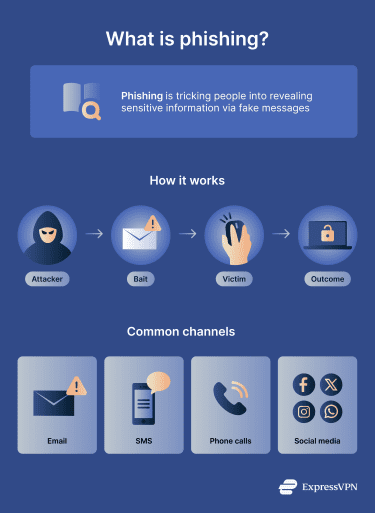
Both individuals and businesses are targeted, and successful attacks can result in financial losses, data breaches (and identity theft), and malware infections, including ransomware.
Where did the term “phishing” come from?
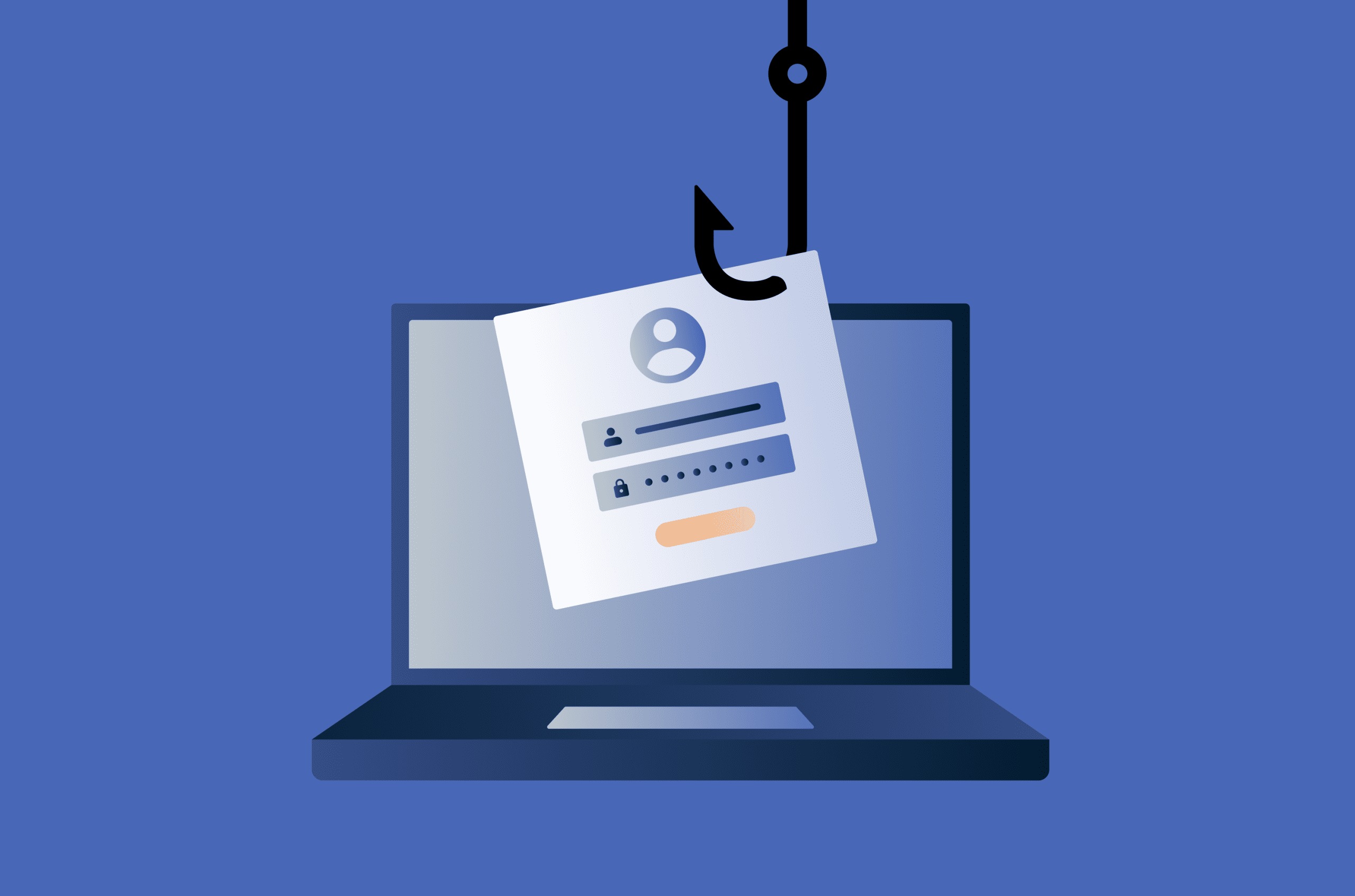
The word "phishing" is an intentional play on “fishing” because of how phishing attackers lay a kind of “bait” for their victims. Here’s a closer breakdown of this metaphor:
- Fishermen: Phishing attackers operate like fishermen, casting their lines into the sea of cyberspace by sending deceptive messages in the hope of reeling in victims.
- Bait or lure: Fishermen use worms or lures to attract fish, while phishing scammers use messages, often involving threats, urgent language, or “too good to be true” claims.
- Fish: In the analogy, attack victims are the fish. Just as some fish will be attracted to a lure and caught by fishermen, some people may fall victim to deceptive phishing messages.
- Hook and reel: Once a fisherman gets a bite, they can rely on their hooks to reel them in. Phishing attackers similarly wait for victims to click a link, open a file, or download an attachment before they strike, stealing the victim’s data, credentials, or money.
Why phishing is spelled with a “ph”
The reason phishing is spelled differently from fishing is that it derives from another, older hacking term, “phreaking,” used in the 1970s and 80s to refer to tools and techniques for hacking into phone systems. Those who engaged in this practice were called “phreaks.” This came from combining the words “phone” and “freak.”
The origins of phishing attacks
Phishing dates back several decades to the early days of the internet, with the first recorded attacks taking place in the 1990s.
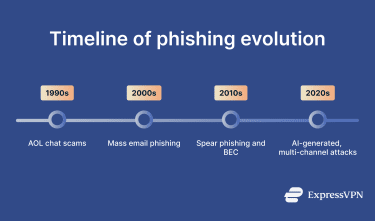
In 1994, to be precise, a hacking program called AOHell was created and used to crack America Online (AOL) accounts. By 1995, this tool could impersonate AOL customer service workers to steal user passwords. It was around this time that the term phishing was first used, reportedly coined by a famous hacker and spammer named Khan C. Smith.
The first mass phishing campaigns
While phishing began in the 90s, it became much more prevalent in the 21st century as the internet played a larger role in society and business.
As more e-commerce stores and online financial platforms emerged, attackers sought to exploit them, creating their own fake websites and login pages to trick their victims.
For example, attackers created fake login screens for popular shopping sites, such as Amazon and eBay, and fake PayPal payment pages. They sent emails to prospective victims, containing links to the malicious sites and urgent demands for users to log in and update their accounts.
A relative lack of cybersecurity awareness left many people vulnerable to these attacks.
How phishing has evolved over time
 Technology has come a long way since the early days of phishing. As a result, modern-day phishing attacks are more advanced and diverse than those that came before.
From email scams to targeted phishing
Early on, phishing scams were somewhat rudimentary compared to those of today. Scammers would create generic deceptive messages and send them to large numbers of users, like a fisherman casting a vast net.
Today, attackers often research their targets in advance to tailor their messages, making them more convincing and increasing their chances of duping their victims.
Phishing in the age of AI and automation
With emerging technologies like artificial intelligence (AI) and machine learning (ML), combined with increasingly powerful automation tools, scams are more sophisticated.
Attackers can use AI to generate convincing, error-free messages to target their victims. They can also harness automation to target more victims, more efficiently.
While this has led to phishing becoming an even bigger threat today, cybersecurity measures have also improved, and technologies like AI can help to spot and stop attempted attacks.
Common types of phishing attacks today
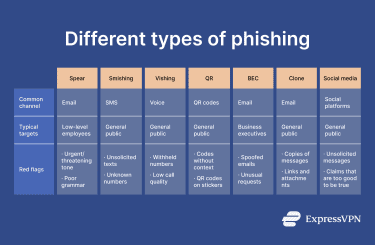 Besides becoming more advanced over time, phishing now comes in many forms. Here are the key types to watch for.
Spear phishing
Spear phishing is where scammers target specific individuals, often low-level employees at major businesses. They research their targets beforehand to personalize their attacks and craft convincing messages.
Their objective is usually to trick the victim into revealing sensitive information that could compromise security, such as granting access to accounts, systems, or data, or approving transactions.
Smishing and vishing
While most phishing attempts occur over email, they also occur over SMS (smishing) and voice calls (vishing).
While the mode of communication may differ, the techniques, characteristics, and objectives of these attacks are generally the same, with attackers attempting to trick users into sharing personal data or sending them money.
QR code phishing (quishing)
This involves attackers using QR codes to send victims to malicious sites or download pages.
Attackers can print these codes and display them in public places, sometimes accompanied by text or images designed to lure people into scanning the code. As QR codes become more prevalent in society, this type of attack is becoming more common.
Business email compromise (BEC)
BEC attacks are similar to spear phishing in that they target businesses and typically involve attackers researching their victims in advance.
Following this, they craft emails that appear to come from fellow employees or other business contacts, like vendors, partners, or customers. The idea is to trick the victim into transferring money, giving up sensitive data, or installing malicious software.
BEC is very similar to whaling, but can target employees at different levels, rather than focusing exclusively on upper management, such as executives.
Clone phishing
Clone phishing is when attackers generate an almost identical copy of a genuine email from a trusted brand. The only difference is that their clone email contains a dangerous link or attachment. Victims may see the clone message, assume it’s safe because they’ve received others like it in the past, and fall into the scammer’s trap.
Social media phishing
Also known as angler phishing, these types of phishing attacks occur on social media platforms, such as Facebook, Instagram, LinkedIn, and X.
Attackers create and send fraudulent direct messages using the platforms’ built-in systems and might impersonate trusted users, claim that the victim has won a prize, or redirect them to a fake login page to attempt to steal their data.
How to recognize a phishing attempt
Being able to spot the signs of phishing is vital to avoid attempted attacks and keep your data safe. While there are various forms of these scams, these are common phishing red flags:
- Urgent language: Scammers often try to stop their victims from spending time analyzing messages or speaking with other people about suspicious demands. As such, messages frequently contain threatening language and urge recipients to act right away.
- Grammatical or spelling errors: Phishing scammers often pose as well-known brands, but you can sometimes spot little errors and inconsistencies. An email might come from Amaz0n instead of Amazon, for example. The body content of phishing messages may also contain typos or other mistakes, but this is less common nowadays due to AI.
- Generic greetings: Scam messages often use vague or generic terms and greetings, such as “Dear Customer,” rather than addressing the recipient by name. Nowadays, many modern brands personalize their messaging.
- Exaggerated claims: Some phishing scams aim to entice the victim into taking action by offering something that sounds too good to be true. They might claim you’ve won a prize, for example, but need to log in or pay an “admin fee” to access it.
- Suspicious links: To get a user's data or money, scammers try to get the recipient to click a link and visit one of their malicious websites.
How phishing messages try to manipulate users
Phishing is a form of social engineering. It involves psychological manipulation tactics aimed at exploiting people’s emotional responses and tricking them into doing something. Scammers use various methods to achieve this, including:
- Fear: Phishing messages may sometimes use aggressive language or false claims about the victim being in danger. They might include threats of legal action, fines, or other penalties if the person doesn’t quickly comply with the scammer’s demands.
- Urgency: They may induce a sense of urgency and panic in the victim. They include short deadlines and urgent demands, encouraging victims to act immediately, rather than thinking things through or consulting with others.
- Trust: Many scammers pose as trusted brands, like Amazon or Apple. Since people are familiar with these brands, they're more likely to trust them and follow any instructions or requests they make.
How to protect yourself from phishing
As well as learning to spot the signs of phishing, you can also take several additional measures to improve your online security and prevent phishing attacks.
- Be wary of any unsolicited messages you receive.
- Avoid clicking suspicious links.
- Hover over links to see exactly where they lead.
- Inspect sender names and email addresses to look for typos or inconsistencies.
- Enable phishing-resistant multi-factor authentication (MFA) on your accounts.
- Verify any requests.
- Never comply with threatening or aggressive messages.
- Keep your devices and software up to date.
- Educate yourself on cybersecurity techniques with free courses and resources.
- Use an antivirus and other security tools, such as ExpressVPN’s Threat Manager, to avoid unsafe sites.
What to do if you fall for a phishing attack
If you click a suspicious link or respond to a phishing message, immediately cease all communication with the scammer and consider reporting the incident to the relevant authorities. In the U.S., you can contact the Federal Trade Commission (FTC) or the Internet Crime Complaint Center (IC3). In the U.K., you can contact the National Cyber Security Centre (NSCS). In Canada, you can report it to the Canadian Anti-Fraud Centre (CAFC) or the Canadian Centre for Cyber Security (CCCS).
You should also update your credentials on accounts you feel may be compromised. Set new, unique passwords, and enable two-factor authentication (2FA) or MFA, if possible.
If you suspect the scammer has your bank or payment details, contact the relevant financial institution for help.
FAQ: Common questions about phishing
Why is phishing spelled with a “ph”?
Phishing is spelled with a “ph” rather than an “f” because it derives from the term “phreaking” (which, itself, is a derivative of the phrase “phone freak”). Phreaking was a term used in the 1970s and 80s to refer to the people and techniques used to hack into early phone systems.
Is phishing related to fishing?
Yes, the origin of the term phishing is directly connected to the activity of fishing. Just as fishermen use bait to lure and catch fish, phishing scammers make use of fraudulent and deceptive emails and messages to trap their victims.
Is phishing pronounced “fishing”?
Yes, phishing is pronounced exactly the same as fishing, despite the difference in spelling.
How is phishing different from vishing and smishing?
Phishing, vishing, and smishing are all social engineering scams, but each involves different modes of communication. Phishing uses email, smishing uses SMS (text) messages, and vishing uses voice or phone calls.
How does phishing affect individuals and businesses?
Phishing can have devastating effects on individuals and businesses alike. For individuals, the risks include privacy infringements, financial losses, and identity theft. For businesses, financial loss is a potential outcome, along with reputational damage, compliance failures, and data leaks.
Take the first step to protect yourself online. Try ExpressVPN risk-free.
Get ExpressVPN