Bad Rabbit ransomware: What it is and how to stay safe


On October 24, 2017, a new form of ransomware named Bad Rabbit struck numerous Windows systems, first in Eastern Europe and then other locations around the world. While the Bad Rabbit threat has since died down, the original code is still active, and ransomware like this remains a serious threat that users need to be aware of.
This guide looks at what Bad Rabbit is, how the 2017 attack unfolded, and how to prevent and deal with ransomware in general.
What is Bad Rabbit ransomware?
Bad Rabbit is a form of ransomware, which is a type of malware that can encrypt or steal a target’s data or lock their device. The malware then asks for a ransom payment to regain access.
The Bad Rabbit ransomware attack was initially reported by users in Russia and Ukraine. It reportedly went on to affect additional victims in Turkey, Germany, Bulgaria, Poland, and Japan.
Targets included private companies and major organizations, such as the Russian news agency, Interfax, and the Ukrainian transport system, Kyiv Metro. Affected organizations were asked to make a 0.05 Bitcoin payment to unlock their files, with the fee increasing if a deadline wasn’t met.
The identities and intentions of the group behind the attack have never been officially confirmed.
How did Bad Rabbit ransomware work?
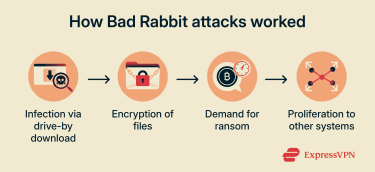 Bad Rabbit relied on drive-by downloads to infect victims’ devices. This is when malicious files are unintentionally downloaded to a user's device when they visit unsafe or compromised websites.
In this case, the cybercriminals compromised several websites to redirect to a host site for the malicious file. This file masqueraded as an Adobe Flash Player update installer, which victims were encouraged to download and run.
Once a victim executed the ransomware, it encrypted their device files, blocking access. They would also see a pop-up message demanding a Bitcoin payment to acquire the password necessary to decrypt and recover their data.
After it infected one device, Bad Rabbit ransomware could sometimes spread to others on the same network. It did this through the use of a Windows exploit known as EternalRomance, which allowed a compromised device to remotely run code on other vulnerable systems.
Windows patched EternalRomance in March 2017, but Bad Rabbit was able to infect devices that hadn’t yet been updated.
Learn more: Read about the “Eternal” family of exploits in our guide to EternalBlue.
Who created the Bad Rabbit ransomware?
It’s not known who created the Bad Rabbit malware. No hacker or cybercriminal group has officially claimed responsibility for the 2017 attacks.
However, analysts have investigated the ransomware’s code, as well as the domains used to carry out the drive-by downloads. In doing so, they discovered multiple similarities with NotPetya, another type of ransomware that largely targeted Ukrainian organizations in June 2017.
The alleged NotPetya/Bad Rabbit connection has led some to believe that the same group is responsible for both of these attacks. Some governments have attributed both to the Russian hacker group known as “Sandworm.”
That said, these claims are unverified. Other security experts have raised doubts about the group's involvement with Bad Rabbit.
Is Bad Rabbit still a threat?
While there is evidence to suggest that Bad Rabbit files are still in circulation, the attack itself only lasted approximately 6 hours before the host server for the malicious file was taken offline. No further attacks or ransom demands have been associated with the malware.
The Windows vulnerability that allowed Bad Rabbit to spread was also patched in 2017, and the malware itself is widely recognized by antivirus software and built-in protections like Windows Defender.
However, legacy Windows systems could technically be at risk if they haven’t been updated. It’s also possible for new attacks to repurpose old code or techniques, and other types of ransomware remain a threat today.
How to prevent a Bad Rabbit ransomware infection
 While Bad Rabbit may no longer be an active threat, there are plenty of other forms of ransomware in use today. It’s important to be aware of the risks these types of malware pose and to follow cybersecurity best practices to prevent ransomware infections.
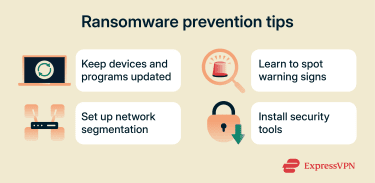
- Updates: Devices, operating systems, and other software should be kept up to date at all times. Updates often include security patches that protect against attacks like Bad Rabbit.
- Segmentation: Network segmentation involves dividing larger networks into smaller subnets. This can help to limit the spread and impact of ransomware.
- Security tools: Antivirus programs and network monitoring solutions can catch ransomware before it’s downloaded or executed. Some virtual private networks (VPNs) also include protective features that can block connections to known malicious websites.
- Education: Bad Rabbit was able to infect many devices because users made the mistake of downloading and running the malicious file without checking if it was legitimate. Educating employees on malware red flags and online safety can help organizations avoid similar attacks in the future.
What to do if you’re infected by Bad Rabbit
The original Bad Rabbit attack is no longer active, and updated Windows systems should be able to detect and block Bad Rabbit malware. However, if you’ve accidentally run a Bad Rabbit file or another form of ransomware, here are some steps you can take.
Should you pay the ransom?
No, it’s not recommended to pay the ransom of any ransomware. Paying doesn’t guarantee that you’ll get your data back. It also incentivizes criminals to target you again in the future and funds their operations for additional attacks against other victims.
Contact your IT department
If your work devices have been affected and you’re not a cybersecurity professional, contact your organization’s IT department or a trusted security expert as soon as possible before taking further action. Ransomware incidents often require careful handling, and attempting to fix the issue on your own can unintentionally spread the infection, destroy forensic evidence, or make recovery more difficult.
Your IT team can help isolate affected systems, assess the scope of the attack, and guide you through safe recovery steps.
File recovery and system restoration options
If you have an offline or cloud-based backup of your data, you may be able to use that to restore your files following a Bad Rabbit infection. You’ll first need to ensure your device is completely disconnected from the internet, then carry out a factory reset to wipe the device’s disks of any trace of the virus. From there, you should be able to connect your backup drive to restore your system files.
Safe file decryption tools (if available)
Depending on the specific type or version of ransomware you’re dealing with, you may be able to use a decryption tool to regain access to your data.
For example, No More Ransom is a collaboration between the Netherlands’s National High Tech Crime Unit, Europol’s European Cybercrime Centre, and other law enforcement and cybersecurity partners. It publishes a public registry of verified ransomware decryptors when they are available.
How to report a ransomware attack
If you experience any sort of ransomware attack, it's important to report it right away. The use of ransomware is a criminal act, and law enforcement agencies can take steps to track down offenders to prevent them from carrying out additional attacks.
In the U.S., you can contact your local FBI field office or file an online report with the Internet Crime Complaint Center (IC3) or Cybersecurity and Infrastructure Security Agency (CISA).
FAQ: Common questions about Bad Rabbit
Can Bad Rabbit ransomware be removed without paying?
Yes, it’s technically possible to remove the ransomware and recover encrypted files without paying. One of the most effective and reliable methods to do this is to use an offline or cloud-based backup to essentially wipe the infected system and restore it to an earlier state. Certain antivirus programs may also be able to remove the ransomware.
How does Mimikatz help Bad Rabbit steal credentials?
The Bad Rabbit ransomware was designed to use a modified version of the Mimikatz tool to extract passwords and other credentials from a system. This allowed attackers to bypass authentication mechanisms and infect additional devices.
What tools can detect and remove Bad Rabbit ransomware?
Most reputable antivirus programs should be able to both detect and remove Bad Rabbit ransomware from a device. If a device is affected within a corporate network, it’s best to contact the IT team for detection and removal.
What are the best practices to prevent ransomware?
Keeping your software and hardware up to date, using reputable antivirus programs, and segmenting organization networks are all good practices. It’s also important for companies to educate employees on how to spot ransomware attacks.
How do ransomware attacks spread across a network?
Once ransomware is on a system, it can make use of various exploitation mechanisms or system vulnerabilities to move laterally to other devices on the same network. Attackers can also use other methods, like internal phishing, to infect additional devices.
What legal obligations do businesses have after a ransomware breach?
It depends on the exact laws in your location, as they can vary from place to place. It’s generally best to speak with legal experts for clarification. As a general rule, however, businesses that suffer ransomware attacks are encouraged to notify law enforcement authorities and take steps to strengthen their defenses.
Can Bad Rabbit come back after removal?
Yes, like other ransomware and viruses, it’s possible for the same device or network to be re-infected by Bad Rabbit after removal. Users have to remain cautious and follow prevention strategies to minimize the risk of another infection.
Take the first step to protect yourself online. Try ExpressVPN risk-free.
Get ExpressVPN