What is DRM? Understanding digital rights management


You try to watch a video, but it won’t play. Or you take a screenshot on a streaming service and get a black screen. This is often because of digital rights management (DRM).
DRM sets the rules behind the scenes, deciding who can access something and under what conditions. In this guide, we’ll look at what DRM is, how it works, and why it affects everything from streaming video to video games.
What is DRM and why is it used?
Digital rights management (DRM) is the technology that controls how you access and use digital content.
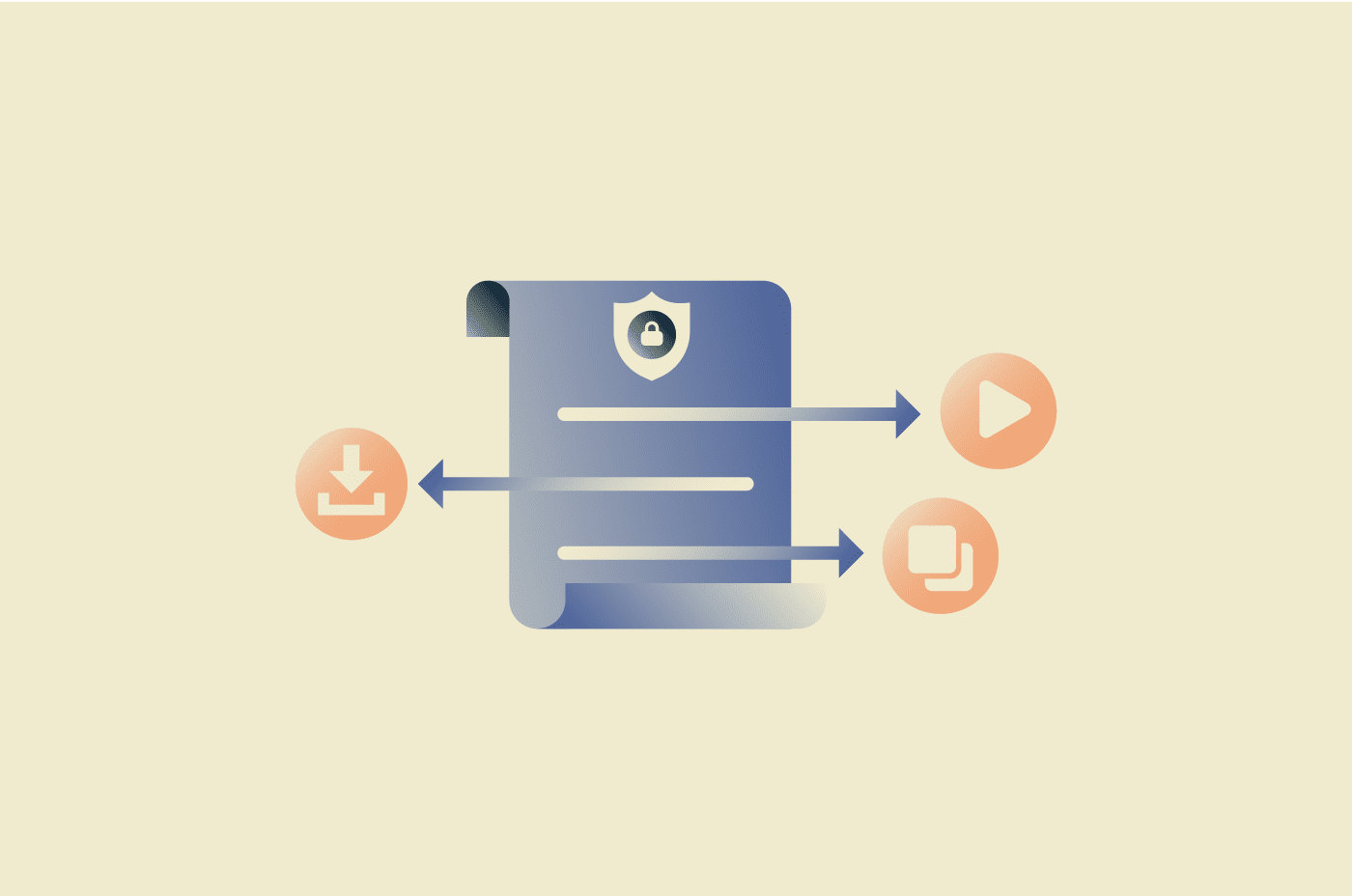
When you buy or subscribe to something online, you’re agreeing to certain usage terms. DRM is what enforces those terms. It determines whether you can download a file, copy it, move it to another device, or keep it after a set period of time.
Services like streaming platforms, game stores, and software providers rely on DRM to apply those rules automatically. You’ll find it across movies, music, games, e-books, and apps, but it usually works quietly in the background, so you might not even notice it.
DRM vs. copyright and licensing
DRM often gets confused with copyright, but they’re not the same thing. Copyright is a legal right that gives creators control over how their work is distributed and shared.
Licensing is a contractual agreement. For instance, when you buy a movie, download a game, or subscribe to a service, you’re agreeing to specific terms that define how you can access and use that content. You don’t usually own the content itself, which is why those terms matter.
DRM is the technology that makes sure those rules are followed. It applies the terms you agreed to automatically through software and systems, so the license works in practice. For example, it can prevent copies from being made or block access when a subscription ends.
How does DRM work?
DRM combines encryption, license checks, and access controls. When you try to open protected content, your device first verifies that you’re allowed to use it. The content may already be on your device or streamed to it in encrypted form. However, it won’t play until the system confirms access and provides the key needed to unlock it.
Usually, the content and license are handled separately. If you press play on a video, your app or browser sends a request to a license server. If your account or device meets the required conditions, the system issues a decryption key and playback begins. If not, it blocks access.
Modern DRM systems often work in real time, especially for streaming sites. For example, if your subscription ends or a rental period expires, playback can stop automatically.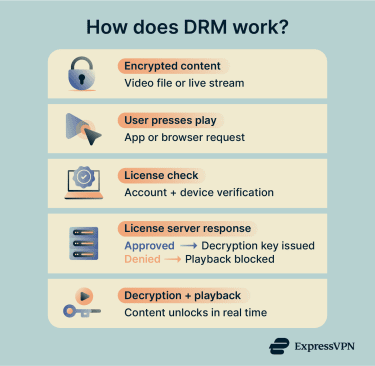
Technical mechanisms behind DRM
DRM relies on several technical layers working together to protect and verify content.
Encryption techniques
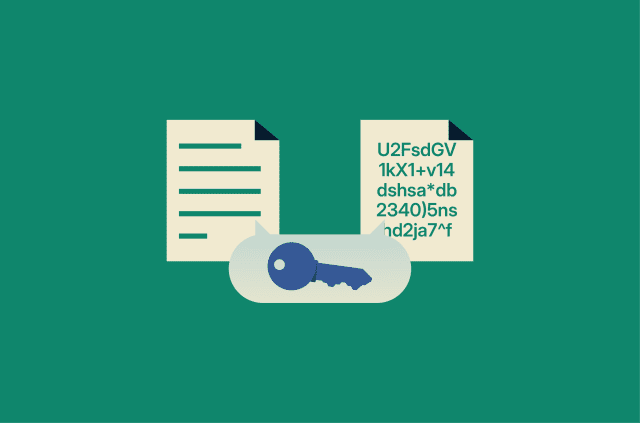
DRM protects content by encrypting it. Encryption scrambles the data so no one can read it without the correct key.
Most systems rely on symmetric encryption to secure the media. This method uses the same key for both encryption and decryption, making it fast and efficient for large streams.
They can also use asymmetric encryption, which relies on a public-private key pair. Instead of encrypting the media itself, it secures the delivery of the decryption key. When your device requests access, asymmetric encryption helps secure the license process and protect the decryption key.
Because symmetric encryption works much faster for large media, DRM systems often use both methods together: symmetric encryption protects the content, while asymmetric encryption secures the key exchange.
In many DRM setups, the system encrypts the media and delivers the key separately. It only issues the key after verifying your access. In streaming environments, this often happens in real time. Your device decrypts the stream as you watch it, typically within a protected component such as a content decryption module (CDM) or a secure execution environment.
Encryption protects the content itself, but licensing systems and authentication protocols define the rules around access. They determine how long you can use something, which devices can open it, and whether you can still access it.
For example, a rental may expire after a fixed window. A subscription may stop working if your plan ends. Some systems tie access to specific devices or limit the number of devices you can use. These controls enable platforms to automatically manage digital access.
Sometimes, services check your access again, especially for subscription-based content, so your device may need to connect to the service and confirm that your account is still active. However, that doesn’t always mean you have to stay online the entire time you’re watching.
Watermarking and fingerprinting
Not all DRM relies on blocking access. Some systems focus on tracing content after it’s distributed.
Digital watermarking embeds identifiable information directly into the content. For example, details about the owner, the platform, or even the specific account that accessed it. The watermark can be visible, such as an on-screen name, or hidden within the media itself through subtle changes to the image or audio.
Fingerprinting works a little differently. Rather than inserting data, the system analyzes the content and generates a unique identifier based on its characteristics. Platforms can then use that identifier to detect copies or track where the content appears online.
Different types of DRM
DRM can operate at different layers, including software, hardware, cloud infrastructure, and platform ecosystems.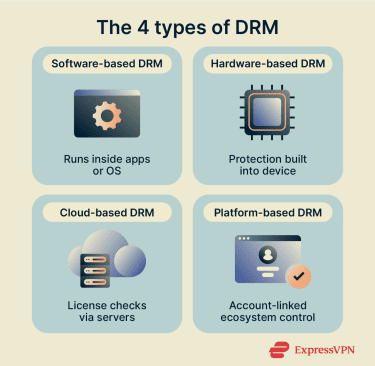
Software-based DRM solutions
Software-based DRM runs inside an application or operating system. It handles encryption, license checks, and access controls through code built directly into the software.
This approach often includes product activation keys, serial number validation, or account-based verification. Some systems also add anti-tamper protections to make it harder to modify the program. Because it operates at the software level, it can be deployed across many devices and platforms without requiring specialized hardware.
Hardware-based DRM solutions
Hardware-based DRM enforces protection at the device or chip level rather than relying solely on software. It uses built-in security features inside the device’s processor to handle sensitive tasks, such as storing and using the decryption keys.
In these systems, the device keeps those keys inside a protected part of the hardware. Apps and the main operating system can’t read or extract them, which makes it harder for someone to access the key, even if they try to modify the software.
Some devices also use a secure video path. After the device decrypts the video, it keeps the clear content within protected hardware components as it moves toward the display. This helps prevent user-space apps or processes from accessing or copying the video data during playback.
Cloud-based DRM solutions
Cloud-based DRM shifts control to remote servers that manage authentication and access through online services. This setup allows platforms to validate subscriptions in real time, update permissions instantly, or block access if needed.
The control sits on centralized servers, so providers can more easily manage content across regions, devices, and large user bases. It also supports streaming models where access depends on an active account rather than a permanently stored file.
Platform-based DRM for apps and devices
Some DRM systems are built directly into larger platforms, such as app stores, gaming consoles, or e-book ecosystems. Usually, protection is part of how the platform distributes and manages content.
When you buy or download something, it links to your account rather than being a downloadable file. You sign in, and the platform decides which of your devices can access it. It can also limit the number of devices you use at once or revoke access if your subscription ends. Since billing and access sit inside the same system, everything works together as part of DRM.
What is DRM in browsers?
Browser-based DRM allows you to play protected media inside a web browser. The service sends encrypted content rather than a normal video file. Your browser can only decode it after it confirms that you have permission to access it.
Browsers implement the Encrypted Media Extensions (EME) standard to support this process. EME defines how websites communicate with a content decryption module (CDM) to unlock protected media. After the system verifies your access, the browser uses the decryption key to play the stream.
Playback also depends on your device and software. If your browser, operating system, or hardware doesn’t support the required DRM features, the video may not play even if your account is valid. In some cases, streaming services may also limit playback quality if your device or browser doesn’t support the required DRM components.
How different browsers implement DRM
Each browser supports specific DRM systems for protected playback:
- Chrome: Widevine
- Firefox: Widevine (you can enable or disable DRM playback in settings)
- Safari: FairPlay
- Edge: PlayReady (most platforms) and Widevine (Windows and supported hardware)
Browsers use different DRM technologies because they’re built on different platforms and security models. Some integrate more closely with the operating system, while others rely on cross-platform DRM modules.
This mainly affects compatibility. Certain content may require a specific DRM system, which means playback can depend on the browser and device you’re using.
User experience considerations
For most people, DRM stays invisible. You might only notice it when something doesn’t behave the way you expect, including:
- You can’t download content as a normal file.
- Screen recording or casting doesn’t work.
- Playback fails on older or unsupported devices.
- Access stops if your subscription ends.
- Protected content settings appear in your browser.
In most cases, DRM-related issues relate to compatibility or your account status rather than security problems.
DRM use cases and examples
DRM appears across many types of digital content, from streaming media to software and online services.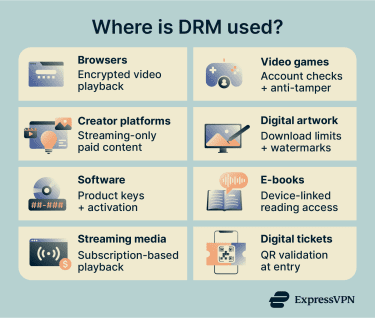
DRM across browsers, games, and creator platforms
In your browser, DRM allows protected video to play through built-in modules such as Widevine. If content is labeled “DRM-protected,” it means the video is encrypted and your browser must check your access before it plays. If playback fails, it’s often because the DRM component is disabled, outdated, or unsupported on your device.
In video games, DRM usually checks your access when you launch the game. Some titles require an online verification step to confirm your account and purchase. Publishers may link the game to your profile, limit device activations, or use anti-tamper systems such as Denuvo. These controls manage distribution.
DRM also limits how you can use content on creator platforms that offer paid videos, courses, or exclusive media. Usually, you can only stream or use content through your account, not download it. Platforms may add watermarks or embedded identifiers to stop you from sharing.
Protect artwork from unauthorized use
Creators often want to show their work online without giving up full control over the file, so DRM helps by limiting how others can access their artwork. A platform might let you view an image but not download the original file or restrict access to paying members only.
Some services also add visible watermarks or embed identifying information into the content. That doesn’t stop someone from taking a screenshot, but it can make unauthorized sharing easier to trace.
Prevent software counterfeiting
Software companies use DRM to control how their products are installed and shared. When you activate a program, you may need to enter a product key or sign in to an account. The system links the license to your device or profile, so the same copy can’t be installed on multiple devices.
Many applications also verify the license with a remote server. The software checks that the serial key is valid and that the activation hasn’t exceeded its limits. Although it doesn’t eliminate unauthorized copying entirely, it does make redistribution harder.
Reduce piracy in gaming
Game publishers often use DRM to control how copies of a title are activated and launched. Some games include always-online DRM, which requires the software to connect to a live server before it starts. Others tie activation to your account or hardware ID, limiting how many devices can run the same copy.
Publishers may also use anti-tamper systems such as Denuvo-style protections. These add extra layers of protection around the game’s code, making it more difficult to alter or remove the built-in DRM. They can scramble parts of the code, encrypt certain elements, and run checks while the game is running to detect tampering. If the system detects interference, it can stop the game from launching properly.
Learn more: Understand the risks of downloading pirated or cracked games.
Control e-book distribution
E-book platforms use DRM to manage how digital books are accessed and shared. When you buy an e-book, the license often ties to your account or a specific reading device to stop you from freely copying or sharing the file outside the platform.
Some also support library-style lending, where access expires after a set period. Other DRM systems can restrict how easily you move an e-book between different platforms or devices, depending on the format and licensing rules. For example, you might buy a book in one e-reader app and find that it won’t open in another that uses a different DRM system.
Protect streaming video and music
Like video games and e-books, streaming services use DRM to control how you access content. The service streams encrypted video or audio and unlocks it only after confirming that your account is authorized.
Access usually depends on an active subscription or purchase. The platform can limit the number of devices you use, control whether you can download content for offline viewing or listening, and set expiration dates for those downloads. For example, rent a movie and download it to watch later, which automatically deletes after 30 days.
Secure digital ticket sales
Digital ticketing platforms can use DRM-style controls to manage entry and prevent duplication. Your ticket is usually linked to your account, so access depends on verifying that you own it.
At the venue, staff might scan a QR code or barcode that connects to the event’s validation system. Some services generate rotating or time-sensitive codes to prevent screenshots from being reused. The system confirms the ticket’s validity at the point of entry, which helps reduce fraud and duplicate use.
Benefits of DRM
DRM plays an important role in how digital services operate and how content creators get paid.
Benefits for content creators
DRM gives creators ways to manage how their work is distributed and monetized:
- Revenue protection: Limits unauthorized redistribution and supports subscription, rental, and pay-per-use models.
- Ownership assurance: Reinforces copyright through technical controls and enables tracing through watermarking or embedded identifiers.
- Distribution control: Allows creators to set geographic, time-based, or device-based access rules and manage staged releases.
Benefits for platforms and distributors
DRM gives platforms and distributors tools to manage access, pricing, and content rights:
- License flexibility: Supports subscription, rental, and purchase models while enabling time-limited or device-limited access across different regions.
- Usage insights and reporting: Tracks license activations and access patterns, supports rights-holder reporting, and helps monitor unusual distribution activity.
Benefits for consumers
DRM can also benefit the people who access digital content:
- Safer access to paid content: Helps reduce the risk of encountering altered or unauthorized copies when accessing content through official platforms.
- Consistent playback experiences: Supports more predictable playback across supported devices and helps reduce corrupted or incomplete media files.
- Clear usage boundaries: Makes it easier to understand what you can and can’t do with purchased or subscribed content, based on the license terms.
DRM-protected vs. DRM-free content
Digital content can be distributed with or without DRM controls, which affect your access to and use of the content.
Key differences and trade-offs
| DRM-protected content | DRM-free content |
| Requires license validation before access | No technical validation required after download |
| Access is often tied to an account, platform, or device | Files can usually be transferred or backed up freely |
| May restrict copying, sharing, or offline use | Little or no built-in technical restrictions on copying |
| Access can expire if a subscription or rental ends | Long-term access doesn’t depend on ongoing authentication |
When DRM-free makes sense
DRM-free models can work well for independent creators who prioritize accessibility and user ownership. They’re also common in open-source or freely licensed software, where sharing and modification are part of the intended use. For example, a developer releasing open-source software may allow you to modify and redistribute the code under specific license terms.
Some educational or archival settings can also use DRM-free distribution. For example, a university might share research materials without DRM so students can download and access them long-term. Museums or digital archives may also avoid DRM to ensure people can still access content easily, even years after publishing.
What consumers should know
DRM-free content gives you more flexibility, but it still comes with important considerations:
- File storage and transfer: You can store and transfer files more freely, but you’re also responsible for backing them up and keeping them accessible.
- License terms: DRM-free content doesn’t remove legal limits. The license still determines whether you can share, modify, or redistribute the content.
- Long-term access: You’re responsible for keeping and managing your copy, since access doesn’t depend on an online account or platform.
Security and legal concerns around DRM
DRM systems are technical controls, and, like any technology, they entail certain security and legal considerations.
Potential vulnerabilities of DRM systems
DRM systems add extra components to your device or browser to manage encrypted content. For example, a content decryption module (CDM) handles the process of unlocking protected media. Since this software runs on your system, it becomes another part of the overall codebase that needs to be secured and updated.
If that component has a flaw, someone could try to exploit it. For instance, a vulnerability in a CDM might allow attackers to access decrypted content or interfere with how the system handles protected media. Even measures designed to strengthen DRM, such as embedded identifiers or watermarks, can sometimes be bypassed by sophisticated actors.
Privacy considerations and tracking risks
In web browsers, DRM works through a system called Encrypted Media Extensions (EME). This allows your browser to communicate with a built-in module that unlocks protected video or audio.
The DRM system may check details about your device or browser to confirm that playback is supported. This can include information about your operating system or hardware capabilities.
In some cases, these checks can add small signals that contribute to browser fingerprinting. However, most modern browsers limit the amount of identifying information that DRM modules can expose to reduce this risk.
DRM systems may also track data to manage licenses and identify misuse. This data typically relates to playback and account validation rather than browsing activity. Some browsers let you turn DRM playback on or off, but others don’t offer a clear setting for it. That said, even if you can turn it off, you can’t change how the DRM module itself handles license checks or protected content.
Learn more: What are trackers?
Legal implications of DRM restrictions
Many countries have laws that protect DRM systems. These laws make it illegal to remove or interfere with DRM in certain situations.
For example, in the U.S., the Digital Millennium Copyright Act (DMCA) prohibits bypassing technical protection measures on copyrighted content. That can apply even if you bought the content legally. Removing DRM may also violate a platform’s terms of service.
Some countries provide limited, narrowly defined exceptions (for example, for accessibility, research, or preservation), often subject to strict conditions. The rules vary by where you live, so be sure to check the terms of service before you buy or use any DRM-protected content.
FAQ: Common questions about DRM
What is DRM and why is it used?
What does DRM stand for?
How does DRM work?
What are the different types of DRM?
What is DRM in my browser?
How do I turn off DRM?
Is it illegal to remove DRM?
Can I legally bypass DRM for personal use?
Why does Netflix say DRM is disabled?
Take the first step to protect yourself online. Try ExpressVPN risk-free.
Get ExpressVPN