DNS over QUIC (DoQ): Everything you need to know about the new DNS protocol


Almost everything you do online starts with looking something up using the Domain Name System (DNS). Often called the internet’s address book, DNS is how your device turns a website name, like www.expressvpn.com, into a machine-readable IP address. For years, this process happened in the open, unencrypted. Internet service providers (ISPs) and network operators could see every site a person visited.
To fix this privacy gap, methods like DNS over TLS (DoT) and DNS over HTTPS (DoH) were developed. These wrap DNS requests in a layer of encryption, making them unreadable to potential snoops.
A new protocol aims even higher: DNS over QUIC (DoQ). This approach uses the modern QUIC protocol to rework how DNS requests are sent. This guide explains how the DoQ protocol works and whether it stacks up against other options.
What is DNS over QUIC?
 First off, some background information about DNS and common protocols is essential. Here’s a quick primer:
- User Datagram Protocol (UDP) is a connectionless transport protocol that sends datagrams. It prioritizes speed rather than reliability or ordering.
- Transport Layer Security (TLS) is a widely used protocol that encrypts and authenticates data as it moves between devices. It facilitates private communication and can detect tampering.
- Hypertext Transfer Protocol Secure (HTTPS) refers to HTTP running over TLS. It encrypts the connection between a browser and website to secure the traffic and provide verification.
- Head-of-line blocking happens when an ordered packet is lost or delayed. As a result, the delivery of subsequent packets is stalled until the missing packet is received or the process times out.
The Quick UDP Internet Connections (QUIC) is a transport protocol that runs over UDP and uses TLS 1.3 (the latest version) for encryption. It was developed by Google and later standardized by the Internet Engineering Task Force (IETF). It’s the engine behind HTTP/3, the latest protocol that carries web traffic.
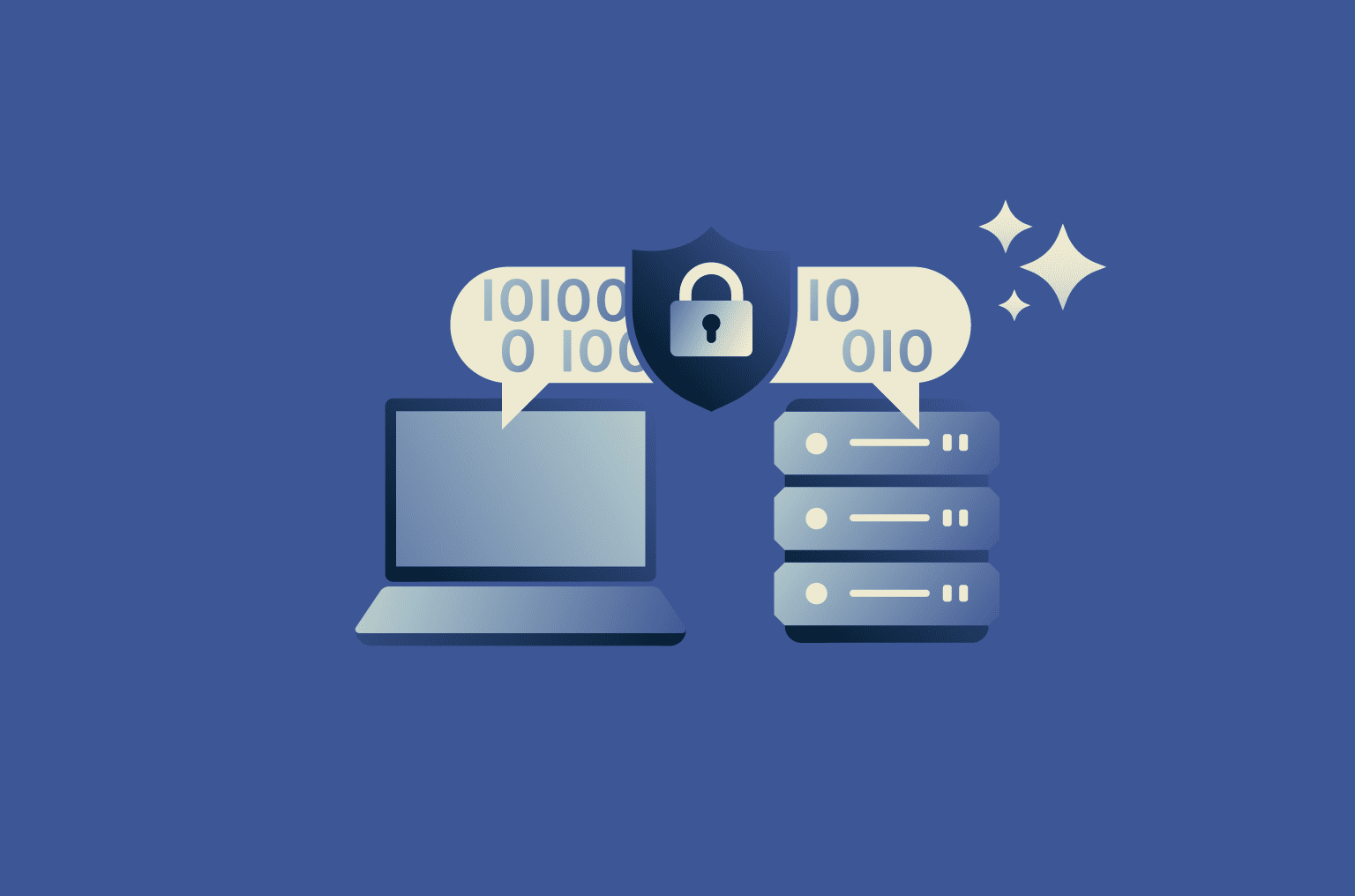
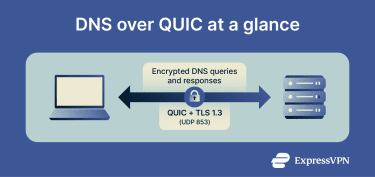
DoQ applies QUIC to DNS, encrypting queries and responses in transit. Your device and the resolver typically keep a single, long-lived encrypted QUIC connection and send lookups as independent streams on that connection. This can improve speed, reliability, and on-path privacy while leaving the resolver model unchanged.
The role of DNS in internet security
Every time you visit a website, your device performs a DNS lookup. Classic DNS, designed in the 1980s, sent those lookups in clear text. With no transport encryption or padding, anyone on the path could read or tamper with lookups. This has obvious downsides and risks, including:
- Snooping: On-path parties, including your ISP or the resolver operator you use, can see your queries and may log the domains that you try to visit. In some cases, this data may be used for marketing or sold to third parties, depending on the policies of the service provider and applicable regulations.
- Blocking: A network operator can easily block access to websites by simply blocking the DNS query. If your device can’t get the IP address, you can’t connect. This technique is widely documented in network-level blocking.
- DNS poisoning: Attackers can spoof replies or poison caches to send users to an impostor server. This might mean redirecting a target to a fake version of a real banking site in an attempt to steal their login details.
Note that while DoQ protects users from hijacking, domain owners still use managed DNS services to protect against such attacks.
What is the DoQ protocol?
The DoQ protocol is a standard, officially defined in Request for Comments (RFC) 9250, for sending DNS lookups over the QUIC transport protocol.
DoQ encrypts DNS queries and responses in transit and typically keeps a single, long-lived QUIC connection to the assigned resolver. Each lookup is sent on its own stream. This can cut setup delay, avoid head-of-line blocking, and survive some network changes through QUIC’s connection migration.
Under DoQ, the resolver can still see queries by necessity, but privacy is still enhanced over unencrypted DNS.
By convention, DoQ listens on UDP port 853, while DoT uses Transmission Control Protocol (TCP) port 853. The shared number simplifies operations and policy, even though the transports differ.
Benefits of DNS over QUIC
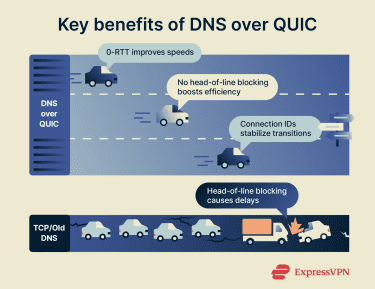 DoQ builds on QUIC to raise privacy while data is in transit. It can also make lookups faster and steadier. That said, performance is where DoQ really stands out.
1. 0-RTT connections
After you connect to a DoQ server once, QUIC employs “zero round-trip time” (0-RTT) for future connections. This improves speed and performance, as your device doesn’t need to do a full security handshake every time. It just starts sending encrypted data. For DNS, which involves lots of small, quick requests, this can make a noticeable difference for the user.
2. No more head-of-line blocking
With protocols that run on TCP, like DoT and DoH, a single lost packet can hold up everything behind it. For example, if packet 5 is lost, packets 6, 7, and 8 won’t be processed until 5 is re-sent. This is called head-of-line blocking. QUIC’s streams are independent, so if one query’s packet is lost, others can still be processed. This keeps your browsing fast and responsive.
3. Smooth connection migration
QUIC connections aren’t tied to IP addresses; they use connection IDs. This means you can switch from Wi-Fi to a mobile network and your secure DNS connection won’t be affected. It just keeps working with little to no delay. This is particularly beneficial for smartphone users, who can enjoy a more stable and reliable connection.
Comparison with DoH and DoT
To understand the differences, it helps to know the relationship between the technologies that DNS encryption methods are built upon.
Namely, TLS is the encryption protocol itself. HTTPS is used for securing web traffic. It consists of HTTP running on a TCP connection that is secured by TLS.
QUIC is a modern transport protocol built on UDP that has TLS 1.3 encryption integrated directly into its core. It’s not just a security layer; it’s a whole new way of moving data that was designed for speed and reliability.
Now, let's see how these underlying technologies translate into real-world differences between DNS encryption protocols. Here is a practical comparison of the three main options.
| Feature | DoQ | DoH | DoT |
| Underlying technology | The newest method, built on the modern QUIC protocol for maximum efficiency. | Uses HTTPS, the same protocol that secures almost all modern websites. | The original encrypted DNS standard, wrapping queries in a basic TLS security layer. |
| Lost packet handling | Excellent. Uses multiple streams, so one lost packet won’t delay others. | Good. Avoids problems when using HTTP/3, but older standards can cause issues. | Fair. A single lost packet can create a traffic jam, holding up all other queries. |
| Connection speed | Fastest. Establishes connections very quickly, especially on repeat visits. | Varies. Works almost as fast as DoQ with HTTP/3, but slower with older standards. | Slowest. Establishes connections more slowly. |
| Network change adaptability | High. Seamless transitions from Wi-Fi to mobile data. | Varies. Connections adapt well only when HTTP/3 is used. | Poor. Connections break and must be re-established. |
| Blockability | Easy to block. Uses a dedicated port (UDP 853) that admins can identify and block. | Very hard to block. Hides within standard HTTPS web traffic (port 443). | Easy to block. Uses a dedicated port (TCP 853) that admins can identify and block. |
In summation, the best protocol depends on your primary need:
- For the best performance, especially on a mobile device, use DoQ. Its connection migration and resistance to packet loss are perfect for people on the go.
- If you need to bypass network restrictions, use DoH. It’s the hardest to block because it blends in with regular web traffic.
- For a simple, reliable setup on a home network with no special requirements, DoT will work fine. It’s widely supported and works in many settings.
How does DNS over QUIC work?
The inner workings of DoQ are what give it its speed and other advantages. It’s a well-designed protocol built for the modern internet.
Encryption and connection setup
When a device first connects to a DoQ server, it performs a handshake. Specifically, DoQ uses a streamlined version of the TLS 1.3 handshake. It does two things at once: verifying the server’s identity (using a certificate) while it establishes the encryption keys that will protect the rest of the conversation.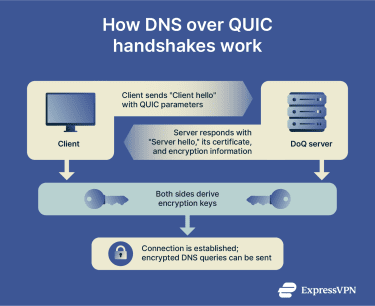
For subsequent connections, QUIC employs the 0-RTT feature. This involves a device sending its first DNS query along with a special key from the previous session. If the server recognizes the key, it can process the query and send back an encrypted response immediately, skipping most of the handshake.
Handling multiple queries
A single QUIC connection to a DNS server can contain multiple streams. In practice, your device can put each DNS query on a separate stream. For example, when a webpage loads, your browser might need to look up IP addresses for the main site, for images, for tracking scripts, and for ad networks all at once.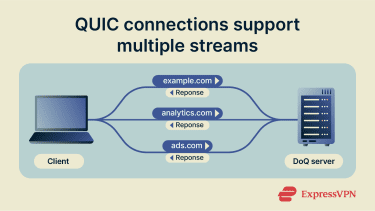
With DoQ, all of these queries can be sent at the same time over one connection. Because they are on different streams, they are handled independently. The response for the ad network can come back before the response for the main site without causing issues. Your browser gets the information as soon as it’s ready.
Packet loss management
The internet isn’t perfect. Packets get lost. In contrast to the rigid system that TCP uses, QUIC is smarter. It knows which stream each packet belongs to. If packet 5 from Stream A is lost, it only affects Stream A. Packets for Streams B and C will continue to be processed without delay.
QUIC only retransmits the specific data that was lost, making the recovery process much more efficient. This is one of the main reasons DoQ feels so much faster and more resilient, especially on congested or unreliable networks, such as public Wi-Fi or mobile data.
Implementing DNS over QUIC
Using DoQ is becoming easier as more services and platforms adopt it. You can set it up on a single device or for your entire network.
Steps to configure DoQ in your environment
Currently, support for DoQ varies across platforms. But the setup process usually involves telling your device to use a specific DNS server that supports DoQ. Additionally, some platforms have native support, which makes the process simpler. Here’s a quick overview:
- Android (Version 13 and newer): Android offers the simplest way to enable DoQ. You can activate it directly in your network settings. Just go to the “Private DNS” option and enter the hostname of a DoQ-compatible server (for example, dns.adguard-dns.com). Your phone will handle the rest automatically.
- Linux: For system-wide protection on Linux, you need an application that can manage your DNS traffic. Some software can be configured to intercept all DNS queries from your system and forward them securely using DoQ. Technical users can also use a command-line tool like kdig to test a DoQ connection directly.
- Windows and macOS: Currently, neither Windows nor macOS has built-in support for DoQ. To make use of it, you must install a third-party application. Some programs for Windows/Mac can take control of your device’s DNS settings and route all your lookups through a secure DoQ connection.
Using public DNS resolvers (Google, Cloudflare)
Major public DNS providers are the easiest way to get started with DoQ. Many now offer stable DoQ endpoints. Here are the configuration details for the leading services:
- AdGuard DNS: A longtime supporter of DoQ, offering free DNS with ad-blocking and tracking protection.
- Hostname: dns.adguard-dns.com
- NextDNS: A highly configurable DNS service that was also an early adopter of the DoQ protocol.
- Hostname: dns.nextdns.io
- Cloudflare DNS: The operator of the popular 1.1.1.1 resolver. After a period of testing, their DoQ service is now generally available.
- Hostname: cloudflare-dns.com
- Google Public DNS: While Google developed the underlying QUIC protocol, its public DoQ service (for the 8.8.8.8 resolver) is still less mature than its other encrypted DNS offerings.
- Hostname: dns.google
To get started, you typically go to your device’s network settings. For example, on Android, this is in Settings > Connections > Network and internet > Private DNS. In the provided field, enter the hostname of the provider you chose (e.g., dns.adguard-dns.com). Your device will handle the rest.
Adjusting router and network settings
For network-wide protection, you can configure DoQ on your router. This is a more advanced method, as you’ll need a router that runs customizable firmware. Because DoQ is something of an experimental protocol, standard consumer routers rarely support it out of the box. Implementations can be unstable and you’re likely to face hurdles throughout the transition.
There are two popular ways to do this:
- Using custom router firmware: You can replace your router’s stock operating system with a powerful open-source alternative like OpenWrt. This allows you to install software that can send all of your network’s DNS queries over DoQ.
- Running a local DNS server: A common solution is to use a service like AdGuard Home, which you can run on a dedicated device like a Raspberry Pi. You point your router’s DNS settings to this device, and AdGuard Home handles encrypting all your queries via DoQ.
Best practices for transitioning to DoQ
DoQ is not yet a plug-and-play standard. Many networks and firewalls block UDP port 853, and support varies significantly between devices. If you force a network-wide switch without testing, you will likely encounter connection failures and software conflicts. To make the process as smooth as possible, consider the following:
- Before you change your whole network, try DoQ on a single device, like your smartphone. This lets you test for any compatibility issues with your chosen provider. Then, gradually roll out DoQ alongside existing DNS protocols, allowing clients to prefer DoQ when available for better privacy and performance.
- Maintaining a fallback is almost always advisable. In case things go wrong, configure a secondary protocol like DoH or DoT. This will help keep you online if DoQ fails.
- Your DNS provider can see your DNS queries, even though they are encrypted on the way. Pick a provider with a strong privacy policy that you trust.
- Use encrypted DNS protocols (DoH/DoT/DoQ) to protect queries from interception and eavesdropping.
Real-world applications of DNS over QUIC
The technical advantages DoQ brings, like connection migration and reduced latency, can seem abstract. The truth is, these have clear real-world benefits to average users.
Use case 1: The commuter on the go
Imagine a consultant working on a train, switching between the train’s spotty Wi-Fi and their phone's 5G mobile hotspot. They are on a video call and need their connection to be as stable as possible. With DoT, every time the network changes (from Wi-Fi to 5G or back), the underlying TCP connection breaks. The device must re-establish a new DNS connection, causing a noticeable delay or "hiccup" that could disrupt the video call.
The DoQ solution: DoQ's connection migration feature is the key. The DoQ connection isn't tied to an IP address but to a connection ID. When the laptop switches networks, the secure DNS connection doesn't drop. It migrates seamlessly to the new path, providing a stable and uninterrupted experience with no DNS-related stuttering on the call.
Use case 2: The competitive mobile gamer
A gamer is playing a fast-paced online multiplayer game on their smartphone. In this context, every millisecond of latency counts, and quick connections to game servers, matchmaking services, and voice chat are essential. The multi-step connection process of TCP-based protocols can add precious milliseconds of delay during initial connections. Furthermore, a single lost packet can cause head-of-line blocking, momentarily stalling all other DNS queries and making the game feel sluggish.
The DoQ solution: DoQ's design gives the gamer a competitive edge. Its 0-RTT connection resumption means subsequent lookups are nearly instant. More importantly, its use of independent streams means a lost packet for one query (e.g., to an ad server) won't block another critical query (e.g., to the game server). The result is lower perceived latency and a snappier, more responsive gaming experience.
The privacy-conscious traveler
A journalist is working from a cafe in a foreign country, using public Wi-Fi. They need to research sensitive topics without exposing their browsing habits to the network operator or anyone else monitoring the connection. Unencrypted DNS on a public network is a massive privacy risk, as anyone on the network could potentially see the domains they are visiting.
The DoQ solution: By enabling DoQ on their Android phone (which has native support), the journalist ensures that every DNS query is encrypted. While DoH offers similar privacy, DoQ’s superior performance on potentially congested or unreliable public Wi-Fi networks means the connection is not only secure but also fast and reliable.
FAQ: Common questions about DNS over QUIC
What is DNS over QUIC, and why is it important?
DNS over QUIC (DoQ) is a protocol that encrypts your Domain Name System (DNS) queries and sends them over the modern Quick UDP Internet Connections (QUIC) transport protocol. It’s important because it gives you three key benefits: privacy, security, and performance.
It stops your internet service provider (ISP) and others from seeing your browsing history via DNS lookups, helps prevent attackers from hijacking your DNS to send you to fake sites, and it’s faster and more reliable than older encrypted DNS protocols, especially on mobile networks.
What is the difference between DoT, DoH, and DoQ?
The main difference is the transport protocol they use. DNS over TLS (DoT) sends Domain Name System (DNS) queries over an encrypted Transmission Control Protocol (TCP) connection on port 853. DNS over HTTPS (DoH) packages queries to look like regular HTTPS web traffic and sends them over the standard web port 443 using TCP or Quick UDP Internet Connections (QUIC), making it very difficult to block. DNS over QUIC (DoQ) sends DNS queries over the newer QUIC protocol on User Datagram Protocol (UDP) port 853. This gives it the best performance and reliability.
What is the default port for DNS over QUIC?
The default port for DNS over QUIC (DoQ) is User Datagram Protocol (UDP) port 853. It shares the same port number as DNS over TLS (DoT), but it uses User Datagram Protocol (UDP) as its underlying protocol, whereas DoT uses Transmission Control Protocol (TCP).
How can I implement DoQ on my network?
You can implement DNS over QUIC (DoQ) in a few ways:
- On your device: If you have Android 13+ or use a third-party app on other platforms, you can set a DoQ provider in your Private Domain Name Server (DNS) settings.
- On your router: If your router supports it, you can set a DoQ server in its DNS settings to protect every device on your network.
- Using a local resolver: You can set up software like AdGuard Home on a device like a Raspberry Pi to handle DoQ for your entire network.
What are the main advantages and disadvantages of DNS over QUIC (DoQ)?
DNS over QUIC (DoQ)’s advantages include fast performance thanks to “zero round-trip time” (0-RTT) and no head-of-line blocking, reliability thanks to connection migration (which keeps it stable when you switch networks), and security thanks to built-in Transport Layer Security (TLS) 1.3 encryption.
Disadvantages include the fact that it’s not as widely supported in operating systems and apps as DNS over HTTPS (DoH) or DNS over TLS (DoT) yet. It can also be blocked; like DoT, it uses a specific port (853) that network administrators can choose to block.
Take the first step to protect yourself online. Try ExpressVPN risk-free.
Get ExpressVPN