How to spot a fake VPN: Risks and warning signs


As virtual private network (VPN) use becomes more widespread, so does the importance of choosing a service you can trust. Not every app calling itself a VPN actually provides the privacy or security it promises. Some of these fake VPNs mimic legitimate services but fail to encrypt your traffic, protect your data, or respect your privacy. In the worst cases, they may even collect user information, inject ads, or facilitate malware.
In this guide, we’ll explain how to recognize fake VPN software and avoid the risks they pose. We also help you identify which VPNs are trustworthy and secure.
What is a fake VPN?
A fake VPN is a piece of software that poses as a legitimate VPN but may actually infect your device or steal your data. Instead of protecting your privacy, these tools often behave like spyware or other data-harvesting malware, collecting sensitive information. The information they collect can include browsing data, passwords, or financial credentials.
Cybercriminals might design fake VPNs to look like trusted applications or browser extensions, using misleading claims to encourage installation. They may use deceptive marketing, polished interfaces, fake reviews, or even impersonate legitimate brands to gain your trust.
These tools can also affect official apps and web stores. While Google uses strict security measures to prevent malicious apps within the Google Play and Chrome Web Stores, the company warned users about the prevalence of fake VPNs in its November 2025 Online Scams Advisory report.
Common warning signs of fake VPN services
It's not always easy to detect a malicious app or extension, but many fake VPNs will share similar warning signs. Here are a few key red flags to watch out for when choosing a VPN.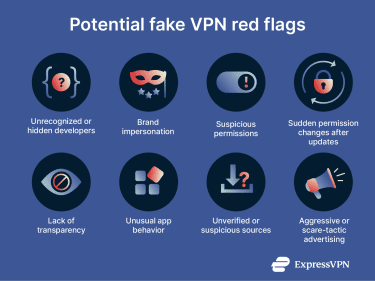
Red flags to watch out for
- Lack of transparency: Reputable VPN providers clearly publish their privacy policies, outlining the service's operations, the data they collect, and how they protect that data and user privacy. Fake VPNs may have vague, copied, or entirely missing policies, making it difficult to understand how your data is handled.
- Not available in official app stores: Fake VPNs are often distributed through third-party app stores, download links, or sideloaded APK files rather than official platforms.
- Unrecognized or hidden developers: Legitimate VPNs clearly identify the company and developer behind them. Fake VPN apps or extensions may come from unfamiliar developers with no history on the app/web store or provide no meaningful information about who operates the service.
- Suspicious permissions: A VPN should only request authorizations necessary to provide its service. Be cautious if an app asks for unnecessary access to contacts, SMS messages, your microphone, your camera, or other unrelated device functions. It’s also a potential red flag when an app or extension receives updates that suddenly require new, broad permissions, especially after installation.
- Unusual app behavior: If the VPN or extension slows down your device, triggers unexpected pop-ups, or behaves like spyware (e.g., capturing screenshots or injecting ads), it’s safest to uninstall it immediately.
- Brand impersonation: Watch out for apps or extensions that use names, logos, or branding similar to well-known companies but have slight misspellings, unusual domains, or no official affiliation.
- Aggressive advertising: VPN ads that use urgent or even crude language could be a red flag. According to Google’s recent warning, fake VPNs may exploit current geopolitical events or use sexually suggestive ads as social engineering tactics.
Real-world examples of fake VPNs
Free VPN Forever and Ghostposter malware
In December 2025, security researchers at Koi Security reported a malicious campaign known as GhostPoster that allegedly targeted Firefox users through multiple fake browser extensions, including one marketed as a VPN called Free VPN Forever. According to the report, these extensions have the ability to covertly communicate with attacker-controlled infrastructure once installed.
Mobdro Pro IP TV + VPN
In September 2025, analysts at threat intelligence firm Cleafy reported that an Android app marketed as Mobdro Pro IP TV + VPN was being used to distribute a sophisticated banking Trojan. The report claims that the app, promoted as a free IPTV and VPN service and distributed outside official app stores, secretly installed malware capable of monitoring user activity and targeting financial applications.
FreeVPN.One Chrome extension
In August 2025, endpoint security company Koi Security reported that FreeVPN.One (a Chrome VPN extension) had allegedly been involved in a potentially malicious campaign, beginning with an update released in April 2025 that expanded the extension’s permissions, allowing it to access every website users visited.
According to the report, over subsequent updates, the extension gained additional capabilities, and by July 2025, the extension started displaying suspicious behavior, including secretly capturing screenshots of users’ browser windows in the background.
100+ browser extensions discovered impersonating trusted brands
In May 2025, internet intelligence company DomainTools reported a large campaign involving more than 100 malicious Chrome extensions distributed through fake websites posing as legitimate services, including VPNs. Some of these extensions impersonated well-known brands such as Fortinet, using names like FortiVPN to appear trustworthy.
While they appeared to function normally, the extensions were allegedly designed to covertly collect user data and maintain ongoing access to browser sessions.
What to do if you’ve installed a fake VPN
If you suspect you’ve installed a fake VPN, acting quickly can help minimize the risks to your device and personal data.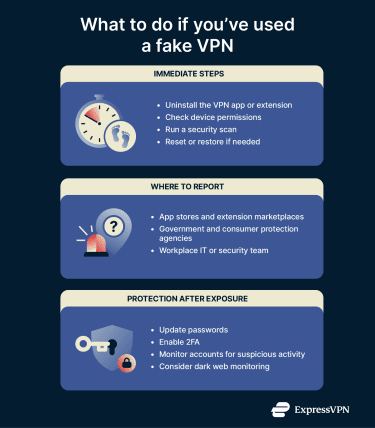
Steps to take immediately
- Uninstall the VPN app or extension: The most important first step is to stop using the VPN and remove it from your device.
- Check your device permissions: Review and revoke any suspicious permissions granted to apps or extensions that you don’t fully trust.
- Run a security scan: Use your device’s built-in antivirus or a reputable security program to detect and remove malware.
- Reset or restore if needed: If you can't remove the VPN or you suspect your device is still compromised, try restoring to a clean backup or carrying out a full factory reset. For more information, take a look at our detailed guides on how to reset a Mac, iPhone, or Android.
Where and how to report fake VPNs
If you’ve encountered a fake VPN app or extension, reporting it can help protect others from falling victim to the same threat. Here are the main places where you can submit your report quickly and effectively.
Official app stores and extension marketplaces
If you downloaded the VPN from an app store or browser extension marketplace, you should report the fake software directly through those platforms.
For problems with apps downloaded from Google Play, visit support.google.com. To report any content downloaded or purchased through Apple, visit reportaproblem.apple.com. You can also report apps to Microsoft via the Microsoft Store app.
If it’s a browser extension, use the reporting tools on the platform you used to install the extension, such as the “Flag concern” option in the Chrome Web Store or “Report this add-on” in the Firefox Add-ons site.
Government and consumer protection agencies
Many countries have agencies dedicated to cybercrime and consumer protection. Reporting fake VPNs to these organizations can assist law enforcement in tracking and shutting down fraudulent operations. For example:
- In the U.S.: You can submit complaints to the Federal Trade Commission (FTC) via ReportFraud.ftc.gov or the Internet Crime Complaint Center (IC3) at www.ic3.gov.
- In the U.K.: Reports can be made to Report Fraud, the UK’s national fraud and cybercrime reporting center.
- In Canada: You can file reports with the Canadian Anti-Fraud Centre (CAFC) at antifraudcentre-centreantifraude.ca.
Your workplace IT or security team
If you use your device for work or are connected to a corporate network, it’s a good idea to notify your IT department or security team immediately. They can take necessary measures to protect sensitive company data and prevent further exposure. Reporting through your workplace also helps raise awareness about such threats and improve overall cybersecurity practices.
Protecting yourself after exposure
- Update your passwords: After any potential breach, it’s crucial to change the passwords on any sensitive accounts, particularly any you may have used while the fake VPN was active on your device. If you’re not confident that your device has been fully secured, you may even want to use a separate device while doing so. A password manager can create unique, complex passwords for each of your accounts and easily store them in one secure location.
- Enable additional security features: Another easy way to increase your security is to turn on two-factor authentication (2FA) where available. This sends verification codes to your device or an authenticator app each time you log in. It works as a failsafe in the event that your password is compromised in the future.
- Monitor accounts for suspicious activity: In a situation like this, it’s a good idea to watch banking, email, and other sensitive accounts for unauthorized logins or transactions.
- Consider dark web monitoring: To stay ahead of potential risks, you can use a dark web monitoring service. These tools scan underground sites and forums where stolen personal information is often traded or shared, alerting you if your data appears.
Real-world risks of using a fake VPN
Fraudulent VPN services can create a wide range of problems, from minor privacy violations to serious malware infections.
Privacy violations and data collection
A legitimate VPN encrypts your traffic and protects your information from third-party onlookers. To reinforce this protection, a strict no-logging policy is crucial. It acts as a promise that no data is stored that can be traced back to you. Reputable companies even have their policies audited by reputable third parties to verify that they're followed.
A fake or untrustworthy VPN may not have one of these policies or it may disregard it.
Malware, fraud, and identity theft
Some fake VPNs may include functions that operate like malware, often designed to capture sensitive information. They may have the ability to record keystrokes, take screenshots, or access your files to harvest more data.
Through this, they may be able to collect sensitive data such as passwords, banking credentials, and cryptocurrency wallet keys. Depending on the situation, this malware may even be able to access personal data like text messages or contacts or recruit your device to a botnet for larger cyberattacks.
Cybercriminals can profit from this collected information by using it to commit fraud, selling it on the dark web, or exploiting it for identity theft.
How to check if a VPN is safe and trustworthy
It’s important to verify both the technical security features and the public reputation of any VPN before trusting it with your data.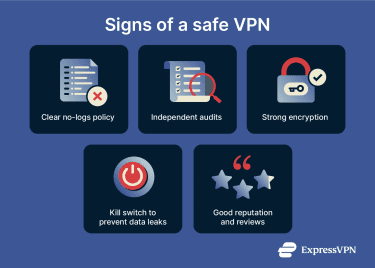
Key features of a trustworthy VPN
- No logs policy: Reputable providers clearly state they do not store or share information about your online activity. Independent audits and transparency reports help verify these claims.
- Strong encryption: Look for VPNs that protect your data using industry-leading ciphers like AES 256-bit encryption or ChaCha20.
- Secure and efficient protocols: Reliable VPN protocols like WireGuard, Lightway, or OpenVPN define how your encrypted data travels securely and efficiently through the network.
- Kill switch: A kill switch blocks internet traffic if the VPN connection unexpectedly drops, preventing your real IP address or data from being exposed.
- Transparency and support: Legitimate VPN companies make their privacy policies easy to understand, explain their technology clearly, and provide helpful, responsive customer support to assist you whenever needed.
How to verify a VPN’s claims and policies
To make sure a VPN is trustworthy, you can research by checking independent reviews, searching for the company’s history online, and looking for reports of scams or suspicious activity linked to them.
Reputable VPNs often submit their software to independent testing and audits to validate their security and privacy claims. The most transparent companies release these reports.
You can also investigate how VPNs perform in real-world tests to confirm their claims and effectiveness.
Are free VPNs safe to use?
Many free VPNs can be perfectly safe to use, but note that even the legitimate options tend to come with limitations. Free VPNs often have smaller server networks, which may lead to overcrowding and slower speeds, or data caps that limit how much you can use them. Since free VPNs aren’t making money selling subscriptions, they may turn to advertisements to generate revenue.
However, it’s important to stay security-aware if you’re choosing a free option. Fake VPNs commonly pose as free VPNs because they want to entice as many people to download as possible. If you’re interested in trying a free VPN, keep an eye out for the red flags we’ve covered above.
FAQ: Common questions about fake VPNs
Are fake VPNs common?
Yes, cybersecurity researchers have observed a growing number of fake VPNs, often disguised as legitimate services. Cybercriminals often create them to steal data, spread malware, or trick users into paying for worthless or harmful services.
Is it illegal to use a fake VPN?
Laws vary by country, but using a fake VPN is usually not illegal. In some countries, however, VPNs are restricted or banned entirely, so using any VPN could carry legal risks. Regardless of legality, it’s not recommended to use fake VPNs due to the risks associated with them.
How can I tell if my VPN is actually working?
An easy way to verify whether or not a VPN is working is to visit an online IP address checker. First, visit the checker without the VPN enabled to see the real IP address details. Then, turn on the VPN and refresh the tool. It should display a different IP address and location, proving there has been a successful connection to the VPN server.
What makes a VPN legitimate?
Legitimate VPNs are trustworthy services that deliver on their promises of privacy and security. They use strong encryption and modern protocols, such as OpenVPN, Lightway, and WireGuard, and provide core protections like a kill switch. A trustworthy VPN will also follow a no-logs policy and publish independent audits and transparency reports that let you know how they respond to requests for data.
Can fake VPNs install malware?
Yes, fake VPNs can sometimes conceal and install malicious software on devices. Security researchers have documented numerous cases where apps or extensions that appear legitimate secretly behave like malware, putting users at risk.
What should I do if I’ve already used a fake VPN?
If you suspect or know that you’ve used a fake or malicious VPN, you should disconnect and uninstall it right away. You may want to run a full virus scan to identify and remove any malware, followed by updating your passwords, enabling two-factor or multi-factor authentication (2FA or MFA) for online accounts, and monitoring your accounts for suspicious activity.
Take the first step to protect yourself online. Try ExpressVPN risk-free.
Get ExpressVPN