Fileless malware: What it is and how to stop it


Fileless malware is a type of cyberattack that runs directly in a device’s memory. It doesn’t rely on a malicious file stored on the system and leaves few traditional file-based traces, so it can be harder to detect than standard malware.
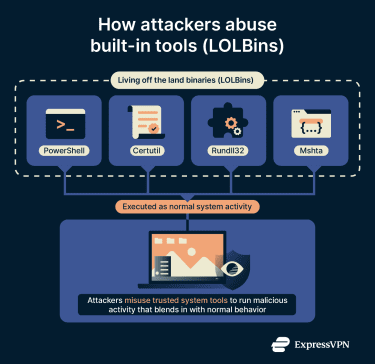
These attacks are often described as “living off the land.” They take advantage of legitimate tools already built into the operating system (OS), allowing malicious activity to blend in with normal behavior.
This guide explains how fileless malware works, the forms it can take, and the measures that can help reduce exposure.
How fileless malware works
Fileless malware can be triggered when a user interacts with compromised content or when an attacker misuses a trusted system tool, such as PowerShell. Once active, it may collect data, run additional scripts, deliver traditional malware, move laterally across a network, or open a channel for remote control.
Because fileless malware runs in memory, it can disappear after a reboot. However, more advanced variants rely on persistence techniques that reload malicious code into memory when the device starts again.
PowerShell and LOLBins
PowerShell is a built-in Windows tool used for system administration and automation. In fileless attack chains, attackers misuse PowerShell to execute commands in memory, download or run additional scripts, or interact with other system components.
Other built-in utilities can also appear in fileless activity. These are often referred to as living off the land binaries, or LOLBins, because they’re legitimate system components that can be repurposed for malicious use. Common examples include:
- Certutil.exe: A Windows certificate utility that attackers sometimes misuse to download or transfer files.
- Mshta.exe: A Windows utility intended to run certain types of applications, sometimes linked to scripts that don’t leave a clear trace on the disk.
- Rundll32: A legitimate tool for working with system libraries that can, in some cases, be associated with unwanted behavior.
Process injection methods
Once malicious code is running, some fileless attacks use process injection. In this technique, attackers inject malicious code into a trusted process, such as explorer.exe or svchost.exe, which helps conceal its activity.
Advanced security solutions can monitor how trusted programs behave over time to detect this. This can include watching for unexpected changes in memory, unusual interactions between processes, or signs that code has been altered while a program is running.
How fileless malware is delivered
Below are the most common ways fileless malware is delivered and how these attacks typically begin.
Phishing emails and document-based attacks
Attackers sometimes use phishing emails as an entry point for fileless malware. These messages are designed to look routine or work-related and may include attachments.
In the past, those attachments sometimes delivered macro-based scripts hidden inside documents. However, modern email and office software now block macros by default, which has made this approach less effective.
Attackers increasingly rely on other document-based techniques. These can include exploiting software weaknesses or using staged attacks that trigger additional activity only after a document is opened.
Malicious websites and drive-by downloads
Some fileless attacks begin when someone visits a compromised website. The page may appear normal, but hidden code can probe the visitor’s browser for known vulnerabilities.
If a weakness is found, the site can use a browser exploit to run malicious code within the browser or on the user’s device, without requiring a file to be downloaded or opened. This type of client-side attack can allow further activity to occur in memory.
Exploiting software vulnerabilities
Some fileless attacks take advantage of flaws in legitimate software, such as OSs, browsers, or widely used applications. When these weaknesses allow unintended behavior or access, attackers can exploit them remotely to run their own code on a device without first installing a traditional malware file.
How fileless malware differs from traditional malware
Traditional malware relies on files stored on the device. Common examples include Trojans, worms, and spyware. Once launched, these threats write components to disk, allowing them to persist across restarts until they’re detected and removed.
Fileless malware techniques
Fileless attacks rely on a range of techniques to execute and maintain malicious activity.
Memory-resident malware
Memory-resident malware runs in a device’s RAM, which functions as the system’s short-term working memory.
This type of malware is often temporary by design. It typically remains active only while the system is running and may disappear after a reboot. In some cases, however, it can be reloaded into memory if persistence has been established elsewhere on the system.
Because it does not rely on files stored on disk, memory-resident malware is commonly used to evade traditional detection methods. Its behavior can vary, from quietly collecting data to executing commands or preparing the environment for further activity, depending on the attacker’s goals.
In some attacks, memory-resident malware serves as an initial stage rather than the final payload. It may be used to retrieve or launch more traditional, file-based malware, such as trojans or ransomware, enabling a more persistent compromise.
Registry-based persistence
Some fileless threats remain active by using the Windows Registry as a hiding place. The Registry is a core database the OS continuously accesses to store system and application settings, including during startup.
Attackers may store encoded instructions inside specific registry entries and configure Windows to run those instructions during boot by pointing them toward trusted system tools.
Fileless malware payloads
Fileless malware can deliver powerful payloads that steal data, spy on activity, or give attackers ongoing control.
Rootkits
Rootkits are designed to hide malicious activity with exceptional depth. Memory-based variants take this further by avoiding changes to system files on disk and instead operating in memory.
These rootkits interact with components the device relies on daily, such as process listings or system calls, to conceal other malicious actions.
By interfering with what the system reports to security tools, rootkits can make unusual activity appear normal. This allows other parts of an attack to continue quietly over extended periods.
Ransomware
Ransomware is designed to encrypt data and demand payment for recovery, regardless of how it’s delivered. In some cases, attackers rely on fileless techniques during the early stages of a ransomware attack.
Detection of fileless malware
Detecting fileless malware often involves monitoring for indicators of attack (IoAs), which are actions that suggest something is out of place.
Common IoAs include:
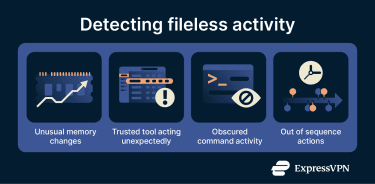
- Unexpected use of system tools: A familiar program, such as Word, suddenly launches PowerShell without a clear reason.
- Changes inside trusted processes: Activity that alters the memory or behavior of a legitimate, long-running process, even though the process itself appears normal.
- Unusual command activity: Administrative tools running heavily encoded or obfuscated commands, which can indicate an attempt to hide what the system is being asked to do.
Behavioral-based detection
Behavioral detection watches for patterns that don’t match everyday use, even when activity comes from trusted tools.
Examples include memory changes that suggest executable code is running where it shouldn’t be, event chains that fall outside normal usage patterns, and built-in utilities being used in ways that don’t align with routine administration.
Managed threat hunting insights
Many organizations rely on dedicated threat hunting teams to look for signs that might escape routine monitoring.
- Proactive investigation: Threat hunters review historical activity across devices to find patterns that don’t match regular use. This includes reviewing historical logs for unexpected script activity, privilege changes, or uncommon remote connections. These patterns are often the same IoAs used by automated detection tools but analyzed manually and over a longer time frame.
- Memory analysis when needed: If an attack is suspected, analysts use specialized tools to capture the device’s active memory. This helps reveal short-lived code that disappears when the system restarts.
- Putting activity in context: Threat hunting teams compare what they see on the device with wider threat intelligence. This helps them understand how attackers operate and create rules that identify subtle behaviors linked to fileless techniques.
How to prevent fileless malware attacks
Strengthening system settings and everyday habits can limit what fileless malware is able to do. Some of these steps apply to individual users, while others are typically handled by IT teams in managed environments.
Everyday habits for individual users
Fileless attacks often begin with routine actions, which makes basic cyber hygiene especially important. Being cautious with unexpected emails, attachments, or links helps reduce the risk of triggering malicious activity.
Keeping your OS, browsers, and common apps updated also closes off the vulnerabilities attackers often target. Many fileless attacks start by exploiting software that simply hasn’t been patched yet.
Safe browsing also matters. Keeping browsers updated and avoiding unfamiliar or suspicious websites lowers the chance of landing on pages that attempt to run harmful code automatically.
For managed or business environments
- Application control and allow-listing: Restrict which applications, scripts, and system tools are allowed to run on a device. On Windows, this can be enforced using features such as AppLocker, which let organizations define approved executables and block untrusted or unexpected code, even when it relies on built-in system tools. These controls are typically applied through OS security policies, endpoint protection platforms, or centralized IT management tools.
- Tightening PowerShell usage: PowerShell is powerful and essential, but also a favorite in fileless attacks. Setting clear limits, enabling detailed logging, and blocking its use for regular users in business environments helps stop misuse. This is typically done through OS security policies, endpoint protection platforms, or centralized IT management tools.
- Least-privilege access: Give each user and service only the access they actually need. With fewer permissions available, attackers can’t move around or make system changes as easily if they gain access to an account.
FAQ: Common questions about fileless malware
What is the most common fileless malware?
There isn’t one specific type that’s the most common. Many attacks rely on built-in tools like PowerShell to run malicious commands in memory because these tools already exist on the system and don’t look suspicious at first.
Can antivirus tools detect fileless malware?
Some antivirus tools can detect it, but it’s harder because fileless malware doesn’t leave files on the device. Tools that watch how the system behaves, especially what happens in memory, are better at spotting this kind of threat.
How is fileless malware delivered?
Most fileless attacks start from simple actions, like opening a harmful attachment or visiting an unsafe website. These methods load the attack directly into memory without installing anything on the disk.
What are the signs of a fileless malware infection?
Signs are subtle because nothing is written to the disk. Unusual system behavior, like unexpected use of system tools or strange command activity, can be a warning. These patterns appear in indicators of attack (IoA) rather than in traditional file scans.
How can I protect my system from fileless malware?
Keeping software updated, blocking macros, limiting the use of scripting tools, and following good security habits helps reduce the risk. Many defenses focus on preventing attackers from misusing built-in tools to run malicious actions.
Take the first step to protect yourself online. Try ExpressVPN risk-free.
Get ExpressVPN