What are Google dorks? A complete guide to risks and safe use



Google is designed to help people find useful information. But with the right search operators, it can also pull up results that are harder to discover with a generic search, like certain login pages and open directories. That’s where Google dorks come in.
This guide explains what Google dorks are, why they matter for cybersecurity, what risks they might uncover, and how to use them safely and responsibly.
What are Google dorks?
Google dorks, also called Google hacking, are advanced search queries that use Google’s built-in search features to tell Google which results to prioritize so the results are more focused and relevant.
What Google dorks don’t do
Despite the “hacking” reference in the alternate “Google hacking” name, these searches don’t unlock hidden systems or restricted content. They only surface information that Google has already crawled, indexed, and made publicly searchable. Google dorks don’t bypass permissions, logins, or security controls: the searches simply reorganize and filter what’s already visible.
The history and evolution of Google dorking
The concept of Google dorking first became widely recognized in the early 2000s, when computer-security researcher Johnny Long began collecting specialized search queries that could reveal exposed or sensitive information through Google’s index.
As the web expanded and more files, cloud services, admin panels, and web apps became searchable, Google dorking evolved from an internet curiosity into a repeatable way to understand what the public could discover through search alone.
How Google dorking works
Google dorking helps identify specific types of indexed pages or files by filtering results by domain, file format, page title, or URL structure. This makes it easier to find things like publicly indexed documents, test pages, or content that an organization may want to review.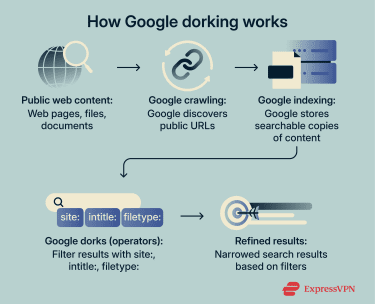
How to use Google dorks effectively
Using Google dorks effectively comes down to choosing the right location and operator, then refining the query step by step until the results match exactly what you’re looking for.
- Pick a location: Decide what you’re searching within (site/domain, subdomain, URL path, or file type on a site).
- Choose your first operator: Start with one filter that removes the most noise (like limiting to a site or a file format).
- Add a specific keyword: Use a clear term that’s likely to appear in the content you want, not a broad topic word.
- Refine with a second operator: Narrow results further by targeting where the keyword appears (title, URL, or page text).
- Use quotes when wording matters: Wrap names or exact phrases in quotes to avoid irrelevant variations.
- Iterate sequentially: Adjust one element at a time so you know exactly what changed the results.
Understanding Google search operators
Google search operators are filters that tell Google what to prioritize, so you can narrow results with much more control than a normal keyword search. Here are the most common Google search operators:
| Operator | What it does | When it’s useful |
| site: | Limits results to a specific website or domain | Searching only within one source (for example, a company site or a university site) |
| filetype: | Restricts results to a specific file format | Finding documents like PDFs, spreadsheets, or presentations |
| intitle: | Matches keywords in the page title | Locating pages where the topic is likely the main focus |
| inurl: | Matches keywords in the page URL | Finding specific sections like /blog/, /docs/, or /support/ |
| intext: | Matches keywords in the page body text | Finding pages that mention a term, even if it’s not in the title |
| "exact phrase" | Searches for an exact sequence of words | Searching names, product titles, quotes, or specific wording |
| OR | Matches either one term or another | Searching variations, synonyms, or alternate spellings |
| - | Excludes results containing a keyword | Removing irrelevant topics or unwanted matches |
| * | Acts as a wildcard inside quotes | Filling gaps when you don’t know the exact wording |
Advanced Google dorking techniques
Once you’re comfortable with the basics, the next step is combining operators so your searches are closer to what you’re looking for.
Build queries in layers
Instead of writing a complex query immediately, start broad and refine it step by step. This helps you understand what each operator changes and prevents you from narrowing too much.
Combine structure + content
This works best when you know where something lives (like a docs section) and also know what it should mention. You use operators like site: or inurl: to narrow the location, then add keywords (or intext:) to narrow the topic.
Use exclusions
If your results are close but cluttered, exclusions are the fastest cleanup tool. Adding -keyword removes pages that contain terms you don’t want, which helps you avoid irrelevant sections like careers pages, press pages, or duplicates.
Search variations simultaneously (OR)
This is useful when the same concept can be labeled in different ways. Using OR lets you include multiple terms in one search, so you don’t miss results just because a site uses different wording.
How to interpret results
Google dork results reflect what Google has crawled and made searchable, and it’s not necessarily what’s current, accurate, or intentionally published. To interpret results correctly:
- Treat results as visibility, not confirmation: A result appearing in Google doesn’t mean it’s important, valid, or meant to be easy to find; it only means it was indexable at some point.
- Check freshness and context: Pages can be outdated, copied, cached, or missing context. Always confirm dates, ownership, and relevance before drawing conclusions.
- Expect duplicates and mirrors: The same content can appear across multiple URLs, subdomains, or mirrored pages, which can make exposure look larger than it is.
- Watch for false signals: File names, titles, and snippets can be misleading. Open the page and verify what it actually contains.
Examples of high-risk results to watch for
Some results are sensitive because of what they reveal when they are indexed. These are common categories worth checking for during audits:
- Login and admin entry points: Publicly reachable portals aren’t automatically insecure, but they can expose management surfaces that should be tracked and protected.
- Configuration and settings artifacts: Exposed config content can leak environment details, service connections, or implementation information that wasn’t meant to be public.
- Logs and error output: Public logs can reveal file paths, software versions, internal URLs, or operational details that increase risk.
- Archived and legacy documents: Old files and backups can remain indexed and searchable even after they’re no longer actively maintained.
How Google dorks reveal security misconfigurations
Google dorking often highlights security misconfigurations by making unintended public visibility easier to notice.
Misconfigurations happen when a system’s settings don’t match the intended security or privacy controls, especially around access permissions and what should (or shouldn’t) be indexable. If a page, file, or folder becomes publicly reachable, search engines may crawl it, and Google dorks can then make that exposure easier to notice in search results.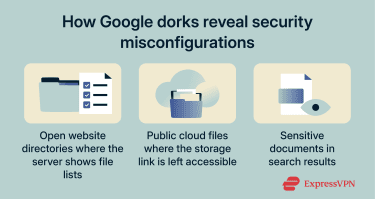
Indexing and directory listing risks
When indexing rules are too permissive, or directory listing is enabled, search engines may index pages and files that were never meant to be discoverable. Google dorks can make this more visible by narrowing results to specific URL patterns or file types that often show up in exposed directories. Even if the content isn’t directly sensitive, indexed directories can reveal structure (folder names, file naming conventions, environments), which increases overall exposure.
Unprotected cloud storage buckets
Cloud storage is often used for backups, exports, and shared files. If access permissions are misconfigured and files become public, they might end up indexed or referenced by indexed pages. This isn’t a flaw in the cloud provider; it’s a configuration issue that makes private data reachable without authentication.
Sensitive documents appearing in search results
Documents like PDFs, spreadsheets, and presentations are easy to publish and share, but they’re also easy to leave exposed. If a document is publicly accessible, Google may index it like any other page.
Google dorks make these files easier to locate by narrowing results to specific document types or search patterns. Over time, this can leave outdated or sensitive documents discoverable long after they were meant to be relevant, creating privacy and compliance risks.
Security benefits and use cases of Google dorking
Google dorking is used across research, security, and privacy contexts to better understand what information is publicly accessible online.
OSINT applications
In open-source intelligence (OSINT), Google dorking is used to locate, verify, and contextualize publicly available information more efficiently. It specifically helps analysts navigate the huge amount of material already available on the open web. Common OSINT-oriented uses include:
- Finding official sources: Locating reports, statements, and documents that exist publicly but don’t rank well in generic searches.
- Cross-checking claims: Comparing multiple sources to confirm consistency and credibility.
- Building context: Understanding how an organization, topic, or project is represented across the public web.
Security testing and exposure discovery
In cybersecurity, Google dorking is used as a defensive visibility check. Security teams rely on it to understand how their systems appear to the public web and whether that visibility matches their intended security standards. This supports:
- Defensive auditing: Spotting publicly indexed content that shouldn’t be there due to misconfigurations, legacy pages, or forgotten assets.
- Exposure validation: Confirming whether access controls and indexing rules are working as intended.
- Risk prioritization: Focusing remediation on issues that are easily discoverable through normal search.
Digital footprint mapping for privacy awareness
Google dorking can also be used to understand digital footprints, which are the information that individuals and organizations have publicly visible across the web. Rather than focusing on systems or infrastructure, this use case highlights how search engines can bring together content that was published at different times, on different platforms, for different purposes.
Because this information is often spread across multiple sources, it may not be obvious how much personally identifiable information is discoverable until it appears in search results. A résumé uploaded years ago, an old profile page, or a cached document can remain searchable long after it stops being actively maintained, and together these fragments can reveal patterns about identity, activity, or affiliations.
How to protect your information from Google dork exposure
Preventing Google dork exposure is mostly about making sure sensitive content isn’t publicly accessible or indexable. A good baseline is to define what should never be public (internal docs, exports, backups, admin tools) and periodically check what search engines can see for your domain, brand terms, names, or file types.
Fixing file indexing vulnerabilities
File indexing vulnerabilities often stem from default settings or overlooked directories that let search engines catalog content more broadly than intended. Reviewing indexing rules, robots directives, and server configurations helps ensure only appropriate pages and files are eligible for indexing. Regular audits are also important for legacy content and temporary files.
Securing cloud and local storage
Cloud storage and shared file systems are common sources of unintended exposure when access permissions aren’t carefully managed. Files uploaded for internal use, collaboration, or backups should be reviewed to confirm they aren’t publicly accessible or link-shared by default.
Applying the principle of least privilege (granting access only where it’s required) helps limit the chance that sensitive material becomes visible through search indexing or direct access.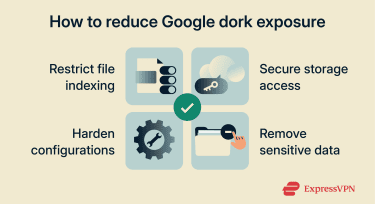
Hardening server and website configurations
Configuration hardening reduces the surface area that search engines can index. Servers and websites benefit from routine configuration reviews to ensure that unnecessary services, directories, or files aren’t exposed. This includes disabling directory listings, removing debugging artifacts, and keeping software up to date.
FAQ: Common questions about Google dorks
Is Google dorking risky?
It can be risky depending on intent and context. The searches themselves are just filters, but they can surface sensitive content if something is publicly exposed. Using dorks to access data you don’t own or don’t have permission to review can create legal, ethical, and security issues.
What is a dork search?
A dork search is a Google query that combines normal keywords with search operators to narrow results to a specific type of page, file, site, or pattern (for example: a specific domain or a specific file format).
How can I protect my data from appearing in dork results?
The best protection is to prevent sensitive content from being public and indexable in the first place. That usually means tightening permissions, removing exposed files, disabling directory listing, restricting access to internal tools, and using proper indexing controls only after access is correctly locked down.
Take the first step to protect yourself online. Try ExpressVPN risk-free.
Get ExpressVPN