PaaS services explained: Platform-as-a-Service overview, types, and use cases


Platform-as-a-Service (PaaS) is a cloud model that lets teams build and run applications without managing the underlying infrastructure. It’s often positioned as the fastest path from code to production, but understanding what the platform manages, and what it doesn’t, is key to using it effectively and making sure it’s the right choice for you.
This guide explains how PaaS platforms work, the different types of PaaS, what they include, and the trade-offs you should consider when adopting them.
What are PaaS services?
PaaS services are cloud computing models that provide developers with fully managed platforms for building, running, and scaling applications. The PaaS provider is responsible for servers, networking, storage, OSs, runtime environments, and ongoing maintenance. As the developer doesn’t have to manage the underlying infrastructure, they can focus on application code, data, and configuration.
What services are included in PaaS
PaaS platforms provide a managed application platform made up of several core service layers. Specific offerings vary by provider, but most PaaS platforms include the same foundational service categories:
- Compute, storage, and networking: The underlying resources that run the application, including CPU and memory to execute code, storage for application assets, and networking to route requests and handle scaling.
- OS and runtime environments: The environment in which application code runs, consisting of the OS and the language runtime, such as Java, Python, Node.js, or .NET.
- Middleware and application services: The services that support application execution and communication, such as request handling, background processing, messaging, caching, and coordination between application components.
- Managed data services: The databases and storage systems used to persist application data, including relational databases, non-relational data stores, and object storage.
- Deployment and automation tooling: Tools that support the application delivery process, from building and deploying code to managing configuration, updates, and rollbacks.
- Monitoring, logging, and management tools: Tools that provide visibility into application behavior in production, including metrics, logs, error reporting, and health status.
How do PaaS services work?
PaaS works by taking your application code, starting it on the provider’s systems, and automatically keeping it running, reachable, and scaled as traffic changes.
PaaS architecture
PaaS architecture is organized as a vertical stack of managed layers. Developers interact only with the application layer, while the platform provider owns and operates every layer beneath it.
At the base of the stack is the physical infrastructure, which includes data centers, servers, networking hardware, and storage systems. These components provide the raw compute and connectivity required to run applications.
Above the physical infrastructure is a virtualization or container layer. This layer isolates workloads, manages resource sharing, and allows multiple applications to run securely on the same underlying hardware.
On top of virtualization sits the platform layer. This layer manages the OS, language runtimes, and core platform services needed to run applications. It handles tasks such as OS patching, runtime updates, load balancing, service discovery, and scaling. Developers do not interact with these components directly.
At the top of the stack is the application layer. This is where developers deploy application code, define configuration values, and connect the application to managed services such as databases or message queues.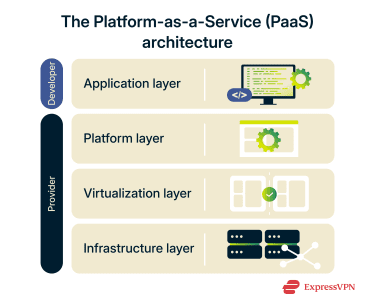
Development, deployment, and runtime layers
The application delivery on a PaaS platform follows a lifecycle made up of three stages that describe how an application moves through the platform:
- Development layer: During development, developers write application code using the languages and frameworks supported by the platform. This can happen locally or in cloud-based environments. The platform defines available runtimes and dependencies, which helps keep development consistent across teams and environments.
- Deployment layer: When code is ready, it is deployed to the platform using automated workflows such as Git-based deployments, build pipelines, or container images. At this stage, the platform builds the application, resolves dependencies, applies configuration, and manages releases.
- Runtime layer: After deployment, the platform runs the application in a managed execution environment. It handles process startup, scaling, traffic routing, and restarts if failures occur. Runtime behavior is controlled by platform policies rather than manual server management.
User experience and developer tools
Through integrated tools and standardized workflows, PaaS platforms minimize operational complexity.
Most providers offer web dashboards and command-line interfaces (CLIs) for managing applications, viewing logs, configuring services, and monitoring performance. APIs are commonly available for automation and integration with external systems.
Built-in support for CI/CD, environment variables, secrets management, and service bindings further enhances the developer experience. Instead of configuring infrastructure manually, developers declare application requirements, and the platform enforces them.
The result is a workflow where deploying, updating, and scaling applications becomes a routine development task rather than an infrastructure project.
Types of PaaS services
PaaS services vary in how they’re deployed and in the problems they’re designed to solve. Here are the most common categories:
Public PaaS
Public PaaS runs on shared cloud platforms, where multiple customers use the same underlying system while each application runs in its own isolated environment. Capacity is provisioned on demand, allowing applications to scale quickly without upfront infrastructure planning.
This makes it well-suited to applications that experience variable user traffic throughout the day or over time. The trade-off is reduced control over low-level configuration, such as networking options, runtime customization, or certain compliance requirements.
Private PaaS
Private PaaS provides a dedicated PaaS environment for a single organization. Isolated environments still exist, but for different teams within the same organization.
This model allows organizations to apply their own networking rules, access controls, and policies while still using PaaS-style deployment and runtime features. Because the platform is dedicated, private PaaS typically involves higher costs and greater operational responsibility than public PaaS. Organizations typically opt for a private PaaS when security, compliance, or data storage requirements rule out shared platforms.
Hybrid PaaS
Hybrid PaaS combines public and private PaaS environments, allowing applications or components to run across both. Teams can place different parts of an application where they make the most sense, rather than committing to a single deployment model.
This approach is useful for organizations that need to balance scalability with control. For example, sensitive workloads may run in a private environment, while customer-facing services use public PaaS for elasticity and reach.
The downside is added complexity. Hybrid PaaS requires careful coordination across environments, particularly around networking, identity, deployment workflows, and monitoring, to ensure applications behave consistently end-to-end.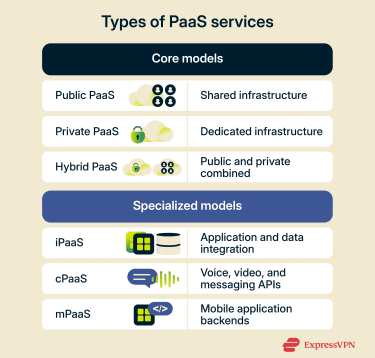
Specialized PaaS models
Not all PaaS platforms aim to host entire applications. Some are built to provide specific platform capabilities that applications consume rather than run on directly.
Integration PaaS (iPaaS)
iPaaS platforms are designed to connect applications, data sources, and services. They provide prebuilt connectors, workflows, and transformation tools that make it possible to integrate cloud and on-premises systems without writing custom integration code.
Common use cases include data synchronization, API orchestration, and automating business processes across multiple services.
Communications PaaS (cPaaS)
cPaaS provides APIs and tools for embedding real-time communication features, such as voice, video, messaging, and notifications, directly into applications. The platform handles signaling, media delivery, and scaling, while developers integrate communication capabilities through APIs.
This model is widely used in customer support systems, collaboration tools, and messaging-enabled applications.
Mobile PaaS (mPaaS)
mPaaS platforms focus on backend services for mobile applications. They typically include functionality such as user authentication, push notifications, data synchronization, analytics, and offline support.
By providing these capabilities out of the box, mPaaS reduces the need to build and maintain custom mobile backends, enabling faster development and more consistent mobile experiences.
Common PaaS use cases
PaaS fits best when teams need to move quickly, release often, and scale applications without turning infrastructure into a bottleneck.
Web and application development
Teams commonly use PaaS to build and run web applications that change frequently and must respond to shifting user demand. Instead of tuning servers or managing environments, developers can focus on shipping features and iterating quickly. This makes PaaS a strong fit for customer-facing applications and internal tools that rely on consistent environments, frequent releases, and automatic scaling.
API development and integration
API-driven systems benefit from PaaS’s ability to deploy, scale, and manage services independently. Teams typically use PaaS to run backend services and integration layers where traffic varies and services evolve continuously. This approach works especially well for APIs that support web and mobile applications, connect internal systems, or expose functionality to partners and external users.
Data analytics and business intelligence
When analytics applications need to ingest, process, and present data at scale, PaaS helps teams focus on data workflows rather than infrastructure. Developers can build reporting and analytics services that sit on top of managed databases and analytics engines. Common examples include dashboards, real-time event processing, and internal tools that turn operational data into insights.
Industry-specific PaaS applications
In regulated or operationally complex environments, teams use PaaS to balance development speed with control. Applications can run on a standardized platform while integrating with existing systems, private infrastructure, or specialized services.
This approach is common in industries like finance, healthcare, manufacturing, and logistics, where applications must evolve quickly without compromising compliance or reliability.
Key benefits of PaaS services
PaaS shifts much of the operational burden away from development teams, which changes how applications are built, deployed, and maintained. The benefits below reflect those practical outcomes: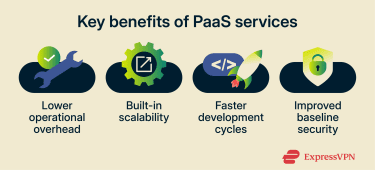
Cost efficiency and reduced infrastructure management
PaaS reduces costs by removing the need to provision, maintain, and operate application infrastructure. Teams spend less time on server management, patching, and capacity planning, and more time on development work.
Costs also tend to align more closely with usage, since applications can scale up or down automatically instead of requiring fixed infrastructure.
Scalability and application flexibility
PaaS platforms are designed to scale applications in response to demand. Teams can handle traffic spikes or growth without redesigning infrastructure or manually adjusting capacity. This flexibility makes it easier to evolve applications over time, add new services, or change deployment patterns without reworking the underlying environment.
Faster development and time to market
By standardizing runtimes, environments, and deployment workflows, PaaS shortens the path from code to production. Developers can deploy updates more frequently and with less operational friction. This accelerates experimentation, feature delivery, and iteration, particularly for teams practicing continuous delivery.
Security, updates, and maintenance advantages
PaaS platforms handle many routine operational tasks, which reduces the risk of unpatched systems and inconsistent environments.
Many PaaS platforms also include built-in security controls like identity integration, centralized logging, and network isolation. These controls are often implemented as part of a zero-trust cloud approach, where no application, user, or service is trusted by default.
While application-level security remains the team’s responsibility, PaaS helps improve baseline security by enforcing consistent configurations and reducing human error at the infrastructure layer.
Challenges and limitations of PaaS
The same abstractions that make PaaS attractive can also introduce constraints. These limitations are important to consider when deciding whether PaaS is the right fit for a given workload.
Vendor lock-in risks
PaaS platforms often rely on provider-specific runtimes, services, APIs, and deployment workflows. Over time, applications can become tightly coupled to these components, which can make migration to a different provider very costly and time-consuming.
Lock-in is most pronounced when apps depend on:
- Proprietary managed databases or messaging services.
- Platform-specific deployment pipelines or configuration models.
- Integrated identity, logging, or monitoring services that don’t have direct equivalents elsewhere.
This doesn’t make PaaS unsuitable for long-term use, but it does mean teams need to weigh speed and convenience against portability early in the design process.
Vendor dependency can also increase operational risk. Apps designed around a specific PaaS environment can be sensitive to changes in a provider’s internal infrastructure, service behavior, or performance characteristics; even a minor platform update can affect stability or efficiency.
Pricing dependency is also a factor: if a provider changes its pricing model, usage thresholds, or service availability, tightly coupled applications may become more expensive to run. Plus, switching vendors to control costs can require significant redevelopment effort.
Security and compliance considerations
The shared responsibility approach in PaaS models can complicate compliance efforts, particularly in regulated environments, because:
- Visibility into lower-level systems may be limited.
- Some security controls are predefined by the platform.
- Audit requirements may need additional tooling or documentation.
Organizations should confirm that a PaaS provider’s controls align with their regulatory and internal security requirements.
To reduce risk, many organizations pair PaaS environments with zero-trust data protection strategies that limit access to sensitive data based on identity, context, and continuous verification.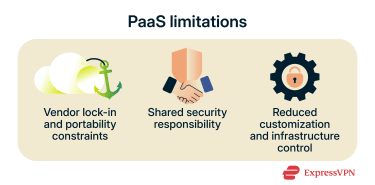
Customization and control limitations
As PaaS platforms standardize OSs, runtimes, and services, they limit how much the environment can be customized. Teams typically cannot:
- Modify OS-level settings.
- Install arbitrary system software.
- Tune infrastructure components beyond exposed configuration options.
These limitations can be restrictive for applications with specialized performance, networking, or compliance requirements. In such cases, Infrastructure-as-a-Service (IaaS) or hybrid approaches offer more flexibility at the cost of increased operational responsibility.
How to choose the right PaaS provider
Choosing a PaaS provider comes down to how well the platform supports your architecture, workflows, and constraints over time.
Key features to evaluate
Start by assessing whether the platform supports your technical requirements today and at scale:
- Supported languages and runtimes: Confirm first-class support for the languages, frameworks, and runtime versions your apps depend on, including update cadence and deprecation policies.
- Managed service ecosystem: Look at the availability and maturity of native services such as databases, message queues, caching, and API gateways. Tight integration reduces operational effort but can increase dependency.
- Deployment and automation capabilities: Look for built-in continuous integration and continuous deployment (CI/CD) support, rollback mechanisms, environment management, and deployment workflows that align with how your teams ship software.
- Scalability and availability controls: Understand how the platform handles autoscaling, regional availability, failover, and traffic management, and what you can and cannot configure.
- Observability and diagnostics: Native logging, metrics, tracing, and alerting should be sufficient to operate production systems without the need for expensive third-party tooling.
Security, compliance, and support factors
Security and compliance should be evaluated in terms of shared responsibility:
- Shared responsibility boundaries: Confirm exactly which layers the provider secures and which remain your responsibility.
- Compliance certifications and controls: Check whether the provider supports required standards, like the General Data Protection Regulation (GDPR), and whether controls are enforced at the platform level.
- Identity and access management: Ensure the platform integrates cleanly with your identity provider and supports role-based access, service identities, and secrets management.
- Operational support and service level agreements (SLAs): Review uptime guarantees, incident response processes, support tiers, and escalation paths.
Common mistakes to avoid when adopting PaaS
Several adoption issues recur across organizations, regardless of provider:
- Ignoring portability early: Building tightly around proprietary services without considering your exit paths increases long-term vendor dependency.
- Underestimating platform constraints: Not all workloads fit within PaaS limits for networking, performance tuning, or system access.
- Assuming security is fully handled: Providers only secure the platform, not your app logic, data access patterns, or identity configuration.
- Skipping cost modeling: Usage-based pricing can scale quickly; teams should model costs under realistic load scenarios, not just initial deployment.
Avoiding these mistakes means you must align platform capabilities with app needs before committing to production.
PaaS vs. IaaS vs. SaaS
PaaS, Infrastructure-as-a-Service (IaaS), and Software-as-a-Service (SaaS) are the three primary cloud service models, each defined by how responsibility is divided between the cloud provider and the customer. The key difference is not what runs in the cloud, but how much control and operational responsibility the customer retains.
At one end of the spectrum, SaaS removes almost all technical responsibility from the customer. At the other end, IaaS provides raw infrastructure with maximum flexibility, but also maximum operational burden. PaaS sits in the middle, balancing control and convenience with abstracted infrastructure and platform management that allows teams to build and deploy their own apps.
| SaaS | PaaS | IaaS | |
| What you get | Fully finished applications | Application platform | Raw infrastructure |
| Who manages infrastructure? | Provider | Provider | Provider |
| Who manages the OS and the runtime? | Provider | Provider | Customer |
| Who manages the app code? | Provider | Customer | Customer |
| Level of customer control | Low | Medium | High |
| Customization | Limited to app settings | Application-level | Full stack |
| Operational overhead | Minimal | Moderate | High |
| Typical use cases | Email, CRM, collaboration tools | Web apps, APIs, analytics | Custom systems, legacy workloads |
When to use PaaS instead of IaaS or SaaS
PaaS is a strong choice when teams need to build and run custom applications but don’t want the hassle of managing servers, OSs, or platform maintenance. It works best when development speed, consistency across environments, and automated scaling are higher priorities than low-level infrastructure.
In practice, many organizations use all three models at the same time: SaaS for standard business functions, PaaS for application development, and IaaS for workloads that need deep customization or infrastructure-level control.
FAQ: Common questions about Platform-as-a-Service (PaaS)
What services are included in Platform-as-a-Service (PaaS)?
PaaS typically includes managed compute, storage, and networking, along with OSs, language runtimes, middleware, databases, deployment tooling, and monitoring.
What is an example of a Platform-as-a-Service (PaaS) platform?
Well-known PaaS platforms include Heroku, which lets developers deploy apps using Git while the platform manages infrastructure like servers, runtimes, scaling, and updates.
Is Netflix a PaaS or SaaS?
Netflix is a Software-as-a-Service (SaaS) product, not a Platform-as-a-Service (PaaS). Users consume the application itself, rather than deploying their own code. It’s a cloud service model focused on end-user software.
How secure are Platform-as-a-Service (PaaS) services?
PaaS security depends on a shared responsibility model. Providers secure the infrastructure, OSs, and runtimes, while customers are responsible for application code, data protection, and access controls.
Which industries benefit most from Platform-as-a-Service (PaaS)?
PaaS is commonly used in industries that need to balance speed and control, including finance, healthcare, and manufacturing. These sectors often rely on industry-specific PaaS applications to modernize systems while meeting regulatory or operational constraints.
Take the first step to protect yourself online. Try ExpressVPN risk-free.
Get ExpressVPN