Password attacks: Common types and how to prevent them


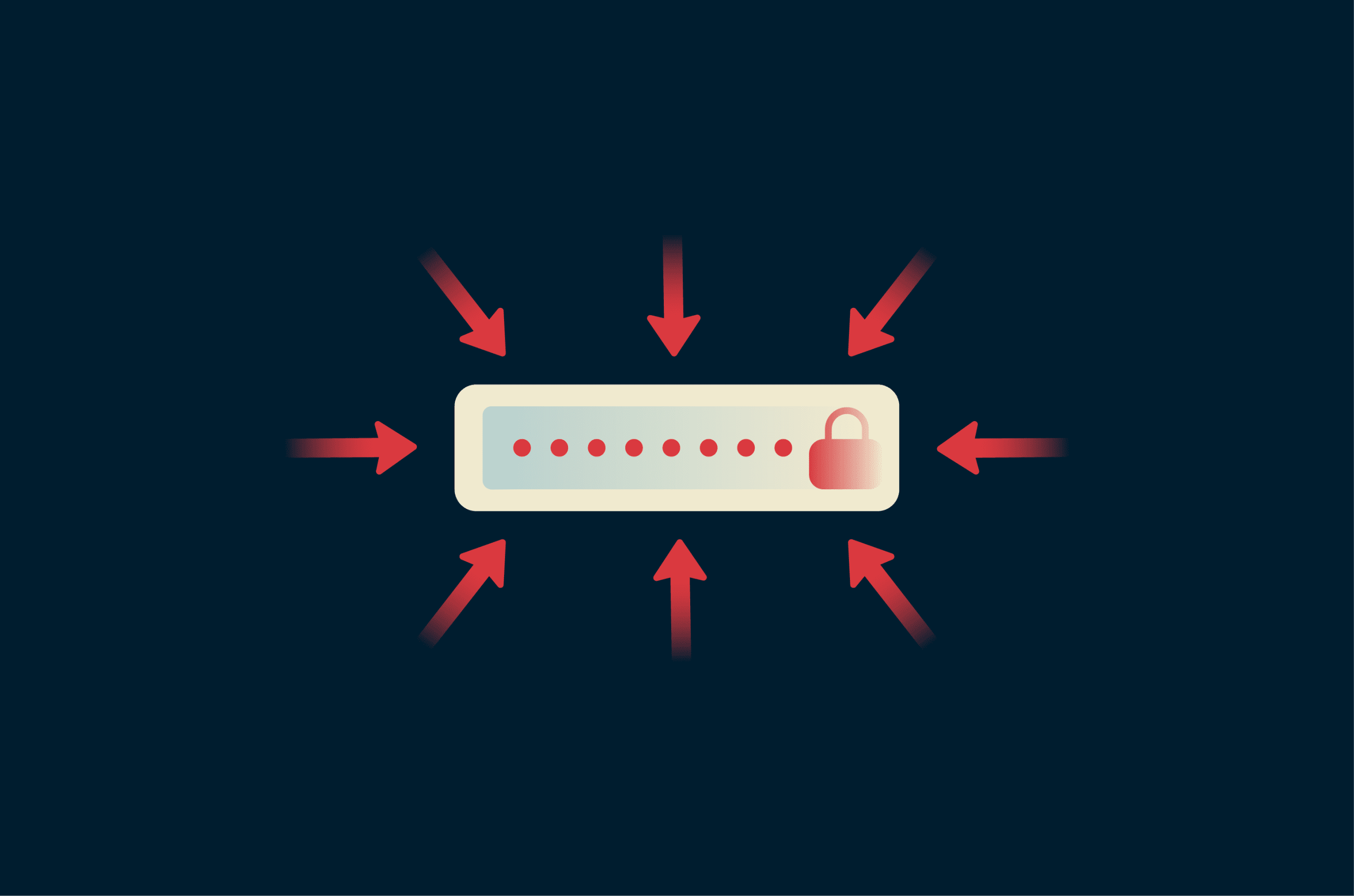
Passwords control access to nearly every digital service, from personal banking to corporate networks. Attackers exploit this with automated tools to steal, guess, or capture credentials at scale.
This guide covers what password attacks are, how they work, common types, real-world examples, and practical prevention tips for personal and business accounts.
What is a password attack?
A password attack is any attempt to gain access to an account by obtaining, guessing, or capturing a password.
While execution varies based on the target's defenses, methods include brute-force attacks on login pages, offline cracking of stolen hashed data (scrambled versions of passwords), or phishing to trick users into revealing credentials.
Learn more: Password hashing explained
How password attacks work
Attacks typically follow this sequence: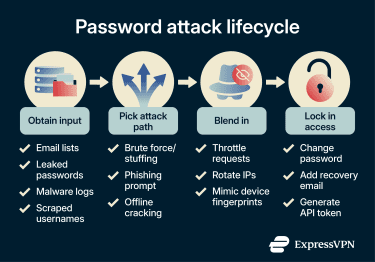
- Obtain input: Attackers collect usernames, email addresses, or leaked password data from breaches, data scraping public information, malware, or other sources.
- Attack path: They try to use or guess credentials against login systems (online) or crack obtained hash data (offline).
- Evade detection: Attackers attempt to avoid security controls, for example, by targeting legacy systems lacking multi-factor authentication (MFA) and rotating IP addresses.
- Lock in access: If successful, they secure ongoing access by modifying account settings, adding backdoors, or creating alternative entry points.
Online vs offline attacks
Password attacks fall into two main categories, depending on whether the adversary interacts with a live system.
Online attacks:
The adversary tests password guesses on a live login system, and every attempt happens in real time. Login systems typically mitigate these attacks through controls such as:
- Rate limiting (restricting the number of logins a user or IP can make in a given time frame).
- Account lockouts after failed attempts.
- IP blocking.
- Logging and alerts.
This is very slow (often only dozens to hundreds of guesses per minute) and is usually detectable.
Offline attacks:
The adversary first obtains hashed passwords (from sources such as data breaches, misconfigured backups, or compromised servers). They then crack those hashes on their own hardware.
The result is faster: billions of guesses per second are possible (depending on the hashing algorithm and hardware used), and unlike online attacks, this has no interaction with the target's system and leaves no logs.
Why password attacks are so effective
Password attacks can offer high reward at a relatively low cost. These are the two biggest drivers:
- Scale: Automation makes it cost-effective to test huge credential lists across many services.
- Reuse: A leaked password often unlocks other accounts using the same password or variations of it.
Common types of password attack techniques
These are some of the main ways hackers get passwords. Many share root causes, so defenses overlap; for detailed, layered strategies, see the section below on preventing password attacks.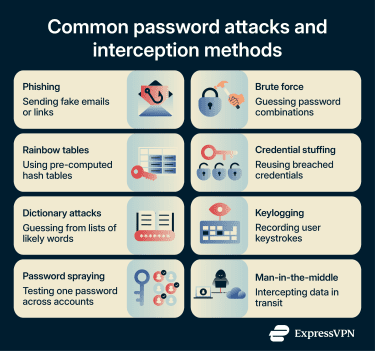
Phishing
Tricks users into entering credentials (or approving actions) on fake sites, cloned emails, or malicious forms, often using typosquatted domains (e.g., g00gle.com), urgency tactics, or exact copies of legitimate messages.
Modern variants include phishing pages that capture credentials and MFA codes, as well as push notification fatigue attacks that trick users into approving login requests. These attacks rely on human distraction or time pressure rather than hacking techniques, bypassing even strong passwords if MFA is phishable.
Key specific defenses: Carefully check password reset emails, verify the sender address, and hover over links (don't click) to confirm the real domain.
Learn more: How to prevent phishing attacks
Credential stuffing
Credential stuffing is the practice of testing stolen username and password pairs from older breaches against other, unrelated services. A strong password alone isn't enough if it appears in a breach dataset and is reused across accounts.
Key specific defenses for service operators: Use bot detection (i.e., CAPTCHA); apply IP reputation checks to block traffic from known malicious/proxied IPs; and monitor for rapid multi-account logins or unusual patterns across accounts.
Brute force, dictionary, and password spraying
All of these methods involve guessing passwords:
- Brute force: Involves trying all possible password combinations (against live login pages or offline on hashes).
- Dictionary attack: Tests curated wordlists (common passwords, personal details scraped from social media [e.g., pet names], seasonal patterns, etc.)
- Password spraying: Tries a few common, weak passwords (e.g., Password123) across many accounts to evade lockouts.
These attacks succeed when passwords are short, predictable, or default, such as "admin" on a router.
Key specific defenses: Choose long and unique passwords when creating passwords or opening accounts.
Rainbow table attacks (offline)
A rainbow table attack uses massive databases mapping common passwords to their unsalted hashes. Instead of calculating the hash for every guess (which takes processing power), the attacker looks up the stolen hash to find the matching plaintext password.
Key specific defenses for developers: Salt your hashes and use modern hashing algorithms such as Argon2 or bcrypt. These are resistant to this type of lookup optimization.
Keylogging and malware-based capture
Malware (delivered via unverified download sources, bundled software, or device compromise) can record keystrokes and clipboard data or steal passwords from memory as they're entered. This means that even strong passwords and MFA codes (if accessed through the same device) can be captured in real time.
Key specific defenses: Avoid untrusted software and run antivirus scans regularly.
Man-in-the-middle
A man-in-the-middle (MITM) attack intercepts unencrypted or weakly secured traffic (e.g., rogue Wi-Fi networks) to capture plaintext credentials or hijack active sessions/tokens.
Key specific defenses: Avoid submitting credentials on HTTP pages and use a virtual private network (VPN) on untrusted networks.
Impact of password attacks
Password attacks may not stop at a single login. A compromised credential could act as an entry point to email, internal tools, and sensitive documents, especially if accounts are connected through single sign-on or password reuse.
- Account takeover and identity theft: If attackers use valid access to impersonate the victim, they could collect personally identifiable information to open fraudulent lines of credit, file false tax returns, or socially engineer the victim's contacts. The compromised account can lead to fraud if it contains sufficient personal information.
- Reputational and brand erosion: For businesses, the loss of trust can outweigh the immediate technical cost. A password attack can lead to negative market reaction or investor concern.
- Fueling the breach lifecycle: Stolen credentials could be aggregated and resold. A single breach could contribute to lists of breached usernames and password pairs that may then be used in credential-stuffing attacks against millions of other targets.
- Regulatory exposure: Unauthorized access to personal data could trigger mandatory reporting duties. This type of breach may lead to audit failures, fines, and forced disclosures.
- Operational paralysis: Post-compromise, attackers may deploy ransomware (which locks files until the attacker is paid) or wiper malware (which permanently deletes data) if they gain administrative access.
How to prevent password attacks
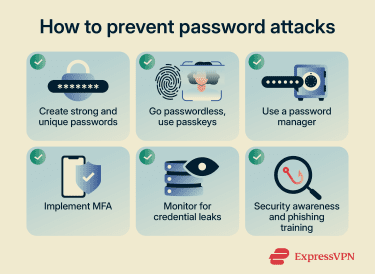
Practical steps for individuals
- Use unique, long passwords or passphrases.
- Enable phishing-resistant MFA where possible, and prioritize passkeys (FIDO, WebAuthn, or hardware keys) over SMS or push notifications.
- Use a password manager to generate and store truly random, unique credentials. Treat the manager account itself as high-value with strong MFA.
- Avoid reusing passwords across services.
- Keep OS, browsers, and apps updated, and avoid cracked/untrusted software.
- Monitor for leaked credentials using a data breach monitor or database like Have I Been Pwned.
Practical steps for organizations
- Screen new passwords against known compromised lists.
- Use memory-hard or adaptive hashing algorithms (e.g., Argon2id, scrypt, bcrypt, or PBKDF2) that intentionally slow offline cracking attempts.
- Avoid forced periodic password changes (they encourage weak patterns); change only when there is evidence of compromise or breach.
- Implement advanced behavioral analytics for login patterns.
- Enforce rate limiting, bot detection, IP reputation, and anomaly monitoring on login endpoints.
- Block known compromised passwords at creation or reset.
Go passwordless where possible
Passkeys are phishing-resistant. They use public-key cryptography, meaning your device proves your identity without sending a password to the server. Because the website never receives or stores a password, there's no "shared secret" for an attacker to steal.
That said, while passkeys eliminate the dangers of password reuse and database hacking, they do not solve every threat. A compromised device still poses a risk. It's always best to pair multiple defenses for the best protection.
Security awareness and phishing training
Training works when it focuses on behaviors people can repeat under pressure.
A good program does three things:
- Shows staff what phishing looks like in the tools they use every day.
- Builds a habit of reporting suspicious messages fast.
- Pushes account owners toward phishing-resistant MFA for high-value accounts.
What to do if your password is compromised
If you think your password has been compromised, it’s best to act quickly. Here are some steps you can take to minimize damage: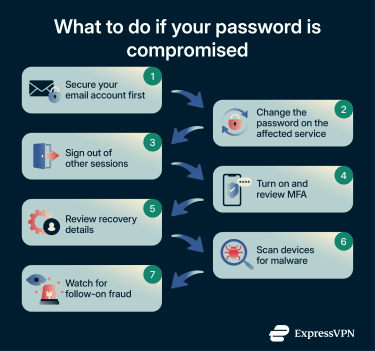
- Secure your email account: If the attacker controls the email, they can undo fixes made elsewhere. Change this password immediately and check for any hidden email-forwarding rules.
- Change the credentials on the affected service: Use a new, unique password generated by a password manager.
- Sign out of other sessions: Changing a password doesn’t always kill active sessions. Look for a “Sign out everywhere” or “Log out all devices” option.
- Turn on and review MFA: Enable MFA and check the list of trusted devices, and remove any keys or phone numbers you don’t recognize.
- Review recovery details: Ensure the attacker didn’t add their own backup email or phone number to regain access later.
- Scan devices for malware: If a keylogger caused the breach, changing the password might give the attacker the new one. Scan your device before logging into high-value accounts.
- Watch for follow-on fraud: Monitor bank alerts and credit reports, as personal data stolen in a breach may be used for identity theft later.
FAQ: Common questions about password attacks
What are the most common password attacks?
How do attackers steal passwords?
Is MFA enough to stop password attacks?
How effective are password managers?
How often should passwords be changed today?
What's the difference between credential stuffing and brute force attacks?
Take the first step to protect yourself online. Try ExpressVPN risk-free.
Get ExpressVPN