How to prevent a ping flood attack on your network



Not all network disruptions come from advanced malware or sophisticated hacking tools. Sometimes, everyday network behavior is simply pushed too far.
A ping flood attack takes a basic connectivity check, something your computer uses every day, and overwhelms the system with it. The system doesn’t break, but it becomes so busy responding to fake requests that real traffic can’t get through. Pages stall, services time out, and users are left waiting.
This guide explains what ping attacks are, how they work, and the practical steps you can take to protect your network.
What is a ping flood attack?
A ping flood attack is a type of denial-of-service (DoS) attack that bombards a target with massive volumes of Internet Control Message Protocol (ICMP) echo request packets (pings).
Under normal circumstances, pings are harmless. They’re used to check whether devices can reach each other, measure response times, and spot basic connectivity problems on a network.
This is what a normal ICMP exchange looks like (in simplified terms):
- ICMP echo request: “Are you there?”
- ICMP echo reply: “Yes, I’m here.”
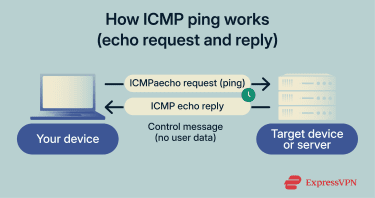 In a ping flood, however, the requests come so fast that your system can’t keep up. It faces an impossible choice: respond to the flood and neglect real users, or ignore the requests and violate protocol standards. Most systems choose to respond.
As the requests pile up, websites stall, logins fail, APIs time out, and services appear online but are unreachable. Think of it like a phone that won’t stop ringing while you’re trying to work. You eventually miss important calls because you’re stuck answering spam.
Once the traffic stops, most systems recover quickly. The damage comes from the disruption, not from permanent failure.
Ping flood vs. other ICMP-based DoS attacks
While the ping flood is the most common, attackers abuse ICMP in several ways. Understanding the difference helps you choose the right defense.
- Standard DoS ping flood: Relies on volume from one source. It’s easier to block, but it can still overwhelm smaller networks.
- Distributed DoS (DDoS) ping flood: Uses a botnet (thousands of compromised devices) to attack simultaneously from multiple locations. It’s much harder to defend against because blocking one source barely dents the volume.
- Smurf attack: Uses amplification via IP spoofing. The attacker spoofs the source address to be the victim’s IP address and then sends a single ICMP request to a network’s broadcast address. Every device on that network receives the request, and because the request seemed to come from the victim, all the responses are sent to the victim’s device, flooding it with traffic and overwhelming it. In practice, this attack is far less common today because most modern routers and network devices are configured to reject ICMP requests sent to broadcast addresses by default, significantly reducing the effectiveness of classic Smurf attacks.
- Ping of death: Instead of sending multiple messages, it sends an oversized or malformed ICMP packet designed to crash the target. Most modern systems have patched this vulnerability, but it remains a cautionary example of what happens when protocols get pushed past their limits.
How a ping flood differs from broader DDoS attacks
| Feature | DoS ping flood | DDoS ping flood |
| Traffic source | Usually one or a few systems | Many compromised devices |
| Disruption | Limited by the attacker’s bandwidth | Distributed across many networks, can exceed 100Gbps |
| Blocking difficulty | Easier; can often filter by source IP | Much harder; traffic comes from hundreds or thousands of IPs |
| Detection | Easier; repetitive patterns from one source | More difficult; requires dedicated DDoS mitigation |
Effects of a ping flood attack
Individual ICMP requests are harmless, but as their volume increases, they can cripple normal operations.
Bandwidth saturation
Your network connection has a finite capacity. During a ping flood, the target receives a constant stream of requests. Each triggers a response, so the system sends just as much data back out. As the bandwidth fills up, legitimate traffic gets stuck in the queue.
As a result, streaming buffers endlessly, video calls freeze, file transfers stall, and users often assume the problem is on their end.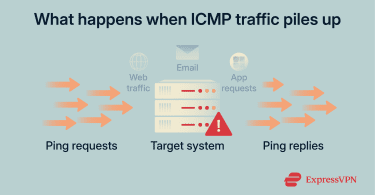
Resource exhaustion
Even if your network connection can handle the traffic, the device behind it has limits. Processing each ping, however small, uses up CPU and memory.
As the flood continues, the system uses most of its resources to respond. What’s left for actual work, such as loading pages, authenticating users, or running applications, isn’t enough. Performance worsens until the system becomes effectively unusable.
Service disruption and downtime
Eventually, services stop responding altogether. Websites go offline and internal tools fail.
Even brief outages cause real damage. Every minute of downtime means lost revenue, frustrated customers, and teams unable to work.
Legal, financial, and reputational consequences
Not all the effects of a ping flood are immediate or technical. Some impacts emerge after the attack has been mitigated.
Service disruptions can create operational costs, such as increased bandwidth usage, short-term protective measures, or additional time spent by IT staff responding to the incident. For e-commerce sites, the downtime directly translates to lost sales.
Repeated or prolonged outages can affect user confidence. Reliability plays a role in how users perceive a service, and interruptions may influence future purchasing or usage decisions, particularly in competitive markets.
In some industries, service disruptions can also raise compliance or contractual considerations. Organizations may need to assess whether existing security controls were adequate and whether service level agreements (SLAs) were affected. In these cases, what begins as a technical incident can require follow-up from legal or compliance teams as well.
How to detect a ping flood attack
Ping floods often start quietly, blending in with normal network traffic. Detection relies on spotting behavior that doesn’t match usual traffic patterns.
Normal traffic has rhythm. It generally rises during business hours and drops overnight. Attack traffic doesn’t follow these patterns. It increases and stays constant regardless of user behavior. For example, if ping times to your business server jump from 20ms to 500ms without a corresponding spike in customers, you’re likely seeing a flood.
Real-time network monitoring tools
You can’t fix what you can’t see. Monitoring tools act as early warning systems by showing traffic behavior as it happens.
- Bandwidth monitoring tools like PRTG Network Monitor or SolarWinds display real-time graphs so sudden ICMP spikes become immediately visible.
- Intrusion detection systems such as Snort or Suricata automatically flag unusual patterns, including abnormal ICMP volumes or request rates above configured thresholds.
- Cloud service dashboards from providers like Cloudflare, AWS CloudWatch, or Azure Monitor include built-in traffic analytics that highlight irregular behavior.
Packet analysis techniques
When basic monitoring isn’t enough, packet analysis reveals exactly what’s moving through your network.
- Packet capture tools: Tools like Wireshark let you inspect individual packets. During a ping flood, you’ll see repeated ICMP echo requests at abnormally high rates, often from the same source or a suspicious range of IPs.
- Log inspection: Server, firewall, and router logs record every connection attempt. A sudden burst of ICMP echo requests, sometimes thousands in minutes, from one IP or an IP range, confirms an attack.
- Flow analysis (NetFlow): Instead of examining every packet, flow data show communication patterns: who’s talking to whom, how often, and how much data they’re exchanging. This makes it easier to spot large or persistent traffic flows that don’t match legitimate use.
How to prevent ping flood attacks
Protecting your network from ping flood attacks involves creating a “filter” that blocks malicious traffic while letting legitimate connections through.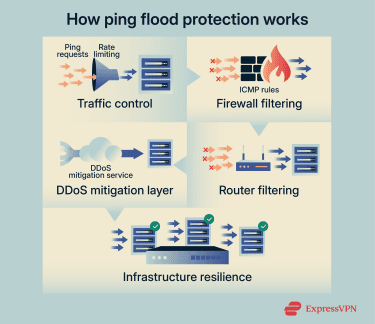
Configure rate limiting
Configuring rate limiting on your firewall or router is your first line of defense. It caps the number of ICMP packets your system will accept per second from any single source. Anything above that threshold is dropped (ignored).
This keeps your system responsive during minor attacks. However, during massive DDoS floods, the firewall itself can become a bottleneck, struggling to process and drop the sheer number of requests.
Disable unnecessary ICMP (with caution)
You can configure your server to stop responding to ICMP echo requests (pings). This reduces the usefulness of basic ping-based scanning and can limit certain types of ICMP-based abuse.
However, this does not fully prevent ping flood attacks. Even if your system ignores ICMP requests, it still has to receive the incoming traffic, and a sufficiently large flood can consume inbound bandwidth before the packets are dropped.
There’s also a trade-off in day-to-day operations. ICMP plays an important role in network diagnostics, uptime monitoring, and path discovery. Blocking it entirely can make troubleshooting harder, as connectivity issues may only surface once users start reporting problems.
Instead of disabling all ICMP, a more practical approach is to restrict ICMP handling. Allow ICMP traffic from trusted IP ranges, such as monitoring systems or administrative networks, and rate-limit or drop unsolicited external requests. This helps reduce exposure while preserving essential network visibility.
Commands for common systems
Here’s how to implement rate limiting and blocking on some common systems.
Linux (using iptables)
Linux servers are common targets for ping floods. You can use the built-in tools to control ICMP traffic precisely.
This example allows only one ping per second from the same source, with a small burst allowed:
If you want to disable all pings, you can turn off ICMP echo replies:
Windows
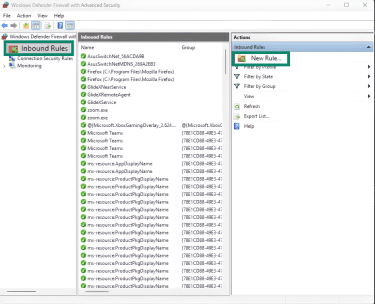
Windows Defender Firewall allows you to create custom rules to block or limit ICMP traffic:
- Open Windows Defender Firewall with Advanced Security and go to Inbound Rules > New Rule.
- Select Custom and click Next.
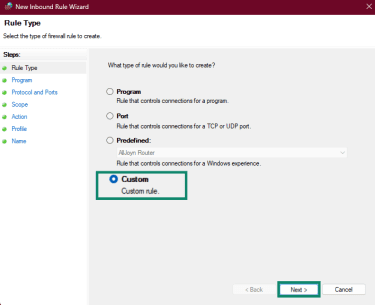
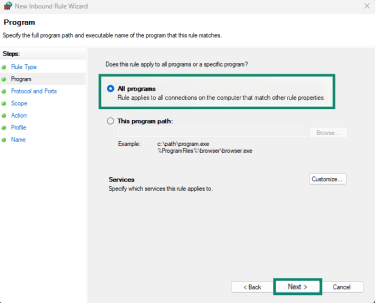
- Then select All Programs and click Next.
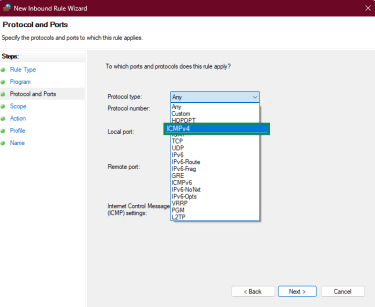
- Set Protocol type to ICMPv4. (Repeat these steps for ICMPv6 to also cover ping traffic over IPv6 networks.)
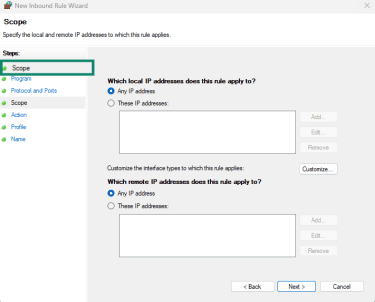
- Under Scope, define which IPs can send pings (for example, your monitoring subnet).
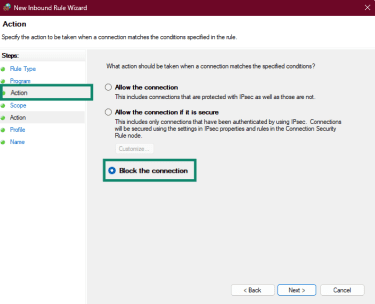
- Under Action, choose Block the connection to stop all pings, or Allow only from specific IPs.
Home routers
Most home routers include basic protection against ping floods. These are the typical steps:
- Log into your router’s admin interface (usually 192.168.1.1 or 192.168.0.1).
- Look for settings under Firewall, Security, or Advanced.
- Enable options like Ignore ping from WAN or Block ICMP echo requests.
This prevents your network from responding to external pings, which reduces exposure to automated scans and low-level attacks.
DDoS mitigation services
When a ping flood comes from many sources at once, basic defenses may not be enough. DDoS mitigation services like Cloudflare, AWS Shield, or Akamai act as a protective buffer between attackers and your infrastructure.
They use a technique called scrubbing:
- All traffic is routed through the provider’s network first.
- They analyze every packet in real time, filtering out malicious ICMP floods.
- Only clean, legitimate traffic reaches your server.
Modern mitigation platforms are designed to absorb traffic volumes far beyond what most organizations can handle on their own. These services charge based on traffic volume or attack frequency. However, for many businesses, the cost is justified by the risk of prolonged downtime.
ISP-level filtering
If you identify the attack source, for example, specific IP ranges or a geographic region, you can block traffic upstream before it ever touches your network.
Contact your internet service provider (ISP) and provide as many details as you can. Many ISPs offer null routing or upstream filtering that drops malicious traffic at their edge, preventing it from consuming your bandwidth.
Strengthening infrastructure capacity
Increasing your network’s resilience helps systems stay responsive while defenses do their job.
- Over-provisioning bandwidth: Having more bandwidth allows the network to absorb short traffic spikes without immediately reducing performance.
- Load balancing: Spreading traffic across multiple servers ensures no single system takes the full impact. Even if one server struggles, the others can handle requests normally.
- Anycast routing: A network technique where requests are routed to the nearest server, so attacks are distributed geographically instead of hitting a single point.
Which defense do you need?
This table helps you decide which prevention technique works best for you.
| Method | Best for | Trade-off |
| Rate limiting | Most business networks | Keeps diagnostics open while dropping excess pings. |
| Cloud scrubbing | Large enterprises | High cost, but it stops the attack before it hits your infrastructure. |
| Total ICMP block | High-security servers | Reduces exposure to basic scanning but does not prevent bandwidth exhaustion |
| ISP filtering | Targeted attacks from specific regions | May block legitimate traffic from affected regions. |
How VPNs help reduce exposure to ping flood risks
A virtual private network (VPN) doesn’t prevent ping flood attacks, but it can help reduce exposure in certain situations.
- IP masking: A VPN replaces your public IP address with the VPN server’s IP. If an attacker targets you based on your visible IP, the traffic is directed at the VPN provider’s infrastructure instead of your local network. Large providers are generally better equipped to absorb or filter unwanted traffic than individual users or small networks.
- Traffic tunneling: VPNs encrypt and tunnel your traffic between your device and the VPN server. While this doesn’t stop volumetric attacks like ping floods, it can limit what external observers can infer about your activity or network structure.
- Provider-side mitigation: Some VPN providers offer limited DDoS mitigation on their servers, such as rate limiting or traffic filtering. This can help against smaller or opportunistic attacks.
Overall, VPNs are best seen as a privacy and exposure-reduction tool, not a primary defense against large-scale ping flood or DDoS attacks.
FAQ: Common questions about ping flood attacks
What is the ICMP flood threshold?
There’s no universal threshold. It depends on your infrastructure capacity, network size, how your Internet Control Message Protocol (ICMP) traffic is configured, and your typical ICMP baseline.
What is the ping of death?
The ping of death is an Internet Control Message Protocol (ICMP)-based attack that uses an oversized or malformed packet to crash or disrupt a system. It exploits buffer overflow vulnerabilities in older operating systems. Most modern systems have patched these flaws, but it is still referenced as a known attack type.
What are the signs of a ping flood attack?
Common signs include slow network performance, high ping latency (for example, 500ms when the normal is <50ms), connection timeouts, and monitoring tools showing Internet Control Message Protocol (ICMP) traffic spikes that don’t match user activity. Server logs reveal thousands of echo requests from the same source or suspicious IP ranges.
How can I protect my home or business network?
Basic protection starts by rate limiting Internet Control Message Protocol (ICMP) traffic and blocking certain ping responses. Use your router’s built-in flood protection features. Monitor traffic with tools or your router’s dashboard. Businesses may want to consider distributed denial-of-service (DDoS) mitigation services for added protection.
Which tools help detect ping flood activity?
Traffic analyzers, intrusion detection systems, packet capture tools, and flow analysis platforms can help identify abnormal Internet Control Message Protocol (ICMP) traffic that indicates a ping flood.
Are ping flood attacks common against small businesses?
Ping flood attacks can affect networks of any size. Attackers often target smaller networks because they assume their defenses will be weaker. Smaller businesses typically have less bandwidth and fewer resources to absorb excess traffic, so even modest floods cause significant disruption.
Take the first step to protect yourself online. Try ExpressVPN risk-free.
Get ExpressVPN