

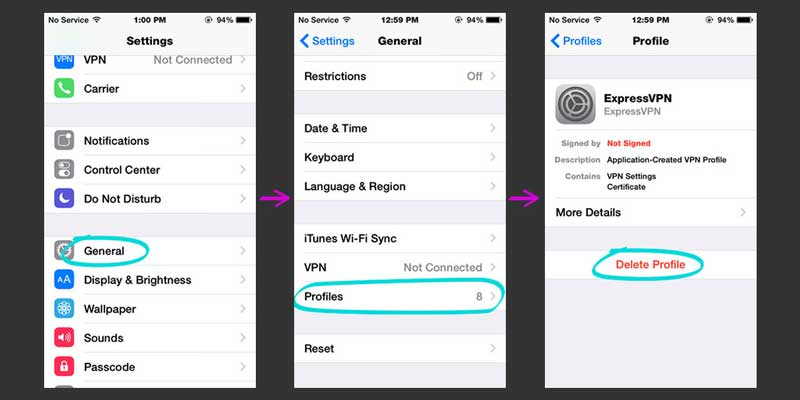
If you ever need to reinstall your ExpressVPN profile, follow these simple steps:
1. Uninstall the existing ExpressVPN profile. Go to Settings > General > Profiles and manually remove all ExpressVPN profiles.
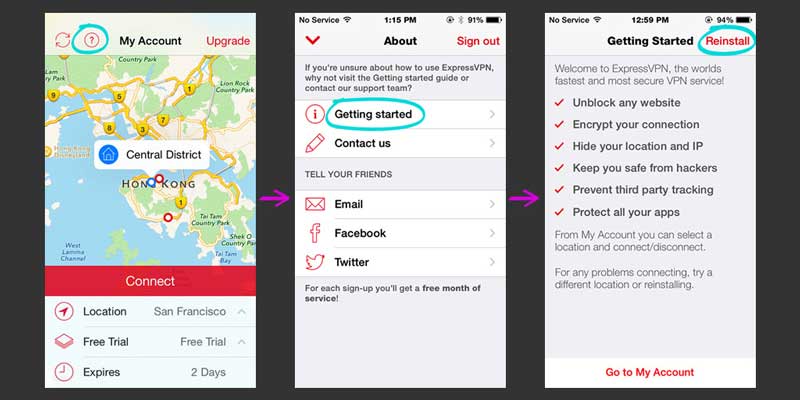
2. Then you'll need to reinstall the profile. You can do this from within the app by going to About (click the Question Mark) > Getting Started > Reinstall.
If you get stuck, please contact us via Live Chat or email us at support [at] expressvpn.com
Happy VPNing!
Explore the web with greater privacy
Get ExpressVPNSign up today for a chance to win FIFA World Cup 2026™ tickets.













Comments
Thanks for the instructions!