Types of phishing attacks: A guide to risks and prevention


Phishing attacks are one of the most common ways cybercriminals steal personal data and financial details and gain unauthorized access to company systems.
Instead of exploiting vulnerabilities, phishing attacks rely on human behavior. By abusing trust, urgency, or curiosity, they can slip past defenses, including spam filters and antivirus tools.
This guide breaks down the main types of phishing attacks, explains how they work, and outlines the risks they pose to both individuals and organizations. It also highlights common warning signs and practical ways to reduce exposure to phishing attempts.
Introduction to phishing
Phishing is a type of social engineering scam where attackers pose as trusted organizations or individuals to persuade victims to share sensitive information or perform harmful actions. These actions can involve entering login credentials into fraudulent pages, providing payment details, downloading malicious files, or approving unauthorized requests.
What makes phishing effective is its reliance on psychological triggers such as trust, urgency, fear, familiarity, curiosity, and authority. A common example is an email warning that an account will be suspended unless the recipient verifies their information immediately. Another is a text message claiming a package is waiting and will be returned unless the recipient follows a tracking link within a specific timeframe.
Why phishing attacks continue to evolve
Phishing tactics evolve as attackers adapt to security controls and new technologies. As email filters improved at detecting suspicious messages, many attackers shifted to text messages and phone calls. As awareness of obvious scams increased, phishing emails and fake websites became more polished and convincing.
Phishing also evolves as attackers gain access to more data. Breaches, leaked credentials, social media activity, and publicly available company information allow messages to be tailored to specific individuals or roles. This is why modern phishing can appear personal or context-aware, using real names, job titles, suppliers, or references to ongoing work.
Advances in AI have further increased the scale and effectiveness of phishing. Attackers can now use AI tools to create highly convincing phishing messages with proper grammar and personalized details. They can also automate the entire process, allowing large numbers of targets to be reached and campaigns to be tested, refined, and resent at scale.
The main types of phishing attacks
Phishing attacks can take many forms, depending on how the message is delivered, who it targets, and how personalized it is. Here are some common types.
Email phishing
Email phishing is the most widely recognized form of phishing. Criminals send fraudulent emails that appear to come from legitimate organizations like banks, online services, or government agencies. These emails typically urge users to click a link, download an attachment, or provide sensitive information in their reply to the email.
Many email phishing campaigns target hundreds of people and rely on familiar language, branding, or routine requests. They try to blend in with everyday inbox traffic. Because they are mass-targeted, they often use generic greetings like “Dear customer” or “Dear subscriber.”
Email phishing can be further divided into multiple categories.
Spear phishing
Spear phishing is a targeted form of email phishing that focuses on specific individuals or organizations. Unlike generic phishing emails, spear phishing messages are carefully crafted using personal information about the target.
An attacker might research the victim’s job title, colleagues, recent activities, or interests to make their message more convincing. For example, the victim might receive an email that appears to be from their manager and references a real project they’re working on.
Whaling
Whaling is a form of spear phishing aimed at senior executives and other key decision-makers within organizations. These attacks are named after “whales” because attackers are essentially “fishing” for the biggest and most valuable targets, such as chief executive officers (CEOs), chief financial officers (CFOs), and other senior leaders.
These attacks can be especially damaging because executives often have access to valuable information and the authority to make significant financial decisions. One successful whaling attack can yield much larger returns than targeting regular employees.
Whaling messages are typically very well-researched and professionally written. Attackers might study the executive's communication style, current business deals, or industry events to craft a convincing message that doesn't raise suspicion.
Clone phishing
Clone phishing involves copying a legitimate email that the recipient has previously received. Attackers usually obtain the legitimate email by compromising an email account or accessing a previously forwarded or leaked conversation. They then replace links or attachments in the original message with malicious versions and resend it from an address that resembles the original sender's.
For example, if someone previously received a legitimate invoice from a vendor, the attacker might send a cloned version with a malicious attachment or link, claiming it's an updated invoice. Because the email closely mirrors a real conversation and the content looks familiar, recipients may trust it without carefully reviewing the details.
These attacks often arrive shortly after the legitimate one, while the original message is still fresh in the recipient’s memory. The timing makes the fake email seem like a natural continuation of an existing exchange.
Business email compromise (BEC)
Business email compromise (BEC) is a business-focused phishing scam in which attackers exploit trusted workplace email communications to impersonate colleagues or partners and manipulate employees into initiating fraudulent payments.
For example, an attacker might impersonate a CEO or CFO and email the finance department with an urgent request to transfer funds or change vendor payment details. BEC attacks can also compromise confidential business information. Attackers might request employee tax records, customer data, or sensitive documents by impersonating HR departments or legal teams. They might then use this information for further fraud or sell it to competitors.
Smishing
Smishing uses SMS or messaging apps instead of email. A smishing message might claim to be from the bank, a delivery service, or a government agency. It typically includes a link or phone number and creates urgency by suggesting there's a problem that needs immediate attention.
Common smishing examples include fake package delivery notifications, warnings about suspicious account activity, or messages claiming the victim has won a prize. The message might ask the recipient to tap a link that leads to a fake website designed to steal login credentials or payment details. Alternatively, it might direct them to call a phone number where a scammer poses as a support agent, effectively turning the smishing attack into a vishing attack.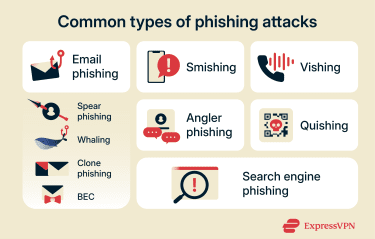
Vishing
Vishing, or voice phishing, uses phone calls to trick people into sharing sensitive information. Attackers might impersonate bank representatives, tech support, government officials, or other trusted authorities.
During a vishing call, the scammer might create urgency by claiming there's a problem with the victim’s account, suspicious activity on their credit card, or an issue with their computer. They'll ask the victim to verify their identity by providing personal information, account numbers, or passwords. Alternatively, attackers might try to convince the victim to grant remote access to their device so they can manipulate the system directly.
These calls can be convincing because the caller might have some basic information about the victim, such as their name or a partial account number, obtained from data breaches or public records. The conversational pressure and real-time nature of phone calls can make it harder for recipients to pause and verify the request.
Sometimes, vishing attacks use caller ID spoofing to make the call appear to come from a legitimate organization. The number displayed on the victim’s phone might match the real company's number, even though the call is actually from a scammer.
Since caller ID can be spoofed, you shouldn’t simply trust a call solely based on the displayed number. Instead, verify the request by hanging up and contacting the organization through an official website or known phone number.
Angler phishing
Angler phishing targets users through social media platforms. Attackers create fake customer service accounts on social media that impersonate legitimate brands, then reach out to users who post complaints or questions about those brands.
The goal is to redirect users to fake support pages or collect information under the appearance of legitimate assistance.
These attacks often appear legitimate because they appear in contexts where victims expect customer support. If someone has just complained about a service issue, a response from what appears to be the company's support team seems natural and helpful. Plus, scammers often use logos, profile pictures, and usernames that closely resemble the real company's official accounts.
Whenever you encounter these suspicious support accounts, you should report them to both the social media platform and the company being impersonated to help limit further abuse.
Search engine phishing
Search engine phishing involves placing malicious websites in search results. Attackers typically use paid ads or search engine optimization (SEO) techniques to elevate fraudulent pages in search results.
When someone clicks on what appears to be a legitimate search result, they land on a phishing website designed to steal their information. The site might look nearly identical to the site it’s impersonating, with similar branding, layout, and design.
These fake sites often target people looking for customer support. Someone might search for their bank's phone number and call a fraudulent number listed on a phony site, connecting them directly to scammers rather than to real support staff. Sometimes, they also target people looking for login pages or software downloads.
Quishing (QR code phishing)
Quishing uses QR codes to direct users to malicious websites or trigger automatic downloads of harmful software. In these scams, attackers may place a fraudulent QR code over a legitimate one, including on objects such as parking meters, restaurant menus, or event posters. Scanning the code can redirect the user to a fake payment page or website designed to collect credit card details.
For example, attackers might place a QR code over a legitimate code on a parking meter, restaurant menu, or event poster. When someone scans it, they're directed to a fake payment page or website that asks for their credit card information.
Because QR codes conceal the destination URL, it’s not always obvious that the link leads to a fraudulent site until after the user interacts with it. In parking-related scams, this can result in victims unknowingly paying the attacker instead of the meter, which may still lead to a legitimate parking ticket being issued.
How phishing impacts individuals and organizations
While a random phishing email in a junk folder may seem insignificant, successful attacks can lead to lasting issues that require time and resources to resolve. The impact depends on what information is exposed, how it’s used, and how quickly the incident is identified and addressed. Here are some common consequences of phishing attacks.
Data theft and account takeovers
When attackers successfully obtain a victim’s login credentials through phishing, they can gain access to the victim's account. This might include email, social media, banking, or any other service where they used the compromised password.
Once inside the account, attackers can access personal information, private messages, and stored payment details. They might use this information for identity theft, sell it on the dark web, or access additional accounts if the victim reused the same password across multiple services.
Account takeovers can also affect the victim’s contacts. Attackers often use compromised email or social media accounts to send more targeted phishing messages to the victim’s friends, family, or colleagues. These messages appear to come from the victim, which makes them more likely to be trusted and opened.
For businesses, stolen employee credentials can provide access to company systems and confidential information. A single compromised account might allow attackers to move laterally across a network and access increasingly sensitive data.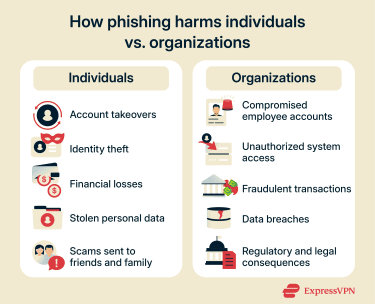
Financial losses and fraud
Phishing often leads to direct financial losses as victims hand over payment details or send money to scammers.
Businesses face even larger-scale financial risks, with phishing serving as the entry point for fraudulent wire transfers or unauthorized access to corporate accounts, potentially resulting in significant financial losses. For instance, a stolen employee login could allow attackers to initiate transactions or modify payment settings inside internal systems.
Long-term repercussions
For businesses, data breaches caused by phishing can damage their reputations and customer trust. Companies might face regulatory penalties, legal action from affected customers, and long-term brand damage that affects future business relationships.
Protecting yourself against phishing attacks
Protecting yourself from phishing relies on awareness, safe habits, and basic security controls. No single step is foolproof, but layered defenses make scams easier to spot and harder to succeed.
To lower your risk, follow proven steps on how to prevent phishing attacks, such as avoiding unexpected links or attachments, never sharing sensitive information over email or messages, and confirming requests through official channels.
A simple way to assess suspicious messages is the SLAM method, which encourages users to slow down, look closely at the sender and content, and verify requests before taking action. Common phishing red flags include suspicious sender addresses, urgent or threatening language, generic greetings, and messages pushing you to act quickly without verification.
Read more: Learn how to detect phishing using both automated and manual methods.
What to do if you fall for a phishing attack
Quick action after realizing you've been targeted by a phishing attack can help minimize damage and protect your accounts and information. The appropriate response depends on what information you shared.
Immediate steps to take
To prevent or limit unauthorized access to your accounts and information, here’s what you should do after falling for a phishing attack:
- Change your passwords immediately: Start with the account you entered credentials into, then update any other accounts that use the same or a similar password. A password manager can help you create strong, unique passwords.
- Log out of other sessions and devices: Use the account’s security settings to sign out of all other logged-in devices and active sessions so attackers lose access immediately.
- Disconnect from the internet if you clicked or downloaded something suspicious: This can prevent malware from spreading or communicating with attacker-controlled servers. Run a full security scan using an updated antivirus before reconnecting.
- Contact your bank or card provider if you shared financial details: They can monitor for fraud, freeze your card if needed, and help prevent unauthorized transactions.
- Turn on multi-factor authentication (MFA): MFA adds an extra layer of protection even if attackers already have your password. Prioritize email, banking, and social media accounts.
- Warn your contacts if your account was compromised: Let people know they may receive phishing messages that appear to come from you, especially on email and social media.
Reporting phishing attempts to authorities and platforms
If you receive a phishing email, you can report it by forwarding it to the Anti-Phishing Working Group (APWG) at reportphishing@apwg.org or, if you’re in the U.S., submitting a report through ReportFraud.ftc.gov. The Federal Trade Commission (FTC) works with law enforcement and other partners to investigate phishing operations and take them down.
If the message was received through a work account, report it to your IT or security team or notify your manager as soon as possible. This allows them to investigate, warn other employees, and block similar messages across the organization.
It also helps to notify the organization being impersonated. Many major companies have dedicated reporting addresses for phishing attempts, and their security teams can use these reports to warn other customers and shut down fake pages or accounts. For example, if an email claims to be from your bank, you can forward it to your bank’s official fraud or security email address.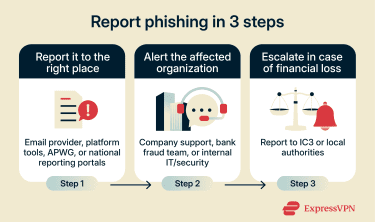
Additionally, use the built-in reporting tools provided by your email service, messaging app, or social media platform. These reports help platforms improve their filters, identify malicious accounts, and block phishing campaigns before they reach more users.
If you lost money or shared sensitive information, consider filing a report with the Internet Crime Complaint Center (IC3). IC3, run by the FBI, collects information on internet-related crimes to support investigations.
For phishing texts (smishing), in many countries, including the U.S., you can also forward the message to 7726. Many major carriers support this reporting number, and it helps them detect and block similar scam texts.
Recovering compromised accounts safely
If attackers gained access to your accounts, recovering them requires careful steps to ensure they're fully secured before you resume normal use. Here’s how to do this.
- Use the service’s official account recovery options: Follow the platform’s built-in recovery process (backup email, phone number, security questions) instead of using unofficial methods, such as responding to recovery links sent in unsolicited emails.
- Check for unauthorized changes in account settings: Look for added backup emails, changed recovery phone numbers, or modified security settings, then remove any changes you didn’t make.
- Review recent activity and connected apps: Watch for suspicious logins from unfamiliar locations, messages you didn’t send, unexpected password reset emails, unauthorized transactions, or third-party apps you don’t recognize. Revoke access where needed.
- Freeze your credit if sensitive personal info was exposed: If highly sensitive identity details, such as a national ID or Social Security number, were exposed, consider placing a fraud alert or credit freeze where available to stop criminals from opening new accounts in your name.
FAQ: Common questions about types of phishing attacks
What are the “4 P’s of phishing”?
The “4 P’s of phishing” is a commonly used awareness framework that describes common elements found in phishing attacks. These are "pretend, problem, pressure, and pay."
First, attackers pretend to be someone the target trusts to make the message feel legitimate. Next, they create a problem, such as a suspicious login or account suspension, to grab the victim’s attention. Then they add pressure by making it urgent, so the recipient doesn’t stop to think. Finally, they push the target to pay, not always with money but also with passwords, card details, or a click on a malicious link or attachment.
What should I do if I fell for a phishing scam?
If you believe you shared information or interacted with a phishing message, start by securing the affected account. Change passwords immediately and update any other accounts that use similar credentials. Monitor account activity for unusual behavior and report the incident to the relevant platform or service provider.
How do phishing attacks affect businesses?
Phishing attacks can disrupt business operations by exposing sensitive data, enabling unauthorized access, or leading to financial losses. Businesses also face costs related to incident response, forensic investigation, customer notification, and implementing additional security measures. The long-term impact can include loss of customer trust and competitive disadvantages.
Take the first step to protect yourself online. Try ExpressVPN risk-free.
Get ExpressVPN