What is data exfiltration? A complete guide



Sensitive data moves through organizations every day. Teams share files, systems sync information, and employees access tools from different locations. Although this makes work easier, it also increases the risk of mishandling sensitive data or sharing it with an unauthorized person.
Data exfiltration describes what happens when data is moved out of a system, network, or cloud environment without approval. In malicious cases, attackers may attempt to move data in ways that blend into normal business activity.
This guide explains what data exfiltration is, how it happens, the common methods attackers use, and how organizations can detect, prevent, and respond to it.
What is data exfiltration in cybersecurity?
Data exfiltration means moving data out of a system or network without permission. It’s also commonly described as data extrusion, data exportation, unauthorized data transfer, or unauthorized data removal. It usually involves copying files, exporting records, or sending information to an unauthorized external destination.
Although the term is often associated with cyberattacks, it’s also used to describe unintentional data transfers and exposure due to misconfigurations.
The impact of losing this data can be high for businesses. Organizations can face financial losses, disruption to day-to-day operations, long-term reputational damage, and even regulatory penalties.
Data exfiltration vs. data breach
Data exfiltration is the act of moving data out of a system or network without permission, so it describes activity rather than an outcome. A data breach refers to the incident itself that usually occurs when sensitive information is leaked, disclosed, or confirmed as lost.
Data infiltration vs. exfiltration
Data infiltration refers to unauthorized access into a system or network, such as exploiting vulnerabilities, delivering malware, or using stolen credentials to gain entry. However, data exfiltration focuses on the information that leaves the environment after an attacker has gained access.
Although the two are closely linked, they serve different purposes in an attack. Infiltration provides the entry an attacker needs, while exfiltration removes the data attackers want to steal.
Anatomy of a data exfiltration attack
In malicious scenarios, data exfiltration often follows a sequence of stages. Attackers typically begin by gathering information and gaining access before locating, preparing, and transferring valuable data. While the exact techniques vary depending on the environment and the attacker’s goals, the process generally moves from initial access to data removal and attempts to avoid detection.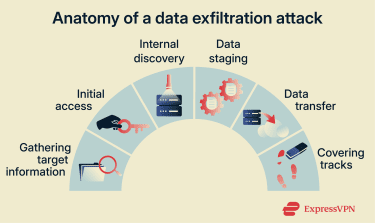
Gathering target information
Before data exfiltration begins, attackers first gather information about the environment they want to target. This step, also known as reconnaissance, helps attackers understand how systems are structured and where weaknesses are most likely to exist.
Attackers examine network layouts, exposed services, software versions, and open ports to identify easy paths in. Misconfigurations often provide those paths, such as publicly accessible cloud storage, overly permissive databases, or outdated security settings.
Cybercriminals also pay attention to people. Details like employee names, job roles, email formats, and third-party relationships give them useful context. They can then use this information to support phishing attempts or identify accounts with high levels of access to systems.
Initial access
Initial access is the point where attackers first break into an environment. Many attackers use social engineering, which relies on manipulation rather than technical exploits. Instead of breaking into systems directly, attackers persuade people to hand over access or data themselves.
One common form of social engineering is phishing, which tricks you into revealing login details by directing you to a malicious website or a fake login form designed to look legitimate. Attackers can then attempt to use this information to access systems and extract data.
Attackers may also target people with information-stealing malware that captures login details or session data. Exposed services, vulnerable applications, or weak authentication controls can then give them broader access to systems and data.
Internal discovery
After gaining access, attackers may move through internal systems to locate sensitive and valuable data spread across file shares, databases, cloud storage, backup systems, or internal applications. This can include:
- Personal data: Customer or employee information, email addresses, birthdates, and identity details.
- Login credentials and authentication details: Usernames, passwords, API keys, and session tokens.
- Intellectual property: Source code, internal designs, product plans, and proprietary research.
- Financial records and payment information: Credit card numbers, banking details, invoices, payroll data, and transaction records.
Data staging
After identifying valuable data, attackers prepare it for removal. This stage involves gathering information from different systems and packaging it in a way that’s easier to move, so it goes unnoticed.
Attackers often compress files into archives, encode data, or encrypt it to reduce file size and hide its contents. They may store this staged data in a temporary internal location, such as a shared folder or compromised system, before transferring it elsewhere.
Data transfer
Data transfer is the point where attackers move data out of the environment. A range of techniques can be used to exfiltrate data, depending on the environment, available access, and how closely activity is monitored. These include:
Automated processing
Attackers can use scripts, scheduled tasks, or malware to transfer files or records without direct human interaction, which helps reduce errors and speed up exfiltration.
Dividing data into smaller transfers
Rather than sending large files all at once, attackers may split data into smaller sizes. These transfers are easier to hide and less likely to trigger size-based alerts.
Exfiltration over common network protocols
Data can leave the environment over protocols already in use, such as:
- HTTP/S
- Domain Name System (DNS)
- Simple Mail Transfer Protocol (SMTP)
- File Transfer Protocol (FTP)
- Internet Control Message Protocol (ICMP)
- Network Time Protocol (NTP)
- Server Message Block (SMB)
Since these protocols support everyday business activity, the traffic often looks normal at a glance.
Exfiltration over command-and-control (C2) channels
Malware may send stolen data back through an existing C2 channel. Attackers use these channels both to receive data and to issue instructions, which helps centralize control and avoid creating new outbound connections.
Exfiltration over alternate network mediums
In some cases, exfiltrated data moves over different network paths, such as Wi-Fi, Bluetooth, or other available connections. These methods can bypass standard network monitoring if controls focus only on primary networks.
Exfiltration over physical media
Someone with physical access may copy data to removable storage, such as a USB drive or external hard disk. This method relies on legitimate access and physical presence rather than network activity.
Exfiltration over web services
Attackers often use web services to move data out. This includes cloud storage platforms, code repositories accessed via APIs, text storage sites, or webhook endpoints. These services integrate easily with existing systems and handle large volumes of data every day.
Scheduled data transfers
Data transfers may run at specific times or intervals, such as overnight or during low-activity periods. Scheduling helps activity blend into background processes and reduces the chance of notice.
Transfers between cloud accounts
In cloud storage environments, attackers may transfer data to another account they control on the same service. Since the data never leaves the platform itself, this movement can be especially hard to spot.
Covering tracks
Attackers often take steps to hide what they’ve done. The goal is to delay detection, limit investigation, and maintain access if possible. They may delete or alter logs, disable security alerts, or remove evidence of the tools and accounts they used. In some cases, they also change timestamps, clear command histories, or disable monitoring features to make activity harder to trace.
If an attacker expects they may be discovered, they may also shut down compromised accounts or infrastructure to avoid leaving obvious indicators behind. This can make it harder to understand what happened and assess the full scope of the exfiltration.
Unintentional data exfiltration
Not all data exfiltration is the result of a deliberate attack. In many cases, data leaves an organization’s environment due to configuration errors, excessive permissions, or policy violations rather than external intrusion.
For example, a cloud storage bucket may be left publicly accessible, allowing anyone with the link to download its contents. An employee might upload sensitive files to a personal account to work remotely. Over-permissioned API tokens or third-party integrations may also allow more data to be accessed or transferred than intended.
In these scenarios, there may be no reconnaissance, lateral movement, or attempts to hide activity. However, the outcome is similar: data moves outside approved boundaries without authorization.
Because unintentional exfiltration often uses legitimate systems and credentials, it can be just as difficult to detect as malicious activity.
Signs of data exfiltration
Data exfiltration signs are often subtle and depend on context. A single indicator doesn’t always point to a problem, but multiple signs appearing together could be suspicious. For example, a large file transfer on its own may be routine, but the same transfer combined with unusual login activity or unexpected permission changes could be concerning.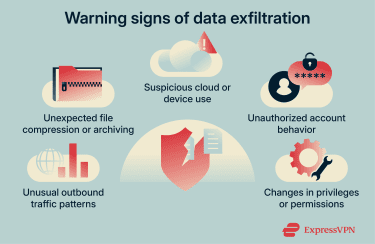
Here are some signs to look out for:
- Unusual outbound traffic patterns: Sudden increases in data leaving the environment, connections to unknown IP addresses or domains, or outbound activity happening outside normal working hours.
- Unexpected file compression or archiving: Large ZIP files, encrypted archives, or compressing batches of files when it isn’t part of normal work.
- Suspicious cloud or device use: Files syncing to unapproved cloud services, uploads to personal accounts, or access from new or unmanaged devices that don’t normally connect to the environment.
- Unauthorized account behavior: Accounts accessing systems or data they don’t usually work with, logging in from unusual locations, or downloading large amounts of data without a clear reason.
- Changes in privileges or permissions: New access rights, broader file access, or temporary admin privileges granted without approval or a clear business need.
How to prevent data exfiltration
Preventing data exfiltration takes more than a single control. Data moves across systems, users, and cloud services, so effective prevention focuses on limiting unnecessary access and reducing opportunities for sensitive information to leave your environment unnoticed.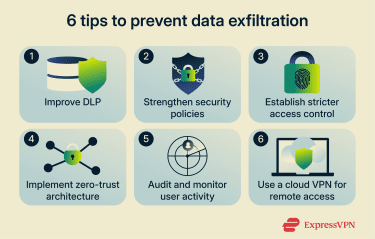
Improve data loss prevention (DLP) methods
DLP focuses on understanding where sensitive data lives and controlling how it moves. Rather than relying on a single block-or-allow rule, DLP uses visibility and policy to reduce the risk of data leaving your environment unintentionally or without approval. DLP controls can apply at the network, endpoint, or cloud level.
Common DLP practices include:
- Identifying and classifying sensitive data: Map where sensitive information exists across systems, endpoints, and cloud services so protections apply consistently.
- Monitoring how data moves: Track how sensitive data is shared across email, cloud platforms, and endpoints, including large exports or external transfers.
- Enforcing data handling policies: Apply rules to restrict unauthorized uploads, downloads, sharing, or copying sensitive data outside approved workflows, for example, syncing with a personal cloud.
- Limit both accidental and intentional loss: Use DLP controls to reduce everyday mistakes, such as misdirected emails, as well as deliberate attempts to remove data.
Strengthen security policies
Clear cybersecurity policies help limit how sensitive data moves through your organization. Done right, they set expectations for everyday work and reduce the chance that risky behavior goes unnoticed or becomes routine.
Here are some areas to cover in your policies:
- Permissions and roles: Define who can access sensitive data, what they can do with it, and where it can be stored or shared, both internally and externally.
- Data retention and deletion: Set clear rules for how long you keep data, where it’s allowed to live, and when it must be deleted to meet legal or compliance requirements.
- Use of cloud services and external tools: Specify which cloud services, apps, and platforms are approved, and what restrictions apply to sharing or syncing data outside the organization.
- Removable media and physical transfers: Clarify whether USB drives or other removable storage are allowed and under what conditions data can be copied or moved.
- Consequences for policy violations: Explain what happens when policies aren’t followed, so expectations are clear and enforceable.
- Training and awareness: Require regular training to help staff understand the rules, why they exist, and how they apply to daily work.
Establish stricter access control
Access controls reduce the risk of data exfiltration by limiting who can reach sensitive systems and information in the first place. Ultimately, the goal is to remove unnecessary access while still supporting day-to-day work. Here are some strategies:
- Limit access by role: Use role-based access control (RBAC), which assigns permissions based on job role, to avoid giving people broader access than they need.
- Require multi-factor authentication (MFA): Enforce MFA for critical systems and accounts to reduce the impact of stolen or reused credentials. This adds an extra step beyond a password, like a one-time code, to make it harder for attackers to log in with stolen credentials.
- Use adaptive authentication: Apply risk-based checks that adjust security based on context. For example, you might require extra verification when someone signs in from a new device, an unfamiliar location, or at an unusual time.
- Centralize identity management: Manage access through single sign-on (SSO), which lets you access multiple systems with one set of credentials, so permissions are easier to manage, review, and revoke from a single place.
- Monitor endpoints: Support access controls with endpoint detection and response (EDR) tools to track endpoint activity and identify suspicious behavior.
Implement zero-trust architecture
Zero-trust architecture reduces data exfiltration risk by removing assumptions about trust inside the network. Instead of treating internal access as safe by default, it requires continuous verification, even after a user or system is already inside the environment.
Common principles include:
- Verify every access request: Check users, devices, and connections each time access is requested, regardless of location or network.
- Apply least-privilege access: Enforce the principle of least privilege (PoLP), which means giving people and systems access only to the data and tools they need for their specific role, and nothing more.
- Assess context continuously: Evaluate identity, device health, and behavior throughout a session, not just at login.
- Limit lateral movement: Restrict how far attackers or compromised accounts can move inside the environment if access is gained. You can do this by segmenting networks, limiting access between systems, and requiring reverification when someone tries to reach sensitive resources.
Audit and monitor user activity
Auditing user activity helps you maintain visibility into how sensitive data is accessed and used over time. The goal isn’t to detect active attacks, but to create accountability and reduce blind spots that allow risky behavior to continue unnoticed.
Here are some practices to consider:
- Log access to sensitive data: Keep records of who accesses critical files, systems, and databases so activity can be reviewed and traced if issues arise.
- Review usage patterns over time: Establish a baseline for normal access and data use by role, making it easier to spot changes that warrant closer attention.
- Track outbound data flows at a high level: Monitor where data is sent outside the environment by reviewing network and cloud activity logs, focusing on destinations, volume, and timing rather than inspecting every individual file transfer.
- Correlate activity across systems: Bring together access logs from endpoints, identity systems, and networks to support audits, reviews, and investigations, so you have a complete picture instead of isolated events.
Use a cloud VPN for secure remote access
A cloud virtual private network (VPN) helps protect data when employees access systems remotely. It’s a type of corporate VPN that focuses on securing data in transit, especially when work happens outside the office or on networks you don’t fully control. This can help with the following:
- Encrypt remote connections: A cloud VPN encrypts traffic between remote employees and corporate systems, which helps prevent interception as data travels over the internet.
- Reduce risk on untrusted networks: When employees use public or shared Wi-Fi, a VPN helps limit exposure to network-level monitoring or interference.
- Apply consistent access rules: Centralized VPN access makes it easier to enforce the same security policies for remote workers, regardless of where they connect from.
However, a corporate VPN protects the connection, not the data itself, once access is granted. It doesn’t prevent insider misuse, stop authorized users from exporting data, or block data exfiltration that happens through approved tools and services. It’s important to use cloud VPNs alongside other measures, such as access controls and data monitoring.
Tools and technologies for data exfiltration detection
Most detection approaches look for deviations from normal activity, including changes in how data moves, how accounts behave, or where traffic goes. To effectively help secure a system, organizations often combine these tools:
Intrusion detection systems (IDS)
An IDS monitors network traffic for signs of suspicious or malicious activity. It inspects what moves across the network and raises alerts when it detects behavior linked to known or suspected threats.
IDS tools typically rely on signature-based detection, which looks for traffic patterns that match known attack techniques. It also uses protocol- or rule-based analysis, which flags unusual use of network protocols, such as repeated outbound connections, unexpected protocol usage, or data transfers that look like previously identified exfiltration methods.
However, IDS has clear limits. It’s less effective when traffic is encrypted since the tool can’t see the data to inspect it. If attackers use new techniques that don’t match existing signatures, this can also make suspicious traffic difficult to detect.
Security information and event management (SIEM)
SIEM brings activity data together from across your environment. It centralizes logs from endpoints, networks, cloud services, and identity systems so you can view and analyze events in one place.
On its own, SIEM doesn’t detect data exfiltration. Instead, it makes it possible to link related activity across systems, such as access to data, changes in behavior, and outbound network traffic. Viewed individually, these events may appear normal. However, when correlated, they can indicate that data is being removed.
SIEM platforms also support investigation and response. They help teams reconstruct timelines, trigger alerts, and coordinate follow-up actions when they’ve identified potential data exfiltration.
Network detection and response (NDR)
NDR tools focus on monitoring network traffic for unusual behavior. Rather than relying only on known signatures, NDR looks for deviations in how data moves across the network. For example, unusually large outbound transfers, connections to unfamiliar external destinations, or steady data movement outside normal working hours.
This makes NDR useful for spotting gradual or less obvious data movement patterns. It’s especially valuable when exfiltration happens through automated processes rather than direct user actions.
User and entity behavior analytics (UEBA)
UEBA is particularly helpful for detecting insider-driven exfiltration or misuse of valid credentials, where activity may look legitimate at first glance.
UEBA tools analyze how people, devices, and systems normally behave, then flag activity that falls outside those patterns. This can include unusual access times, sudden increases in downloads, or data access that doesn’t match someone’s typical role.
Managed detection and response (MDR)
MDR combines technology with human analysis. MDR providers monitor activity across endpoints, networks, and cloud environments, then investigate alerts on your behalf.
For data exfiltration, MDR can help validate suspicious signals, reduce false positives, and respond more quickly when internal teams lack the time or resources to investigate every alert.
Endpoint detection and response (EDR)
EDR is useful for detecting malware-based data theft, suspicious file access, or tools that attempt to package and transfer data from endpoints. EDR tools monitor activity on individual devices such as laptops, servers, and virtual machines. They track processes, file activity, and connections that could indicate data being collected or staged for exfiltration.
What to do if you detect data exfiltration
If you suspect data exfiltration, it’s important to act quickly and methodically to help limit further exposure. The appropriate response depends on the size and scope of the incident, but structured investigation and containment are key. Here are some steps to consider: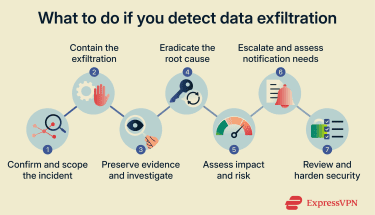
Confirm and scope the incident
- Validate the alert to rule out a false positive.
- Identify which systems, accounts, or workloads are involved, what data may have been accessed or transferred, and whether the activity is ongoing or historical.
Contain the exfiltration
- Isolate affected endpoints, workloads, or cloud resources.
- Suspend or revoke compromised credentials and access tokens.
- Block suspicious outbound connections or destinations where possible.
- Avoid actions that could overwrite logs or destroy evidence.
Preserve evidence and investigate
- Retain relevant logs, network traffic data, and audit trails.
- Capture system snapshots where appropriate.
- Build a timeline of events.
- Identify the likely exfiltration path, such as a cloud service, API, email, or tunnel.
Eradicate the root cause
- Remove malware, backdoors, or unauthorized integrations.
- Patch vulnerabilities or misconfigurations.
- Reset credentials.
- Review access permissions.
- Confirm the attacker no longer has persistence.
Assess impact and risk
- Identify the types of data involved, such as personal data, credentials, or intellectual property.
- Evaluate the potential business, operational, and compliance impact.
- Check whether additional systems may be affected.
Escalate and assess notification needs
- Notify security leadership and bring in legal and compliance teams early.
- Consider whether you have regulatory, contractual, or customer notification requirements.
- Engage regulators or law enforcement where appropriate.
Review and harden security
- Address the gaps that allowed the exfiltration.
- Improve monitoring and alerting.
- Update policies and access controls.
- Refine incident response plans.
- Feed lessons learned into training or tabletop exercises.
FAQ: Common questions about data exfiltration
What is the meaning of data exfiltration?
Data exfiltration means moving data out of a system, network, or cloud environment without permission. This can involve copying files, exporting records, or transferring information to an unauthorized external destination.
What causes data exfiltration?
Data exfiltration can be caused by many different security vulnerabilities, including compromised accounts, malware, insider misuse, phishing attacks, misconfigured systems, or overly broad access permissions.
What is the difference between data exfiltration and data theft?
Data exfiltration means moving data out of an environment. Data theft is the outcome, where data is stolen, exposed, or misused. Theft can also sometimes occur without deliberate exfiltration, for example, if your data is exposed through misconfigured systems without the involvement of any malicious actors.
How can organizations prevent data exfiltration?
To prevent data exfiltration, you can reduce the risk by limiting access to sensitive data, applying strong authentication, monitoring activity, and setting clear policies for data handling and sharing.
What are the impacts of data exfiltration on businesses?
Data exfiltration can lead to financial losses, regulatory penalties, operational disruption, reputational damage, and loss of customer trust. The impact often depends on the type and volume of data involved and how long the activity goes undetected.
Does a VPN help protect against data exfiltration?
A corporate VPN can help protect data in transit, especially for people working remotely on untrusted networks. However, it doesn’t prevent insider misuse, stop authorized users from exporting data, or detect exfiltration on its own. Organizations typically use VPNs alongside other security controls, such as access management, intrusion prevention systems (IPS), and behavioral analysis.
Take the first step to protect yourself online. Try ExpressVPN risk-free.
Get ExpressVPN