 Celebrate with up to 80% off
What is DNS over HTTPS (DoH) and how does it work?



DNS over HTTPS (DoH) sends Domain Name System (DNS) queries using HTTPS, the secure web protocol also used for encrypted website connections. That helps protect DNS traffic from being read or altered by parties between a device and the DNS resolver.
What is DNS over HTTPS (DoH)?
DoH performs DNS resolution (translating a domain name into an IP address) over an encrypted HTTPS connection, which helps protect queries in transit.
By contrast, classic DNS commonly sends queries in plaintext over port 53, making them visible along the network path.
DoH doesn't change how the rest of your web traffic is encrypted or routed, only the DNS lookup. As a result, it helps hide DNS queries from an internet service provider (ISP) and other on-path observers, but it doesn't hide all browsing metadata, and the DNS resolver provider can still see the queries it receives.
How does DNS over HTTPS work?
At a high level, DoH wraps DNS lookups inside an encrypted HTTPS connection between your device and a DoH resolver. The process works roughly like this:
- Handshake: Your device opens a connection to a DoH endpoint and performs a Transport Layer Security (TLS) handshake to establish an encrypted connection.
- Request: Your browser or operating system sends an HTTP request that carries the DNS query, such as “example.com,” inside that encrypted connection.
- Resolution: The DoH resolver receives the request and resolves it according to normal DNS resolution rules.
- Response: The resolver sends a DNS response back over the encrypted HTTPS connection, often using the application/dns-message media type. If the lookup succeeds, that response may include the IP address for the domain.
- Connection: Your device uses the returned result, such as the IP address, to connect to the website or service.
Because DoH uses HTTPS and HTTP semantics, a client can often reuse one connection for multiple DNS requests. Many implementations support HTTP/2, and some also support HTTP/3.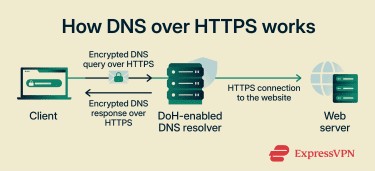
How DoH prevents DNS interception
By encrypting DNS data in transit between a device and a DoH resolver, DoH reduces the risk of DNS interception. On-path observers generally cannot read the queried domain names from the DoH exchange itself, and it becomes much harder for intermediaries to modify responses or apply DNS-based filtering by tampering with traffic in transit. This helps protect DNS responses from being altered along the network path.
Observers can still see that a connection to a DNS resolver is being made, but not the query contents. In short, because DoH uses standard HTTPS, this traffic is less easily distinguishable from other encrypted web traffic.
DNS over HTTPS vs. other DNS protocols
DoH is part of a broader set of standards that protect different aspects of DNS resolution.
- DNS over TLS (DoT): Encrypts DNS traffic over TLS, typically using a dedicated port, which makes it easier to identify separately from regular web traffic.
- DNS over QUIC (DoQ): Provides similar privacy benefits to DoT but uses the Quick UDP Internet Connections (QUIC) protocol, which can reduce connection setup latency and handle network changes more efficiently.
- DNS Security Extensions (DNSSEC): Uses digital signatures to verify that DNS data hasn’t been altered. It helps provide authenticity and integrity, but it doesn't encrypt DNS data for privacy.
None of these methods changes what the destination website can see; they affect the DNS resolution step. These protocols also often work together.
| Feature | DoH | DoT | DoQ | DNSSEC |
| Encryption | Yes | Yes | Yes | No |
| Transport port | HTTPS on 443 | TLS on 853/Transmission Control Protocol (TCP) | QUIC on 853/User Datagram Protocol (UDP) | Standard DNS transport |
| Primary goal | Privacy | Privacy | Privacy and performance | Integrity and authenticity |
DNS over HTTPS vs. DNS over TLS in practice
While DoH and DoT both use TLS to protect DNS traffic, they carry that traffic differently.
| Feature | DoH | DoT |
| Encryption method | Over HTTPS | Over TLS |
| Typical transport | HTTPS web traffic, typically on port 443 | Dedicated DNS port, typically on port 853 |
| Traffic visibility | Often blends in with HTTPS traffic | Easier to identify as DNS traffic |
| Common deployment | Browsers and some operating systems | Operating systems and network-level resolvers |
Both methods encrypt DNS queries, so the choice often comes down to deployment preferences and network policy. For example, Android supports DoT natively at the system level, while browsers like Firefox commonly use DoH at the application level.
Benefits of using DNS over HTTPS
DoH changes who can observe and influence DNS traffic. This leads to several privacy and security benefits:
- Hides DNS lookups: Makes it harder for local networks, such as public Wi-Fi providers, to read the domain names in DNS queries.
- Limits ISP visibility: Access providers generally can’t directly read DNS queries sent over DoH, instead leaving that visibility to the chosen DNS resolver.
- Helps prevent DNS hijacking and tampering: Makes it much harder to spoof DNS responses or reroute traffic by altering DNS data in transit.
- Reduces accidental exposure: Lowers the risk of DNS queries being exposed on misconfigured or closely monitored networks.
Limitations and concerns of DNS over HTTPS
While DoH improves privacy on the network path, it has important limitations:
- Doesn’t hide IP information: Websites can still see the source IP address they connect to, and network observers may still infer visited services from IP connections and other metadata.
- Resolver visibility: DNS queries remain visible to the resolver handling them.
- Doesn’t stop tracking methods: Cookies, trackers, and browser fingerprinting still apply. DoH secures the DNS lookup, not the rest of web tracking or all subsequent traffic.
- May be blocked by networks: Network administrators can restrict access to known public resolvers or disable DoH to preserve local DNS policies.
- May not cover all traffic: Browser-based DoH may not protect system-wide DNS traffic from background apps or operating system services.
- May fall back to standard DNS: Some clients or configurations may revert to unencrypted DNS if DoH fails, though this depends on the implementation and settings
- Doesn't hide domain names during TLS setup: The requested hostname may still be exposed through Server Name Indication (SNI) during connection setup, unless protections such as Encrypted Client Hello (ECH) are used.
- Doesn't block malicious actions: Encrypted DNS doesn't, by itself, block malware or stop phishing.
DoH also has context-specific limitations depending on the environment:
- Managed networks: Often blocked or disabled to enforce DNS-based filtering or controls commonly used in corporate or school networks.
- Internal resources: Can interfere with access to private servers or intranets that rely on internal or split-horizon DNS.
- Troubleshooting: Can make some DNS troubleshooting harder because DNS contents are less visible to network tools and administrators.
- Inconsistent coverage: May result in a mix of protected and unprotected DNS traffic when different applications handle DNS differently.
Also read: A guide to protecting your network from DNS threats.
How to enable DNS over HTTPS
You can enable DoH at the browser or operating system level. This determines whether only browser traffic or system-wide DNS traffic uses DoH.
At the browser level, most modern browsers support DoH, often with an automatic configuration option of choosing a custom provider, such as Cloudflare, Google Public DNS, or Quad9.
Enabling DNS over HTTPS in Google Chrome
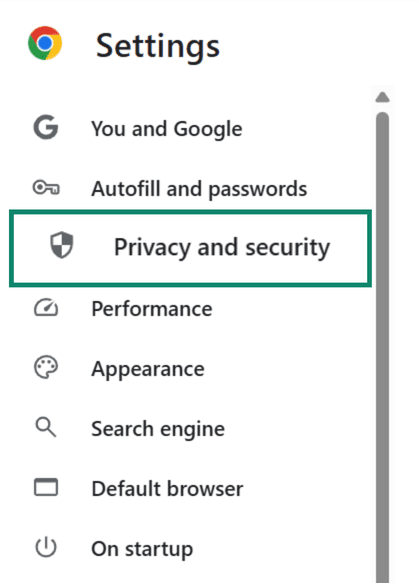
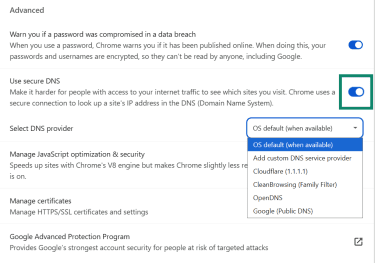
- In Chrome, open Settings, then go to Privacy and security.
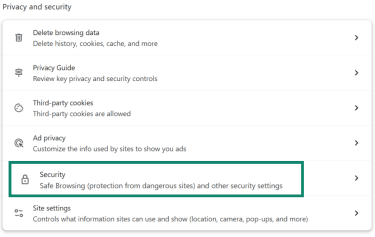
- Select Security.
- Under Advanced, enable Use secure DNS and choose your current provider or select a custom provider.
Turning on DNS over HTTPS in Mozilla Firefox
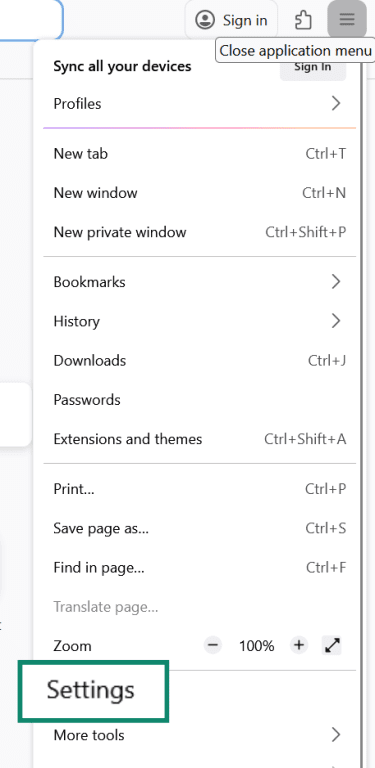
- In Firefox, click the menu button and open Settings.
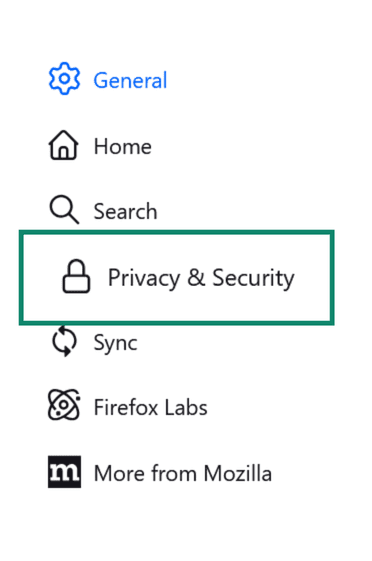
- Go to Privacy & Security.
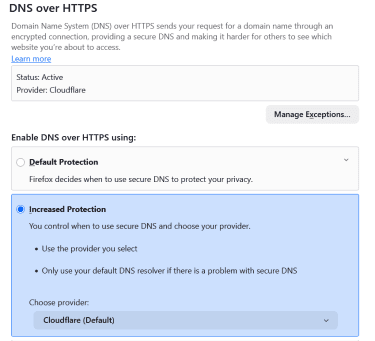
- Scroll to DNS over HTTPS. You can choose Default Protection, Increased Protection, or Max Protection and select a resolver or use the default provider. The DoH status will now turn to Active and show your chosen resolver.
Using DNS over HTTPS in Microsoft Edge
- In Edge, open Settings and select Privacy, search, and services, then Security.
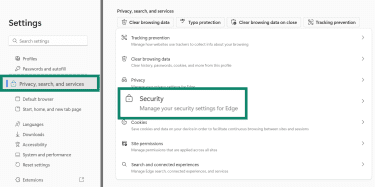
- Scroll down and turn on Use secure DNS to specify how websites are looked up, then choose your current provider or pick another.
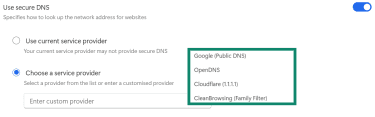
Note that browser-level DoH covers DNS queries generated by the browser itself. Other applications may use system DNS settings instead.
Enabling DNS over HTTPS on Windows
- Go to Settings and select Network & internet.
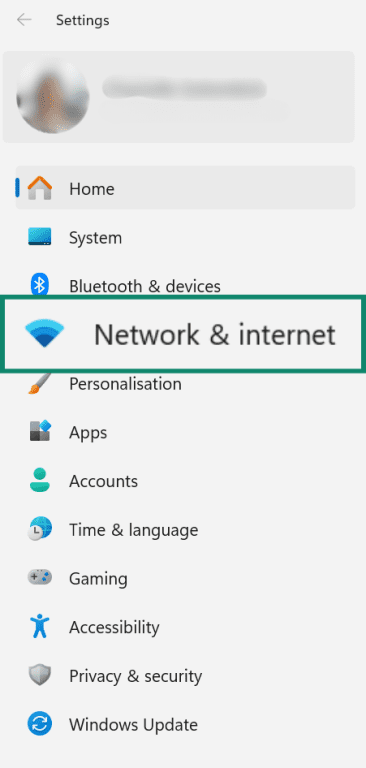
- Open your active connection, such as Wi-Fi or Ethernet, and select Properties for that network or interface.

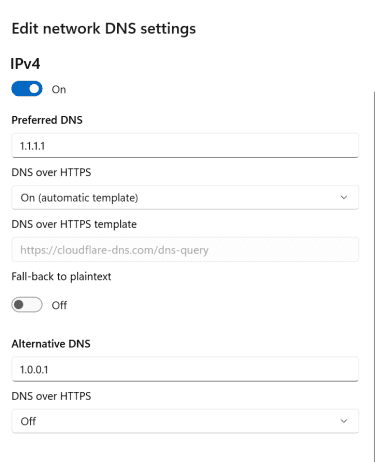
- Scroll down to DNS server assignment, click Edit, and change the settings to manual.
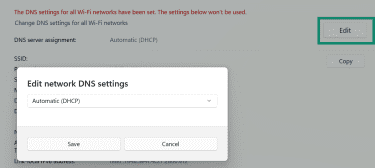
- Enable IPv4, enter the DNS server details, choose the available DNS encryption option for that server, then click Save. On Windows, the DoH encryption option appears when the DNS server is one of the supported known DoH servers.
Enabling DNS over HTTPS on macOS
macOS supports encrypted DNS, but Apple’s documentation describes deployment more clearly through configuration profiles, such as .mobileconfig files, and managed DNS settings.
Standard DNS server entries can still be changed in System Settings > Network, but that isn't the same as a simple built-in DoH switch like Windows provides.
Using DNS over HTTPS on mobile devices
Mobile operating systems may support encrypted DNS through system settings or managed profiles.
- On Android, the Private DNS setting uses DoT rather than DoH.
- On iOS, encrypted DNS support includes DoH and DoT, but system-wide use is commonly configured through apps, managed settings, or downloaded configuration profiles.
Behavior varies by version and vendor, so results may differ across devices.
How to check if DNS over HTTPS is working
You can test DNS resolution behavior with tools that report how DNS queries are sent.
- Use a resolver test page: Cloudflare’s 1.1.1.1/help page explicitly reports whether “Using DNS over HTTPS (DoH)” is enabled. Google Public DNS’s dns.google page can help with DNS lookups and troubleshooting, but it's not the same kind of simple DoH status dashboard.
- Use browser-specific internal pages: Some browsers provide DoH settings, diagnostics, or internal networking pages. For example, Firefox provides detailed guidance on DoH settings and protection-level information.
- Perform a DNS leak test: Third-party sites can show you which DNS servers are responding to requests. If you see only the servers of your chosen DoH provider, your DNS queries are likely being resolved by that provider. However, this doesn't confirm the mode of transport on its own.
- Monitor port 53: Advanced Windows users can use the pktmon command to inspect traffic on port 53. If DoH is working for browser traffic, there may be little or no traditional DNS traffic on port 53 while browsing, though other apps or fallback behavior may still generate some DNS traffic.
A failed test can indicate configuration issues, fallback behavior, resolver mismatches, or network restrictions that push traffic back to standard DNS.
FAQ
How does DNS over HTTPS improve privacy?
Is DNS over HTTPS faster or slower?
Can internet service providers (ISPs) or network admins block DoH?
Should DNS over HTTPS be enabled by default?
What's the difference between 1.1.1.1 and 9.9.9.9 DNS?