What is pharming? Understanding cybersecurity threats


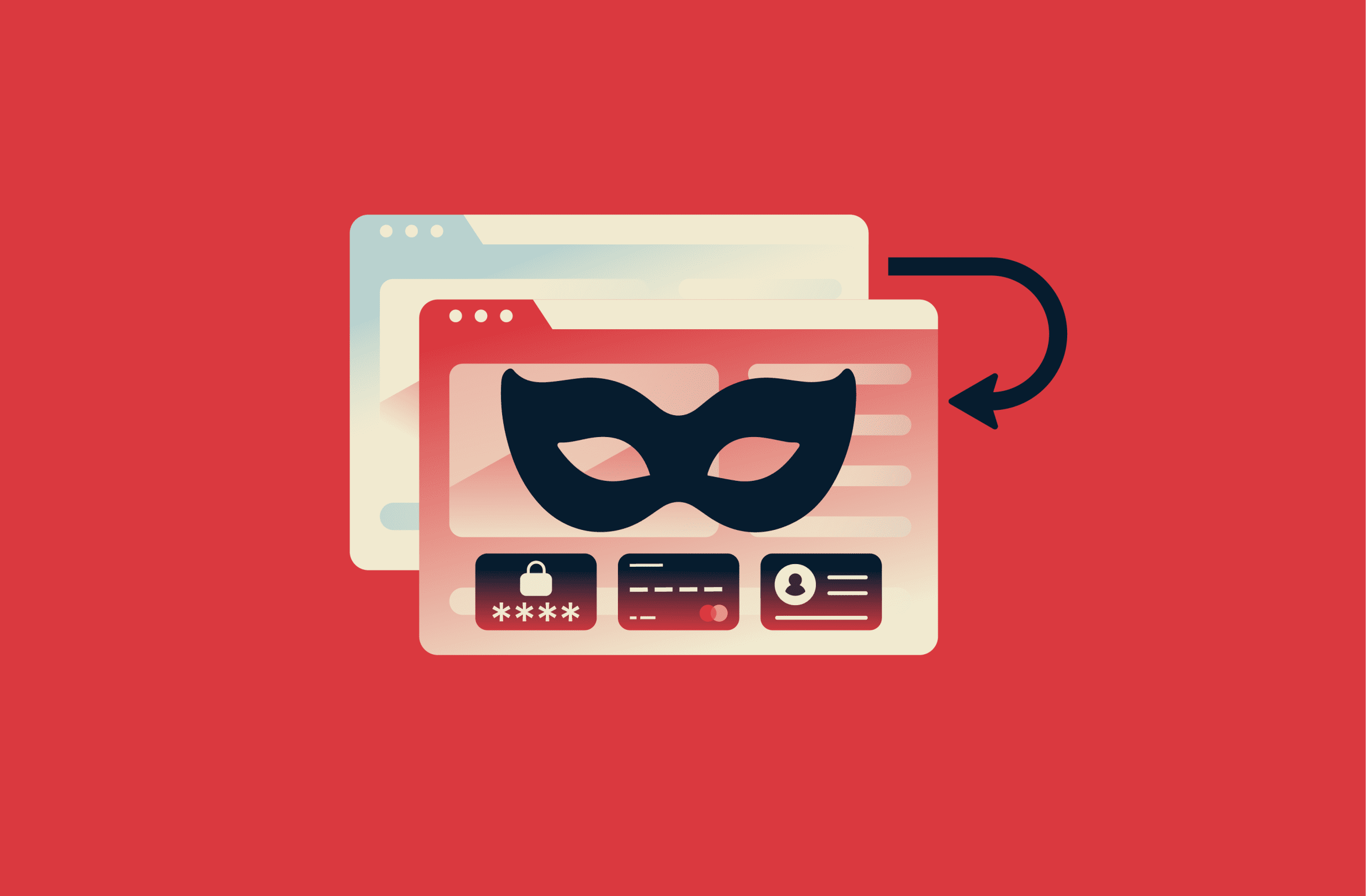
Pharming is a cybersecurity threat that manipulates how web addresses are resolved, causing users to be directed to malicious websites even when they enter legitimate URLs. These malicious sites often mimic genuine ones, making the attack difficult to detect.
Attackers use pharming to steal sensitive information. A user may type in a web address, thinking they’re logging into their bank, email, or another trusted service, but they're silently routed to a malicious site designed to capture passwords, credit card numbers, and other sensitive data.
This article explains how pharming works, the ways attackers carry it out, and the practical steps you can take to spot and prevent these threats.
How a pharming attack works
Pharming attacks exploit the way the internet directs users to websites. Every device connected to the internet, including the servers that host websites, has a unique IP address. Networks use these numerical addresses to determine where to send and receive data.
Because IP addresses are long strings of numbers and can be difficult to remember, websites use user-friendly domain names like example.com for easy reference. When you type a domain name into your browser, it’s automatically translated into the correct IP address through the Domain Name System (DNS), so your device can connect to the intended website.
In a pharming attack, cybercriminals interfere with this translation process, redirecting traffic to malicious websites.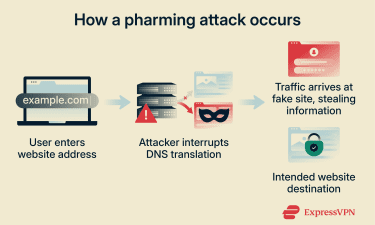
Types of pharming attacks
Pharming attacks take different forms. Knowing the different types helps users understand how these attacks work and how to defend against them.
DNS poisoning
When a user enters a website name into a browser, DNS servers and devices temporarily store DNS records in a cache to speed up future lookups. This DNS cache acts like a short-term memory for domain-to-IP address mappings, so the system doesn’t have to query authoritative DNS servers every time a user revisits the same website. Cached records are kept for a defined period (called the time to live, or TTL), after which they expire and must be refreshed.
In a DNS poisoning attack, attackers insert false records into a DNS server’s cache. As a result, when users attempt to visit a legitimate website, the compromised DNS server returns a fraudulent address controlled by the attacker. Users are redirected to a malicious website, often without noticing anything unusual.
Domain hijacking
Domains are managed through domain registrars, companies accredited to register and manage domain names on behalf of owners. Registrars provide control panels where domain owners can update DNS records, transfer domains, enable security features, and manage renewals.
Domain hijacking allows a cybercriminal to gain unauthorized access to an organization’s domain registrar account or DNS configuration and alter domain settings to redirect traffic. This is typically done in one of the following two ways:
- Domain slamming: Attackers submit domain transfer requests to move a domain from one registrar to another. This process abuses the registrar-to-registrar transfer system, which is meant to allow legitimate domain owners to switch providers. Once the transfer succeeds, the attacker controls the account and changes routing settings to point traffic to a malicious server.
- Domain expiration: Domain names require regular renewal. Registrars manage renewal periods and grace windows after a domain expires. If the owner fails to renew the domain on time, ownership can transfer to someone else. An attacker can claim the expired domain and redirect traffic until the original owner regains control through legal or administrative steps.
Malware-based and host file pharming
Malware-based pharming targets individual computers or devices. Cybercriminals deliver malicious software, such as a virus or Trojan, that changes DNS settings or the local host file on the victim’s system or router. The host file controls how domain names are mapped to IP addresses, so manipulating it allows attackers to redirect legitimate website addresses to fraudulent ones.
Router-based pharming
Some pharming attacks are router-based rather than device-based. In these cases, attackers use techniques such as brute-force attacks to gain access to a router with a weak password and modify its DNS settings. This is often successful because many routers are left with their default usernames and passwords, making them easy targets.
Real-world examples of pharming attacks
Around the world, attackers have used clever techniques to redirect users to fake websites, steal personal data, and commit fraud. These real-world cases show how widespread and damaging pharming can be.
Operation Ghost Click
Operation Ghost Click was a multinational law enforcement operation led by the FBI that targeted a large-scale cybercrime ring behind the “DNSChanger” malware. Beginning around 2007, the group infected millions of computers worldwide with malicious software that altered victims’ DNS settings.
By hijacking DNS settings, the attackers were able to secretly redirect users to attacker-controlled servers and malicious or fraudulent websites, even when victims typed legitimate web addresses into their browsers. This allowed the group to manipulate online advertising traffic, display fake ads, and redirect users to sites that generated revenue for the criminals. In some cases, the malware also exposed victims to additional malware by disabling their antivirus software.
At its peak, the operation is estimated to have affected roughly 4 million devices across more than 100 countries. According to the FBI, the criminal network generated at least $14 million in illegal revenue through advertising fraud and related schemes. The infrastructure behind the operation relied on a global network of rogue DNS servers that handled millions of fraudulent web requests every day.
In 2011, the FBI, in coordination with Estonian law enforcement and Europol, dismantled the operation and arrested several members of the cybercrime group in Estonia.
SOHO router pharming attack
In early 2014, security researchers observed a large-scale compromise of more than 300,000 small office and home office (SOHO) routers around the world. These routers had their DNS settings maliciously altered so that devices on affected networks would use DNS servers controlled by attackers: when users tried to look up web addresses, the rogue DNS servers could return addresses of sites chosen by the attackers.
Researchers from U.S. security research firm Team Cymru and other security analysts said that attackers took advantage of known security flaws in these routers or weak/default login credentials that had never been changed from the factory settings.
Once a router was compromised, any device connected to that network would receive DNS responses from the attacker’s DNS servers. That meant legitimate domains could be resolved to attacker-controlled IP addresses, enabling phishing, credential harvesting, and distribution of malicious software.
Pharming vs. phishing
Both pharming and phishing are used by attackers to steal personal information, but they operate in very different ways.
Pharming targets the underlying systems that direct a device to websites, causing the user to end up on a fraudulent site even when they type the correct web address in their browser.
Phishing relies on social engineering. Attackers trick users into taking an action, such as clicking a malicious link or opening an attachment in an email or text message that appears to come from a trusted source.
How to recognize a pharming attack
Paying attention to subtle clues and security indicators in your browser can help you catch a pharming attack before it succeeds.
Warning signs of redirection and fake websites
Watch for the following signs that a pharming attack may be redirecting you to a fake site:
- Altered or unusual URLs: Malicious sites often use web addresses that closely resemble trusted domains but include small changes, such as extra characters or misspellings.
- Lookalike pages with design differences: If a site closely resembles a trusted page but has small inconsistencies in logos, fonts, or buttons, it may indicate a cloned page designed to capture user data.
- Strange pop-ups or extra prompts for information: Fraudulent sites may display unexpected pop-ups or request personal details that the legitimate site wouldn’t normally ask for.
- Slow page loading or performance issues: Pharming attacks may route traffic through compromised systems, which can result in slower or inconsistent page loading compared to normal browsing.
HTTPS and certificate errors to watch for
The following signs can indicate certificate issues commonly associated with fake websites:
- Missing padlock icon or HTTPS text: Legitimate sites that handle personal data use secure connections, indicated by “https” and a padlock icon in the address bar. If you see “http” or no lock, the site might be malicious.
- Browser warnings: If your browser alerts you that a website is “Not secure” or that “Your connection is not private,” it can mean the site isn’t legitimate.
- Certificate details that don’t match: Clicking on the padlock and checking certificate details can reveal if the certificate was issued to a different domain than the one you expected.
How to protect yourself against pharming
Protecting yourself from pharming requires a mix of good habits and smart tools. Since pharming can redirect you to fake websites without any warning, you need multiple layers of defense.
Keep systems, browsers, and routers updated
One of the simplest and most effective ways to protect yourself is to keep everything on your device updated. Software updates often include security patches that fix vulnerabilities attackers exploit for pharming and other cyberattacks.
This applies to your operating system, web browser, security software, and your router’s firmware. Whenever possible, enable automatic updates so you receive these protections as soon as they’re released.
Use a secure DNS and network protections
The default DNS server provided by your internet service provider (ISP) may not always offer the strongest security. Using a public DNS service can reduce exposure to DNS-based pharming attacks by relying on infrastructure designed with additional security controls.
DNS settings can be changed at the device or router level by manually entering the DNS addresses provided by the selected service through the network configuration menu.
You should also secure your home or office network by changing default router passwords and reviewing DNS settings regularly to make sure they haven’t been altered to redirect your traffic.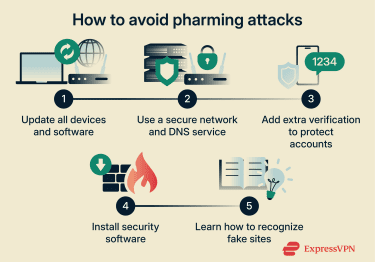
Enable two-factor authentication
Two-factor authentication (2FA) adds an extra layer of security during the login process, so you should enable it where possible. Even if attackers steal your password, they cannot access your account without the second factor, such as a code sent to your phone. This makes unauthorized access much more difficult and helps protect your data even if other defenses fail.
Use threat protection tools
High-quality antivirus and anti-malware programs can help protect you from pharming attacks by detecting and blocking malicious software before it can tamper with your system. This includes malware that tries to modify your hosts file, change your device’s DNS settings, or install browser extensions designed to redirect you to fake websites.
Educate yourself and others
Learn how pharming attacks work, study the warning signs of fake sites, and share information with friends, family, or colleagues. Regularly reviewing security best practices helps you recognize suspicious behavior and avoid actions that could expose you to attacks.
FAQ: Common questions about pharming
What is pharming used for?
Attackers use pharming to redirect web users to malicious websites so they can steal login details, passwords, or financial information.
Can antivirus software prevent pharming attacks?
Yes, antivirus software can help prevent some types of pharming, especially malware-based attacks that try to alter host files or system settings. However, not all antivirus tools stop every pharming method, so you need additional protections like secure Domain Name System (DNS) and browser checks.
Can pharming affect home networks and routers?
Pharming can affect home networks and routers when attackers change Domain Name System (DNS) settings or exploit vulnerabilities in router firmware. If your router's DNS is compromised, all devices on that network can be redirected to fake websites.
What should I do if I suspect a pharming attack?
If you suspect a pharming attack, stop entering personal information, run a full antivirus scan, and check your router and network Domain Name System (DNS) settings for unauthorized changes.
Take the first step to protect yourself online. Try ExpressVPN risk-free.
Get ExpressVPN