The complete guide to FIFA World Cup 2026™ Wi-Fi safety


Wi-Fi will be available across FIFA World Cup 2026™ host cities, stadiums, fan zones, airports, transit hubs, hotels, and select flights, with 5G networks and high-speed fiber connectivity in some places to help provide consistent internet access for large crowds.
However, this convenience may come with security trade-offs, as not all Wi-Fi networks provide strong security controls. This can expose travelers to digital threats, including the theft of sensitive data.
Common Wi-Fi security risks for FIFA World Cup 2026™ fans
Accessing Wi-Fi networks during the FIFA World Cup 2026™ can expose you to digital threats, especially on unsecured networks. Knowing these risks can help you stay alert.
Open or poorly-secured networks
Wi-Fi access is readily available across most venues, but this comes with security trade-offs. Some public networks may lack encryption, making connections vulnerable to eavesdropping, where attackers can intercept and steal sensitive data like passwords or credit card information.
Open networks are also vulnerable to man-in-the-middle (MITM) attacks, where cybercriminals intercept and redirect network connections to malicious websites. Victims may end up on fake login pages or scam and impersonation sites designed to steal sensitive data, such as ticket details, personal identification, payment credentials, and even account logins for travel or booking platforms.
And while many networks use encryption, some may use weaker ciphers that are easier to exploit. For instance, one security report estimates that only around 13% of Wi-Fi deployments use Wi-Fi Protected Access 3 (WPA3), while 62% of networks still rely on WPA2. While WPA2 is still widely used and generally secure when properly configured, it has known vulnerabilities that, if unpatched or misconfigured, could be exploited by attackers within range of the network.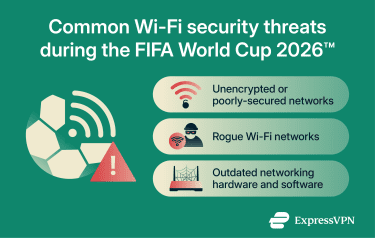
Fake networks
Malicious actors may set up rogue hotspots, particularly in high-density areas, to lure victims into connecting to them. Often called an evil twin attack, this usually involves cybercriminals using a rogue access point, such as a small router or mobile hotspot, to imitate a legitimate network at a hotel, stadium, airport, or even in-flight.
Attackers may replicate the Service Set Identifier (SSID) of a legitimate network with slight variations to trick victims into connecting. In some cases, deauthentication attacks are used to force devices off a network, causing them to automatically reconnect to a stronger, look-alike malicious network.
Once a victim connects to a fake network, the attacker controlling it may monitor communications and steal shared data. They could also redirect connections to dangerous websites that host malware or create fake Wi-Fi login portals that request sensitive information, such as email addresses or government ID numbers, for example. Social Security numbers (SSN) in the U.S.
Outdated hardware and software
While many FIFA World Cup 2026™ venues offer 5G networks and high-speed fiber, some accommodations and venues around the host cities may still use older networking hardware and software, which can have security gaps and vulnerabilities. This can leave networks exposed, making them easier targets for cyberattacks or data breaches.
How to stay safe on public Wi-Fi in host cities
With the increased use of public Wi-Fi during the FIFA World Cup 2026™, using mobile data can be a safer alternative. It relies on your carrier's network infrastructure rather than potentially vulnerable venue or accommodation networks. However, this may not be an option for everyone, especially if data coverage or roaming charges are a concern.
If using mobile data isn't always an option, there are several steps you can take to stay safe on public Wi-Fi. Common best practices include:
Avoid sensitive online activities on unsecured Wi-Fi
When using open networks, it's best to avoid activities that may expose sensitive information. For example, you shouldn't:
- Log into important accounts, such as email, social media, or banking accounts.
- Perform a password reset (unless absolutely necessary).
- Send or receive private documents, images, videos, or other important files.
- Use the FWC2026 Mobile Tickets app to check, download, or transfer tickets.
If you need to access tickets or reset a password while on an unsecured network, try to wait until you're on a more secure connection, like your hotel’s private network.
Turn off file-sharing and auto-connect settings
Disabling file sharing helps ensure that folders and other local services on your device aren't visible to other users on the same network.
Turning off auto-connect helps prevent your device from automatically reconnecting to a network when disconnected or when it comes back within range. This can reduce exposure to rogue hotspots.
Note: How you disable these settings depends on your device model and operating system version. In general, you need to check your network or Wi-Fi settings, along with built-in file-sharing and syncing features.
After connecting to a public Wi-Fi network, consider removing or “forgetting” it from your device. This can prevent your device from automatically reconnecting in the future, especially if a malicious network uses a similar name.
Use a virtual private network (VPN)
A VPN is an online tool that encrypts internet traffic by routing it through a secure VPN server, making it more difficult for malicious actors to monitor or intercept it. You should connect to a VPN on Wi-Fi before engaging in sensitive online activities, such as online banking, reading emails, or checking tickets on open networks. Even if you’re on a secured network, you can still use a VPN to add an extra layer of security and privacy.
VPNs can affect internet speeds because of the added encryption, but you can reduce this impact by connecting to a nearby server. For example, ExpressVPN has server locations in 113 countries, including the U.S., Canada, and Mexico, making it easier to find a strong connection while traveling. Pairing a VPN with a travel eSIM can further reduce your reliance on public Wi-Fi while traveling.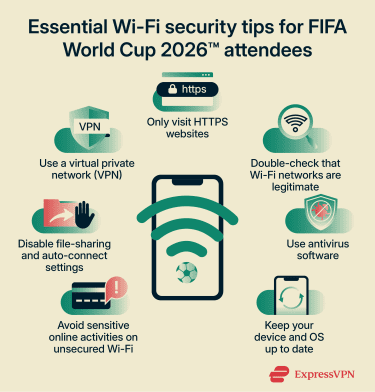
Always access HTTPS websites
Make sure the website you're visiting uses HTTPS, as it provides stronger security than HTTP. If you enter sensitive information on an HTTP site, attackers may be able to intercept it, or the website owner may log it.
To quickly check whether a website uses HTTPS, look for "https://" in the URL bar or a padlock icon indicating the connection is secure.
Learn how to spot fake public Wi-Fi networks during the FIFA World Cup 2026™
There’s no guaranteed way to confirm whether a hotspot is legitimate just by looking at it. However, you can reduce risk by verifying the network name (SSID) with official staff or signage and avoiding networks that seem suspicious.
You should also watch for common warning signs, such as:
- Duplicate names: For example, if the venue's legitimate network is called "Stadium_WiFi," an attacker may set up a fake network called "Stadium_WiFi_Free."
- No password protection: If the network doesn't require a password, it may mean traffic isn't encrypted.
- Suspicious login pages: Unexpected portals that appear when connecting and ask for sensitive data, such as email addresses, credit card details, or SSNs.
Use an antivirus
An antivirus is security software that scans your device for signs of malware. If it detects threats, it can automatically quarantine them. Antivirus tools also help protect against dangerous links and websites, with some modern solutions even warning users when they're on suspicious or unsafe networks.
Note: Antiviruses and VPNs work best together for stronger digital security, especially on unsecured networks.
Keep your device and software up-to-date
Always make sure your device and operating system are updated to the latest version. System updates typically include important security fixes that patch known vulnerabilities. Delaying updates may leave you exposed to threats that can put your data at risk, especially when using unsecured Wi-Fi networks.
Airport, hotel, and stadium Wi-Fi: Which is riskiest?
There's no definitive research comparing how secure airport, in-flight, hotel, and stadium Wi-Fi networks are. Travelers and fans may be exposed to various security threats regardless of which type of network they use, so it's important to follow good security practices no matter the type of Wi-Fi.
Stadium and fan zone Wi-Fi safety
Network security depends in part on whether organizers provide encrypted hotspots. Unsecured networks can expose users to malicious snooping and interception. In addition, a large number of attendees may cause severe network congestion that disconnects devices. Attackers may exploit this by setting up fake networks so disconnected devices accidentally reconnect to them.
Hotel Wi-Fi security during the FIFA World Cup 2026™
Hotel Wi-Fi
may come with certain security risks, such as a lack of encryption, weak security standards, or outdated hardware and software that leave network infrastructure exposed to known vulnerabilities. This can expose visitors to various digital threats, including snooping, MITM attacks, and attacker-controlled hotspots.
Airport and in-flight Wi-Fi safety for FIFA World Cup 2026™ travelers
Some airport Wi-Fi networks may use open or weakly secured connections, which can leave users exposed to interception risks. Threat actors may also use evil twin attacks because they can target a large number of travelers who often spend hours waiting for flights. These users may also be disconnected from legitimate airport hotspots because of stability issues caused by network overcrowding.
In-flight Wi-Fi may involve fewer users, but it still carries similar risks if the network is unsecured or spoofed. For example, in one reported incident, an attacker used a fake in-flight hotspot to access sensitive personal data from other flyers.
FAQ
What is the biggest risk of public Wi-Fi?
Can hotels see what I do on their Wi-Fi?
Is it safe to connect to airport Wi-Fi?
Should you leave Wi-Fi on at all times?
Is it safe to do banking on hotel Wi-Fi?
How do you verify a public Wi-Fi network?
Does a VPN make public Wi-Fi safe?
Do football stadiums have Wi-Fi?
Is stadium and fan zone Wi-Fi safe?
Is Wi-Fi available during the FIFA World Cup 2026™?