YouTube account hacked? How to get it back and secure it for good


A hacked YouTube account can be used to publish scam content, target your audience, damage your channel’s reputation, or steal your money through payment tampering. Acting quickly is critical to regaining control and limiting further harm.
In this post, we explain the immediate steps to take if your YouTube account has been hacked, red flags to watch out for, and how to prevent future takeovers.
Immediate steps to take now
If you have reasons to believe your YouTube account was hacked, you should secure the Google account attached to it right away.
If you can still sign in
If you can still sign in, follow the guide below to try to recover your account and halt the attack on your YouTube channel. Updating your password and enabling stronger authentication can help to stop unauthorized access and reduce the risk of continued misuse.
Change your Google account password
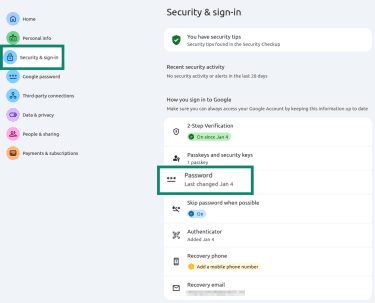
- From your Google account settings, go to the Security & sign-in section and click on Password.
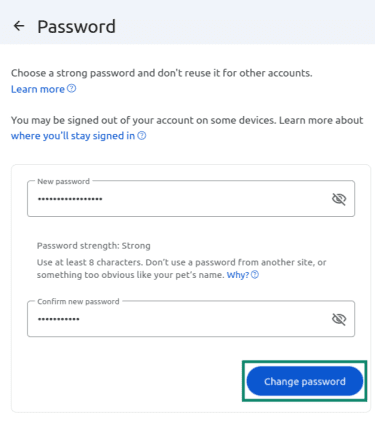
- Add a new password, confirm it with your old one, and click Change password.
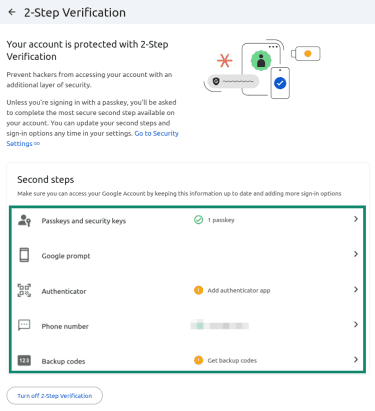
Add or change your 2-Step Verification method
- Select 2-Step Verification in your Google security settings.
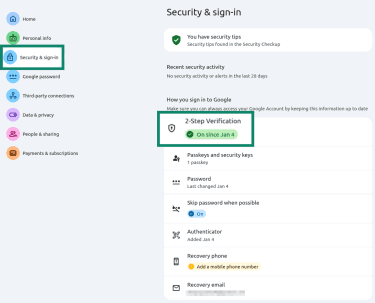
- Remove any suspicious verification methods and restore your own. If this section is empty, add a verification method (like an authenticator app or security key).
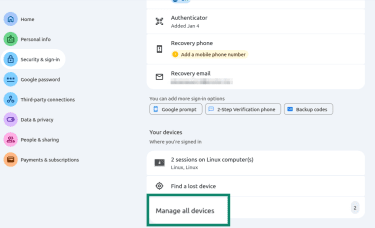
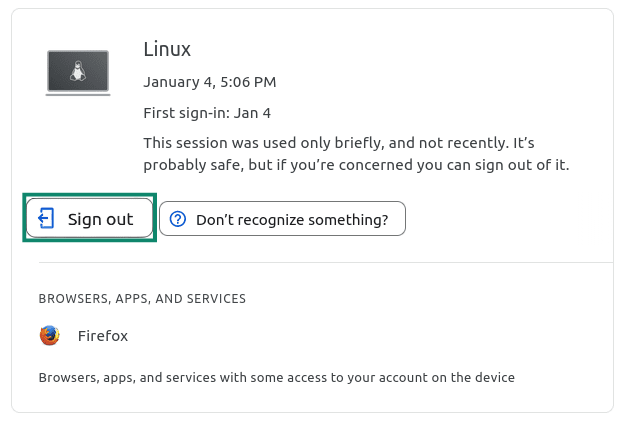
Managing devices connected to Google
- Select Manage all devices under the Your devices section in the Security & sign-in tab.
- Select any device you don’t recognize.
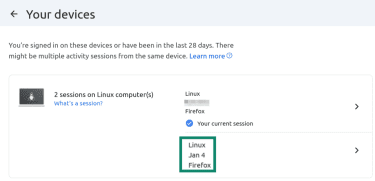
- Click Sign out.
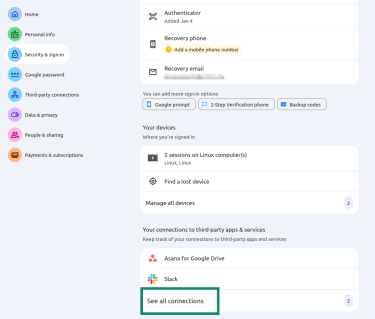
Managing your third-party app and service connections
- Click on See all connections in the Security & sign-in tab.
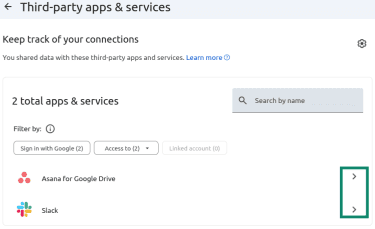
- Select any third-party apps or services you don’t recognize.
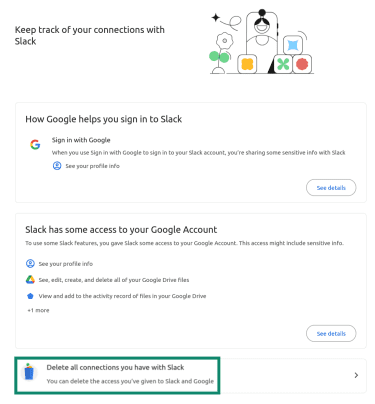
- Select Delete all connections you have with the app and confirm.
Just as a precaution, it’s a good idea to also change the password to your recovery email account or any other linked accounts (like AdSense), in case they’ve been infiltrated, too. Cybercriminals are typically after money, and AdSense payouts or sponsorship contracts are an attractive target after a YouTube account hack.
You should also review your AdSense payout details to ensure that bank account information, payee names, and payment thresholds haven’t been changed. Attackers may attempt to redirect future earnings before you regain control. If you notice unauthorized changes to payout details, contact AdSense support immediately and consider placing a temporary payment hold until the issue is resolved.
Revert unwanted changes to your channel
At this point, you should also revert any unwanted changes on your YouTube channel, as these could lead to violations of YouTube’s Community Guidelines. For instance, if any videos promoting scams have been published without your knowledge, you should remove them as soon as possible.
YouTube Studio’s activity history and permissions management tools can show any unusual or suspicious activities on your channel, allowing you to review them and take action. Alternatively, you can manually clean up the channel. According to YouTube, common changes made during account takeovers include recent uploads and alterations of channel info and channel permissions. Here’s what you can do:
- If the videos have no content ID claims, copyright strikes, or Community Guideline strikes, you can just delete them. If they’ve already received a strike, you should contact YouTube support through the hacked account recovery flow to request a review and potential removal of strikes related to the compromise.
- Remove unknown users, managers, and owners from your channel. You can do this from YouTube Studio or, if it’s a Brand Account, follow these instructions to change the permissions.
- Restore the channel’s branding if it’s been tampered with; check the name, handle, profile picture, and banner image.
- Review video privacy settings, comments posted by your channel, playlists, custom thumbnails, subscribed channels, and AdSense or Content Manager settings (if applicable).
- Check whether the monetization settings were disabled or altered on recent videos.
If you can’t sign in
If you can’t sign into your Google account or access your YouTube channel, you should go through the Google account recovery process. You’ll need to prove your ownership of the account, which sometimes requires multiple verification steps, and recovery isn’t guaranteed. If verification is successful, you’ll be able to change your password to regain access to the account. Then, you should follow the steps above to secure it.
Signs your YouTube account is hacked
There are a few common signs of unauthorized YouTube access, including:
- Unexpected changes to your YouTube channel: Your profile picture, Google two-factor authentication (2FA) settings, channel description, or AdSense profile may have been altered. If you don’t remember making the change, it could signal unauthorized access. Attackers may disable comments, delete older videos, unlist content, or change moderation settings to prevent viewers from warning others.
- Unrecognized uploads: Videos or community posts that you don’t remember uploading are a red flag, especially if they’re a serious departure from your channel’s main topic.
- Comments you don’t remember writing: These comments may contain links to suspicious or malicious websites. Watch out for notifications on comments you don’t recognize, as they can indicate a potential account takeover. You may also see spam replies posted under your account or sudden community guideline strikes.
- Unknown logins or security alerts on your linked Google account: Logins from unfamiliar locations or devices and notifications about recent password changes unrelated to you could point to an attempt to take over your account.
- Monetization and payment tampering: Attackers might make changes to the channel’s monetization settings or linked payment settings, including AdSense payout information.
- Login problems: You may find yourself logged out unexpectedly from your YouTube channel or linked Google account and unable to log back in using your usual credentials.
As soon as you notice any red flags, it’s best to take action and report the incident to Google or through YouTube Studio. Acting quickly can help limit further damage.
What hackers do after taking over
Once attackers gain control of a YouTube account, there are a few potential actions they’ll take:
- Channel rebrand and audience abuse: Threat actors may rebrand the channel and abuse the existing audience, changing the channel name and branding, posting malicious links, and leveraging subscriber trust to spread phishing campaigns.
- Crypto scam live streams or redirects: They may also use your channel to trick viewers into sending money or sharing sensitive information.
- Monetization and payout tampering: Attackers frequently manipulate monetization and payout settings. This can include changing AdSense payout details, replacing bank account information, or redirecting revenue to accounts they control. These actions allow cybercriminals to exploit your channel’s monetization before you regain access.
Acting quickly after noticing a takeover is critical to prevent financial loss and limit the impact on your subscribers.
Report a hacked YouTube channel
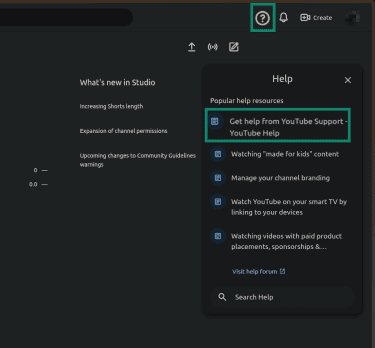
If your YouTube channel was hacked, reporting it through official YouTube and Google channels helps to ensure that the incident is documented and reviewed. If available in your region, the “Help” option in your YouTube Studio lets you open a chat with a hack channel assistant who can give you the next steps you should take:
- In your YouTube Studio, click the question mark icon in the top-right corner and select Get help from YouTube Support. If the option isn’t there, search for it using the Search Help search box at the bottom.
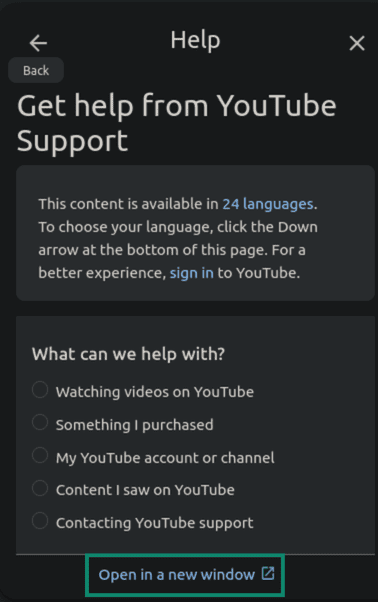
- Select Open in a new window.
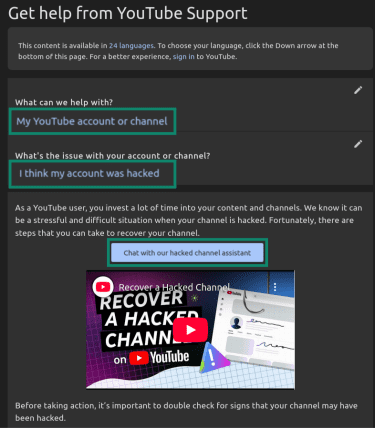
- Click the option that says your account was hacked and select Chat with our hacked channel assistant. Explaining the situation to YouTube’s support team may help with removing any potential strikes the channel may receive due to unauthorized video uploads that break YouTube’s Terms of Service. The support team can also guide you on how to best recover your channel.
If your hacked channel is being used to publish scam videos and you’ve lost access, use Google’s account recovery form first.
Creator support and partner escalation
YouTubers who are in the YouTube Partner Program have access to Creator Support during account takeovers, which can provide more direct guidance. Eligible creators may see options in YouTube Studio such as live chat or specialized recovery tools. Note that availability varies by region, channel type, and monetization status, so not all Partner Program members will see the same options.
What evidence to collect
While it doesn’t guarantee account restoration, documenting unauthorized activity can help provide context when reporting the incident to YouTube or Google. Consider collecting:
- Security alert emails from Google.
- Screenshots of suspicious devices connecting to your account from unfamiliar locations.
- Dates and times of suspicious activities on your Google account or YouTube channel.
- Screenshots of unauthorized changes to your channel, such as deleted videos or unauthorized uploads.
- Transaction records (if AdSense monetization was affected).
- Any recovery emails or failed login attempts.
After-recovery security checklist
After you’ve recovered and secured your YouTube channel and Google account, it’s a good idea to reassess potential vulnerabilities and attacker access points, undo any harmful changes, and inform your audience of the events.
Scan devices for malware
The account hijack may have happened due to a malware infection on your device, so running a malware scan with an antivirus is a vital step. A good antivirus solution should be able to help you identify, quarantine, and remove the threat.
Malware can arrive on your device from malicious email links or attachments, shady ads, redirects, or after visiting a dangerous website. Reputable antivirus solutions have phishing protection that can block many of these threats before you get a chance to interact with them.
Review recent activity and settings
Reviewing your Google account and YouTube channel’s recent activity and settings, such as the forwarding settings on your Gmail account. Ensure email forwarding is either disabled or that it’s forwarding to an address you intentionally set up.
Notify your team members
If your channel is managed by a team, inform all collaborators about the incident so they can secure their own accounts and devices. Ask team members to change passwords, review recent activity, and run malware scans on any devices they use to access the channel. If channel access is shared through brand or permissions features, re-audit roles and remove any access that is no longer strictly necessary. Coordinated hygiene across the team helps prevent reinfection or repeated compromise through a weaker account.
Notify your audience and sponsors
If unauthorized content was published during the compromise, some creators choose to post a brief update clarifying that the activity wasn’t legitimate. Identifying which videos or livestreams were affected can help reduce confusion. In cases involving scam content, this is essential to prevent further harm.
It’s also important to audit financial and sponsorship impact by checking for revenue dips during the hack and notifying sponsors if any brand misuse occurred.
How YouTube accounts get hacked
YouTube account takeovers happen in various ways. Knowing the various tactics employed by cybercriminals can help you detect suspicious activities ahead of time.
Phishing and brand-deal email traps
Phishing campaigns, including tactics such as spear phishing, are one of the most common tactics used against YouTubers and influencers. Spoofed brand-deal emails or urgent “YouTube policy updates” aim to trick you into clicking on infected links or entering your credentials on a fake login page.
Here’s a quick checklist of phishing email red flags you can watch out for:
- Unexpected links or attachments that attempt to pressure you into acting, potentially involving a “contract” or “media kit.”
- Requests for sensitive information, like payment details or login information.
- Suspicious sender details like email addresses that don’t match those of legitimate domains.
- Brand-deal offers that seem inconsistent with your channel’s size, audience, or niche.
- Urgent language, especially in connection to a “limited-time” sponsorship or partnership, perhaps promising high payouts.
- Fake YouTube support emails claiming that your channel may be terminated or requiring you to “verify ownership immediately.”
Larger channels may attract more targeted phishing attempts due to higher perceived payouts. However, owners of smaller channels should stay vigilant, too.
Infostealer malware and session theft risks
Session hijacking is the technique attackers use to take over logged-in accounts, and infostealer malware is one of the main tools they use to carry it out. Browser infostealers can steal active session tokens from a user’s browser, allowing attackers to access a YouTube account without needing the password or 2FA code.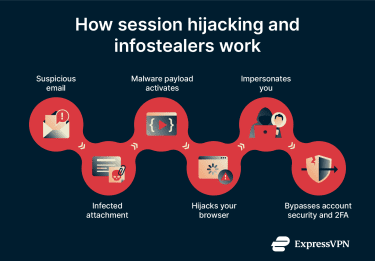
This kind of malware can be delivered via infected email attachments such as .ZIP/.RAR archives. Opening them can trigger the payload and infect your browser, allowing attackers to extract saved credentials or active session tokens.
It’s important to avoid downloading email attachments from unfamiliar sources. If you’re unsure of the contents of an attachment or if the surrounding context seems suspicious, it’s best to stop and reassess.
Dangerous OAuth and “tools” access
Open Authorization (OAuth) is a standard that lets third-party apps access parts of your Google account, such as your YouTube channel or Google Drive, without sharing your password. When you approve specific permissions, the app receives access tokens that allow it to act on your behalf within the limits of those permissions.
For YouTube creators, OAuth is commonly used for automatically uploading videos, managing playlists, accessing analytics data, and syncing content across tools. However, OAuth can be exploited by malicious apps in two main ways:
First, attackers can use consent phishing to trick creators into approving OAuth access for a malicious app. Instead of stealing login credentials, the attacker directs the victim to a legitimate-looking Google consent screen that requests permissions for a fake “creator tool” or “analytics service.” Once approved, the app receives valid access tokens with the scopes it requested, which may include managing videos, changing channel details, or accessing private channel data. From YouTube’s perspective, the actions performed by the app appear authorized, because the creator technically granted permission.
Second, attackers can disguise malware as legitimate creator tools that integrate with YouTube. Some of these tools request overly broad OAuth permissions that go beyond what is necessary for their stated function, while others use OAuth mainly as a trust signal before delivering malicious software. Once installed, these fake tools may steal browser session tokens, saved credentials, or other sensitive data from the creator’s device, enabling further account compromise beyond OAuth access alone.
How to prevent future YouTube hacks: Security checklist
After recovering your YouTube account and dealing with the aftermath, you should protect yourself against repeat attacks by improving your account security. The checklist below has actionable steps to take right now:
| Steps to prevent YouTube hacks | Why it matters |
| Use a strong, unique password | A password manager, such as ExpressKeys, can help you create and store strong, unique passwords for your Google account (which also secures your YouTube account) and all your other related accounts. |
| Consider a hardware 2FA solution | Hardware security keys are widely considered the most phishing-resistant form of 2FA and can offer stronger protection for creators at higher risk of targeted attacks. |
| Enable Google’s Advanced Protection Program | This program requires passkeys or security keys, strengthens account security checks, and limits access for unverified third-party apps. |
| Protect your recovery email | Your recovery email can be targeted by attackers in an attempt to hijack your main account. Protecting your recovery email with 2FA adds another layer of defense. |
| Practice personal security habits | Basic security habits, such as verifying email senders, checking website URLs before entering credentials, and avoiding suspicious attachments, can help protect your account from attacks. |
| Limit your use of browser extensions | Each browser extension adds third-party code to your browser, which can expand your attack surface, especially if the extension requests broad permissions. Limit your extensions to only those you really need. |
| Assess third-party apps periodically | In your Google account, under ”Third-party apps,” remove any apps you’re not using. These tools can retain OAuth for long periods, which means the app may have permission to access or control your YouTube account. |
Protect your channel with a team
YouTube creators who work with editors, contractors, or moderators may need additional security safeguards to protect their channels. Access management becomes an essential step when more people are involved.
Safe roles for editors and managers
The “Owner” role is particularly significant in terms of security. Owners can remove other owners, transfer ownership privileges, and make serious structural changes to a YouTube channel. Most team members don’t need this level of privilege and control.
Instead, YouTube’s built-in roles (Viewer, Editor, Manager, and Owner) preserve accountability and provide role-specific access to your YouTube channel, typically the lowest level of access required for someone to do their job (least-privilege access).
Avoid shared logins
Using shared login credentials may eliminate accountability and visibility into who performed specific actions on the channel. And if multiple people use the same account, it can become difficult to attribute uploads, monetization changes, or content deletions.
Offboarding checklist for team changes
When someone leaves your team (permanently or temporarily), you should remove their access and permissions to the YouTube channel. Forgotten permissions can be a security gap, especially for creators collaborating with many contractors or freelancers. Here’s what you can do when a team member leaves:
- Remove their role from the YouTube Studio or the Brand Account.
- Remove their access to third-party tools or dashboards they used.
- Change any shared passwords if any were previously used.
- Confirm they no longer have access to shared cloud space or brand assets.
FAQ: Common questions about a hacked YouTube account
Can I recover my YouTube account without my phone number?
You can recover your YouTube account without a phone number by verifying your identity through a recovery email, a recognized device, or a familiar location. In the recovery process, you can select the “Try another way” option when prompted.
What if my hacked YouTube channel is rebranded?
If your hacked YouTube channel is rebranded and you can still access it, you should ensure the cybercriminals can’t hijack it again by improving your account security. You can use the YouTube Studio customization tab to revert your original branding and delete the unauthorized videos and comments.
What if hacked YouTube videos were deleted or made private?
If a threat actor makes your videos private or unlists them, you can easily publish them again from the YouTube Studio visibility settings. However, it’s usually not possible to recover deleted YouTube videos, as YouTube doesn’t have a “trash bin” functionality like Google Drive does. This is why keeping backup copies of your videos on your computer or in cloud storage is strongly advisable.
How do I stop YouTube scam live streams?
To stop YouTube scam live streams on your account, you should immediately go to YouTube Studio, find the “Content” section, then “Live,” open the active stream, and select “End stream.” If you don’t have access to your YouTube channel, you need to start the Google account recovery process immediately.
When should I contact legal support if a YouTube account was hacked?
Consider contacting legal counsel if the hack resulted in significant financial loss, identity misuse, contractual disputes, or reputational damage. While legal support won’t typically speed up YouTube’s recovery process, it may be helpful if you’re dealing with fraud, impersonation, or disputes related to business partnerships.
Take the first step to protect yourself online. Try ExpressVPN risk-free.
Get ExpressVPN