Expressvpn Glossary
Cloud database
What is a cloud database?
A cloud database is a database that runs on cloud computing infrastructure provided by platforms such as Amazon Web Services (AWS), Google Cloud, or Microsoft Azure. It can replace locally managed servers with managed infrastructure accessible over the internet.
Cloud databases typically automate maintenance tasks, scale with demand, and include security features, such as encryption.
How does a cloud database work?
A cloud database runs on infrastructure managed by a cloud provider. Applications and administrators connect to the database over the internet using web interfaces, command-line tools, or APIs.
The provider handles ongoing maintenance, software updates, security patches, and backups, while typically encrypting data in transit and at rest to reduce the risk of unauthorized access. Storage capacity and performance can be adjusted based on demand, often automatically depending on the service.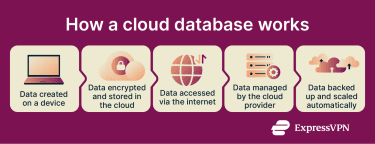
Types of cloud databases
Cloud databases can be grouped by how data is structured and how the service is delivered:
- Relational databases: Use structured tables and Structured Query Language (SQL) for organizing data. Common examples include Amazon RDS, Amazon Aurora, Google Cloud SQL, Microsoft Azure SQL Database, and Oracle Cloud Database.
- Non-relational databases: Also known as NoSQL (Not Only SQL) databases, they store unstructured or semi-structured data in formats such as key-value, document, or wide-column stores. Examples include MongoDB Atlas and Google Cloud Firestore.
- Hybrid databases: Support multiple data models to handle varied workloads within a single engine.
- Database-as-a-Service (DBaaS): Fully managed database offerings from providers such as AWS, Azure, and Oracle Cloud that automate deployment, scaling, monitoring, and maintenance.
Why are cloud databases important?
Cloud databases reduce infrastructure costs by eliminating the need for on-premise servers and dedicated hardware. They allow global, near-real-time data access from different locations, supporting easy remote access and collaboration for distributed teams. Automatic updates, scaling, and managed disaster recovery improve performance and resilience, while high availability and data redundancy strengthen business continuity.
At the same time, reliance on stable internet connectivity, the risk of vendor lock-in, and potential data privacy issues from misconfiguration are important considerations when adopting cloud databases.
Security and privacy considerations
Cloud databases protect information through layered security measures:
- Encryption: Safeguards data both in transit and at rest to prevent unauthorized access.
- Access control: Restricts who can view or modify data using authentication and user permissions.
- Backups: Create secure copies to recover data in case of loss or corruption.
- Compliance: Supports alignment with standards like the General Data Protection Regulation (GDPR) or the Health Insurance Portability and Accountability Act (HIPAA), depending on configuration and usage.
- Virtual private network (VPN) integration: Adds a private, encrypted connection between users and cloud resources for additional protection.
Common use cases
Cloud databases support a wide range of digital services. They’re often used to host web and mobile applications, manage user profiles and transactions, power analytics and business intelligence, and provide secure storage for enterprise systems that require reliable, scalable data access.