Expressvpn Glossary
Firewall

What is a firewall?
A firewall is a network security system that monitors and controls network traffic based on a defined set of rules. It acts as a barrier between trusted internal networks and untrusted external networks, such as the internet, to block malicious activity and unauthorized access. By filtering data traffic, firewalls help reduce the risk of cyberattacks and prevent unauthorized users or applications from accessing sensitive systems or data.
How does a firewall work?
A firewall monitors data packets moving in and out of a network through its entry points, known as ports. Each packet is inspected according to predefined security rules, technically referred to as access control lists. These rules can check various attributes, such as IP addresses, domain names, protocols, and port numbers, to determine whether the traffic is safe or potentially harmful.
If the traffic matches approved criteria, the firewall allows it to pass. If it appears suspicious or malicious, the firewall blocks it. This filtering applies not only to inbound traffic from external sources but also to outbound traffic from within the network, preventing compromised systems from sending harmful data to external destinations.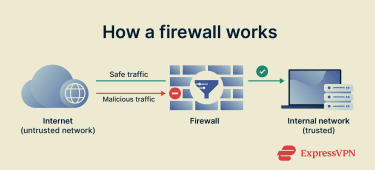 Firewalls operate as either stateless or stateful systems. Stateless firewalls check each packet individually based on fixed rules, without tracking ongoing connections. Stateful firewalls monitor active sessions and analyze traffic behavior over time, allowing them to detect suspicious patterns and respond to threats more intelligently.
Firewalls can be hardware devices, software applications, or a combination of both. They are often used alongside other security measures like intrusion detection systems (IDSs) and antivirus software for layered protection.
Why is a firewall important?
Firewalls serve as the first line of defense in network security. They reduce exposure to threats such as malware, phishing attempts, and distributed denial-of-service (DDoS) attacks. By limiting unauthorized access, firewalls help protect sensitive data and maintain the integrity of network operations. They are also essential for compliance in industries handling confidential information, where regulations may require network protection measures to be in place.
Without a firewall, networks are more vulnerable to attacks, unauthorized access, and data loss. Even a single unmonitored connection can become an entry point for malicious actors, making firewall protection a core element of cybersecurity strategies for organizations of all sizes.
Where is it used?
Software firewalls are built into many consumer devices, including computers and routers, providing default protection for home and small business users. In larger or high-risk environments, dedicated firewall systems are deployed to manage complex traffic and safeguard critical infrastructure.
Industries with strict security requirements rely on firewall security as a core protective measure:
- Healthcare: Protects patient data and supports compliance with regulations such as the Health Insurance Portability and Accountability Act (HIPAA).
- Finance: Secures financial transactions and customer information against fraud and cyberattacks.
- Retail and e-commerce: Safeguards customer details, payment systems, and online stores from threats like Structured Query Language (SQL) injections and DDoS attacks.
Further reading
FAQ
How do I check my firewall?
You can check your firewall status by going to your device’s settings. On Windows, open the Control Panel or Settings app and look for “Windows Defender Firewall.” On macOS, go to System Settings > Network > Firewall.
What are the types of firewalls?
Firewalls come in several types. Hardware-based firewalls are physical devices that protect entire networks. Software-based firewalls are programs installed on individual devices to control traffic. Network-based firewalls monitor traffic between different parts of a network, while cloud-based firewalls are hosted online and protect cloud infrastructure or services.
How do I turn off the firewall?
On Windows, go to Control Panel > System and Security > Windows Defender Firewall, then click “Turn Windows Defender Firewall” on or off. On macOS, go to System Settings > Network > Firewall and toggle it off. Just be aware that turning off your firewall can leave your device more vulnerable to attacks, so it’s best to do it only if you have another layer of protection in place.