 Celebrate with up to 80% off
Password fatigue: Causes, risks, and how to prevent it


From email and banking apps to workplace platforms and streaming services, the average person manages a significant and growing number of digital accounts. Each one may bring a new password to create and remember, and many people find it increasingly difficult to manage so many credentials, a phenomenon known as password fatigue.
What is password fatigue?
Password fatigue refers to the exhaustion and stress many people experience from having to create and remember large amounts of passwords. Pew Research data suggests that password fatigue is a growing problem, with nearly seven-in-ten Americans feeling overwhelmed by the number of passwords they have to manage.
This issue has become prominent enough to be considered a potential cybersecurity risk.
What causes password fatigue?
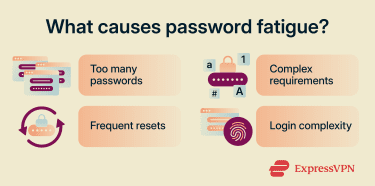 Many users manage dozens of online accounts, each requiring its own unique password. As the number of credentials grows, so does the cognitive burden of keeping track of them all. This burden is compounded by several factors:
Complex password requirements
To maintain cybersecurity, some organizations and services enforce strict password requirements. They may ask users to create passwords of a certain length, for example, and include a mixture of numbers, symbols, etc. This can make accounts more secure, but may also cause difficulties for users when it comes to remembering such complicated codes.
Frequent password resets
Some organizations require users to reset or update their passwords regularly, rather than using the same one for too long. However, guidance from the National Institute of Standards and Technology (NIST) and the National Cyber Security Centre (NCSC) recommends against requiring arbitrary, periodic password resets. Both agencies cite issues such as selecting a password that is similar to an old password or reusing passwords across accounts, which are elements of password fatigue.
MFA and login fatigue
Multi-factor authentication (MFA) can add an important layer of protection to online accounts. It requires users to enter a verification code or fingerprint scan when accessing their accounts, in addition to their password. This can lead to a broader problem of login fatigue, or tiredness associated with having to spend so much time on login procedures.
The psychology behind password fatigue
According to a study published in Computers & Security, with large numbers of passwords to memorize, users are prone to memory interference, the confusion between similar memories, and memory decay, the natural deterioration of memory over time. The study finds that this burden generates anxiety about their perceived ability to remember passwords, regardless of their actual memory capabilities.
The cybersecurity risks of password fatigue
Research shows that there is often a correlation between password fatigue and cybersecurity risk. When people feel overwhelmed or fatigued by password management, they may look for ways to simplify the process, and those shortcuts create vulnerabilities that attackers actively exploit.
Some of these unsafe practices can include:
Weak passwords
When users struggle to create and remember complex passwords, they often default to shorter, simpler ones. These are significantly easier for attackers to crack using methods like dictionary attacks, which run through lists of common words and phrases, or brute-force attacks, which systematically try every possible combination.
Password reuse
Rather than creating a unique password for every account, users might reuse the same one across multiple accounts because it’s simply easier to remember that one password than having to remember multiple combinations.
The risk is that if an attacker obtains one password through a data breach or phishing attack, they may be able to use it to access other accounts where it has been reused, a technique known as credential stuffing.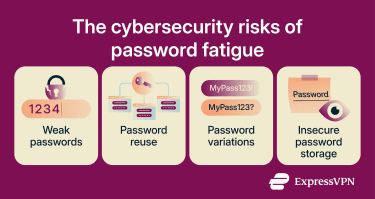
Predictable password modification
Users who are wary of the risks of reusing passwords often try to get around this potential vulnerability by modifying their passwords instead. This involves making small changes to an existing password, such as adding a number or special character.
However, research by a team from Virginia Tech found that many users modify their passwords only slightly and in predictable patterns for use across services. This lowers the barrier for attackers to guess passwords.
Insecure password storage
When users cannot remember their passwords, they may write them down in an insecure location, such as a notebook, an unencrypted app, or a document. If a malicious party gains access to those notes, whether through physical theft, malware, or unauthorized access to a device, they might be able to log into the user's accounts, steal sensitive data, or commit identity theft.
How password fatigue affects businesses
Password fatigue doesn’t only affect individuals but can also lead to operational, financial, and security challenges for businesses of varying sizes. These challenges include:
- Reduced employee productivity: If employees spend more time resetting forgotten passwords or fixing login issues, it can have a negative impact on overall efficiency and productivity.
- Increased IT support costs: IT teams may find that they have to spend large amounts of time dealing with password or authentication-related issues. This can increase their workloads and leave less time and resources for dealing with other problems.
- Higher risk of data breaches: Fatigued employees may be more likely to reuse passwords or create weak ones. This may increase the chances of compromised accounts and data breaches.
The password blame culture problem
When security incidents occur, users are sometimes blamed for setting poor passwords or failing to follow best practices. It’s true that these kinds of behaviors can weaken account security, but putting the blame entirely on individual users can make them more frustrated and less engaged with security initiatives. Organizations are therefore encouraged to recognize that security systems should be designed with human behavior and cognitive limitations in mind.
How to reduce password fatigue
Organizations and individuals can use technology, education, and policy adjustments to address password fatigue. Examples of mitigation strategies include: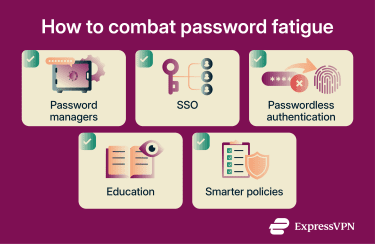
Using password managers
Password managers help resolve one of the leading causes of password fatigue: the need to remember dozens of unique credentials. Rather than relying on their memories or unencrypted notes, users can store their passwords in encrypted vaults. They typically only have to remember a single master password to gain access.
Some password managers, like ExpressKeys, offer additional security features, such as a built-in password generator and a password health checker that identifies weak or reused credentials. It also generates time-based one-time passwords (OTPs) for compatible accounts with two-factor authentication (2FA).
Implementing single sign-on (SSO)
SSO is an authentication system that allows a user to access numerous applications or websites using only a single set of credentials. It’s often deployed in business environments, allowing employees to access an organization's internal systems, email, and third-party applications more easily.
It’s a helpful tool for combating password fatigue, since it reduces the need for users to memorize multiple passwords and saves them time accessing their most important accounts. Fewer passwords to remember also means fewer opportunities for weak password creation or password reuse.
Moving toward passwordless authentication
Passwordless authentication reduces reliance on passwords during the authentication process. Instead of entering a password, users may instead be asked to scan their fingerprints, type in a one-time security code, or tap a push notification on their mobile device. Depending on implementation, this eliminates the need for them to both create and remember passwords, which significantly reduces the risk of fatigue.
Passwordless technologies can also improve online security in other ways, such as reducing a user’s exposure to phishing attacks and attempted password theft.
Strengthening security awareness training
Addressing password fatigue isn’t just about using different tools and technologies but also educating users on the importance of cybersecurity. Organizations are encouraged to raise awareness of the risks associated with poor password practices, as well as ways in which they can adopt safer behaviors without exacerbating their workloads.
Businesses should try to make training engaging, intuitive, and ongoing, possibly using real-world examples to highlight the importance of strong password practices. When employees understand the risks and need for strong security measures, they may be more likely to comply with them.
Simplifying authentication policies
It’s important for organizations to have strong cybersecurity policies in place to protect data and comply with regulations. At the same time, overly complex policies can cause frustration and fatigue. Users might feel overwhelmed, for example, if they’re made to create long, complicated passwords for all accounts but aren’t given tools to help them, like password managers.
Organizations may wish to look for ways to simplify their authentication policies to ease user friction without compromising their security standards. Policies that balance security with usability may be easier to enforce and more welcomed by the workforce.
Managing password fatigue at an organizational level
Reducing password fatigue often involves more than just introducing new tools. Organizations may need to look at adjusting their overall cybersecurity strategy, culture, and policies to combat the effects of fatigue and promote healthier password habits. Recommended steps include:
- Design systems around human behavior: Remove arbitrary, periodic password rotation policies. Set minimum password length requirements rather than complexity rules, which may be harder to remember without making passwords more secure. Provide employees with a password manager so that strong, unique credentials don’t rely on memory.
- Respond to incidents with education: When security incidents occur, use them as an opportunity to educate employees on the risks of password fatigue and how to address them.
- Monitor for signs of fatigue: Track password reset volumes, login failures, and help desk tickets related to authentication. High reset volumes and repeated login failures are early indicators that authentication policies are creating too much friction. Acting on these signals early, by simplifying policies or introducing new tools, helps reduce risk.
- Involve employees in security decisions: Seek feedback on authentication policies and involve staff in decisions about new tools and processes. Employees are more likely to follow security measures consistently if they understand why those measures are in place and feel consulted on them.
Is passwordless authentication the future of login security?
As organizations seek ways to reduce password fatigue without compromising security, passwordless authentication is starting to become more prevalent. Some experts believe that passwordless systems may even supplant traditional password-based logins in the future. This could help reduce the problem of password fatigue, but may introduce new challenges.
Biometrics and passkeys
Biometrics and passkeys are two of the most widely used forms of passwordless authentication. Biometrics involves the use of unique physical characteristics, like fingerprints or voice patterns, to verify identity. Passkeys, meanwhile, are a device-based form of cryptographic technology that allows users to sign into numerous apps without having to type separate passwords.
Benefits of passwordless security
- Reduced risk of fatigue: Users don’t have to create and remember passwords but can simply tap a fingerprint scanner or enter a PIN to access their accounts.
- Stronger protections against certain threats: Passwordless systems are considered more secure against certain digital threats, like phishing and credential theft.
- Improved user experience: Passwordless authentication is largely a faster and simpler process than having to enter multiple unique passwords for every account.
- Less burden on IT support: Adoption of passwordless systems may lead to fewer password reset problems and account lockouts for IT experts to deal with.
Challenges of passwordless adoption
- Compatibility issues: Passwordless technologies may not work on legacy devices or integrate with older applications.
- Costs: Organizations may need to invest in new platforms and devices to roll out passwordless authentication at scale.
- Transitions: Users may need time and training to understand and become comfortable with passwordless logins.
- Device dependency: Some passwordless systems, like passkeys, rely on the use of specific devices, which may lead to issues around access or recovery.
- Biometric compromise: Unlike passwords, biometric data can’t be changed. If a fingerprint or facial recognition system is compromised, resetting or replacing that credential can be much more complicated than resetting or changing a password.
FAQ
What are the signs of password fatigue?
How can organizations reduce password fatigue?
What is the difference between password fatigue and MFA fatigue?
Are password managers safe?
Can SSO reduce password fatigue?
Is passwordless authentication safer than passwords?