What is a burner email? How it works and when to use one


Many platforms require an email address, and accounts can accumulate across websites, apps, services, and one-time downloads. Over time, repeated signups can lead to a high volume of unwanted messages. A burner email address is often used to manage short-term interactions without adding long-term clutter, although it has limitations.
This guide outlines how burner emails work, when they're typically used, and the trade-offs involved. It also introduces alternative approaches that provide more control or flexibility for specific privacy-related use cases.
What is a burner email address?
A burner email (also called a throwaway or disposable email) is an email address used for one-time or short-term purposes, like signing up for a single account or downloading a resource. People use burner emails to avoid sharing their primary email address, which can help them maintain greater control over their contact information and online privacy. Depending on the service, a burner email may be a temporary standalone inbox or a forwarding alias that passes messages to another mailbox.
How burner emails work
Some disposable email services handle the full lifecycle of a temporary address: they create it, host its inbox, and eventually delete it. In many cases, the process is quick and simple. You visit a provider's website or app, and the service generates an address, sometimes without requiring sign-up or personal details.
The address usually uses a domain owned by the provider rather than a mainstream one like Gmail, so it might look something like dasoco2487@azucore.com.
That address connects to a temporary inbox hosted by the service. Many of these temporary inboxes are receive-only, though some burner email tools instead work as aliases that forward messages to a real inbox and may support replies.
After a set period, some disposable email providers automatically delete the address, inbox, and contents. Alias-based services work differently: they generally keep forwarding until the user disables or deletes the alias.
It's worth noting that many websites maintain blocklists or detection systems for known disposable email domains, so a burner address won't work everywhere. These checks are commonly used to reduce the risk of fake signups and account abuse.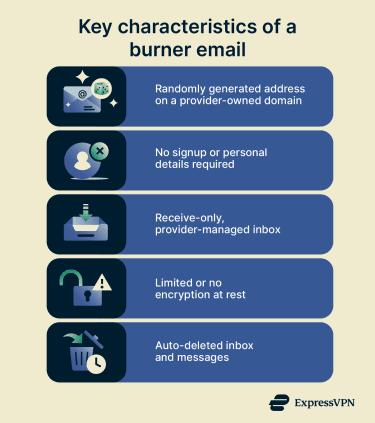
Types of burner emails
Burner email tools do not all work in exactly the same way. Some provide a temporary inbox that expires, while others use masked or alias addresses that forward messages to another mailbox. The main differences are how long the address lasts and how much control you have over it.
- Short-lived inboxes: These expire after a provider-set window, which can range from a few minutes to a day or more. They're built for quick, one-off tasks like receiving a verification code or completing a signup.
- Session-linked inboxes: Some providers tie access partly to your browser session or cookies. You may lose access sooner if you close the browser or clear your cookies, although some services also offer ways to recover the inbox.
- Renewable inboxes: These email addresses start with a limited lifespan, but you can extend them before they expire. Some providers also offer recovery tokens or similar tools, so you can reopen the same inbox later.
- Longer-lived disposable addresses: Often a premium feature, these addresses remain active until you deactivate or manually delete them. In many cases, these work more like masked or alias addresses than self-destructing inboxes.
Burner emails vs. email aliases vs. masked emails
Burner emails are one way to protect your email privacy, but they're not the only option. Email aliases, masked emails, and private email services also help, each with different strengths depending on what you need.
Key differences and use cases
These options differ in how they handle address management, inbox storage, replies, and message protection.
| Email type | Best for | Key characteristics |
| Burner email | Convenient one-time use |
|
| Email alias | Spam reduction and inbox organization |
|
| Masked email | Flexible account isolation |
|
| Private email | Stronger message privacy and security |
|
Email aliases
Email aliases are additional addresses linked to a primary account. Gmail supports plus addressing for inbox organization, and some providers or business accounts support true alternate addresses or custom domains. Emails sent to an alias usually land in your main inbox, so you can manage everything in one place without a separate login. Aliases typically remain active indefinitely unless you disable them.
They're useful for organizing your inbox and limiting how widely your main address is shared. If an alias starts attracting spam, you can set rules to filter, block, or remove those messages. Some providers limit how many aliases you can create and how frequently you can add new ones, depending on the account type. Google Workspace, for example, allows up to 30 aliases per user.
Also read: How to stop spam with anonymous email forwarding.
Masked emails
Like aliases, masked emails route messages to a main inbox. The difference is that masking services usually generate random, provider-controlled addresses that can be created for individual websites or sign-ups and later disabled if needed. Some masking services also support replies that keep the real address hidden. Apple’s Hide My Email, for example, forwards messages to a personal inbox and supports replying without exposing the real address.
Services like ExpressMailGuard add an additional layer of privacy by forwarding messages and immediately deleting successfully delivered copies from their servers.
Private emails
Private email services focus more on protecting the contents of messages rather than your address, though many providers also offer aliases or masking features.
Like mainstream providers, they encrypt messages in transit and at rest. Some also support E2EE, which is the main technical difference for services built around stronger mailbox privacy.
Also read: How to protect your email: Step-by-step guide.
Practical applications of burner emails
Burner emails can be useful in a wide range of everyday situations where a site or service asks for an email address, and you don't want to share your primary one.
E-commerce and online shopping
Online stores often require an email for order confirmations, receipts, and shipping updates, but they may also use it for marketing. A burner address can help reduce unwanted promotional mail while still letting you complete a purchase.
If the order involves billing issues, returns, renewals, or subscription management, make sure you can access the inbox long enough to handle follow-up messages.
Newsletter and content subscriptions
Many websites gate downloads, reports, or articles behind an email signup. A burner can provide you access without requiring a commitment to a mailing list. For content that requires manual approval and may take hours or days to arrive, a longer-lived burner or an alias is a better fit.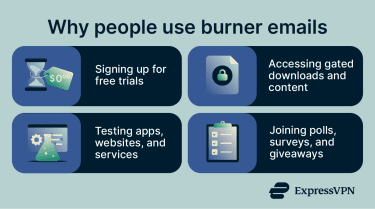
Software and app testing
If you're evaluating multiple tools or services, a burner email lets you create separate signups for each without cluttering your main inbox. It can also make it easier to observe onboarding emails, verification flows, and follow-up messages before deciding whether to register with a permanent address. Temporary inboxes are commonly used for verification and confirmation emails.
Classifieds and marketplace transactions
Listing items for sale or responding to ads usually means sharing an email address with strangers. A burner email can keep your primary address private and can be discarded once the transaction is done.
Dating apps and social platforms
Creating a profile on a platform you're not sure about can feel like a risk. A burner lets you try it out without tying your real email to a profile that may be publicly visible or stored long-term. However, some platforms block known disposable domains, so this approach will not always work.
Polls, surveys, and giveaways
These often collect email addresses to manage responses, send results, or deliver promotional follow-ups. A throwaway address can help reduce unwanted follow-up survey requests or marketing. If a survey or giveaway involves delayed rewards or later confirmation messages, a short-lived burner may expire too soon, so a longer-lived alias may be safer.
Read more: How to create a free anonymous email account.
How burner emails protect you
Beyond convenience, burner emails can offer privacy and security benefits, though the level of protection depends on how the service works.
- Preserving your primary email address: Your main email is often tied to important accounts, such as banking, work, and social media. Every time you hand it to an unfamiliar site, you increase the risk of phishing and unwanted contact. Burner emails can act as a buffer by keeping your primary address out of databases you don't fully trust.
- Reducing spam and unwanted marketing: Signups often lead to ongoing promotional emails. A burner email can help limit that exposure by separating those messages from your main inbox. With temporary inboxes, the messages stop when the address expires. With alias or masked email services, they usually stop when you deactivate the address.
- Limiting exposure from data breaches: According to the Identity Theft Resource Center's (ITRC) 2025 Annual Data Breach Report (DBR), the U.S. recorded 3,322 publicly reported data compromises in 2025, a 79% increase over five years. 88% of people who received a breach notice reported at least one negative consequence, including more phishing or scam attempts (53.7%) and attempted account takeover (40.3%). If a breached site only has a burner address instead of your primary one, that can reduce direct exposure of your real inbox, though it doesn't prevent other leaked data from being abused.
- Maintaining a compartmentalized digital identity: Using different email addresses for different purposes makes it harder for data brokers and advertisers to link your activity across sites. Each burner address is an isolated identity; if one is compromised, nothing else connected to it is. This can also help identify which service shared, leaked, or mishandled an address. But email separation alone does not stop all tracking, since companies may still use other identifiers.
Also read: Email address found on the dark web? Here’s what to do.
Limitations and risks to consider
Burner emails solve some problems well, but they come with tradeoffs worth understanding:
- Limited security and reliability: Security features vary widely between providers. Many burner email services don't clearly document how messages are stored or protected, and users depend entirely on the provider for access, uptime, and retention. That makes them a poor fit for sensitive or important communications.
- Risk of access loss: Some providers keep an address active only briefly, and messages may disappear after a short window. Links, files, receipts, or trial details received earlier may no longer be available when needed. Retention policies vary, so short-lived inboxes can be unreliable for anything that may require later follow-up.
- Unsuitable for sensitive or long-term use: Many burner email services don’t offer persistent storage, reliable account recovery, or long-term access. Some also have limited reply features, depending on the service. They're generally not appropriate for banking, healthcare, government services, or any account you'll need to access again.
- Potential website blocking: Many platforms check email domains against disposable email blocklists during signup. Some also use email verification or anti-abuse tools that flag known temporary email providers, so a burner address may be rejected on sites with stricter checks.
- Management complexity: Burner addresses are often random and harder to remember, and some services give each address its own separate inbox. Managing multiple short-lived addresses across different services can become confusing, especially over several days. Alias-based tools may be easier to organize, but they work differently from traditional temporary inboxes.
Can burner emails be traced?
Burner emails make tracing significantly harder, but they don't guarantee full anonymity. Most temporary email services don't require a sign-up or personal details, and some delete inboxes after a short period, which can limit long-term data retention. Other burner-style email tools work differently, such as masked addresses that forward messages to a real inbox.
However, technical data can still connect activity to a device or network. Providers may process information such as IP addresses, cookies, and browser details while the service is in use. Email messages also carry metadata, including timestamps, sender information, and routing-related header data.
Read more: What is email tracking? How it works and how to stop it.
How to create and use a burner email
Burner emails are straightforward, but a few best practices can reduce friction.
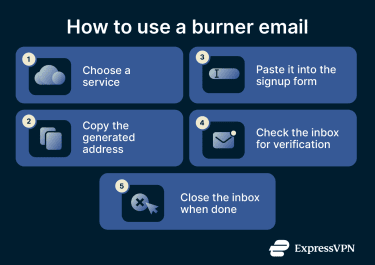
- Choose a reliable service: Before committing, check the provider's privacy policy and test the service to confirm it works on the sites you need.
- Set up your address: Most services generate a disposable address automatically when you visit the site or open the app. Copy the address and use it where needed. For short-lived inboxes, keep the tab open until you receive the email you need. For account-based alias services, manage the address through the provider’s dashboard.
- Watch the expiration window: Check how long the address and inbox stay active. If they expire within minutes, save download links, confirmation codes, or files right away, as they might not be available after the inbox is deleted.
- Keep a simple record: If you use multiple burner addresses, note which one you used for each service and when it expires. This avoids confusion if you need to revisit a site or check for follow-up emails within the active window.
- Switch to an alias or masking service when a burner won't work: Some sites block known disposable domains. In those cases, alias services like ExpressMailGuard may be a better fit. ExpressMailGuard is a private email relay service that creates aliases that forward mail to a real inbox, and offers more control and longer-term usability than a self-destructing inbox.
Read more: Getting started guide for ExpressMailGuard.
Are burner emails legal?
Yes, generally. Using a temporary or disposable email address to protect privacy or reduce spam is not, by itself, generally illegal under U.S. or European law. Burner emails are legal tools; what matters is how they're used.
Using a burner to sign up for a free trial or reduce unwanted marketing is usually fine. But using one to commit fraud, impersonate someone, send deceptive commercial email, or carry out other unlawful activity can have serious legal consequences. In those cases, the legal issue arises from deceptive or fraudulent conduct, not simply from the use of a temporary email address.
Note: Under EU data protection law, an email address may qualify as personal data if it relates to an identified or identifiable natural person.
FAQ: Common questions about burner emails
Are burner emails safe to use?
Can I receive replies with a burner email?
Do burner emails expire automatically?
Can websites block burner email addresses?
Should I use a burner email for important accounts?