What is an intranet? Understanding its role in businesses



An intranet is an essential part of how public and private organizations operate. It might sound complex, but the concept is fairly straightforward. It’s a private network that belongs to a specific organization and lets authorized users access important resources.
This guide explores the topic in depth, explaining what an intranet is, how it works, the key features it offers, and how organizations typically implement it.
What is an intranet?
An intranet is a private computer network that uses internet technologies and protocols to securely share information, resources, and services within an organization. It’s designed for internal use and is accessible only to authorized users, such as employees or contractors.
Types of intranet
Depending on functionality, team size, and organizational needs, intranets can fall into the following categories:
- Traditional intranet: Static, IT-managed sites that host company announcements, HR documents, and policies.
- Social intranet: Dynamic platforms that focus on engagement through comments, likes, user-generated content, and gamification.
- Collaboration intranet: Systems that help teams work together by offering file sharing, task tracking, and document co-editing.
Intranets can also be categorized by how they are built and hosted:
- On-premise intranet: Hosted and managed on an organization’s own internal servers and infrastructure. Access is typically limited to the internal network, and maintenance, security, and updates are handled by in-house IT teams.
- Cloud-based intranet: Hosted on cloud infrastructure and accessed over the internet. This model supports hybrid and remote workforces by allowing secure access from different locations without relying on internal network connectivity.
- Custom-built intranet: Developed specifically for an organization’s technical and business requirements. Instead of using an off-the-shelf platform, the intranet is designed, implemented, and maintained as a tailored solution.
Note: Modern intranet platforms often combine elements from all the types mentioned above.
Intranet vs. internet
An intranet is a private network owned and managed by a single organization, while the internet is a global network that no single entity controls. Although both rely on the same underlying networking technologies, intranets restrict access to authorized users, whereas the internet is publicly accessible.
Intranet vs. extranet
An intranet and an extranet are both private networks, but they differ in who can access them. While an intranet is restricted to internal users within an organization, an extranet provides controlled access to selected external parties such as partners, suppliers, or customers.
An extranet specifically extends limited access to specific systems or information, using permissions and security controls to ensure that external users can access only what they are authorized to see. An example would be customers using external portals to check real-time order or transaction statuses, submit support tickets, or access members-only website sections.
Features of intranet
Intranets can include different features depending on how they’re set up. Organizations typically prioritize the following to support clear communication, strong security, and ease of use.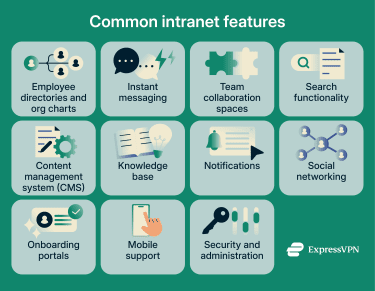
Employee directories and organizational charts
An employee directory is a centralized resource that stores employee profiles, skills, department details, and contact information. It usually integrates with human resources (HR) systems to keep data up to date, includes search features, and lets employees personalize their profiles.
Directories also often include organizational chart views, giving users a visual look at team structures and reporting lines. This helps people quickly understand team setups and hierarchies.
Instant messaging
Real-time communication is a core intranet feature that lets employees send instant messages to colleagues. Compared to email, instant messaging helps people collaborate faster and more efficiently, whether they work on-site or remotely.
Intranet messaging features typically support the following:
- Private and group messages: Users can send one-on-one messages or create group chats for specific projects, teams, or departments.
- Message storage and search: The system stores message history and lets employees search past conversations to find important information.
- Real-time presence indicators: Status updates show whether someone is available, away, or busy.
- File sharing: Employees can quickly share links, files, and images through chat.
Team collaboration spaces
These are virtual workspaces where teams can collaborate on projects from anywhere. They let teams brainstorm, share ideas, co-edit documents and presentations, assign and track tasks, exchange messages, and host video meetings. Many organizations also make these spaces customizable, so teams can add widgets for quick access to tools or use templates for recurring processes.
Search functionality
Built-in search is essential because it helps users quickly navigate large amounts of data and find the right information or files. To boost productivity, search tools should also include:
- Advanced filters: Employees can filter results using criteria like date, department, or document type.
- History and bookmarks: Saving search history and bookmarking frequent queries helps employees revisit information without running new searches.
- Suggestions and auto-complete: Relevant suggestions and auto-completing searches save time when users look up information.
- Full-text search: Results show content within documents, not just file titles, making relevant information easier to find.
Content management system (CMS)
An intranet CMS helps teams create, organize, and share internal communications, such as company news, product updates, and blog posts. A good CMS has an intuitive interface, supports role-based permissions to control who can view, edit, or share content, and lets internal communications teams schedule posts and include different types of media, such as videos, images, and presentations.
Knowledge base
A knowledge base serves as a central hub where employees can find support information, documentation, and other resources. It can include internal policies, troubleshooting guides, development workflows, design guidelines, and product tutorials.
It should include a built-in search so users can quickly find what they need. Content should also be organized into clear categories, subcategories, and sections for easy navigation and support multimedia formats such as videos, downloadable files, and images.
Notifications
Notification systems reduce human error by sending instant alerts about critical updates, important meetings, time-sensitive tasks, or organizational changes. Intranets should support real-time notifications to keep employees informed at all times.
Notifications should also work across multiple devices and communication channels. Additionally, employees should be able to customize their preferences, such as choosing to receive only critical alerts or messages from specific departments.
Social networking
Social networking elements drive interaction and engagement, help people build personal connections, encourage two-way communication, and create a sense of community within the organization.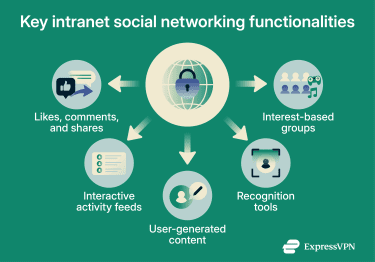
Key social intranet features include:
- Likes, comments, and shares: Allow employees to actively engage with the content they see.
- Interactive activity feeds: Let users view the latest updates, announcements, posts, and comments from colleagues and supervisors.
- User-generated content: Employees can share videos, blog posts, and other content to support communication and knowledge sharing.
- Recognition tools: Built-in or integrated tools let managers and employees publicly recognize achievements and boost morale.
- Interest-based groups: Social groups built around shared interests, such as pets, food, travel, or sports, that can bring people together and strengthen connections across departments and teams.
Onboarding portals
An intranet with an onboarding portal streamlines the integration of new hires. It serves as a central hub where new employees can access training materials, introductions and orientation content, employee handbooks, and other essential resources. An onboarding portal also helps ensure remote team members have the same experience as on-site colleagues, creating consistency across the organization.
Beyond official documentation, some organizations include welcome messages and team introductions to help new hires feel connected and integrated. They may also use interactive training modules, such as videos and quizzes, to help employees learn key processes, tools, and company culture more easily.
Mobile support
A well-designed intranet should support mobile access, since many employees may use smartphones and tablets instead of desktops or laptops. This helps people stay productive while traveling, working remotely, or away from their desks.
Organizations should invest in a mobile app that integrates with the intranet. The app should be easy to navigate and use a responsive design so users don’t run into usability issues that hurt productivity or engagement. It should also support push notifications to alert employees about urgent updates or meetings. The intranet itself should work smoothly across different devices and screen sizes.
Security and administration
An intranet provides access to valuable network assets, so strong security is essential. Many organizations protect their intranets with measures such as:
- Data encryption: Converts readable information into an unreadable format, keeping stored and in-transit data secure.
- Strict access controls: Ensure users only access resources based on their roles. For example, someone in HR wouldn’t have access to customer contact details.
- Business virtual private networks (VPNs): Secure remote connections to intranet resources. Organizations may also use site-to-site VPNs to safeguard communications between distant offices. Please note that corporate VPNs are different from commercial VPNs, like ExpressVPN, which help individual users and small teams to protect their data.
- Activity monitoring tools: Provide detailed reports on user activity, such as who accessed specific files and when, helping security teams spot suspicious behavior.
- Secure login methods: Use strong authentication methods, such as single sign-on (SSO) or multi-factor authentication (MFA), to add extra identity verification during login.
Some organizations also use zero-trust architecture, which assumes no user or device is trusted by default. This approach relies on continuous identity checks to ensure only authorized accounts and secure devices can access the intranet.
Benefits of using an intranet
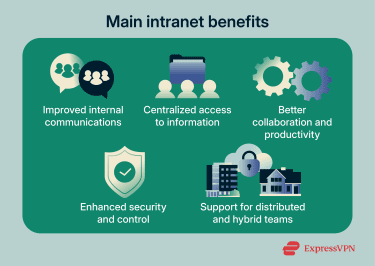
Intranets are widely used across organizations because they offer several key benefits:
- Improved internal communication: An intranet reduces reliance on scattered emails by providing a consistent channel for company-wide announcements, updates, and reminders.
- Centralized access to information: An intranet brings work-related information, policies, and internal tools into one place, making it easier for employees to find what they need and reducing duplicated effort.
- Better collaboration and productivity: Intranets support shared workspaces and collaboration tools that help teams coordinate tasks, manage projects, and work together more efficiently.
- Enhanced security and control: Because an intranet is a private network, organizations control access to sensitive information through permissions and role-based access, keeping internal systems separate from public networks.
- Support for distributed and hybrid teams: Modern intranets provide secure access to internal resources from different locations, allowing teams to stay connected and productive regardless of where they work.
Implementation insights
Implementing an intranet can take time and resources, and the process looks different for every organization. The sections below cover common implementation approaches, helpful tips, and potential risks.
How to implement an intranet
Intranet implementation can vary depending on an organization’s size, budget, and needs. That said, most companies follow similar pre-launch and deployment steps and rely on specific software and tools.
Planning and design considerations
A successful intranet depends on a reliable and scalable network architecture. Organizations should ensure their network architecture supports performance, availability, and security, and decide early whether the intranet will run on on-premises infrastructure or cloud-based systems.
Planning should also address strategy and structure, including:
- Goals and metrics: Make objectives clear and actionable by attaching numbers to them. For example, “increase engagement” sounds good but doesn’t offer real insight. A goal like “get 80% of employees to use the intranet platform” makes progress easier to track.
- Content audits: Help teams migrate only relevant content to the new intranet. Some documents can move over as they are, while others may need updates, such as older employee handbooks or outdated organizational charts. Teams can also remove unnecessary content, such as old newsletters or duplicate files.
- Content ownership: Assign department heads or team leads to own specific content. IT teams can manage technical issues and migration, but they shouldn’t be responsible for creating content for every department.
- Information architecture design: Organize information based on how people naturally search for it. Instead of creating separate tabs for HR, IT, and finance, build content hubs that centralize related resources. Someone looking for company policies is more likely to check a resource hub than browse the HR section.
Tools and software
While organizations can develop in-house intranet software, many choose reputable third-party solutions instead. These platforms often provide cloud-based intranet tools that make deployment and management easier while also offering customization and workflow automation.
Companies also use a range of security tools to protect intranet access and hosted data. Common solutions include firewalls, access controls, VPNs, and encryption.
Deployment and rollout
Instead of treating deployment as a one-time launch, it’s best to approach it as a controlled transition with ongoing refinement.
- Validate functionality: Test authentication, permissions, mobile access, and core workflows across devices and browsers. Confirm that critical resources such as help content and documentation are easy to locate.
- Prepare users: Communicate the change ahead of time and explain what employees should expect. Clear guidance reduces confusion and support requests during the transition.
- Support initial usage: Provide short walkthroughs, recorded demos, and basic documentation that show employees how to complete common tasks. Ensure support teams are prepared to handle questions beyond basic login issues.
- Monitor usage and feedback: Track adoption metrics, search behavior, and common support requests. Use this data to refine navigation, improve content quality, and identify training gaps.
- Maintain and improve: Treat the intranet as an evolving system. Update content regularly, retire unused sections, and adjust structure as organizational needs change.
Common intranet challenges and how to address them
Organizations often encounter recurring challenges when deploying and maintaining an intranet.
Low user adoption
Low adoption usually happens when the intranet doesn’t replace or meaningfully improve existing ways of working. Intranets tend to see stronger engagement when they support everyday tasks such as accessing policies, locating tools, or sharing updates, and when they reduce the number of systems employees need to check during the workday.
High implementation costs
Intranet costs can escalate when organizations over-customize early or rely heavily on on-premises infrastructure. Costs remain more predictable when organizations start with a limited feature set, avoid unnecessary customization, and expand functionality based on actual usage.
Management and maintenance overhead
Ongoing management becomes a challenge when content responsibility is unclear. In many cases, IT teams end up managing not only the platform but also content updates, which slows response times and leads to outdated information. This burden decreases when departments own their own content and follow shared publishing guidelines.
Poor search performance
Search issues often stem from inconsistent naming, unstructured content, and missing metadata rather than the search engine itself. You can improve search performance with consistent naming conventions, clear categories, and by including basic metadata such as document type or owner. Reviewing search queries and failed searches also helps identify gaps that navigation alone doesn’t reveal.
Stale or outdated content
An intranet feels irrelevant when content remains unchanged for long periods or when outdated material stays visible. This can happen when content ownership is unclear or when review timelines are not enforced. Regular content reviews, visible “last updated” dates, and automatic reminders for owners help prevent information from going stale.
Network and performance challenges
Performance problems often appear in larger or distributed organizations when intranets depend on legacy infrastructure or limited internal bandwidth. Slow load times and inconsistent access discourage use, especially for remote employees. You can reduce these issues by prioritizing hosting environments that support geographic distribution, redundancy, and scaling.
FAQ: Common questions about intranet
What is an example of an intranet?
An employee portal is a common intranet example. It can take the form of a homepage or mobile app where employees log in to check company news and announcements, find documents and files, view upcoming events, complete forms, or contact colleagues.
What are the three types of intranets?
The three main intranet types are traditional, social, and collaboration intranets. Traditional intranets are mostly static and provide access to company and HR documents. Social intranets focus on engagement, and collaboration intranets prioritize teamwork.
What are the main benefits of using an intranet?
The main advantages of an intranet include stronger employee engagement, better internal communication, and more streamlined operations, since teams can collaborate easily on shared projects. An intranet also improves knowledge sharing by making it simple for employees to exchange ideas and access key resources, and it provides centralized storage for important files and documents.
How do organizations implement an intranet system?
Intranet implementation varies by organization, but it usually starts with building reliable network infrastructure, either on-premise or in the cloud. Companies then use intranet software to design the platform and security tools to protect access and data. Careful planning also plays a key role, helping ensure a smooth migration, clear content ownership, strong internal communication, and easy access to relevant information.
What features should a modern intranet include?
Modern intranets are highly customizable, so organizations can add the tools they need. Common intranet features include employee directories and organizational charts, instant messaging, strong search tools, social networking elements, team collaboration spaces, a knowledge base, a content management system (CMS), mobile access, notifications, security controls, and onboarding portals.
How does an intranet help with employee collaboration?
An intranet can improve employee collaboration by letting teams across departments or locations work together on shared projects. They can co-edit documents, share files and ideas, exchange real-time messages, and hold video meetings.
Take the first step to protect yourself online. Try ExpressVPN risk-free.
Get ExpressVPN