
Is mobile banking safe? Your questions answered


Mobile banking is generally safe if you follow good security practices (like keeping your banking app up to date) and avoid higher-risk situations such as using public Wi-Fi. Most risks come from attackers exploiting users, rather than from inherent flaws in mobile banking itself.
In this article, we’ll break down when mobile banking is safe, when it can be insecure, common threats to watch out for, and whether browser-based banking is a safer alternative.
How does mobile banking security protect you?
Banks implement various mobile cybersecurity measures to protect against external attacks and manipulation from cybercriminals:
- Fraud monitoring: Banks use automated systems, often powered by AI, to continuously monitor transactions for suspicious activity. These systems can identify patterns and anomalies that may indicate fraud, sometimes detecting threats that human analysts might miss. If something appears suspicious, they may flag the transaction, temporarily restrict activity, or ask the user to verify it. This is especially important for international mobile banking, as cross-border transactions may trigger additional verification or temporary declines.
- Device registration and binding: Many banking apps tie access to a specific registered or trusted device. This means that even if someone obtains your login details, they may still need to complete a separate verification or activation step before using the app on a new phone. This adds another barrier against unauthorized access, although the exact setup varies by bank.
- Card freezing: Most banks and many mobile banking apps allow you to freeze a lost or stolen credit or debit card to avoid unauthorized transactions or financial fraud.
- Encryption: Using data encryption algorithms, banks convert your personal and financial data into code when transmitting it over a network. This makes the data extremely difficult to read without the proper decryption keys.
- Automated sign-out: Most mobile banking apps automatically sign you out of the app after a period of inactivity (typically a few minutes). This protects against unauthorized access from anyone with access to your mobile device.
Overall, financial institutions use strong security measures for mobile banking. In practice, many cases of financial fraud involve social engineering that targets users, rather than direct attacks on banking systems.
Common threats to mobile banking
Mobile banking presents an attractive target to criminals due to the obvious financial incentives involved. Here are some of the common threats that mobile banking users should be aware of.
Fake banking apps
Fake banking apps are designed to impersonate legitimate apps from real banks. They often copy a bank’s name, logo, interface, and login flow closely enough to look convincing, especially to users who are downloading the app for the first time. Their goal is to trick users into entering sensitive information such as usernames, passwords, card details, PINs, and one-time codes. Once entered, that information is sent to the attackers, who can then use it for fraud or account takeover. Some fake banking apps may request phone permissions to intercept or bypass security codes sent by text, which can make them even more dangerous.
Installing banking apps only from official stores such as Google Play or Apple’s App Store lowers the risk, but it does not remove it entirely. Users should also verify the developer name, avoid downloading apps from links in messages or emails, and, when possible, use the download link provided on the bank’s official website.
Malware
Instead of pretending to be your bank so it can gather enough information to register a new device, malware often abuses the trusted phone you already use for banking.
For example, a banking trojan may hide inside another app and stay dormant until you open your real banking app. It can then place a fake login screen over the legitimate app to steal your credentials while passing you through to the real app afterward, making the compromise harder to notice.
Overlay-based attacks can also be used to manipulate what you see or tap on screen, and Android’s own security guidance notes that overlays can be dangerous because they may steal passwords or read messages. Some banking apps try to reduce this risk with protections such as blocking screenshots, limiting screen sharing, and preventing third-party overlays on sensitive screens, but malware on the device can still be a serious threat.
SIM swap and account takeover
SIM swapping, also known as SIM porting or SIM jacking, happens when an attacker tricks a phone carrier into transferring a phone number to a SIM card under their control. This means that calls, messages, and one-time passcodes go to the attacker’s SIM card instead of the one in the user’s phone.
This becomes relevant to mobile banking when SMS-based two-factor authentication (2FA) is used for login. While many banks support SMS-based 2FA because it’s widely compatible and easy to use, it can be vulnerable to SIM swapping. In some cases, attackers can use intercepted codes to reset passwords and gain unauthorized access to accounts.
Red flags of SIM swapping may include a sudden loss of service, inability to send texts or receive calls, or unexpected account activity. In some cases, mobile carriers may send alerts about SIM changes or number transfers, but this varies by provider and region.
Public Wi-Fi and network snooping
Public Wi-Fi can be risky, especially if attackers set up fake hotspots or if the device itself is compromised. While mobile banking apps typically encrypt data in transit, that does not eliminate every risk connected to untrusted networks. Using a virtual private network (VPN) like ExpressVPN adds an extra layer of protection, but it should not be treated as a substitute for using a trusted network and a secure device.
Data breaches
Data breaches happen when a company that holds user data suffers a data leak, exposing personal or sensitive user information. This can happen due to human error or because of a cyberattack.
Depending on the information leaked, data breaches can lead to account takeover or financial fraud. The most common type of data involved in leaks includes email addresses, phone numbers (which can contribute to SIM swapping attacks when combined with other personal information), names, residential addresses, and account passwords.
Mobile banking best practices
Implementing these steps can help improve your personal security and mitigate many of the methods often used by cybercriminals to gain access to your banking app.
- Use official banking apps: Fake banking apps can look nearly identical to the real thing and may lead to account takeover. Download banking apps only from official app stores like Google Play or Apple’s App Store, and check the developer before installing.
- Choose strong passwords and 2FA: Strong passwords and 2FA reduce the risk of unauthorized access. A password manager like ExpressKeys can also help create, store, and monitor unique passwords.
- Keep your phone and apps updated: Security updates fix known vulnerabilities that attackers may exploit. Installing updates promptly, and enabling automatic updates where possible, helps keep your device protected.
- Turn on alerts and transaction notifications: Banking alerts can notify you about account activity, including actions you did not initiate, so you can respond quickly to suspicious behavior.
- Secure your device with a screen lock: A PIN helps prevent unauthorized access if your phone is lost or stolen.
- Avoid rooted or jailbroken devices: Rooted or jailbroken devices are often more exposed to security risks and may stop receiving important security updates.
- Use a mobile antivirus: Mobile antivirus tools can detect malware, block malicious websites, provide real-time phishing protection, and sometimes scan SMS messages or check app reputation.
Mobile banking vs. internet banking (netbanking)
You can access your bank account in two main ways:
- Mobile app (mobile banking): Download the app from an official store like Google Play or Apple’s App Store.
- Browser (desktop or mobile): Visit your bank’s official website and log in.
Both methods let you perform typical operations like checking your account balance, making transactions, freezing cards, or adding and removing accounts. But are they equally safe and secure? Let’s break it down.
How safe is internet banking in a browser?
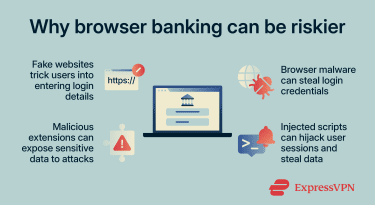
Browser-based banking uses similar security measures to mobile apps, but it can expose users to different risks:
- Copycat websites: Cybercriminals can create fake versions of a bank’s site that closely mimic the original and trick users into entering login details. Bookmarking the official site instead of using search results can reduce this risk.
- Browser-targeted malware: Banking trojans or keyloggers can infect browsers and steal login credentials from users. Some attacks may even alter what users see on the page, potentially manipulating them into sending money or accepting unauthorized transactions.
- Malicious browser extensions: Some browser extensions can be malicious and may expose sensitive data (like banking credentials) to external attacks. Mobile apps run in isolated environments (sandboxing) and don’t support the same kind of third-party extensions as desktop browsers, which can help limit these attack vectors.
- Greater exposure to compromised websites: Browsers execute code from websites, including scripts that may come from different sources, which can increase exposure if a site contains vulnerabilities or is compromised. For example, vulnerabilities like cross-site scripting (XSS) can allow attackers to inject malicious code and potentially steal data or hijack sessions.
 Mobile banking apps aren’t risk-free either. They can still be targeted by malware or fake apps, but the more controlled environment can reduce exposure to some browser-based risks.
When one option can be safer than the other
Generally speaking, using the official mobile banking app is often safer in practice than browser-based banking. That’s especially true if you keep your phone and apps up to date.
Browser-based banking is generally safe, too, assuming you:
- Don’t have malware or spyware on your device.
- Avoid risky websites and practice good online banking safety habits.
- Pay attention to the browser extensions you use.
It’s also worth noting that some antiviruses include a separate protected browser designed specifically for sensitive activities like banking and payments. These browsers can run independently of your regular browser, block screen-capture attempts, use a virtual keyboard to reduce keylogging risk, and warn you about fraudulent or harmful websites. They’re not essential, but they can add another layer of protection for banking on desktop devices.
Understanding the limitations of mobile banking
Mobile banking has several limitations or disadvantages:
- Over-permissions and data exposure: Some banking apps may request access to certain device features or data to support specific functions. It’s a good idea to review those permissions and only grant access that seems relevant to the app’s features.
- Mobile-specific attacks can be harder to detect: While less common than phishing, some mobile attacks can overlay fake login screens on legitimate apps or capture user input without obvious signs, making them difficult for users to identify.
- Outdated app versions introduce security risks: Depending on your phone settings, apps may not install updates automatically. Forgetting to install updates may introduce banking app vulnerabilities.
- Same-device authentication risk: Unlike a desktop browser, which can separate the device on which you access your bank account from the authentication device (your phone, for instance), your mobile banking app uses the same device for both access and authentication. This means that a compromised device could make it easier for attackers to bypass security measures.
When you should avoid mobile banking
It’s generally less safe to use mobile banking on untrusted networks (like public Wi-Fi) or if you have reasons to believe your phone is compromised. This may include performance issues, unexpected pop-ups, or unfamiliar apps installed without your knowledge.
Similarly, if you’re in a public place where strangers can observe your screen over your shoulder, using your banking app may put you at unnecessary risk.
FAQ: Common questions about mobile banking
Can scammers hack your mobile banking app?
Is mobile banking safe on Android and iPhone?
What is the safest device for online banking?
How can I secure my mobile banking account?
Take the first step to protect yourself online. Try ExpressVPN risk-free.
Get ExpressVPN














Comments
Some banking and financial institutions will lock you out if you use a VPN whether home or abroad, so how do you get around that?
You have provided very useful information to me. I often log in on some unknown sites using the same password. The simple reason is that I don't forget. However, this is a big mistake. After reading this article, I have to be more careful in using the password on sites that are not known with certainty.
So are you saying when I sign on to my online banking and it gives me the option to save my password, I should save it? I was thinking if I did that and someone new my username it would be easy for them to access? I want to get back on here and read again tomorrow when I am not so tired. Will that be ok?