 Celebrate with up to 80% off
What is a data leak? Causes, signs, and how to protect your data


A data leak is one of the most common ways sensitive information becomes accessible to people who were never supposed to see it. Usually, it’s because of a misconfiguration, a mistake, or an access control that was never set up properly.
Personal details, passwords, financial records, and internal company information are all susceptible to data leaks. Once that data is exposed, it can be copied, shared, and reused before anyone realizes it was ever accessible. And it doesn't need to involve a cyberattack.
This guide explains what a data leak is, how it differs from a data breach, what causes it, how to spot the warning signs, and what you can do to reduce your risk.
What is a data leak?
A data leak is the unintended exposure of sensitive information to unauthorized people. The key point is exposure, not data theft: the data has become accessible, even if no one has actively stolen or misused it yet.
That distinction matters. A leaked database might sit unnoticed for weeks or months before anyone acts on it. But the exposure itself is the problem, because once the information is out, you can’t put it back.
Types of data commonly exposed
Data leaks can happen inside an organization (information reaching employees or systems it was never meant for) or outside it (becoming publicly accessible on the internet). Either way, the same kinds of information are usually involved:
- Personally identifiable information (PII): Names, addresses, phone numbers, dates of birth, and passport details. The details that make identity theft possible.
- Login credentials: Usernames, passwords, and security question answers that can be used to access accounts.
- Financial data: Bank account details, payment card numbers, and billing records.
- Health records: Medical histories, insurance information, test results, and prescriptions.
- Business-sensitive files: Contracts, source code, product plans, and internal reports.
Data leak vs. data breach: What’s the difference?
The terms are often used interchangeably, but they describe different situations. A data leak is usually accidental exposure. A data breach is unauthorized access. Think of it like this: a data leak is leaving the door open, and a data breach is someone walking in or forcing their way inside.
In practice, the two often overlap. A data leak can become a data breach the moment an attacker discovers and acts on the exposed information. This is why leaks are treated seriously even when no theft has been confirmed: a window of exposure is a window of opportunity.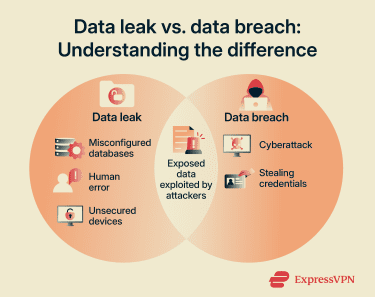
How do data leaks happen?
Most data leaks are preventable. They come down to a handful of root causes: something was configured incorrectly, someone made a mistake, or access wasn't managed carefully enough.
Misconfigured cloud storage or databases
Moving data to cloud services creates new ways for things to go wrong with permissions. A storage bucket set to “public” instead of “private,” a database left open without a password, or an API that doesn’t check who’s asking for access. All of these can expose sensitive information to anyone on the internet.
A well-known case involved Microsoft Power Apps portals. In May 2021, cybersecurity firm UpGuard discovered that some Power Apps portals using OData list feeds (feeds that make database-style records available to apps or websites in a structured format) were exposing data to anonymous users because table permissions had not been enabled. UpGuard later reported that 47 organizations (including government agencies, American Airlines, J.B. Hunt, and Microsoft itself) had unintentionally exposed 38 million records, including names, email addresses, employee IDs, COVID-19 appointment data, and some Social Security numbers (SSNs). Microsoft later changed the platform so table permissions would be enforced by default for new portals and released tools to help customers check for exposed data.
Human error
Simple mistakes are also behind a significant portion of data leaks. Even well-intentioned employees working in secure environments can cause exposure through everyday slip-ups:
- Sending a sensitive file to the wrong email address.
- Attaching the wrong document to a message.
- Sharing links without restricting access.
- Uploading private internal files to a public folder or collaboration tool.
- Using unapproved tools to handle sensitive data.
These are predictable mistakes. They tend to happen when people are busy, distracted, or unaware of the security implications of what they’re doing.
Weak or excessive access permissions
determine who can view or use certain data. When they are too broad, more people than necessary can access sensitive information, and the chances of it leaking rise sharply. Common problems include:
- Users or systems being granted more access than their role requires.
- Reused or weak passwords that make accounts easy to compromise.
- No multi-factor authentication (MFA) on accounts that hold sensitive information.
- Access permissions that aren’t removed when employees leave or roles change.
The principle of least privilege (giving people access only to what they actually need) is one of the most effective ways to limit this exposure.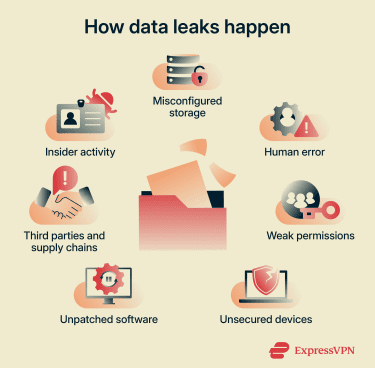
Third-party and supply chain risk
Strong internal security is not enough if a vendor, contractor, or software tool with access to your data is not equally secure.
The MOVEit incident in 2023 is a striking example. Attackers linked to the Cl0p ransomware group exploited a zero-day vulnerability in Progress MOVEit Transfer, a widely used file transfer tool, to steal data from vulnerable systems. The incident affected thousands of organizations and exposed the personal data of tens of millions of people, with cybersecurity company Emsisoft’s public breach tracker later putting the known impact at more than 2,700 organizations and 95 million individuals. Many victims had no direct relationship with MOVEit or its maker, Progress Software. Their data was exposed because an employer, service provider, government agency, or other organization in their supply chain used the software.
Insider activity
While accidental exposure is more common, deliberate insider threats also happen. These cases involve employees misusing their access, for example:
- Copying data before leaving a company.
- Selling or sharing confidential information.
- Accessing data outside their role.
- Working with external threat actors to bypass security controls.
Because insiders already have authorized access, these incidents can be harder to detect and more damaging than external attacks.
Unsecured devices and remote work risks
Remote work increases the risk of data leaks if security controls are weak. Common issues include:
- Lost or stolen laptops containing sensitive files.
- Unencrypted USB drives.
- Work data stored on personal devices.
- Use of unapproved apps or services to share or store files.
Unpatched software
Outdated systems often contain known vulnerabilities, which are a consistent source of data exposure. A patch closes the gap. Without it, the gap can stay open for a long time. Case in point, the Log4Shell vulnerability, first disclosed in December 2021, was still being exploited years later against organizations that hadn’t applied the available fix.
Unencrypted data
Encryption makes data unreadable without the right key. Without it, anyone who finds the data can immediately use it. This means that even a relatively contained exposure, such as a misconfigured storage bucket, a lost device, or a misdirected file, can be far more damaging than it would otherwise be.
Real-world examples of data leaks
Here are some notable incidents that show how data leaks happen in practice and what the consequences can look like.
Facebook (2021): Scraping via a product feature
Attackers abused Facebook’s Contact Importer feature, which was designed to help users find friends by uploading contact lists, to match large sets of phone numbers to Facebook profiles.
The scraped dataset, later made freely available online in April 2021, contained personal data linked to about 533 million users across 106 countries, including phone numbers, Facebook IDs, full names, locations, birthdates, bios, and, in some cases, email addresses.
Facebook said it had made changes to the feature in 2019 to prevent this kind of mass scraping, but by then the data had already been collected and later resurfaced online.
Capital One (2019): Cloud misconfiguration exploited
A misconfigured web application firewall in Capital One's Amazon Web Services (AWS) environment allowed an attacker to access a server and download more than 100 million customer records, including names, addresses, credit scores, and SSNs.
While the underlying error was a configuration mistake, a malicious actor found and exploited it. It’s a useful example of how a leak can quickly become a breach.
Accenture S3 exposure (2017): Unsecured cloud storage
In September 2017, researchers at cybersecurity firm UpGuard discovered that global consulting company Accenture had left at least four AWS Simple Storage Service (S3) storage buckets publicly downloadable.
The buckets were linked to Accenture Cloud Platform and contained highly sensitive internal data. One bucket alone contained 137GB of data, including database dumps with nearly 40,000 plaintext passwords, while other exposed files included private signing keys and credentials for services such as Google and Azure.
UpGuard said the data could have been used to attack Accenture or its clients, though Accenture later said the exposed files did not include production data and could not have provided access to client systems.
Risks and consequences of data leaks
A data leak doesn’t have to involve active theft to cause real harm. Once information is accessible to people who shouldn’t have it, the damage can spread quickly and be difficult to contain.
For individuals
Even small pieces of information can be useful to an attacker.
Identity theft and fraud
Fraudsters can use exposed personal information to impersonate someone, open accounts in their name, or apply for loans or credit cards.
For the individuals affected, the impact can go beyond the immediate financial loss. There’s the anxiety of not knowing how far the data has spread, the time spent disputing fraudulent activity, and a lasting loss of trust in the services involved.
Follow-on attacks
Exposed data is often used in further attacks:
- Spear phishing: An attacker can use real data, such as a person’s name, employer, and email address, to send them a targeted, convincing scam message. One that looks nothing like the generic phishing attempts most of us have learned to spot.
- Credential stuffing: Attackers will test a username and password combination exposed from one site across hundreds of other websites and services automatically, exploiting people’s habit of reusing login credentials.
- Social engineering: Specific personal details make it easier for attackers to impersonate companies, colleagues, or officials convincingly in calls, messages, or emails.
For organizations
Data leaks can lead to major financial losses and reputational harm.
Financial and reputational damage
IBM’s 2025 Cost of a Data Breach Report
puts the global average cost of a data breach at $4.4 million. That figure covers investigation costs, regulatory fines, lost business, and post-incident customer support, but it doesn’t capture the reputational damage that can persist long after the event.
Beyond the immediate disruption, a significant data incident can interfere with longer-term business plans. Mergers and acquisitions become more complicated when a security incident is on the record. The resulting costs, operational disruption, and reputational damage can force companies to reassess or abandon planned growth strategies.
When intellectual property is leaked, such as source code or product designs, the damage can be harder to quantify but just as lasting. It undermines innovation, and competitors or threat actors who obtain it gain an advantage that simply can’t be undone.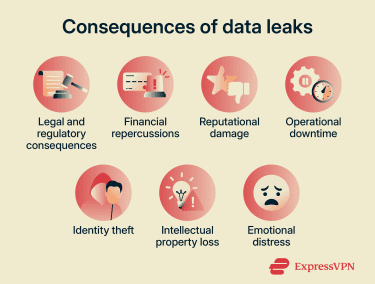
Regulatory and legal consequences
Organizations that expose personal data may face regulatory and legal consequences, depending on the data involved and the location of the affected people:
- General Data Protection Regulation (GDPR): In the EU and the U.K., organizations may be fined up to €20 million (£17.5 million) or 4% of annual turnover, whichever is higher. They must also notify their supervisory authority within 72 hours of becoming aware of the qualifying breach.
- California Consumer Privacy Act (CCPA): Companies in California could face private lawsuits from affected individuals and enforcement action from California privacy regulators, including the California Privacy Protection Agency and the state Attorney General.
- Other jurisdictions: Many countries now have customer data protection laws with mandatory breach reporting and potential penalties, such as the Personal Information Protection and Electronic Documents Act (PIPEDA) in Canada, Brazil’s Data Protection Law, and Singapore’s Personal Data Protection Act (PDPA).
Long-term exposure
Leaked data doesn’t expire. Once copied and distributed, it can circulate on dark web forums, get repackaged into larger datasets, or resurface months or years after the original incident.
Information that can’t be changed, like a date of birth, health record, or ID number, carries that risk indefinitely. A breach from years ago can still fuel identity fraud today.
How to detect a data leak
Data leaks are often discovered after the data has been misused, but there are warning signs and tools that can help you spot one earlier.
Warning signs for individuals
Here are some common signs that your information may have been leaked:
- A sudden increase in spam calls or phishing emails, particularly ones that include accurate personal details.
- Unexpected login alerts or account lockout notifications.
- Unfamiliar charges on a bank or credit card statement.
- New accounts, subscriptions, or credit applications.
- Notifications from a company saying personal data may have been exposed.
Tools to check if your information is exposed
Some services, like Have I Been Pwned, let you check whether a specific password or email address has appeared in known breach datasets. If a password you use shows up there, change it everywhere you have used it.
Many password managers, browsers, and identity protection tools now include built-in breach monitoring that can alert you if they find exposed personal information or compromised credentials. For example, ExpressVPN’s Identity Defender, available to eligible U.S. subscribers on supported plans, includes ID Alerts that notify users when certain personal information appears in data breaches, on the dark web, or in other monitored records. It also offers data broker removal, credit monitoring, and identity theft insurance* depending on the plan.
How organizations detect data leaks
Organizations need a more systematic approach than a simple account alert to detect a leak. They often rely on a mix of automated security tools and proactive monitoring. Common methods include:
- Data loss prevention (DLP) tools: Monitor and protect data across endpoints, networks, and cloud environments, flagging or blocking unusual transfers before data leaves the organization.
- Dark web monitoring: Security teams scan illegal marketplaces and forums for company credentials or data dumps, which often show up shortly after a leak.
- User and entity behavior analytics: Uses machine learning and automation to analyze behavior patterns to detect anomalous behavior, such as employees downloading unusually large amounts of data or accessing sensitive data unrelated to their job.
- Attack surface scanning: Continuously checks all internet-connected devices, such as cloud storage buckets, for misconfigurations that could expose sensitive data.
- Network traffic monitoring: Tracks outbound traffic for unauthorized transfers to unknown or suspicious IP addresses.
- Penetration testing: Security experts simulate attacks to discover vulnerabilities before real attackers do.
- Log review: Regularly analyzing server and access logs to catch unusual patterns that automated tools might miss.
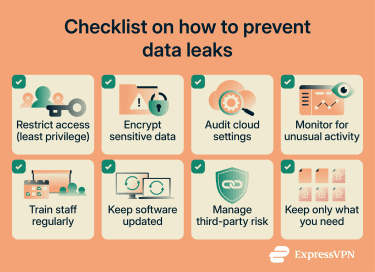
How to prevent data leaks
Preventing data leaks is about reducing unnecessary exposure and controlling how information is accessed, stored, and shared. The goal isn’t just to stop outside threats; it’s to close the gaps that close the most leaks in the first place.
For individuals
Here are several practical steps to reduce the risk of your personal data being exposed or misused.
- Use strong, unique passwords for every account: Password managers make this much easier to manage. They generate and store complex passwords so you don’t have to remember them and limit the damage if one set of credentials is exposed.
- Turn on two-factor authentication (2FA): Even if a password is exposed, an attacker still can’t get in without a second verification, usually a code from an app or a hardware key.
- Use a unique email alias per service: Create a different email address for each service you sign up for. If one starts receiving spam or scam messages, you know immediately which service was compromised.
- Be selective about what you share: Decline optional data fields, use virtual card numbers for online purchases, and think twice before registering anywhere with your primary email address.
- Monitor your accounts: Watch for unusual account activity, login alerts, or unexpected permission changes to catch potential problems early. Also, check back statements and credit reports regularly for activity you don’t recognize.
- Keep software updated: Updates often include security patches for vulnerabilities that are already being exploited. Delaying them extends your exposure.
- Use a virtual private network (VPN) on public Wi-Fi: A reputable VPN can encrypt traffic between your device and the VPN server, making it harder for others on the same public network to monitor what you’re doing. It doesn’t replace HTTPS or encrypted messaging, but it adds a useful layer of protection on untrusted networks.
For organizations
Reducing data leak risk requires a layered and proactive security approach across systems, people, and processes.
- Apply least privilege: Give users and systems access only to what they need for their role. Implement a zero-trust approach and trim permissions regularly as most cloud accounts accumulate excess access over time through normal project work.
- Secure your cloud configuration: Default settings aren’t always secure. Check cloud storage buckets, databases, and APIs regularly. Set access to private by default and use automated scanning tools to catch misconfigurations before attackers do.
- Manage third-party risk: Assess the security posture of vendors and partners who have access to your data. Know what data they can reach, how it is protected, and what they are contractually required to do if they experience an incident.
- Train employees: Regular, short security awareness sessions tend to work better than annual one-off training. Cover phishing, safe data handling, acceptable use of tools, and what to do if something looks wrong.
- Encrypt sensitive data: Encrypt data both at rest and in transit. If encrypted data is exposed, it’s far less useful to whoever finds it.
- Classify and protect sensitive information: Label data like PII and intellectual property so it can be prioritized and protected appropriately. Not all data carries the same risk, and treating it all the same is inefficient.
- Manage secrets properly: Store secrets like API keys, credentials, and tokens in dedicated secret management tools rather than embedding them in code, configuration files, or shared documents.
- Practice data minimization: Collect and keep only the data you genuinely need. Data you don’t hold can’t be leaked. It’s also a legal requirement under GDPR (Article 5).
- Patch promptly: Apply security updates as soon as they are available, especially for software that handles sensitive data or connects to the internet. The MOVEit breach exploited a zero-day, a flaw nobody knew about, but many attacks use vulnerabilities for which patches have been available for months.
What to do if your data has been leaked
Speed matters. The sooner you act to limit the exposure, the easier the path to recovery.
For individuals
Here are some practical steps you can take to protect your accounts, finances, and identity:
- Secure your accounts immediately: Change passwords for any affected accounts, then check whether you have used the same password elsewhere and change those too. Enable 2FA where possible.
- Contact your bank or payment providers: If financial or identity data may be exposed, ask them to monitor activity, flag unusual activity, or issue new cards. Act before something goes wrong rather than after.
- Monitor financial activity: Regularly check bank statements and credit reports for anything unfamiliar. Set up transaction alerts if your bank offers them. If you’re in the U.S., consider placing a fraud alert or credit freeze with the major credit reporting agencies.
- Be alert for follow-on scams: Leaked data is routinely used to build convincing phishing messages. Be skeptical of any unexpected email, text, or call asking you to verify details, click a link, or take urgent action.
- Report the incident if appropriate: In the U.S., you can report identity fraud or scams to the Federal Trade Commission (FTC). In the U.K., complaints can be submitted to the Information Commissioner's Office (ICO), which oversees data protection issues and enforcement.
For organizations
Act quickly to contain the incident, understand its impact, and prevent further damage or recurrence.
- Contain the exposure immediately: Remove public access, revoke compromised credentials, adjust permissions, and isolate affected systems if required. The priority is to stop further exposure.
- Assess the scope of the leak: Identify what data was exposed, how much of it, how long it was accessible, and which individuals or systems were involved.
- Notify relevant parties: Inform affected individuals, partners, regulators, and other stakeholders where legally required. Under regulations such as GDPR, notification obligations may apply depending on severity.
- Fix the root cause: Correct the misconfiguration, close the access gap, or apply the patch; whatever made the leak possible. Document what was done and why for internal records and in case regulators ask.
- Prepare for secondary risks: Stolen or exposed data is often reused in phishing or social engineering campaigns targeting the affected organization and its customers. Brief internal teams and, where appropriate, warn affected individuals about the risk of follow-on contact.
FAQ: Common questions about data leaks
How can I check if my email address was exposed?
Can a data leak lead to identity theft?
How long does leaked data stay online?
What should I do if my data was leaked?
Can leaked information be removed from the internet?
Is a data leak the same as a data breach?
* The insurance is underwritten and administered by American Bankers Insurance Company of Florida, an Assurant company, under group or blanket policies issued to Array US Inc, or its respective affiliates, for the benefit of its Members. Please refer to the actual policies for terms, conditions, and exclusions of coverage. Coverage may not be available in all jurisdictions. Review the Advanced Tier Summary of Benefits and the Express Pro Tier Summary of Benefits.