 Celebrate with up to 80% off
What is web filtering? Types, benefits, and best practices for safer browsing


Web filtering refers to a range of tools that help control which websites and online content users can access. It's used in schools, workplaces, and homes to reduce exposure to malicious sites, enforce acceptable use policies, and support safer browsing.
What is web filtering?
Web filtering is a method for controlling internet access based on predefined rules. With filtering enabled, a system checks web requests against policies, threat intelligence, or content categories to decide whether access should be allowed, blocked, or logged. Filters can operate at the network, Domain Name System (DNS), browser, proxy, or device level, and may use domain lists, URL categories, threat databases, or real-time analysis to enforce policy.
Benefits of web filtering
Network admins may implement web filtering for a number of reasons. Common motivations include:
- Enhancing online safety: Web filtering protects users from malicious websites by blocking access to domains or URLS known to host malware, phishing pages, ransomware, or other harmful content. It acts as one layer of defense, reducing the likelihood that users will visit dangerous sites or download malicious software.
- Boosting productivity: By restricting access to sites not relevant to work‑related tasks, web filtering can help employees maintain focus during work hours. It can also be configured to apply different access rules at specific times, allowing organizations to exercise flexibility.
- Supporting compliance and policy enforcement: Web filtering can help organizations enforce acceptable-use policies, reduce exposure to risky sites, and support broader security and compliance programs. It's usually one control among several, alongside access management, monitoring, endpoint protection, and user training.
- Protecting children from inappropriate content: Helps prevent children from being exposed to age-inappropriate material by blocking certain categories of sites. This can make digital spaces safer for learning and play.
Common misconceptions
Web filtering is not just about blocking adult content. Depending on the policy, a setup might allow some categories while blocking others, such as phishing, malware, gambling, proxy-avoidance tools, or high-risk newly registered domains.
It’s also not safe to assume that every blocked request gives an administrator full visibility into the exact page content or the person involved. The level of detail depends on the filtering method, device identification, authentication, encryption handling, and logging settings.
How web filtering works
Web filtering helps control access to online content by screening web requests against security and policy rules.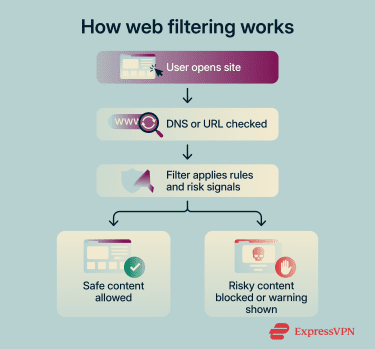
How filtering decisions are made
Web filters may use static lists, category databases, threat intelligence, real-time analysis, or a combination of these methods. In the strictest form, each request is checked against an allowlist; only those directed to approved sites are permitted. Alternatively, a filtering setup may restrict access only to sites on a blocklist.
Allow and block rules may be created manually or based on vendor-maintained categories. For example, an admin may choose to block or allow sites in categories such as social media, news, adult content, or gaming.
Many filters also include threat categories for domains or URLs associated with malware, phishing, command-and-control (C2) activity, or other malicious behavior. If a site matches a blocked threat category or appears on a configured threat list, the filter can automatically deny access.
Advanced filters may go beyond list-based checks by analyzing requested pages, URLs, redirects, downloads, or other request attributes for suspicious patterns. Some use real-time analysis or machine-learning models to assign risk levels, though deeper inspection may depend on the filtering method and whether HTTPS inspection is enabled.
What happens when a site is blocked
When a user visits a blocked site, the filter may redirect the browser to a page announcing that access was denied. If this is not set up or the filter method cannot display one, the user may simply see a standard browser or network error.
A block page may explain which policy or category triggered the block. Administrators can customize this notification to provide instructions for reporting a false positive or requesting a temporary exception.
With the user prevented from accessing the site, a report may be sent to whoever is responsible for managing the filter. This may include details such as a timestamp, requested domain or URL, policy category, user account, device, or network address.
Types of web filtering solutions
There are two major aspects of web filtering that administrators must consider. One is the technical layer that enforces filtering. The other is the policy logic that determines which sites are allowed, blocked, warned, or logged.
The enforcement layer
To implement web filtering, organizations may use URL filtering, DNS filtering, proxy filtering, browser controls, endpoint controls, or a combination of these methods.
URL filtering
URL filtering evaluates requested web addresses against filtering rules. When a user tries to access a page, the filter checks the domain, subdomain, URL path, or reputation against a database or manually configured policy. If the request violates the policy, access may be blocked, subject to warnings, logged, or granted with restrictions.
It’s worth noting that most traffic today uses HTTPS rather than HTTP. Because HTTPS traffic is encrypted, web filtering tools may not be able to inspect the full URL path or page content unless HTTPS inspection is enabled. Without decryption, filtering is often limited to information such as the domain, hostname, category, reputation, or certificate-related details, depending on the product and deployment.
When more detailed inspection is available, admins can apply more granular controls, such as blocking specific pages or paths rather than an entire site.
DNS filtering
DNS filtering works at the DNS lookup stage. It checks the hostname a device is trying to resolve, such as example.com or subdomain.example.com, against established policies. If the hostname is blocked, the resolver may return a block page address, return an address such as 0.0.0.0, or otherwise prevent the connection.
This method is lightweight, relatively easy to deploy, and effective at blocking known malicious or inappropriate domains before a device connects to them.
However, DNS filtering has limits. It cannot inspect full URLs, paths, query strings, page content, or specific files. This means it generally cannot block one harmful page while allowing another page on the same hostname. It may also be bypassed if users connect directly to an IP address, use an unauthorized DNS resolver, or route traffic through a virtual private network (VPN) or proxy.
Proxy filtering
Proxies are intermediate servers that sit between users and the internet. For a proxy to serve a filtering function, devices or network traffic must be routed through the proxy before reaching external websites and services.
When a user attempts to access a website, the proxy checks the request against filtering policies. If the site or service is approved, traffic is forwarded on to the intended destination. If not, the request is denied, redirected to a block page, or logged according to policy.
Because a proxy sits between users and the internet, it can provide more visibility into web traffic than some other filtering methods. In environments where HTTPS inspection is enabled, proxy filters can examine full URLs and, in some cases, page content or downloaded files. Without decryption, however, filtering is typically limited to domain-level decisions.
Proxy filtering is commonly used in enterprise and school networks, where it can enforce access policies, support user- or group-based rules, log web activity, and, in some deployments, cache content to improve performance.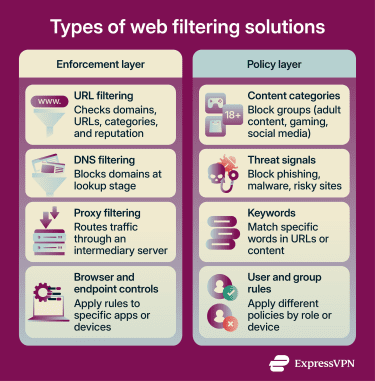
The policy layer
The policy layer defines what a web filtering solution should allow, block, warn about, or log. Administrators can build policies using several criteria, including content categories, URL or domain lists, reputation data, threat categories, keywords, user or group identity, and time-based rules.
Content filtering
Content filtering examines page content rather than just domain names. Depending on the tool and deployment, this may involve category databases, page analysis, file scanning, script analysis, metadata checks, or malware detection. In terms of the enforcement layer, content filtering is possible via URL and proxy filtering, but not compatible with DNS-only filtering.
The tools that support this level of filtering must account for dynamic pages and interactive web applications that load scripts and media on demand. Detecting suspicious behavior in these environments may require real-time analysis, file scanning, browser isolation, or sandboxing, depending on the product and configuration.
Because it can identify risky content on otherwise trusted domains, deeper content filtering can add protection beyond static blocklists. However, it's not a complete replacement for domain-, URL-, category-, and reputation-based filtering.
The downsides are that deeper inspection can be resource‑intensive and may raise privacy concerns because it inspects encrypted traffic. Content filtering can also be used for internet censorship.
Keyword-based filtering
Keyword-based filtering blocks, allows, or recategorizes requests based on specific words or phrases. Administrators define keywords and associate them with a blocking category or policy action.
Some keyword-based filtering checks only parts of the requested URL, such as the domain, path, or query string. This can be useful for simple rules, but may be limited by HTTPS encryption unless deeper inspection is enabled. Other tools can scan page text or metadata for keywords when proxy, endpoint, browser-based, or HTTPS inspection is available.
DNS filtering can only apply keyword rules to hostnames, such as words in a domain or subdomain. To check keywords in full URLs or page content, a filter typically needs proxy, endpoint, browser-based, or HTTPS inspection capabilities.
Because URL keyword filtering relies on pattern matching rather than deeper page analysis, it's generally less resource-intensive than full content inspection. However, it's also less precise and can produce false positives or miss harmful content that doesn't use the specified terms.
How to choose the right web filtering solution
Selecting a web filter involves balancing security, compliance, user experience, and resource requirements. There's no one‑size‑fits‑all solution. Instead, you must consider your specific environment, the types of threats involved, and the level of control you require.
Evaluating your needs
Web filtering may look very different for a large company than it will for a parent looking to protect their child from adult content. Category-based DNS filtering may be effective at blocking adult sites, but if deployed network-wide, it may also affect other household members unless the solution supports device-, user-, or profile-based rules.
If you're implementing web filtering, consider your goals and the networks, users, or devices you want to protect.
Key features to look for
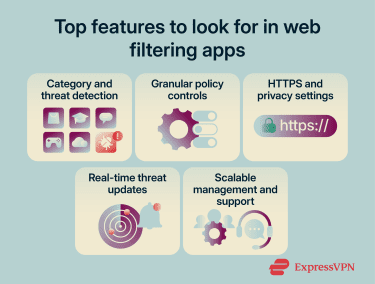
Modern solutions offer many functions. Key features to look for include:
- Category, reputation, and threat detection: Choose a filter that organizes sites into categories (social media, entertainment, finance, or adult content) and can identify risky domains or URLs. Combining category-based controls with reputation data and threat detection can help block unwanted content and reduce exposure to phishing, malware, C2, and other web-based threats.
- Granular policy enforcement: Ensure the solution allows different policies for different user groups, such as administrators, employees, contractors, students, or guests. It should also make it easy for administrators to update rules as access requirements change.
- Encrypted traffic and privacy controls: Since most web traffic uses HTTPS, consider whether the solution can enforce policies on encrypted traffic and support configurable HTTPS inspection. Organizations should be able to apply inspection selectively, create exceptions for sensitive categories, and align logging and inspection settings with privacy and regulatory requirements.
- Real-time threat intelligence and updates: A filter that uses frequently updated threat intelligence, reputation data, and real-time analysis can help identify newly discovered malicious domains or URLs more quickly. Automatic updates help keep category databases and blocklists current without relying only on manual changes.
- Scalability and vendor support: Evaluate how well the solution scales with your organization's growth, including support for multiple offices, remote users, and cloud-based access. Reliable vendor support, clear documentation, and regular security updates can make filtering easier to manage over time.
Integrating web filtering with existing infrastructure
Web filtering works best when it's deployed as part of a broader, well-managed security environment rather than as a standalone control. Consider the following while implementing a web filtering system:
- Collaboration with IT and security teams: Integrate web filtering in close coordination with IT, cybersecurity, and compliance stakeholders to ensure policies align with existing access controls, privacy requirements, and traffic-forwarding settings. This helps organizations deploy filtering more consistently across users, devices, and remote locations.
- Monitoring and adjusting policies: Regularly review web filtering reports to see which categories, domains, and user groups are generating the most blocks or access attempts. Use that visibility to fine-tune policies over time so that security controls remain effective without unnecessarily disrupting legitimate work.
- Ongoing maintenance and updates: Keep web filtering effective by regularly reviewing exceptions, testing enforcement, and ensuring threat intelligence and policy data stay current as new malicious sites emerge. Ongoing maintenance helps organizations reduce gaps in protection without relying solely on static blocklists.
Challenges and limitations of web filtering
Despite its benefits, web filtering has limitations that need to be considered when designing policies and selecting a solution. Understanding these challenges can help admins mitigate risks and set realistic expectations.
Overblocking legitimate websites
Sometimes legitimate websites can trigger false positives and be blocked by aggressive filters. When that happens, employees, students, or individual users may be denied access to websites they genuinely need, which can interrupt work, learning, or everyday browsing.
To limit disruption, organizations should give users a clear way to request that sites be reviewed and unblocked when appropriate. Individuals using web filtering tools at home should also review blocked-site reports, adjust categories or exceptions, and ensure filters aren’t blocking access to legitimate content. It also helps to test new policies before full enforcement, review exceptions regularly, and adjust rules over time based on feedback and recurring access issues.
Policy management at scale
As organizations grow, it becomes harder to maintain consistent web filtering policies across large numbers of users, devices, and departments. Differences in how rules are applied can create enforcement gaps, while technologies such as DNS-over-HTTPS (DoH) and DNS-over-TLS (DoT) can make traditional DNS-based filtering methods less effective when users or applications bypass approved resolvers.
It's also important to document rules centrally so that administrators across different teams apply them consistently.
Filter evasion
Web filtering can be undermined when users or applications route traffic around it. This can happen through unauthorized proxies, VPNs, or direct-to-Internet connections, or DNS settings that avoid the organization's usual inspection path. In some cases, encrypted DNS technologies such as DoH may be used to bypass locally managed DNS filtering.
When evasion succeeds, requests that would normally be logged and filtered may no longer be visible to the filtering system, reducing administrators’ ability to enforce policy or investigate activity.
Administrators should understand common evasion methods and plan countermeasures. Perfect enforcement may not be possible, but controls such as managed devices, endpoint agents, approved DNS resolvers, firewall rules, secure web gateways, VPN routing, and regular policy audits can reduce opportunities for bypass.
FAQ
Can web filtering stop phishing attacks?
Does web filtering slow down internet speed?
Can web filtering be used for remote workers?
Can users bypass web filtering?
What is the difference between web filtering and parental controls?
How often should web filtering policies be updated?