 Celebrate with up to 80% off
What can someone do with your phone number? Understand the risks


A phone number is more than contact information. Many online accounts use it for verification, alerts, and account recovery, which makes it valuable to scammers.
A phone number alone usually isn’t enough for someone to break into accounts. However, it can help attackers contact you, impersonate trusted callers, or target accounts that rely on SMS codes.
How scammers obtain phone numbers
In most cases, scammers get phone numbers from data leaks, public sources, or through social engineering.
Data breaches and leaked databases
Data breaches are a major source of exposed phone numbers. When a company is hacked or accidentally exposes customer records, phone numbers can leak alongside names, email addresses, passwords, or other account details. This information can be incorporated into larger fraud datasets that criminals may use to target people with scams.
Social engineering
Scammers may also get or confirm phone numbers through social engineering. A fake giveaway, bogus delivery update, impersonation call, or phishing page may ask for a number as part of a “verification” step. In other cases, a caller posing as a representative of a trusted organization may pressure the victim to share it.
Public profiles, forms, and online listings
Scammers may collect phone numbers from places where people voluntarily post them, such as social media profiles, business listings, classified ads, event pages, contact forms, or sign-up pages.
Once a number appears on a public profile, listing, or form, it can be copied, scraped, or republished beyond the original page.
Data brokers and people-search sites
Commercial data brokers can collect personal information from multiple sources, including public records, commercial data, and online activity, then combine it into detailed profiles.
People-search sites may make that information easy to access. Depending on the site and available sources, someone may be able to search for a phone number and find related details such as names, addresses, relatives, or past locations. Even if a number has never been posted publicly, it may still appear in these databases through indirect sources.
Also read: What to do if your information is on the dark web.
Offline sources like mail and paperwork
Offline paperwork, such as forms, receipts, shipping labels, or letters, may include a phone number if it's lost, shared, or thrown away without being destroyed.
What someone can do with a phone number
The risk of an exposed phone number depends on how it’s used. If it’s linked to accounts, public profiles, data broker records, or SMS-based security, it can become a starting point for exploitation.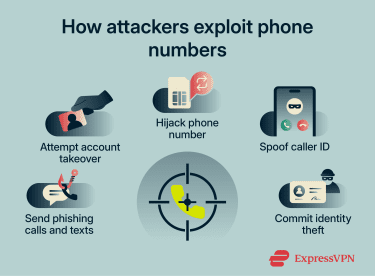
Send phishing texts and calls to steal personal information
One common use of a phone number is to enable direct contact via phishing texts (smishing) or scam calls. Examples include fake missed-delivery alerts, suspicious account activity warnings, or messages that appear to come from a trusted company.
Scammers typically want passwords, bank details, or one-time codes. They may also collect personal details such as birth dates, addresses, or account information to make follow-up scams more convincing or to sell the data to other criminals.
Attempt account takeover with SMS verification
If an account sends login codes or recovery codes by text, a phone number becomes part of the account’s security process.
If someone can trick the account owner into sharing a code, start a password reset and intercept the recovery message, or gain control of the number itself, they may bypass text-based security. Although SMS is still widely used, it's not the strongest option for two-factor authentication (2FA).
A recycled number can create similar problems if the previous owner’s accounts are still linked to it. The new owner may receive recovery codes or account notifications meant for someone else.
Commit SIM swap or port-out fraud
SIM swap or port-out fraud happens when someone convinces a mobile provider to move a phone number to a SIM card, device, or mobile account they control. If successful, they start receiving calls and text messages, including password reset codes, instead of the legitimate owner.
Spoof the number to scam others
Criminals can make calls or texts appear to come from someone else's phone number. This is called caller identification (ID) spoofing, and doesn't require access to the actual phone account.
A familiar number makes people more likely to answer, call back, or trust what they’re being told. Scammers may use this tactic to impersonate banks, government agencies, or people the victim knows.
Also read: How to detect and prevent vishing attacks.
Track, harass, or doxx the victim
Criminals may use phone numbers to look up people and gather personal information about them. This information can make it easier to harass someone, send targeted threats, identify their home or workplace, or publicly expose private details online (doxxing).
What isn’t possible with just a phone number
A phone number alone can't:
- Give direct access to a phone: Knowing a number isn’t the same as controlling the device or mobile account. Criminals need another route in, such as malware, stolen credentials, or SIM swap fraud.
- Allow account sign-in: Most account takeovers require something else, like a password, a reset flow, a one-time code, or control of the number itself.
- Reveal personal information directly: A number alone doesn’t automatically expose the victim’s address, relatives' names, or other private details. However, it may be linked to people-search databases, public records, data broker profiles, or leaked information, all of which can reveal more.
Signs your phone number may be compromised
One sign on its own doesn’t always mean a phone number has been compromised. But if several signs appear at the same time, they may be worth investigating.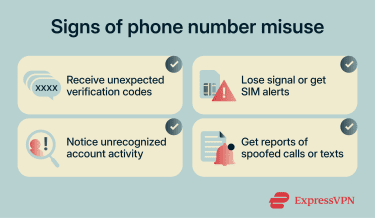
Unexpected verification codes or password resets
Login codes or password reset messages arriving without being requested are one of the clearest warning signs.
These messages may arrive when someone tries to sign in, reset a password, or test whether the number is linked to an account. Repeated code attempts may indicate that someone is actively testing credentials or trying to access an account.
If the victim uses a push-based authenticator app (like Microsoft Authenticator, Duo, or Okta Verify), scammers may also flood them with approval prompts. This technique is called multi-factor authentication (MFA) fatigue or push bombing.
Attackers may then contact the victim, posing as IT support, and use the prompts to make the request seem legitimate and convince them to approve access.
Loss of cell service or SIM-related alerts
A sudden loss of signal, inability to make calls, or unexpected SIM-related notifications can be a serious red flag.
This may happen if the number has been moved to a different SIM card, device, or mobile account. If a phone suddenly stops receiving calls or texts for no clear reason, the phone owner should contact the mobile provider immediately using a verified support channel.
Contacts reporting calls or texts from the number
If people report receiving calls or messages the phone owner didn't send, this may indicate the number is being spoofed.
The more people who report receiving these calls or texts, the more likely the number is being used in a spoofing campaign. This can lead to the number being blocked by contacts, flagged by carriers, or marked as spam by call-filtering services.
What to do if someone has your phone number
If someone has your phone number, the goal is to limit how they can use it.
Contact your mobile carrier and lock your SIM
In the U.S., the Federal Communications Commission (FCC) requires wireless carriers to use secure authentication before approving SIM changes or number transfers and to notify customers when such requests are made.
You can further strengthen this protection by contacting your carrier to set up a port-out PIN, account PIN, or number lock. This adds another verification step before your number can be transferred to another carrier.
Change passwords and switch from SMS-based 2FA
If your phone number is linked to important accounts, especially email, banking, or social media, update your passwords as soon as possible. Start with your email account, since it’s often used to reset access to other services.
Then, switch from SMS-based verification to stronger options, such as passkeys, security keys, or app-based 2FA, where available. These methods aren’t tied to your phone number and are harder to intercept. A password manager, such as ExpressKeys, can also help store strong, unique passwords and passkeys securely.
Review banking, email, and social account activity
If you find unauthorized activity, lock the account immediately through the platform's security settings. Document everything with screenshots showing dates, times, and specific changes.
Report the compromise through the official support channel and request account recovery. For financial accounts with unauthorized transactions, dispute the charges directly with your bank and file a fraud report.
Warn your contacts about spoofing
If you suspect your number is being misused for scams, warn friends, family, and coworkers via a different communication channel, such as email or a messaging app.
Tell them not to click links in texts that appear to come from your number. They should verify unusual requests through a separate trusted channel, such as by calling a known number rather than replying to the message. They should also be cautious of emergencies, urgent payment requests, or time-sensitive offers.
Don’t engage with scam calls and texts
If you start getting scam calls or spam messages, don’t engage. Avoid replying, clicking links, or following instructions. Instead, block the number and use spam-filtering tools available on your device or network.
Even a small interaction, like replying to a message or pressing a button during a robocall, can signal that your number is active and lead to more spam. If something feels off, contact the company directly using their official website or app, not through links or phone numbers provided in the message.
Monitor your credit and personal data
Check your credit reports for accounts you didn't open or hard inquiries you didn't authorize. Review bank and credit card statements for unfamiliar transactions. You can also set up fraud alerts with credit bureaus, which tells businesses to verify your identity before opening new credit in your name.
If you suspect identity theft, consider a credit freeze, which restricts access to your credit report and makes it harder for someone to open new accounts in your name. Eligible U.S. ExpressVPN users can also use Credit Scanner in Identity Defender to monitor credit activity, view alerts, and find information for freezing their credit.
Read more: How to prevent a data breach and protect your personal data.
How to protect your phone number
You can't make a phone number completely private once it's in circulation. Once it enters databases through data brokers, public records, leaked datasets, or past signups, you may not be able to force every entity to delete it.
But you can make it much less useful to scammers and harder to connect to your name, address, email, and online accounts.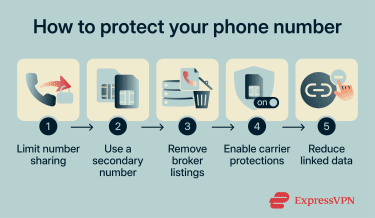
Limit where you share your number
Treat your phone number like sensitive information, not casual contact details. Do not give it out unless there’s a clear reason, such as delivery notifications, account recovery, 2FA, or customer support callbacks.
Avoid sharing it on social media profiles, forums, public listings, online contest entries, or unnecessary signup forms. Some services may share data with partners or use it for marketing, while public pages can be scraped or copied into other databases.
Use a secondary number for signups
If you regularly sign up for services, marketplaces, newsletters, or one-off promotions, keep those registrations separate from your main number. Use a secondary number for lower-trust signups. Options include Voice over Internet Protocol (VoIP) services, burner number apps, or a separate prepaid SIM.
If that secondary number ends up on spam lists or in broker databases, your primary number stays protected. Reserve your real number for critical accounts like banking and primary email, since losing access to a throwaway number could lock you out of those accounts.
Remove your number from data broker sites
If your number is already circulating, opt out of people-search sites and data-broker listings where possible. It takes time, but it reduces how easily strangers can connect your number to other personal information.
Opt-outs aren’t always permanent. Information can reappear, so the process may need to be repeated periodically.
Eligible U.S. ExpressVPN users can also use Identity Defender’s Data Removal tool to scan data broker sites and submit removal requests. Data Removal is included with ExpressVPN Advanced and Express Pro subscriptions in the U.S.
Read more: How to remove yourself from data broker sites and protect your privacy.
Use carrier-level scam protection tools
Carrier-level protections may catch scam calls and texts earlier than your phone’s filters. If your provider offers scam labeling, robocall filtering, verified-caller indicators, or account-level protections for SIM changes and porting, it's worth enabling them.
In the U.S., STIR/SHAKEN helps carriers validate caller ID on IP networks, which is why some calls appear as “Verified” or “Caller Verified.” However, it doesn't cover every call path or stop all spoofing.
Reduce data linked to your number
When you use apps, websites, and services, they may connect your phone number with other data, such as email addresses, device identifiers, location data, or account activity. Use privacy-focused browsers, limit app permissions, disable location access when it isn’t needed, and avoid using the same number across low-trust services.
A virtual private network (VPN) can also help reduce other data linked to your phone number by hiding your device’s IP address from websites and apps. This can make it harder to connect browsing activity to an approximate location, but it won’t hide information shared through logins, cookies, browser permissions, or account profiles.
FAQ
What if I gave my phone number to a scammer?
Can someone steal my identity with my phone number?
That said, your number can be a starting point. If it’s linked to exposed data in people-search databases, data broker profiles, public records, or leaked datasets, criminals can use it to gather more information over time. Credit freezes and fraud alerts can help protect against identity theft by making it harder for scammers to open new credit accounts in your name.
Can someone hack my phone using just my number?
Should I change my phone number?
Consider it if there is persistent harassment, repeated targeted scam attempts, or ongoing account recovery abuse. Otherwise, secure accounts and filter unwanted calls instead.
How do I stop someone from using my number?
If they’re using it for account access, secure affected accounts, change passwords, and enable stronger authentication, such as app-based two-factor authentication (2FA), passkeys, or security keys.
What are the signs of a SIM swap scam?
- Unexpected loss of signal.
- Inability to make calls or send texts.
- Suspicious messages about SIM changes or account updates.
- Verification requests when no login was attempted.
These signs often appear together. If they do, contact the mobile carrier through a verified support channel and secure affected accounts.